
Your GitHub Actions YAML handles the deterministic parts of your workflow well. It doesn't handle the judgment calls — reading a PR and deciding which comments are worth leaving, correlating an alert with the commits that touched the same paths, or deciding which backlog issues need an owner versus a close. For those, someone on the team either does the work manually or writes fragile heuristic scripts that break when the inputs change shape.
Claude Code Routines, launched April 14, 2026 in research preview, are designed to close that gap. The short version: you configure a prompt, one or more repositories, and connectors once; attach a schedule, an API endpoint, or a GitHub event as a trigger; and Anthropic's infrastructure runs a full Claude Code session on your behalf — with no terminal open, no machine running, no cron daemon to maintain. The session can read your repos, use MCP connectors, and push changes to a claude/-prefixed branch for human review.
Before going further: Routines are not a renamed version of /loop. They run on managed cloud infrastructure. /loop runs inside an active terminal session and dies when you close it. That distinction determines everything about how you'd use them, so the first section makes it concrete with a comparison table.
What Claude Code Routines Are
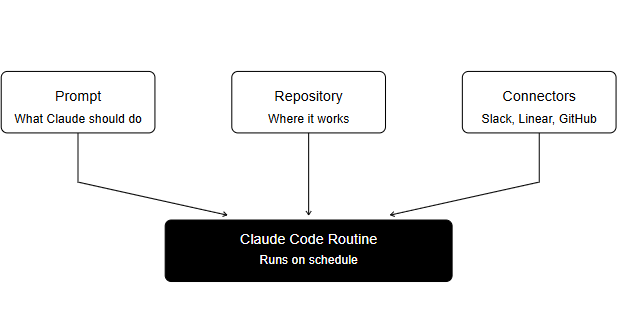
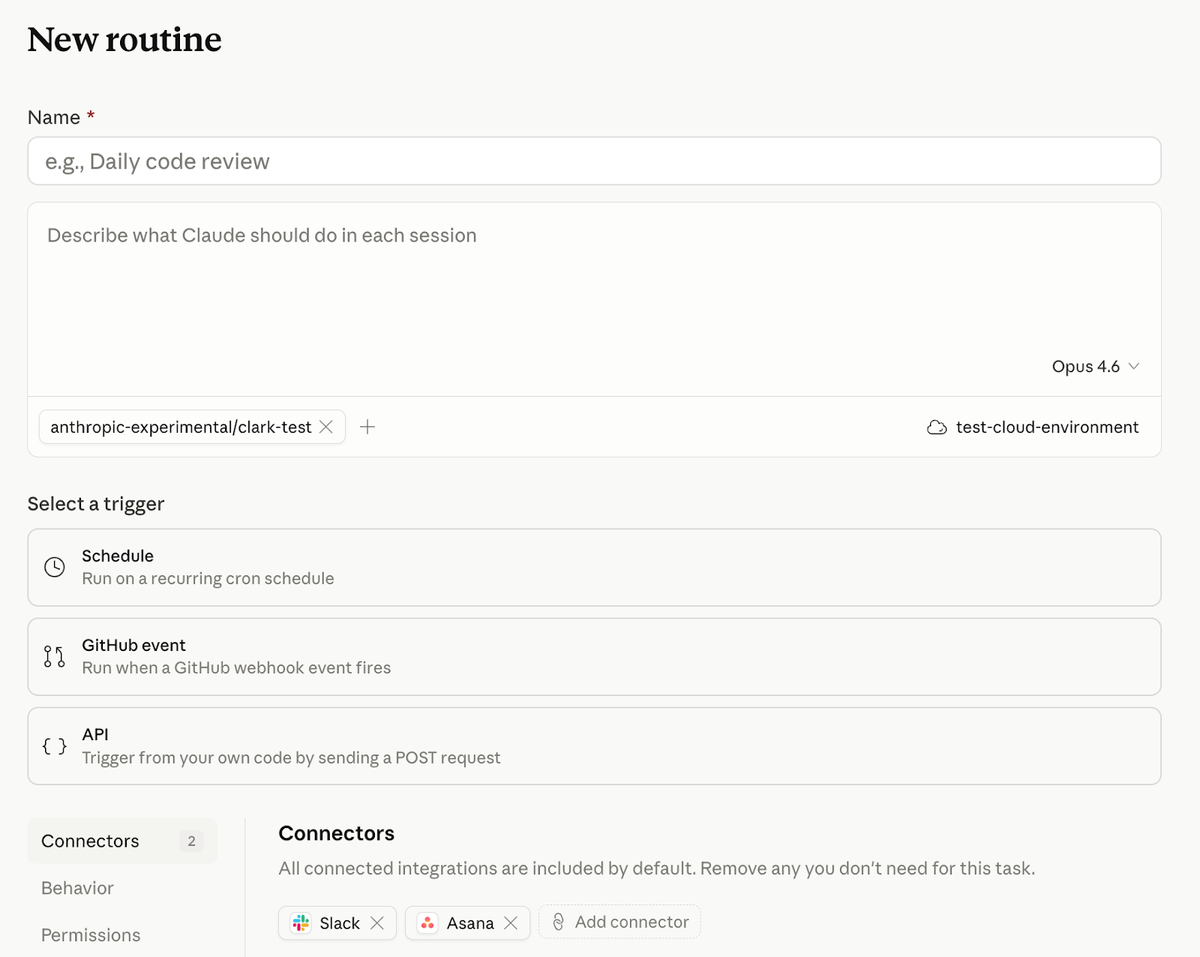
A routine is a saved Claude Code configuration. Officially: a prompt, one or more repositories, and a set of connectors, packaged once and run automatically. When a trigger fires, Anthropic spins up a fresh cloud session, clones the specified repositories from their default branch, makes connectors available, and runs Claude against the prompt you defined. The session completes, the output is available for review, and any changes Claude made live in a claude/-prefixed branch until you decide what to do with them.
Routines are available on Pro, Max, Team, and Enterprise plans with Claude Code on the web enabled. Create them at claude.ai/code/routines or from the CLI with /schedule. The full routines reference covers the complete API surface and configuration options.
Routine vs local scheduled task
Claude Code has three automation tiers:
| /loop (CLI) | Desktop Scheduled Task | Cloud Routine | |
|---|---|---|---|
| Lives in | Active terminal session | Local machine | Anthropic cloud |
| Survives terminal close | No | Yes (machine must be on) | Yes |
| Survives machine sleep/off | No | No | Yes |
| Repo access | Local working directory | Local filesystem | Clones via GitHub |
| MCP connectors | Session connectors | Session connectors | Configured per-routine |
| Trigger types | Manual /loop command | Time schedule | Schedule, API, GitHub |
/loop runs recurring prompts within an existing interactive session — it's a session construct, not a background process. Desktop Scheduled Tasks run on your machine through the Desktop app and require your machine to be on and logged in. Routines run on Anthropic's servers and have none of those dependencies.
The practical consequence: a routine configured to run at 2am on weekdays will run at 2am on weekdays regardless of whether anyone on the team has Claude Code open.
Why cloud execution changes the workflow
When automation runs locally, the person who set it up carries the maintenance burden — their machine, their SSH keys, their uptime. When it runs on managed infrastructure, the configuration becomes the artifact. A routine's prompt, repository list, and connector set are what you version-control and hand off, not a cron daemon or an always-on machine.
The trade-off: the routine runs as you. Commits, pull requests, Slack messages, and Linear tickets created by the routine carry your identity. This is not a service account — it's your personal Claude account with your connected integrations acting autonomously. That identity question matters for team settings, and it's covered in the limits section below.
How Triggers Work
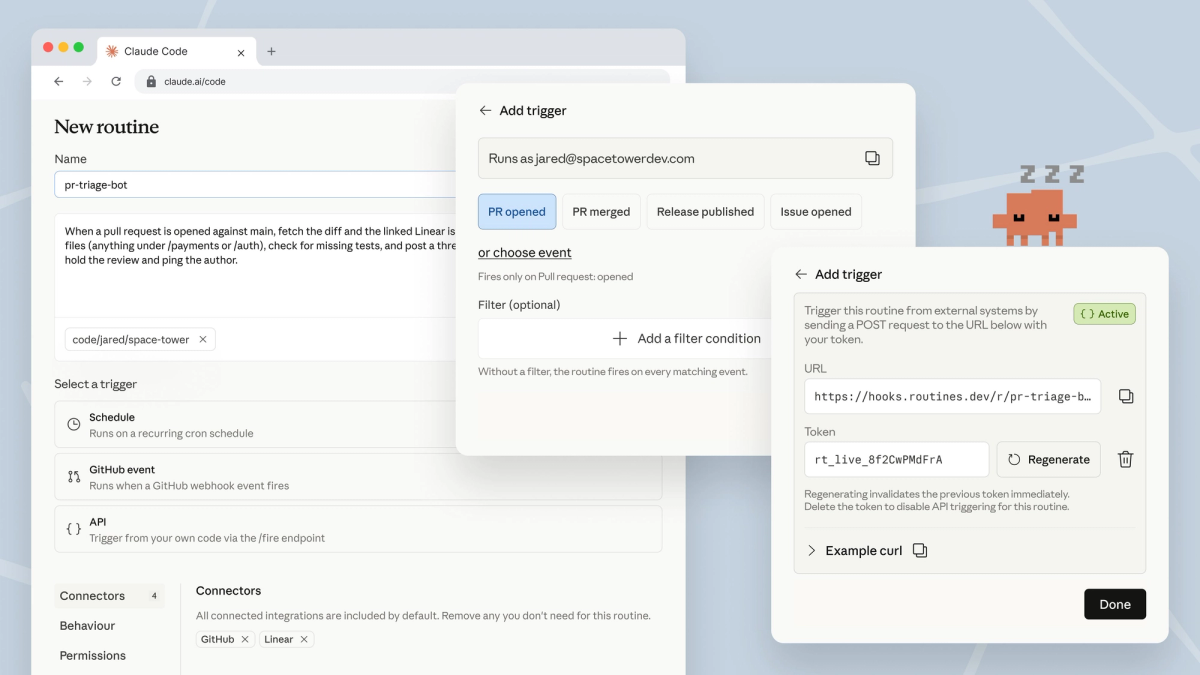
A single routine can have multiple triggers active simultaneously. You can fire the same configuration on a schedule, from an API call, and on a GitHub event — three entry points, one execution definition. Add or remove triggers from the routine's edit form at any time.
Schedule triggers
A schedule trigger runs the routine on a recurring cadence. The presets are hourly, daily, weekdays, and weekly. Times are entered in your local timezone and converted automatically; the routine fires at that wall-clock time regardless of where the cloud infrastructure is located.
Runs may start a few minutes after the scheduled time due to stagger, and the offset is consistent per routine — so if your routine consistently starts at 2:04am instead of 2:00am, that's expected behavior.
For custom intervals (every two hours, first of the month), pick the closest preset in the UI, then run /schedule update in the CLI to set a specific cron expression. The minimum interval is one hour — expressions that run more frequently are rejected.
CLI creation: /schedule creates scheduled routines conversationally. You can also pass a description directly: /schedule daily PR review at 9am. /schedule creates scheduled triggers only; API and GitHub triggers require the Web UI.
API triggers
An API trigger gives the routine a dedicated HTTP endpoint. POST to it with a bearer token and a new session starts. The response includes a session ID and a session URL where you can watch execution in real time.
curl -X POST https://api.anthropic.com/v1/claude_code/routines/trig_01ABCD.../fire \
  -H "Authorization: Bearer $ROUTINE_TOKEN" \
  -H "anthropic-beta: experimental-cc-routine-2026-04-01" \
  -H "anthropic-version: 2023-06-01" \
  -H "Content-Type: application/json" \
  -d '{"text": "Deploy v2.4.1 completed at 14:32 UTC. Run smoke checks."}'
The optional text field passes run-specific context to the session as a freeform string — it is not parsed or structured by the platform. If you send JSON in the text field, Claude receives it as a literal string; your prompt should instruct Claude how to interpret it.
Token handling: the bearer token is shown exactly once at generation. Store it immediately in your alerting system's or CD pipeline's secret store — it cannot be retrieved later. The CLI cannot currently create or revoke tokens; both happen in the Web UI.
The /fire endpoint ships under the experimental-cc-routine-2026-04-01 beta header. Anthropic guarantees the two most recent previous header versions continue to work, giving you a migration window when breaking changes ship. Track the official routines documentation for header version updates.
GitHub event triggers
A GitHub trigger starts a new session automatically when a matching event occurs on a connected repository. Supported events include: pull_request, push, issues, check_run, workflow_run, discussion, release, and merge_queue events.
Pull request triggers support granular filtering. All specified conditions must match for the routine to fire:
| Filter field | What it matches |
|---|---|
| Author | GitHub username of the PR author |
| Title | Substring or pattern in PR title |
| Body | Substring or pattern in PR body |
| Base branch | Target branch of the PR |
| Head branch | Source branch of the PR |
| Labels | One or more required labels |
| Draft state | Draft or ready-for-review |
| Merged state | Open or merged |
| From fork | Whether the PR comes from a fork |
Each matching event starts its own independent session — there is no session reuse across events. Two PRs opened in quick succession produce two separate sessions.
GitHub App requirement: GitHub triggers require installing the Claude GitHub App on the target repository. Running /web-setup in the CLI grants repository clone access but does not install the App — webhook delivery requires the separate installation step. The trigger setup in the Web UI walks you through it.
During the research preview, GitHub webhook events are subject to per-routine and per-account hourly caps. Events beyond the limit are dropped until the window resets. For high-activity repositories, filter events tightly to avoid exhausting the cap on noise.
Repositories, Environments, and Connectors
Repositories: a routine can target one or more GitHub repositories. Each run clones the specified repos from their default branch. Claude creates branches with a claude/ prefix for any changes it makes. To allow pushes to branches without the prefix, enable "Allow unrestricted branch pushes" for that repository in the routine configuration — the implications of that setting are covered in the limits section.
Environments: each routine runs in a cloud environment that controls network access, environment variables, and setup scripts. A Default environment is provided. Custom environments let you set API keys the routine needs (for monitoring tools, external APIs), restrict or expand network access, and run install commands before each session (dependency installation, tool configuration). The environment is where you put secrets — not in the prompt.
Connectors: all your connected MCP connectors are included in a routine by default. Remove any that the routine doesn't need. Connectors give Claude access to external services — Slack, Linear, Google Drive, and others — during each run. Scoping connectors to what the routine actually needs limits the blast radius if the routine takes unintended actions.
Where Routines Fit in Real Dev Teams
PR review
A GitHub trigger on pull_request.opened (or pull_request.labeled for teams that use a label to request review) runs the routine against each new PR. Claude applies the review checklist defined in the prompt: security concerns, performance patterns, style consistency, missing test coverage. It leaves inline comments and a summary comment. Human reviewers inherit a pre-annotated PR focused on design decisions rather than mechanical checks.
Scoping the prompt precisely matters here. A vague "review this PR" prompt produces inconsistent output. A prompt that specifies "flag any direct SQL string concatenation, any missing input validation on user-supplied fields, and any function that exceeds 50 lines without an explanation comment" produces consistent, useful signal.
Backlog triage
A schedule trigger running weeknights against your issue tracker connector reads issues opened since the last run, applies labels based on the code area referenced in the issue body, assigns owners by matching the affected paths to your team's ownership map (described in the prompt or a skills file in the repo), and posts a summary to Slack. The team starts the morning with a groomed queue.
The connector-to-repository interaction is what makes this work: the issue tracker connector reads external state, the repository gives Claude the ownership context, and the Slack connector surfaces the result. None of this requires a server.
Deploy verification
Your CD pipeline calls the routine's API endpoint after each production deploy, passing the deploy version and timestamp in the text field. The routine runs smoke checks against the new build, scans error logs for regressions in the deployment window, and posts a go/no-go to the release channel before the deploy window closes. On-call engineers review a structured report rather than starting from a blank terminal after each deploy.
This is a case where the API trigger's per-call context (the deploy version) matters. The saved prompt defines the verification logic; the text field provides the specific run context.
Limits and Trade-Offs
Research preview status
Routines are in research preview. Anthropic's documentation states explicitly: "Behavior, limits, and the API surface may change." In practice this means daily caps may change, supported GitHub events may expand (webhook support beyond GitHub is on the roadmap), the beta header for API triggers will version when breaking changes ship, and the feature behavior itself is not stable.
For production-critical workflows, treat research preview status as a signal to test thoroughly before relying on it, and to monitor the Claude Code changelog for breaking changes.
Daily run caps by plan, as of April 2026:
| Plan | Daily run cap | Overage behavior |
|---|---|---|
| Pro | 5 runs/day | No overage (hard cap) |
| Max | 15 runs/day | No overage (hard cap) |
| Team / Enterprise | 25 runs/day | Metered overage if extra usage enabled |
Routine runs draw from the same usage allowance as interactive Claude Code sessions. On Pro, 5 routine runs per day and heavy interactive use can compete for the same quota. Plan accordingly.
Branch push restrictions and usage caps
By default, routines can only push to branches prefixed claude/. This is intentional safety behavior — a poorly written prompt doesn't end up committing to main. The restriction can be disabled per-repository in the routine configuration with "Allow unrestricted branch pushes."
Before enabling unrestricted branch pushes, verify you have branch protection rules on sensitive branches in GitHub itself. The routine's branch setting controls where Claude can write; branch protection rules in the repository are a separate and more robust enforcement layer.
Identity and ownership: a routine runs as your individual claude.ai account. GitHub commits and PRs created by the routine appear under your GitHub user. Slack messages and Linear tickets use your linked accounts for those services. There is no service account, no bot identity, and no shared team identity for routines — they are personal automations that happen to be useful to a team. This means routine actions appear as your actions in audit logs and PR histories.
No approval prompts: routines run autonomously without permission-mode prompts. The scope of what a routine can do is determined entirely by the repositories, environment, and connectors you configure. Scope these conservatively during the research preview.
FAQ
Are Routines different from /loop?
Yes, fundamentally. /loop runs recurring prompts within an existing interactive session — it's a way to repeat a task while you have Claude Code open. It dies when you close the terminal. Routines are cloud-executed sessions triggered independently of any local state. They are not /loop with persistence added; they're a different execution model. The analogy: /loop is a recurring alarm on your phone; a Routine is a scheduled job on a server.
Can a routine push to any branch?
By default, no. Routines can only push to branches with a claude/ prefix. This is the default behavior for all newly created routines. To allow pushes to any branch for a specific repository, enable "Allow unrestricted branch pushes" in that repository's configuration within the routine. This is a per-repository setting, not a global toggle. Even with unrestricted branch pushes enabled, GitHub branch protection rules on the repository are an independent control layer.
Who owns the actions a routine takes?
You do. Routines execute under your individual claude.ai account using your connected integrations. Commits carry your GitHub username. Slack messages appear from your Slack account. Linear tickets are created under your user. There is no separate bot identity. If a routine takes an action you didn't intend, that action is attributable to your account. This is the primary reason to scope repository permissions, environment access, and connectors tightly — and to run prompts in dry-run or review mode before enabling production-level actions.
Conclusion
Claude Code Routines are a meaningful operational shift: from AI coding assistant (you ask, it responds) to cloud-executed agent (you configure, it runs). For dev teams, the relevant surface area is: what prompt defines the work, what repositories and connectors define the reach, what trigger fires the session, and what identity owns the actions. Each of those decisions has operational consequences.
The research preview status is real — caps, behavior, and the API surface will change. The practical approach is to start with low-stakes automations (docs drift detection, backlog labeling) on repositories where the worst-case outcome of an unintended commit is low, validate the output quality on your specific codebase, and expand scope as the feature stabilizes.
Related Reading
- What Is Superpowers? Agent Skills Framework for AI Coding — Skills-based structured workflow for interactive sessions; complements Routines for on-demand agent work.
- Superpowers vs Vibe Coding: Structured Agents vs Freeform Prompts — Routines enforce structured, scheduled execution; this comparison explains when that structure pays off versus when freeform prompting is faster.
- Claude Opus 4.7 vs 4.6: Agentic Coding Comparison — The model running inside Routine sessions changed significantly; the tokenizer shift and xhigh default affect autonomous run cost and quality.
- Claude Code vs Verdent: Multi-Agent Architecture Compared — Where Routines fit relative to multi-agent orchestration systems designed for parallel workstreams.
- Claude Managed Agents Pricing: What You Actually Pay — How Routine runs interact with session-hour billing and subscription usage limits.
