
Here's a workflow I used to do on autopilot: open a PR, watch CI, fail on a lint error, fix it, push, wait again. Sometimes twice. If you've spent meaningful time with Claude Code you know this loop intimately — and you know the usual fix was either clicking "approve" on everything until your eyes glazed over, or flipping --dangerously-skip-permissions and hoping for the best. Anthropic shipped two connected features in March 2026 that change this: Auto Mode (a smarter permission layer in the local CLI) and Cloud Auto-Fix (which moves the PR fix loop into the cloud entirely). They're related, but they're not the same thing — and confusing them will waste an afternoon.
What Auto Mode Actually Is (vs What It Sounds Like)
Cloud-Based Execution vs Local Terminal Sessions
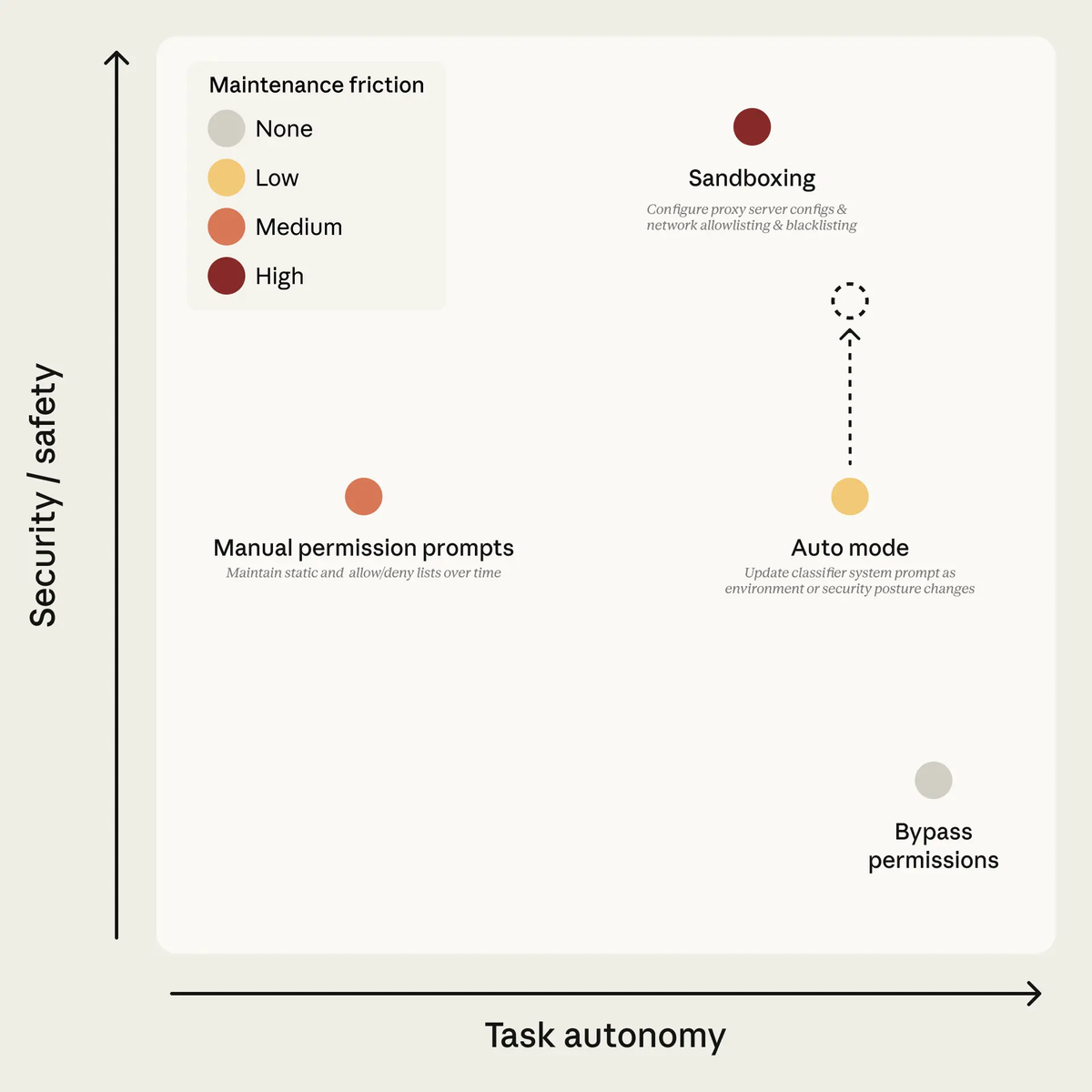
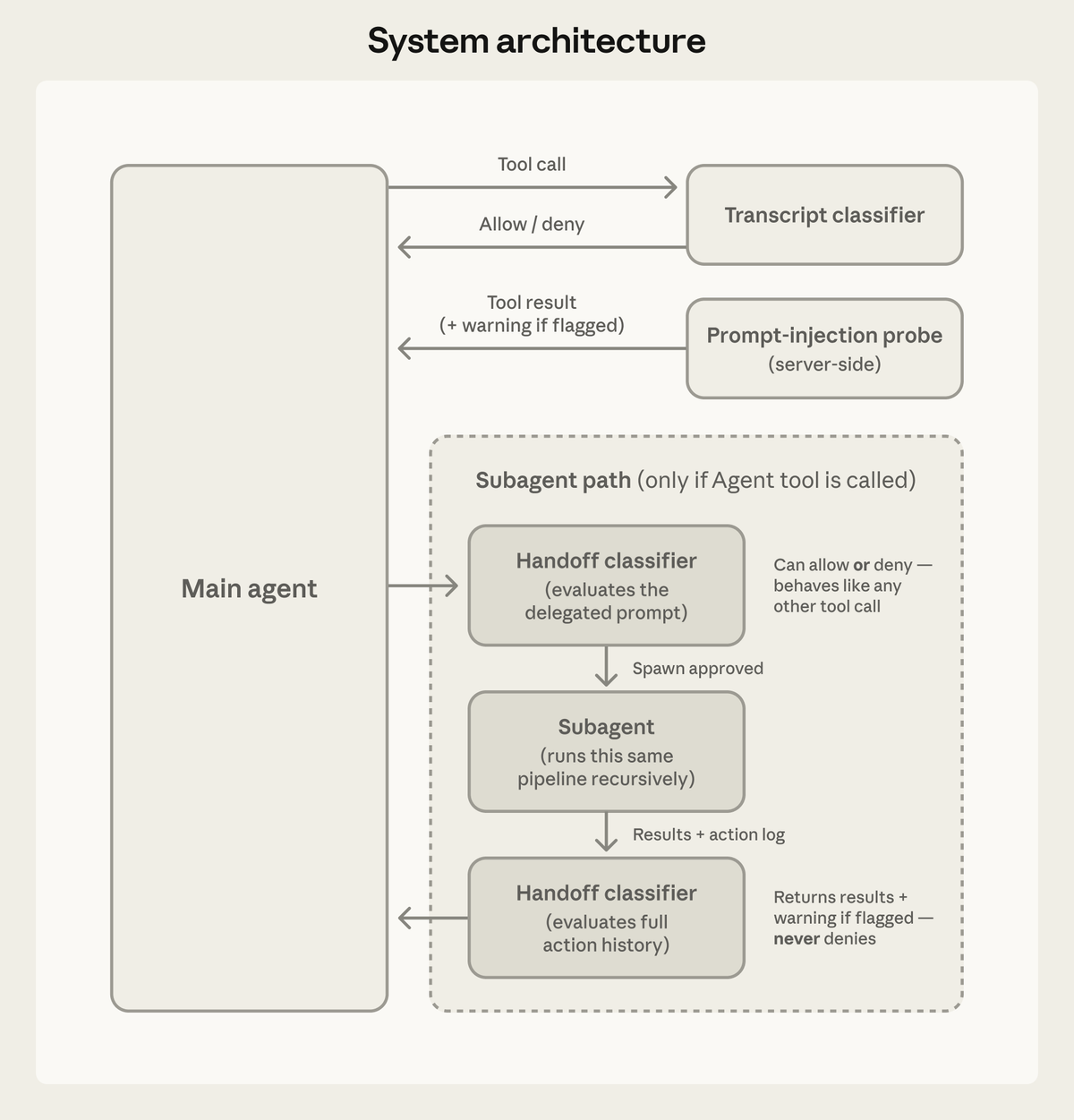
Before anything else: Auto Mode is a local permission mode, not a cloud execution environment. It runs in your terminal, on your machine, against your local filesystem. What it changes is how Claude handles permission prompts during a session — instead of asking you to approve every file write and Bash command, a background classifier model evaluates each tool call before it runs and either lets it proceed automatically or blocks it.
Cloud Auto-Fix is the separate feature that actually runs in the cloud. It picks up a PR from a web or mobile session and continues watching it on Anthropic's infrastructure after you close your laptop. These two features launched close together — Auto Mode on March 24, Cloud Auto-Fix on March 26 — which is why they get conflated. They solve different problems at different points in the workflow.
How It Differs from Remote Control (Which Keeps Your Local Machine Running)
Remote Control lets you connect to a Claude Code session running on your local machine from another device — your phone, a different laptop. The session stays anchored to your machine. If your machine sleeps, the session goes with it.
Cloud Auto-Fix is genuinely machine-independent. Once enabled on a PR from a web or mobile session, it watches GitHub events and executes entirely on Anthropic's infrastructure. Your machine doesn't need to be on.
Auto Mode is neither of these. It's a permission-layer change to how a local session runs. The official permission modes documentation notes explicitly that cloud sessions on claude.ai/code don't offer Auto Mode — it's a CLI and desktop app feature.
What "Follow PRs Automatically" Means in Practice
When Cloud Auto-Fix is enabled on a PR, Claude subscribes to GitHub events on that PR. The behavior breaks down into three cases:
CI failure: Claude reads the error output, investigates the cause, writes a fix, and pushes it to the PR branch with an explanation of what changed.
Clear review comment: Claude makes the requested change, pushes it, and replies to the reviewer thread — under your username, labeled as Claude Code.
Ambiguous situation: Claude asks rather than acts. It surfaces a question in the PR or in your session rather than guessing.
That last point matters. This isn't an autonomous agent that interprets every reviewer comment as a directive. Ambiguity triggers a prompt, not an action.
The Three Things Auto Mode Changes
Cloud Auto-Fix: Follow an Open PR, Fix CI Failures, Address Review Comments
Cloud Auto-Fix is the headline capability. Three ways to enable it:
- From a web session PR: Open the CI status bar, select Auto-Fix
- From mobile: Tell Claude to watch the PR
- Any existing PR: Paste the URL into a session and ask Claude to auto-fix it
Once active, the session runs on Anthropic's cloud. You get back a PR that's either ready to merge or has surfaced specific questions that need human judgment.
One permission boundary to know upfront: Auto-Fix can push commits to your PR branch. It does not push to protected branches (main, master, or branches with branch protection rules) by default. It cannot auto-merge unless you've explicitly configured that. Review threads it replies to are posted under your account, labeled as Claude Code.
Scheduled Tasks: Recurring Checks Without a Terminal Open
March 2026 also brought scheduled tasks. There are actually two distinct types, and the distinction matters:
Claude Code cloud scheduled tasks run on Anthropic-managed infrastructure. You give Claude a prompt, attach repos, choose a schedule, and the task runs even when your computer is off. Each run starts from a fresh clone, creates its own session, and produces reviewable output with the option to open a pull request. These are the "always-on" tasks referenced in the launch announcements.
Desktop (Cowork) scheduled tasks run locally on your machine. Per Anthropic's official Help Center: they only run while your computer is awake and the Claude Desktop app is open. If your machine is asleep or the app is closed, the task is skipped and queued for when you return.
For true autonomous recurring work that doesn't depend on your machine being on, use cloud scheduled tasks via the web interface or /schedule in the CLI pointing to cloud execution. Desktop scheduled tasks are more suitable for local-file workflows where you need direct filesystem access but are okay with machine-dependency.
Cross-Device Continuity: Pick Up Sessions on Any Device
Web and mobile sessions sync state, so you can start a session on your desktop, check its progress on your phone, and pick it up on your laptop when you're back. For Cloud Auto-Fix sessions specifically, the session state lives in the cloud regardless of which device you check it from.
How to Set Up Auto Mode
Plan Requirements (Team, Enterprise, and API — Not Pro or Max)
Auto Mode (local permission classifier): Launched March 24, 2026 as a research preview on the Team plan. Anthropic subsequently confirmed via its official channels that Auto Mode has now also rolled out to Enterprise plan users and API users. As of the time of writing, Pro and Max individual subscribers do not have access — users on those plans see "unavailable for your plan" in Claude Code. If you are on Pro or Max and need auto-approval behavior, check the current status via the official changelog before building workflows around it.
Cloud Auto-Fix: Available for web and mobile sessions. Plan requirements follow the underlying session type.
Code Review (the separate automated PR analysis feature): Team and Enterprise only; not available for organizations with Zero Data Retention enabled.
Enabling Auto Mode via CLI and Settings
# Start a session with auto mode enabled
claude --enable-auto-mode

# Once in a session, cycle permission modes with Shift+Tab
# Cycle order: default → acceptEdits → plan → auto → bypassPermissions
For VS Code: Settings → Claude Code → Enable auto mode toggle → select Auto from the permission mode dropdown. Advanced permission modes only appear after enabling the "Allow dangerously skip permissions" setting in the extension — this gates access deliberately, not as a requirement to actually use bypassPermissions.
For Desktop: Organization Settings → Claude Code → enable explicitly (disabled by default).
If Auto doesn't appear in the Shift+Tab cycle, verify: (1) you passed --enable-auto-mode at startup, (2) your plan supports it, (3) your org admin hasn't disabled it via managed settings, (4) you're on Sonnet 4.6 or Opus 4.6.
Configuring Which PRs It Can Follow
Cloud Auto-Fix is enabled per-PR from the session interface. There's no global "follow all PRs" toggle — you opt each PR in explicitly, which keeps the permission surface scoped to what you've reviewed.
For Auto Mode's trust boundaries, the classifier defaults to trusting your working directory and the git repo's configured remotes. Everything else — other GitHub orgs, cloud buckets, internal services — is treated as external until you declare it trusted. Admins extend the trust boundary via the autoMode.environment setting.
Permission Model: What It Can and Cannot Do Automatically
The Anthropic engineering post on Auto Mode documents both what the classifier blocks by default and its known limitations.
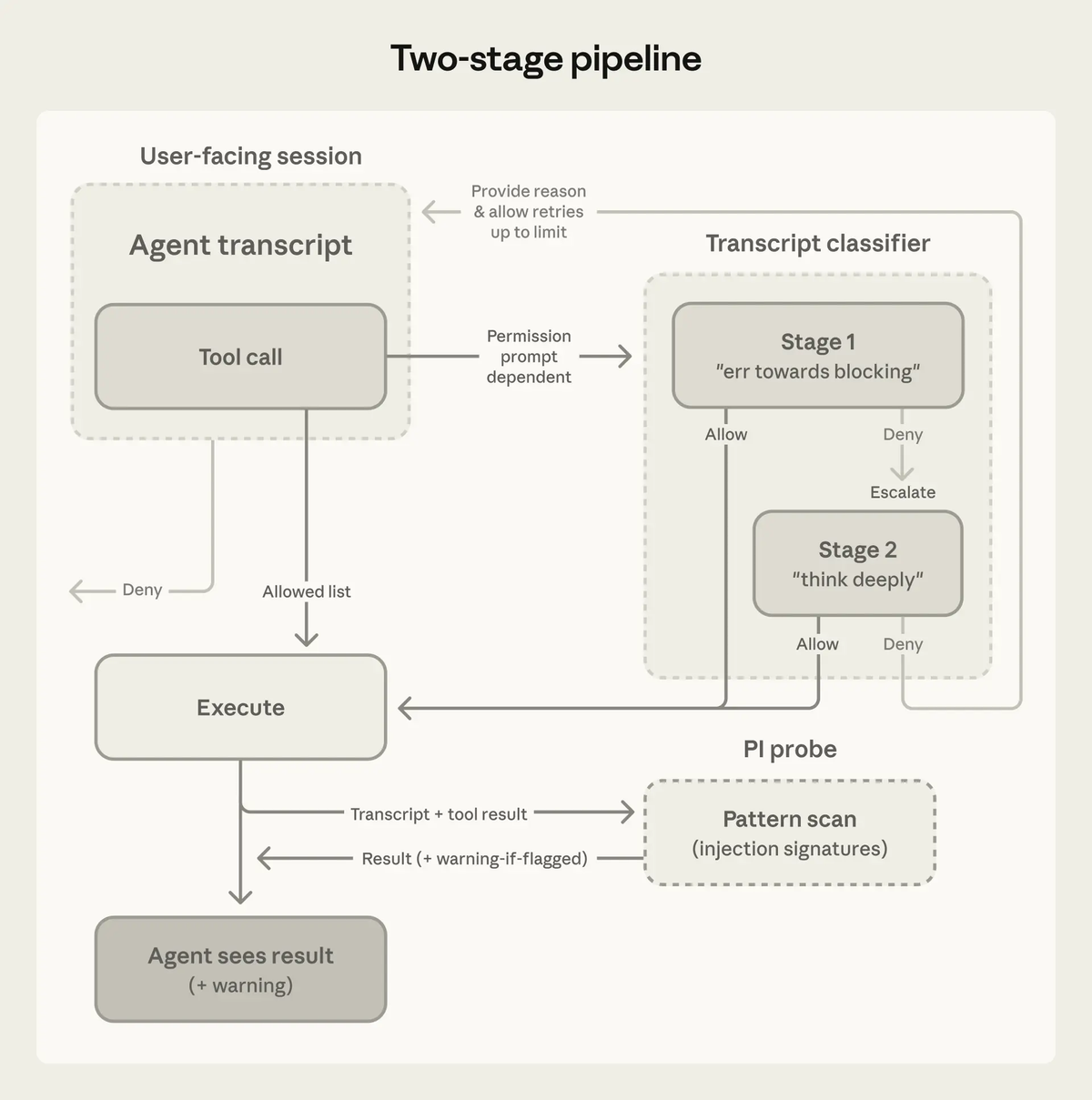
Blocked by default:
- Force-pushing or pushing directly to main/protected branches
- Production deploys
- Downloading and executing code from external sources (
curl | bashpatterns) - Bulk destructive operations (mass file deletion, dropping tables)
- Accessing credential stores or sending data to unrecognized services
- Installing persistence mechanisms (SSH keys, cron jobs)
- Modifying the agent's own permission configuration
Allowed by default:
- File reads and searches
- Writing files within the working directory
- Running tests
- Pushing to the branch the session started on or one Claude created
- Installing packages already declared in the repo's manifest
When the classifier blocks an action three consecutive times or 20 times total in a session, Auto Mode pauses and Claude Code resumes prompting manually. A runaway block loop doesn't silently fail — it escalates to human review.
That same post documents a 17% false-negative rate on real overeager actions in internal testing. The classifier occasionally interprets a prior vague user message as implicit consent. Anthropic published this number explicitly rather than burying it; it means Auto Mode is not a substitute for reviewing session transcripts.
Where Auto Mode Works Well — And Where to Be Careful
Good Fit: CI Fix Loops, Documentation Updates, Routine Code Checks
The strongest use case for Cloud Auto-Fix is the PR lifecycle problem itself: CI has opinions, reviewers have comments, and you don't want to babysit the fix loop manually. Claude watches GitHub events, handles clear cases, and surfaces ambiguous ones.
Local Auto Mode fits best for long-running, repo-scoped tasks that stay within a trusted branch and toolchain: multi-file refactors, dependency updates, test-fix loops. The classifier was built for this specific problem — Anthropic's internal data shows users approve 93% of permission prompts, meaning most of that clicking is rubber-stamping without review.
Scheduled tasks fit best for recurring operational maintenance where you don't need real-time interaction: overnight CI checks, weekly dependency audits, post-merge doc syncs.
Needs Caution: Permission Scope, Audit Trail, Sensitive Repos
Repositories with secrets in environment or config files. The classifier checks for credential exfiltration, but the 17% false-negative rate on overeager actions is a real number. Don't run Auto Mode sessions in repos where a classifier miss has high blast radius.
PRs that require architectural judgment. Auto-Fix handles clear CI failures and unambiguous review comments well. "Ambiguous to the classifier" and "requires careful review" may not align perfectly.
Audit trail. Auto-Fix pushes commits and posts replies under your account. Commits are labeled as Claude Code, but they appear under your name in your team's git history. Make sure your team's review culture accounts for interactions with your agent, not with you personally.
The "Always-On Agent" Risk: How to Set Safe Boundaries
Practical containment, layered:
- Scope by branch. Auto-Fix operates on your PR branch, not protected branches. Keep main protected.
- Define behavior in CLAUDE.md. A
CLAUDE.mdin the repo root sets explicit behavioral constraints the agent reads at session start. - Enable sandboxing for local Auto Mode sessions. OS-level isolation as a hard backstop behind the classifier.
- Declare
autoMode.environment** explicitly.** Don't rely on default trust boundaries if your repo touches internal services. - Review session transcripts. Auto Mode produces a full action log in the Claude Code panel. Reviewing it for unfamiliar patterns is straightforward once you have a baseline for normal behavior.
Auto Mode vs /loop: Which to Use When
/loop: Session-Scoped, Terminal-Dependent, Expires
/loop runs a recurring task loop within the current session. It requires your terminal to stay open and your machine to stay on. When the session ends, the loop ends. Right choice for a bounded task you're actively supervising: run tests and fix failures until the suite is green.
Auto Mode: Cloud-Based (Auto-Fix) or Local Classifier (Permission Mode)
Cloud Auto-Fix is persistent and machine-independent. Once enabled on a PR, it continues after you close the terminal. Right choice for a task you want to fully hand off: keep this PR green while I'm away.
Local Auto Mode isn't persistent — it's a per-session permission configuration. But combined with scheduled tasks, it gives you recurring unattended execution without the terminal dependency.
Decision Table by Use Case
| Scenario | Right Tool |
|---|---|
| Fix CI failures while you sleep | Cloud Auto-Fix |
| Long refactor with fewer approval prompts | Local Auto Mode |
| Recurring overnight dependency audit | Scheduled Tasks |
| Active debugging loop you're supervising | /loop |
| Check PR progress from your phone | Remote Control or Cloud session |
| Parallel workstreams across multiple repos | Multi-agent tools (Agent Teams, parallel worktrees) |
That last row marks a real boundary: Auto Mode is single-session and single-thread. Genuinely parallel workstreams — separate agents working across different branches or repos simultaneously — need a multi-agent architecture rather than a single cloud session. Tools built around parallel isolated execution, like Verdent's parallel worktree approach, address that pattern when the single-session model isn't enough.
FAQ
Does My Machine Need to Stay On?
For Cloud Auto-Fix: no. It runs on Anthropic's infrastructure, watching GitHub events independently.
For local Auto Mode: yes, your machine needs to be on and the terminal session active. This is the key distinction from Cloud Auto-Fix.
For Remote Control: yes, your machine needs to stay on — Remote Control bridges to a session running locally.
Can Auto Mode Push Commits Without My Approval?
Cloud Auto-Fix can push commits to your PR branch without per-push approval — that's the point. It cannot push to protected branches and cannot auto-merge without explicit configuration.
Local Auto Mode can write files and push to your working branch when the classifier deems actions safe, without per-action prompts. Pushes to main and force pushes are blocked by default.
If you need pre-push review on every commit regardless of mode, configure a PreToolUse hook on the Bash tool for git push commands — hooks apply in all permission modes.
Is There an Audit Log of What It Did?
Yes. Cloud Auto-Fix sessions produce a reviewable transcript in the web interface. Commits and PR replies made by auto-fix are labeled as Claude Code in the GitHub UI. For local Auto Mode, the Claude Code panel shows every action with timestamps. The full session transcript is accessible.
Team and Enterprise admins have an analytics dashboard for Code Review activity and spend per repository, which is separate from individual auto-fix session logs.
What Happens If a CI Fix Fails After Multiple Attempts?
Cloud Auto-Fix doesn't loop indefinitely. If it can't resolve a CI failure, it surfaces the issue with an explanation of what it tried rather than pushing increasingly speculative fixes. The design intent is escalation to human review.
For local Auto Mode: if the classifier blocks an action three consecutive times or 20 times total in a session, the mode pauses and Claude Code resumes prompting manually. Repeated blocks signal something the classifier can't safely resolve unilaterally.
Related Reading
- Claude Code vs Verdent: Multi-Agent Architecture Compared — For parallel workstreams that exceed what a single Auto Mode session handles.
- Claude Code Pricing 2026: Plans, Token Costs, and Real Usage Estimates — Auto Mode sessions consume tokens for the classifier on every tool call; understand the cost before running long sessions.
- Best Claude Code Alternatives for Agentic Workflows in 2026 — How Auto Mode fits in the broader tool landscape.
- Claude Skills vs MCP vs Agents: Key Differences — The architectural layers that work alongside Auto Mode in a complete agent stack.
- What Is Model Context Protocol? — MCP tool calls within Auto Mode sessions go through the same classifier pipeline.
