
Alright, let me be honest with you: the first time I heard "Model Context Protocol," my eyes glazed over. It sounds like something you'd read in a dense academic paper, not something that would genuinely change how I work.
But here's what MCP actually is: it's the reason Claude can open a GitHub issue, update a Notion page, and draft an email — all from a single conversation. It's the bridge between an AI that talks about your tools and one that uses them.
If you've been seeing MCP mentioned everywhere lately and still aren't sure what the fuss is about, this is the guide I wish I'd had. No jargon spirals, no assumed knowledge. Just a clear explanation of what it is, why it matters right now, and how to get started.
What Is Model Context Protocol (MCP)?
The Model Context Protocol (MCP) is an open standard and open-source framework introduced by Anthropic in November 2024 to standardize the way AI systems like large language models integrate and share data with external tools, systems, and data sources. MCP provides a universal interface for reading files, executing functions, and handling contextual prompts.
In plain English: before MCP, AI assistants like Claude were essentially locked inside their conversation window. They could talk about your code, your emails, your project board — but they couldn't actually reach out and touch any of it. MCP changes that. It's the standardized handshake that lets Claude connect to real tools and take real actions.
The Problem MCP Solves
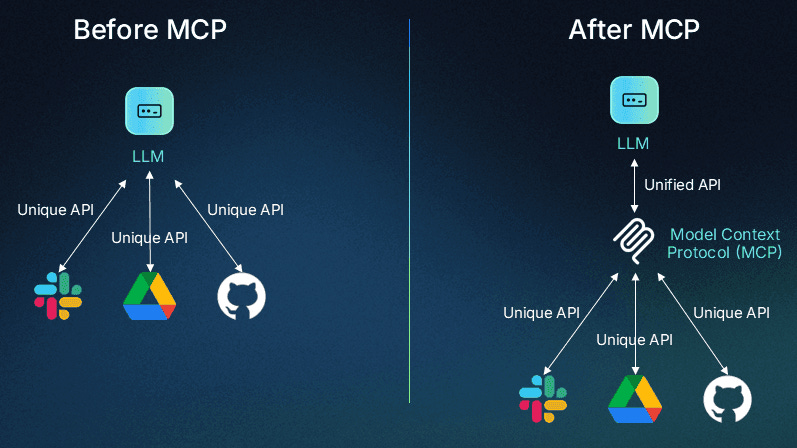
Before MCP, developers often had to build custom connectors for each data source or tool, resulting in what Anthropic described as an "N×M" data integration problem. Every new AI app needed to build custom pipelines to every service it wanted to connect to — one for Slack, one for GitHub, one for your database, one for your calendar. Multiply that by the number of AI tools emerging every month, and you get an integration nightmare that nobody could win.
MCP flips this by providing one shared protocol. Each AI application integrates once on the client side. Each tool or data source integrates once on the server side. Everything becomes interoperable.
MCP Explained in One Analogy
Before USB-C, every device needed its own cable: Lightning for iPhones, micro-USB for Android, proprietary connectors for cameras. MCP does the same thing for AI integrations.
That's the cleanest way to think about it. USB-C didn't change what your devices could do — it just made everything work together without hunting for the right cable. MCP is that universal standard, applied to how AI connects to the software world.
How Does MCP Work?
The Three Components of MCP
MCP is built around a clean client–server architecture with three roles:
| Component | Role | Example |
|---|---|---|
| Host | The environment where you interact with AI | Claude Desktop, Cursor, VS Code |
| Client | Manages the connection to MCP servers | The MCP protocol layer inside Claude Desktop |
| Server | Exposes tools and data through the MCP protocol | GitHub MCP Server, Notion MCP Server |
Servers expose capabilities in three forms. Tools are executable functions Claude can call — things like create_pull_request or search_files. Resources are read-only data Claude can pull in as context, like your project documentation. Prompts are pre-built prompt templates that streamline specific workflows.
The latest MCP spec (March 2025) also added comprehensive tool annotations for better describing tool behavior — like whether a tool is read-only or destructive — along with support for audio data, OAuth 2.1-based authorization, and a more flexible Streamable HTTP transport. These additions mean you can now safely expose enterprise tools through MCP with proper permission scoping and cloud-hosted servers, not just local ones.
MCP in Action — A Real Example
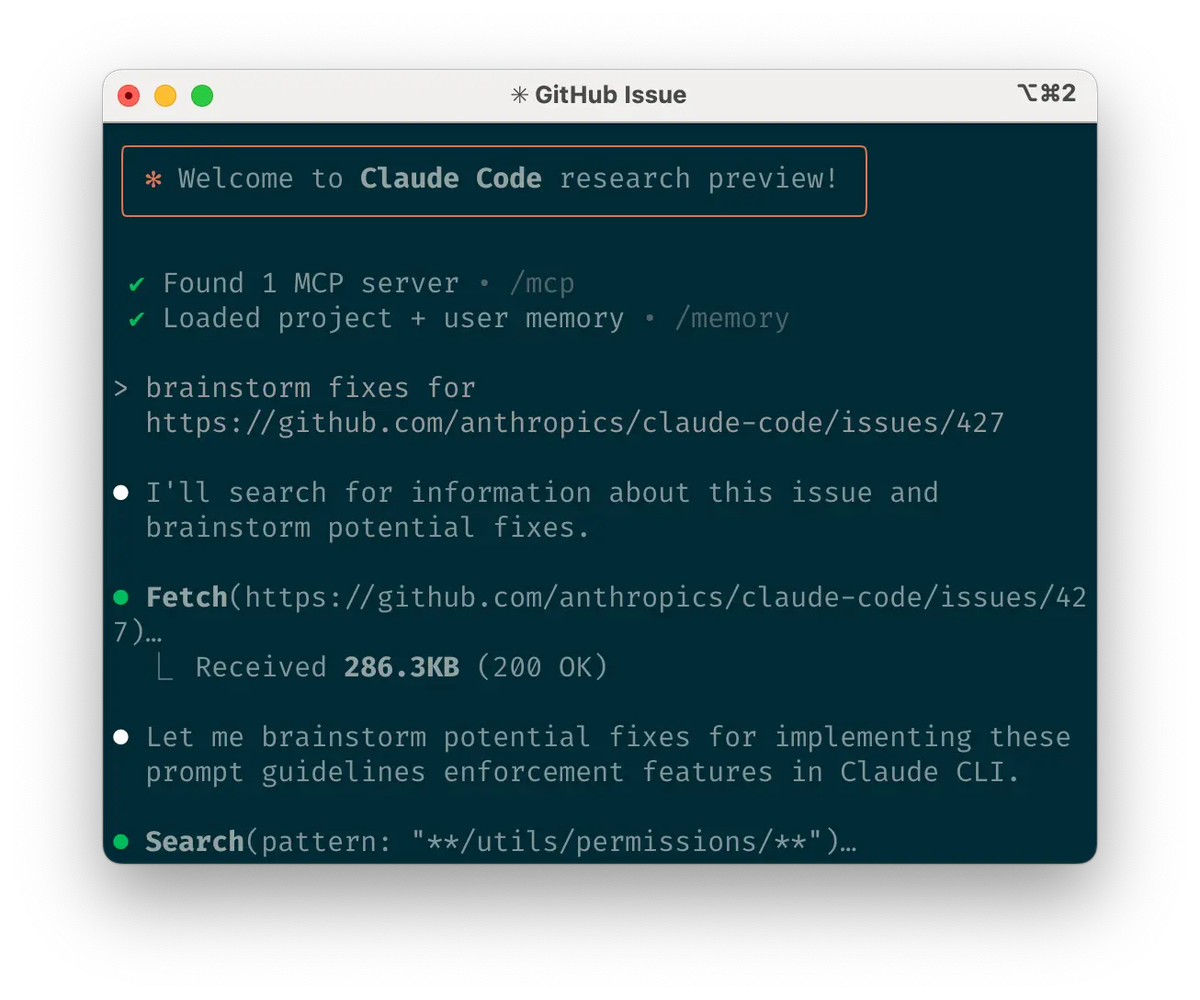
Say you're working in Claude Desktop and you type: "Open a GitHub issue for the login bug we just discussed, assign it to me, and draft a follow-up email to the team."
Without MCP, Claude would write you a template and tell you to do it yourself. With MCP:
- Claude identifies it needs to call GitHub tools and Gmail tools
- The GitHub MCP server receives the
create_issuerequest with the right parameters - The Gmail MCP server receives the
create_draftrequest with the issue link included - Both actions execute in parallel
- Claude reports back: issue #247 created, draft saved to your Gmail
You didn't copy-paste anything. You didn't switch tabs. The AI genuinely did the thing.
Why MCP Is a Big Deal for AI in 2026
MCP vs Traditional Integrations
| Traditional API Integration | MCP | |
|---|---|---|
| Setup per new tool | Custom code per integration | One-time protocol adoption |
| Who maintains it | Each app developer | Community + official server maintainers |
| Works across AI tools | No — app-specific | Yes — any MCP-compatible client |
| Security model | Ad hoc, varies widely | Standardized OAuth 2.1 authorization |
| Discovery | No standard mechanism | Official MCP Registry + .well-known URLs |
The numbers tell the story of how quickly this has spread. In one year, MCP became one of the fastest-growing and widely-adopted open-source projects in AI: over 97 million monthly SDK downloads, 10,000 active servers, and first-class client support across major AI platforms like ChatGPT, Claude, Cursor, Gemini, Microsoft Copilot, and Visual Studio Code.
MCP's inflection point came on March 26, 2025, when OpenAI CEO Sam Altman announced full-throated support: "People love MCP and we are excited to add support across our products." That single post signaled that MCP wasn't an Anthropic-only bet — it was the industry converging on a shared standard.
Who Created MCP and Why
The Model Context Protocol was created by David Soria Parra and Justin Spahr-Summers. Anthropic launched it as an open standard in November 2024, specifically to avoid a future where every AI company built incompatible integration layers and the ecosystem fractured.
In December 2025, Anthropic donated MCP to the Agentic AI Foundation (AAIF), a directed fund under the Linux Foundation, co-founded by Anthropic, Block and OpenAI, with support from other companies. This is the key move that makes MCP genuinely neutral infrastructure: it's now governed by a cross-industry foundation, not owned by any single company. AWS, Google, Microsoft, and Cloudflare are all supporting members.
MCP and Claude — How They Work Together
What Claude Can Do with MCP
With an MCP server connected, Claude can interact with files on your computer, create new documents, organize folders, and search through your file system — all with your explicit permission for each action.
That's just the filesystem example. Extend it across the full server ecosystem and Claude can read and write your code repos, manage your task boards, query your database, pull in your design files, search your email, monitor your CI/CD pipelines, and interact with basically any tool that has an MCP server available.
MCP Apps are now officially live as an MCP extension — tools can return interactive UI components that render directly in the conversation: dashboards, forms, visualizations, and multi-step workflows. This is a significant shift: Claude responses can now include dynamic, interactive outputs, not just text.
Real Use Cases
Here's how this plays out across different roles:
For developers: Ask Claude to implement a feature described in a JIRA ticket, push the code to a branch, and open a PR — without leaving the conversation. Connect a database MCP server and Claude can explain your schema, write and run queries, and debug data issues directly.
For team leads and managers: Connect Asana or Linear and ask Claude to summarize all overdue tasks, draft a status update, and create follow-up items from a meeting transcript — all in one prompt.
For non-technical users: Desktop Extensions — the new .mcpb packaging format — make installing MCP servers as simple as clicking a button. When Anthropic released MCP, the feedback was consistent: installation was too complex. Desktop Extensions solved this by bundling an entire MCP server, including all dependencies, into a single installable package.
How to Get Started with MCP Today
No-Code Options
If you want to get started without touching a terminal, Claude Desktop is your path in.
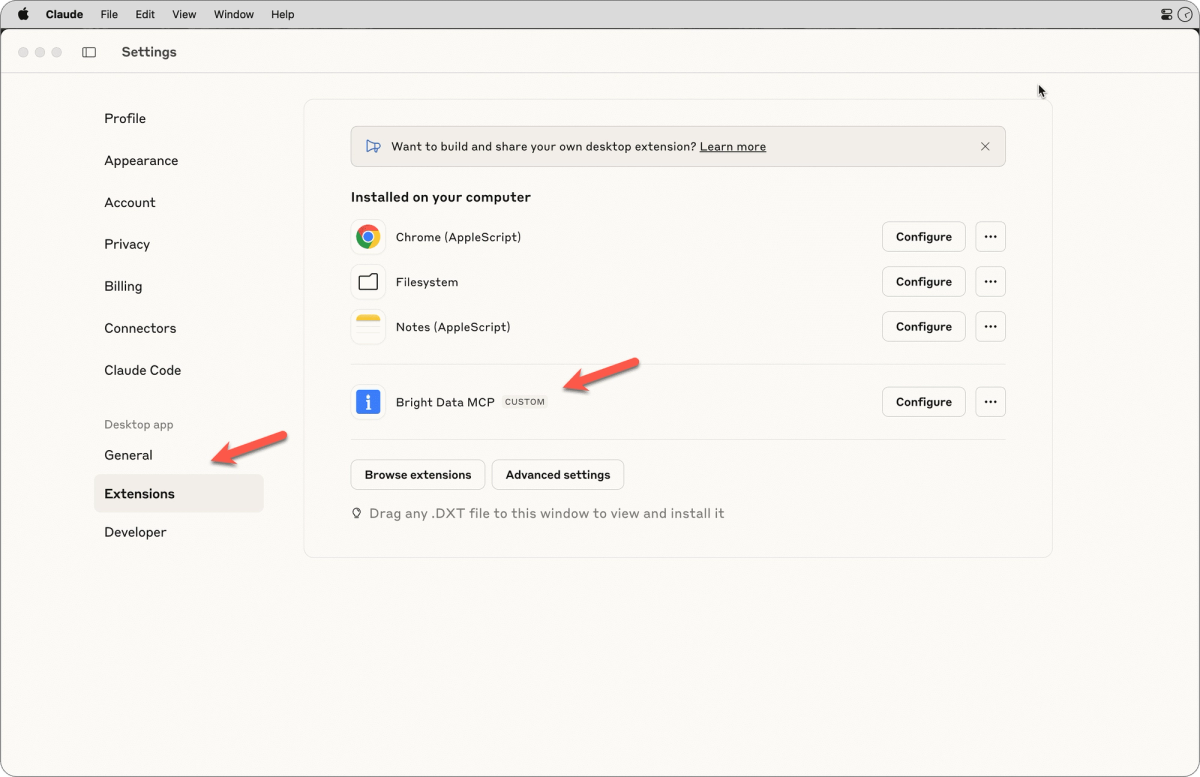
Navigate to Settings → Extensions in Claude Desktop, click "Browse extensions" to view the directory, and click on any Anthropic-reviewed tool you want to use. The built-in Node.js runtime means you don't need to install anything else — the extension installs everything it needs automatically.
Desktop extensions operate within your corporate network boundaries, use your existing authenticated context without requiring additional firewall rules or VPN configurations, and leverage existing SSO and browser sessions automatically — with no token management required. For enterprise teams, this is a significant advantage over traditional API integrations.
Quick start path:
- Download Claude Desktop (latest version, macOS or Windows)
- Open Settings → Extensions → Browse Extensions
- Install one server — the GitHub or Filesystem server is a good first choice
- Click the
+button in the chat input and select "Connectors" to confirm it's connected - Try your first real prompt
For Developers
If you're working in Claude Code or want more control, the CLI approach gives you full flexibility.
# Add a remote MCP server (HTTP transport — recommended for cloud services)
claude mcp add --transport http github https://api.githubcopilot.com/mcp/

# Add a local MCP server (stdio transport — for local tools)
claude mcp add --transport stdio filesystem -- npx -y @modelcontextprotocol/server-filesystem ~/Projects

# Check what's connected
claude mcp list

# Verify inside a session
/mcp
MCP supports SDKs in Python, TypeScript, C#, Java, Kotlin, Ruby, and PHP — so you can build your own server in whatever language your team uses. The official GitHub organization is actively maintained, with SDK repos updated as of March 2026.
For discovering what servers exist, the official MCP Registry is the canonical source, and PulseMCP provides a community-curated layer with quality signals and usage data.
FAQs
Q: Is MCP only for Claude? No. Following its announcement, the protocol was adopted by major AI providers including OpenAI and Google DeepMind. Any MCP-compatible client — Claude, ChatGPT Desktop, Cursor, GitHub Copilot, Gemini, Microsoft Copilot — can connect to any MCP server. The whole point is interoperability.
Q: Do I need to know how to code to use MCP? Not anymore. With Desktop Extensions, you can now install local MCP servers on your computer as easily as browser extensions — no manually configuring JSON files or managing dependencies. The no-code path through Claude Desktop's Extensions directory handles everything.
Q: Is it safe to give Claude access to my files and tools through MCP? All actions require your explicit approval before execution, ensuring you maintain full control over what Claude can access and modify. That said, Anthropic recommends using MCP servers from trusted, well-maintained sources — particularly official servers from established companies. Be cautious with unknown community servers, especially ones that could fetch untrusted content, as these can expose you to prompt injection risk.
Q: What's the difference between MCP Tools, Resources, and Prompts? Tools are functions Claude can execute (like creating an issue or sending an email). Resources are read-only data Claude can pull in as context (like your project docs or database schema). Prompts are pre-built templates that guide Claude through specific workflows. Most MCP servers you'll interact with expose primarily Tools.
Q: Can I build my own MCP server? Yes, and it's more approachable than it sounds. The MCP SDK is available for multiple languages, and the official quickstart on modelcontextprotocol.io walks you through building a simple server in under an hour. If you have an internal tool or data source you want Claude to work with, a custom MCP server is often the most direct path.
Q: What does "Agentic AI Foundation" mean for MCP's future? It means MCP is no longer dependent on a single company's roadmap or priorities. The protocol is now hosted by the Linux Foundation, with AWS, Google, Microsoft, Cloudflare, and Bloomberg as supporting members. Governance is community-driven through working groups and a formal Specification Enhancement Proposal process — the same model that made HTTP and Linux durable infrastructure.
Start Exploring MCP Today
Here's the reality: MCP crossed the threshold from "interesting developer experiment" to "production infrastructure" sometime in mid-2025. The 97M monthly SDK downloads, the Linux Foundation governance, the cross-industry adoption — these aren't signs of a trend still finding its footing. This is the direction AI tooling is going.
The best time to get comfortable with it is now, before your tools start requiring it.
Download Claude Desktop, install one MCP server from the Extensions directory, and try one real task in your actual workflow. That's it. The setup takes ten minutes, and the first time Claude actually does something instead of just talking about it, you'll understand why this matters.
Browse the MCP server registry and find the integration that fits your stack.
related post:
