
Okay, real talk — the first time someone told me to "just add an MCP server" to Claude, I stared at my terminal for a solid five minutes wondering where to even start.
That was a few months ago. Now I've set up a dozen of them across different projects, and honestly? It's one of those things that sounds complicated until it clicks. Once it clicks, you wonder how you ever used AI without it.
If you're a developer, a team lead, or just someone who wants Claude to actually do things in your tools instead of just talking about them, this guide is for you. I'll walk you through what MCP servers are, which ones are worth your time right now, and exactly how to get your first one running — no fluff, no filler.
What Is an MCP Server?
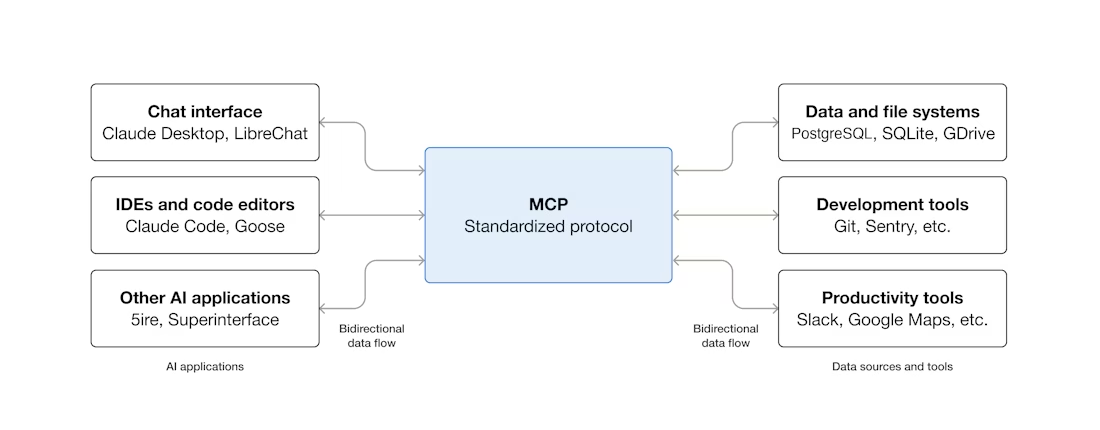
The Model Context Protocol (MCP) is an open standard that enables developers to build secure, two-way connections between their data sources and AI-powered tools. In practical terms: an MCP server is a bridge that lets Claude reach outside its conversation window and interact with your real tools — your files, your GitHub repos, your email, your databases.
Without MCP, Claude can give you advice about code. With MCP, Claude can read your actual codebase, open a PR, check your Asana board, and draft a follow-up email — all from a single prompt.
MCP vs Traditional API
The old way of connecting AI to external tools meant building a custom integration for every single service. One integration for Slack, another for GitHub, another for your database. Every company, every developer, doing it from scratch.
MCP solves the M × N integration problem by transforming it into an M + N model through a standardized connection protocol. Each AI application integrates once on the MCP client side, and each tool or data source integrates once on the MCP server side.
| Traditional API Integration | MCP Server | |
|---|---|---|
| Setup per tool | Custom code required | Standardized install command |
| Maintenance | Per-integration updates | Protocol-level compatibility |
| Reusability | App-specific | Works across any MCP client |
| Security model | Ad hoc | Consistent permission scoping |
Why MCP Servers Matter in 2026
The ecosystem has exploded. The official MCP repository on GitHub now lists hundreds of community and officially maintained servers, covering everything from databases and file systems to CI/CD pipelines, design tools, and CRMs. The more important shift is that major platforms — GitHub, Asana, Notion, HubSpot — now maintain official MCP servers, meaning you're not relying on a hobby project that might break next week.
Desktop Extensions — a new packaging format introduced by Anthropic — make installing MCP servers as simple as clicking a button. The days of manually editing JSON config files for every server are largely behind us, though you'll still want to know how to do it for production environments.
How MCP Servers Work
The Client-Server Model Explained Simply
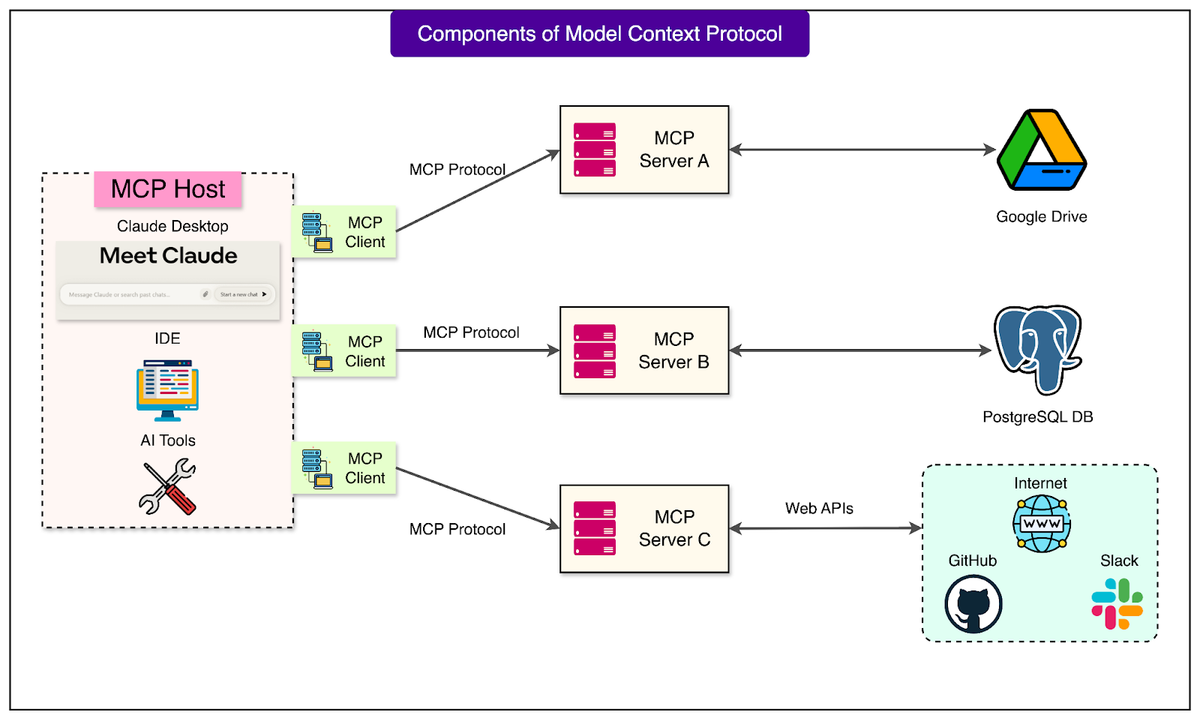
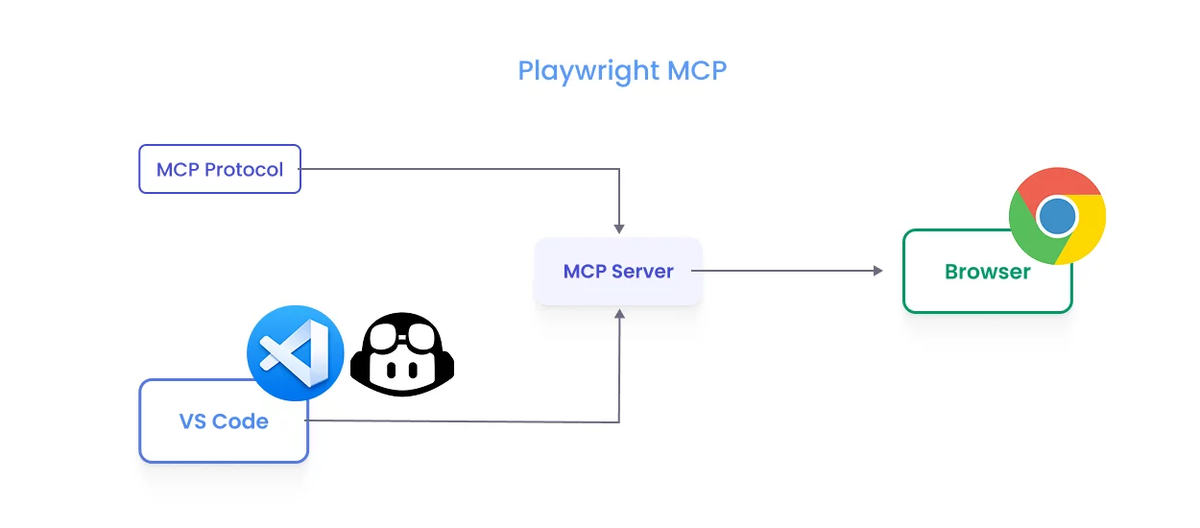
MCP is built on a client–server architecture. The Host is the environment where the user directly interacts with the AI application (e.g., Claude Desktop, Cursor). The Client is a component within the Host responsible for managing the connection to the MCP Server. The Server is an external application or service that provides capabilities through the MCP protocol.
Think of it this way: Claude Desktop is the host, the MCP protocol layer inside it is the client, and the GitHub MCP Server is the server. Claude talks to the client; the client talks to the server; the server talks to GitHub's API. You just see Claude doing GitHub things.
Servers expose three types of capabilities:
- Tools — executable functions Claude can call (e.g.,
create_issue,search_code) - Resources — read-only data Claude can pull in as context (e.g., your project docs)
- Prompts — pre-built prompt templates that guide specific workflows
What Happens When Claude Connects to an MCP Server
When you start a session with an MCP server configured, Claude automatically discovers what tools that server exposes. You don't need to tell Claude what's available — it reads the server's tool list and decides when to use those tools based on your request.
With MCP servers connected, you can ask Claude Code to implement features from issue trackers ("Add the feature described in JIRA issue ENG-4521 and create a PR on GitHub"), analyze monitoring data, query databases, integrate designs from Figma, and automate workflows like creating Gmail drafts.
One important note: Claude Code now supports MCP list_changed notifications, allowing MCP servers to dynamically update their available tools, prompts, and resources without requiring you to disconnect and reconnect. This matters for active development environments where tool availability changes frequently.
Best MCP Servers Available Right Now
Gmail MCP Server
What it does: Lets Claude read, search, and send emails from your Gmail account. Useful for drafting follow-ups, summarizing threads, and creating drafts at scale.
Install (Claude Code):
claude mcp add --transport http gmail https://gmail.googleapis.com/mcpOr for Claude Desktop, add to claude_desktop_config.json:
{
  "mcpServers": {
    "gmail": {
      "command": "npx",
      "args": ["-y", "@modelcontextprotocol/server-gmail"],
      "env": {
        "GMAIL_CLIENT_ID": "your-client-id",
        "GMAIL_CLIENT_SECRET": "your-client-secret"
      }
    }
  }
}
Best for: Teams doing high-volume outreach, customer success workflows, or anyone who wants Claude to manage inbox triage.
Google Drive MCP Server
What it does: Gives Claude access to your Drive files — read, search, and use them as context in any conversation. Anthropic shared pre-built MCP servers for popular enterprise systems including Google Drive as part of the initial MCP launch, and the server is actively maintained.
Install:
claude mcp add --transport http gdrive https://drive.googleapis.com/mcpBest for: Architects and leads who want Claude to pull in PRDs, specs, or documentation as context without manual copy-paste.
Asana MCP Server
What it does: Connects Claude to your Asana workspace — read tasks, create new ones, update status, and query project boards in natural language.
The official Claude Code docs show a real example connecting to Asana via SSE transport:
claude mcp add --transport sse asana https://mcp.asana.com/sseBest for: Engineering managers and PMs who want to close the loop between Claude conversations and actual project tracking. Ask Claude to "create a task for the auth bug we just discussed" and it does it — no context switching.
GitHub MCP Server
This is the one I recommend to every developer who asks me where to start. The GitHub MCP Server connects AI tools directly to GitHub's platform, giving AI agents the ability to read repositories and code files, manage issues and PRs, analyze code, and automate workflows through natural language interactions.
It covers repository management, issue and PR automation, CI/CD intelligence (monitoring Actions runs, analyzing build failures), and code analysis including security findings and Dependabot alerts.
Install (remote, recommended for VS Code 1.101+):
claude mcp add --transport http github https://api.githubcopilot.com/mcp/Install (local, works everywhere):
claude mcp add --transport stdio github -- npx -y @github/mcp-serverNote: The original Anthropic-maintained GitHub MCP server is now deprecated in favor of the GitHub MCP Server officially maintained by the GitHub team. Use the GitHub-official version going forward.
How to Connect an MCP Server to Claude (Step by Step)
What You Need Before You Start
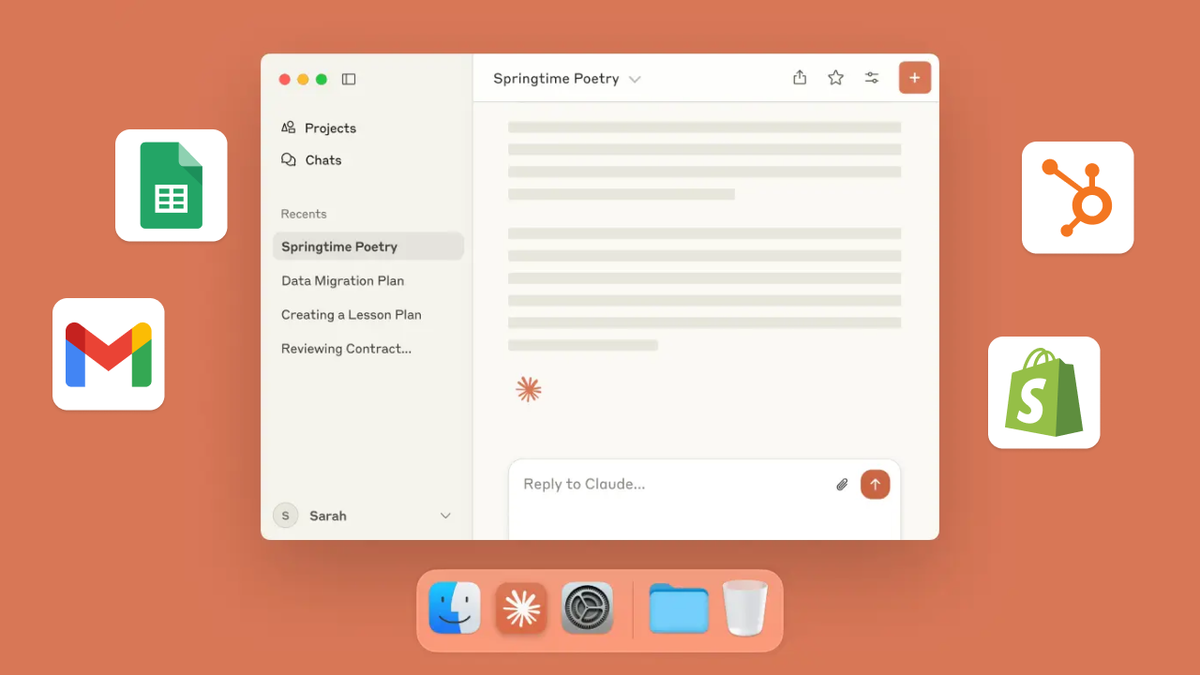
- Claude Desktop (latest version) or Claude Code installed
- Node.js 18 or higher (
node --versionto check) - An Anthropic account with an active plan — all Claude.ai plans support connecting MCP servers to the Claude Desktop app
- API credentials for the specific service you're connecting (e.g., a GitHub Personal Access Token)
Step-by-Step Setup Guide
Option A: Claude Code (terminal) — recommended for developers
Claude Code makes adding servers a one-liner. The basic syntax for HTTP servers — the recommended option for remote MCP servers — is claude mcp add --transport http <name> <url>.
# Add GitHub MCP server
claude mcp add --transport http github https://api.githubcopilot.com/mcp/

# Verify it's connected
claude mcp list

# Check status inside a Claude Code session
/mcp
Claude Code supports three scope levels: local (default, current project only), project (shared with your team via .mcp.json), and user (available across all your projects).
Option B: Claude Desktop — recommended for non-terminal users
- Open Claude Desktop → Settings → Developer → Edit Config
- Add your server to
claude_desktop_config.json:
{
  "mcpServers": {
    "github": {
      "command": "npx",
      "args": ["-y", "@github/mcp-server"],
      "env": {
        "GITHUB_PERSONAL_ACCESS_TOKEN": "your-pat-here"
      }
    }
  }
}- Save the file and restart Claude Desktop
- Look for the tool icon (🔧) in the message composer — that confirms tools are available
Windows users: On native Windows (not WSL), local MCP servers that use npx require the cmd /c wrapper to ensure proper execution. Without it, you'll get "Connection closed" errors:
claude mcp add --transport stdio my-server -- cmd /c npx -y @some/packageTroubleshooting: If a server isn't appearing, validate your JSON first — a single trailing comma breaks the whole config. Use an online JSON validator before restarting.
Which MCP Server Should You Start With?
Best for Productivity
Start with GitHub MCP Server if you write code. It's the highest-signal integration you can add: Claude goes from talking about your codebase to working in it. First task to try: "Summarize the open PRs in [repo] and flag any that have been open more than a week."
Add Asana or Google Drive next if your work involves project tracking or documents. The combination of a task manager MCP + a docs MCP means Claude has full context on both what needs doing and the specs for how to do it.
| Server | Setup Difficulty | Immediate Value | Best First Task |
|---|---|---|---|
| GitHub | Easy | Very High | "List open issues labeled 'bug' in my repo" |
| Google Drive | Medium | High | "Summarize the Q1 roadmap doc" |
| Asana | Easy | High | "Create a task: fix login timeout bug, assign to me" |
| Gmail | Medium | Medium | "Draft a follow-up to the last email thread about the API integration" |
Best for Developers
If you're building with Claude Code, GitHub MCP is non-negotiable. After that, I'd add a filesystem MCP for local file access and a PostgreSQL MCP if you're working with a database — Claude can then run queries, explain schemas, and help debug data issues without you copy-pasting results back and forth.
For the full picture of what's available, the official modelcontextprotocol/servers repository on GitHub is the canonical list, managed by Anthropic and the MCP steering group — that's your source of truth for reference implementations. For community servers, PulseMCP maintains a well-curated discovery layer with usage estimates and quality signals.
FAQs
Q: Are MCP servers safe to use? The official and well-maintained servers from established companies (GitHub, Asana, Google) are safe. Anthropic warns to use third-party MCP servers at your own risk, and to be especially careful with servers that could fetch untrusted content, as these can expose you to prompt injection risk. Stick to official servers from companies you trust until you've reviewed the source code of community ones.
Q: Do MCP servers work on all Claude plans? Yes — all Claude.ai plans support connecting MCP servers to Claude Desktop.
Q: Can I run multiple MCP servers at the same time? Absolutely. In claude_desktop_config.json, you add multiple entries inside the "mcpServers" section — one for each server you want to run. When you restart Claude Desktop, it'll launch all servers and connect to all the tools they expose. Running multiple servers keeps your setup modular — if one crashes or needs updating, it won't take down the others.
Q: What's the difference between HTTP and stdio transport? HTTP servers are the recommended option for connecting to remote MCP servers and are the most widely supported transport for cloud-based services. Stdio servers run as local processes on your machine and are ideal for tools that need direct system access or custom scripts.
Q: How do I remove an MCP server I no longer need? In Claude Code: claude mcp remove <server-name>. In Claude Desktop: delete the server's entry from claude_desktop_config.json and restart the app.
Q: Where can I find more MCP servers beyond the four listed here? You can find hundreds more MCP servers on GitHub, or build your own using the MCP SDK. The official MCP Registry and PulseMCP are the two best discovery resources as of March 2026.
Start Connecting Claude to Your Tools Today
The barrier to getting started is genuinely low. Pick one server — GitHub if you're a developer, Asana or Google Drive if you're more of a product/ops person — run the install command, and try one real task in your actual work context.
That first moment when Claude opens a GitHub issue, or creates an Asana task, or drafts an email from inside the conversation — that's when MCP goes from abstract concept to daily habit.
Browse the full MCP server registry on GitHub and find the integration that fits your workflow.
related post:
Claude Code: Parallel Workflow
Claude Code: Remote Control Setup
