
Most vision-language models can describe a UI screenshot. Far fewer can translate that visual understanding into working code without significant degradation in one direction or the other — either the visual analysis is good but the code is wrong, or the code logic is fine but the pixel-level fidelity is lost. GLM-5V-Turbo's specific claim is that it closes this loop natively. Whether that claim holds up in real engineering workflows is what this article examines.
What Problem Does GLM-5V-Turbo Actually Solve for Engineers?
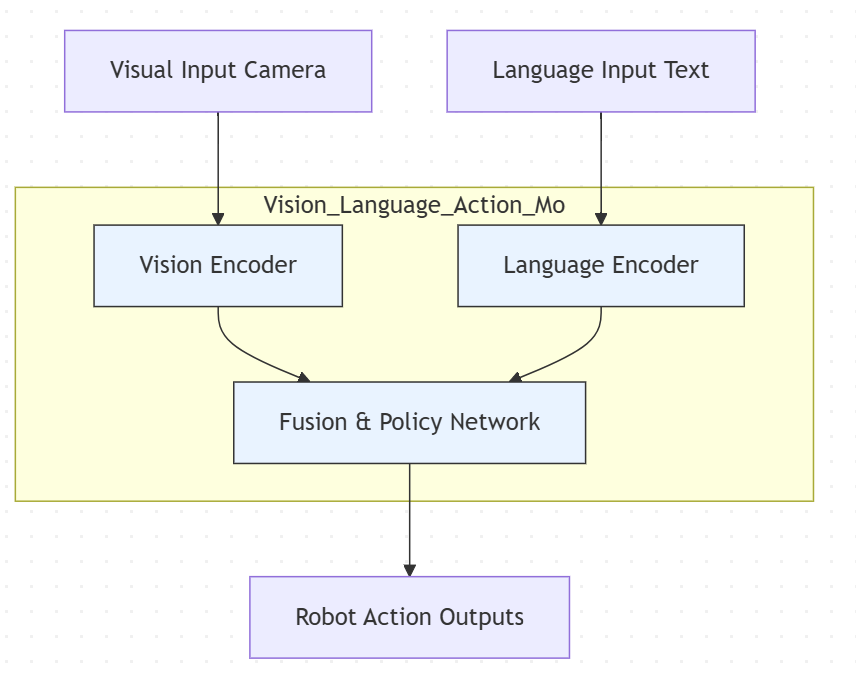
The technical problem it targets is what Z.ai's documentation describes as the "see-saw" issue in vision-language models: visual accuracy and code generation quality tend to trade off against each other in conventional VLM architectures. Improve the visual encoder's recognition — better attention to layout, color relationships, component hierarchy — and the language model's coding logic often suffers. Optimize for code generation quality, and visual fidelity drops.
The architectural approach here uses a CogViT visual encoder that feeds directly into the transformer backbone as native token representations. Many earlier vision-language systems — particularly pipeline-style VLMs that combined a separate vision model with a language model — worked by converting visual information to a text description first, then feeding that description to the language model as a text prompt. GLM-5V-Turbo was trained with vision as a native input modality from the start: the CogViT encoder processes spatial hierarchies and visual detail in parallel with text, rather than compressing them into a textual intermediate. The practical consequence is that layout relationships, spatial positioning, and visual hierarchy are less likely to be lost before the model reasons about them.
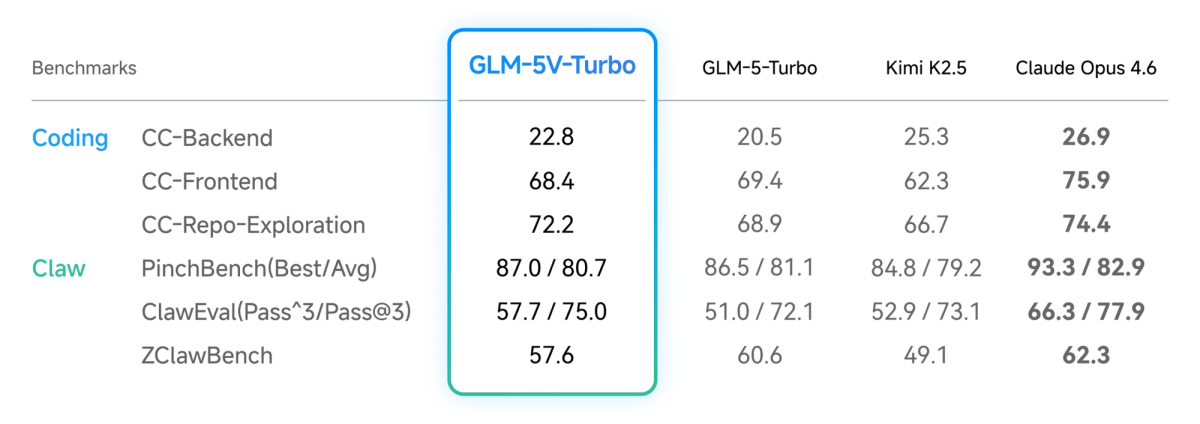
The 30+ Task Joint RL training reinforces this: rather than training visual understanding and code generation separately, the reinforcement learning objective optimizes across multimodal coding tasks simultaneously. The stated goal is that adding visual capability doesn't cannibalize text-only coding performance — the benchmarks Z.ai publishes on CC-Bench-V2 (backend, frontend, repo exploration) are the evidence cited, though these are primarily Z.ai's own evaluations.
The specific engineering scenarios where this architecture matters are narrow but real: tasks where the input is visual (a design mockup, a screenshot of a bug, a UI layout export) and the output needs to be executable code that accurately reflects that visual input. For purely text-based coding workflows, the architecture advantage is irrelevant — use GLM-5-Turbo instead.
Real Workflow Scenarios Where It Makes Sense
Design Mockup to Frontend Code
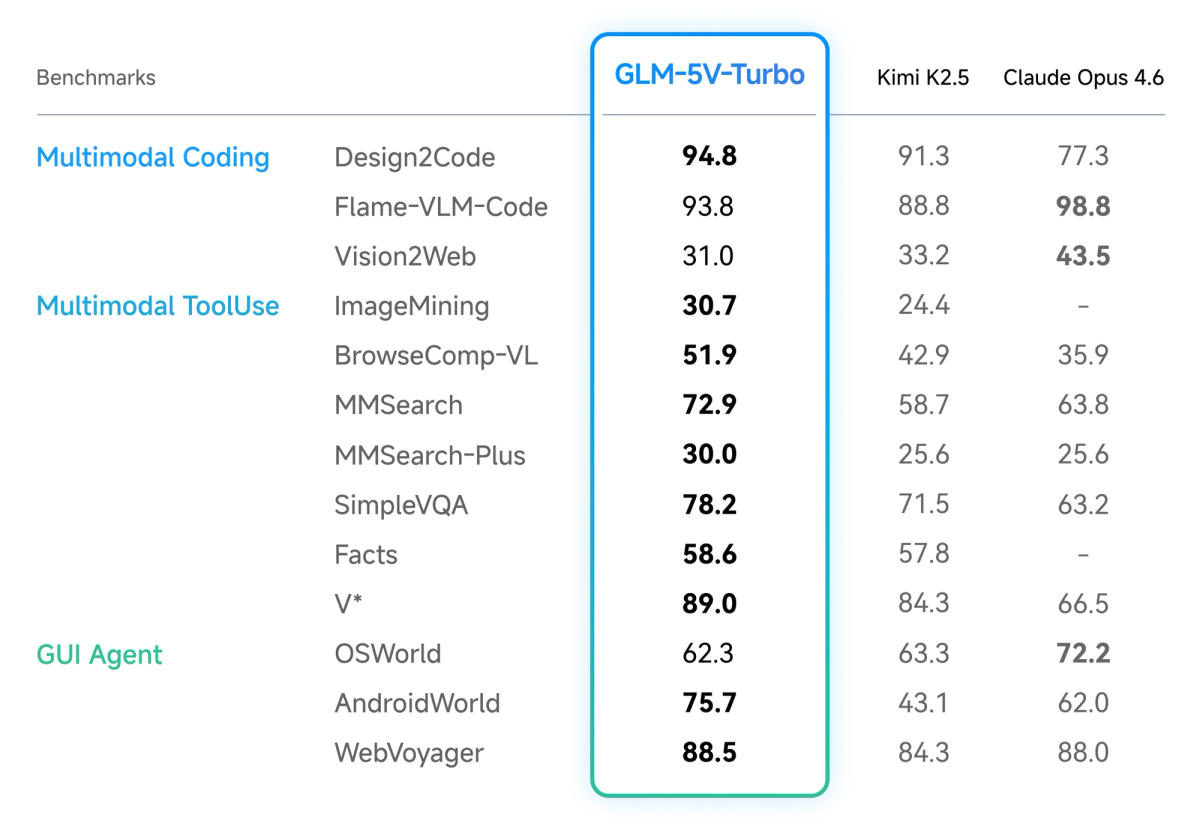
The most directly validated use case is design-to-code generation. Z.ai reports a Design2Code score of 94.8 against Claude Opus 4.6's 77.3 — a substantial claimed margin. These are self-reported figures, and independent benchmarking on this specific evaluation is limited as of April 2026. That caveat applies, but the benchmark is an established one (not a Z.ai proprietary eval), and the gap is large enough that even significant measurement noise wouldn't eliminate the advantage in this domain.
The practical workflow: provide a Figma export, a screenshot of a competitor's UI, or a hand-drawn wireframe. The model maps layout structure, component hierarchy, color palette, and interaction affordances to generate HTML/CSS/React components. The goal Z.ai describes is pixel-level consistency for high-fidelity designs and structural/functional reconstruction for wireframes.
Where this is genuinely useful for engineering teams: situations where a designer produces mockups that a developer needs to turn into code without a manual translation step. For teams spending significant engineering time on this conversion — particularly on pixel-accurate frontend work — the model's design-to-code performance is worth evaluating on representative inputs from your actual design system.
What it doesn't automatically solve: integration with your existing component library, TypeScript types, test coverage, accessibility requirements, and state management. The output is code that matches the visual, not code that fits into your codebase. That gap still requires engineering work.
GUI Agent for Browser and App Automation
GLM-5V-Turbo's official documentation describes performance on AndroidWorld and WebVoyager — two benchmark environments that test whether a model can observe a real GUI environment, plan a sequence of actions, and execute them without human intervention. Z.ai states "strong performance" on both without publishing the specific numeric scores in the documentation. Third-party tracking shows a WebVoyager score of 88.5% on the public leaderboard as of April 13, 2026 (source: BenchLM, mirroring Z.ai's published figures — not independent evaluation).

The practical workflow for GUI automation: the agent receives a screenshot or video frame of the current browser or application state, reasons about what action to take next, calls a tool to execute that action (click, type, scroll, navigate), observes the result, and continues the loop. GLM-5V-Turbo's perceive → plan → execute loop is specifically trained for this pattern.
For engineering teams, the concrete use cases are UI regression testing (screenshot-driven), web scraping workflows that require visual state reading, and automation of interfaces without APIs. The model's tool-calling improvements from GLM-5-Turbo inheritance are relevant here — the intent is to reduce failed tool invocations in multi-step agent loops, which is where most GUI automation agents break down in practice.
Realistic integration with Claude Code or OpenClaw: Z.ai's documentation states the model "works seamlessly with agents such as Claude Code and OpenClaw." In practice, this is an OpenAI-compatible API, so the integration works through routing. For Claude Code, the actual path is via a LiteLLM proxy — Claude Code routes calls through an OpenAI-compatible endpoint that proxies to Z.ai's API. For OpenClaw, you configure openclaw.json to add the model as a provider. Neither is turnkey; both require manual configuration. The "deep synergy" language in the announcement refers to the fact that the model was optimized on OpenClaw task patterns, not that there's a native plugin or first-class integration documented in a quickstart guide.
Document Layout Understanding for Code Generation
A less-discussed but practical use case is complex document-to-code workflows: feeding a PDF containing a data schema, an architectural diagram, or a chart alongside a request to generate processing code that handles the structures shown.
For enterprise workflows involving specification documents, regulatory filings with structured tables, or system architecture diagrams, the visual layout carries semantic information that text extraction loses. A table in a PDF has positional relationships; an architectural diagram has flow and dependency structure. Passing the visual directly to a model that reasons natively on visual tokens preserves those relationships through to the code generation step.
The limitation: this works well for generating code to process or work with the structures shown, less well for very large documents where the 200K context window matters for the accompanying text but the visual token budget for each image is constrained.
Where GLM-5V-Turbo Falls Short
Speed is a genuine operational constraint. GLM-5V-Turbo ranks in the 34th percentile for output speed across benchmarked models (source: benchable.ai, third-party). In a batch task or asynchronous pipeline, this is a cost-of-doing-business tradeoff. In an interactive agent loop — where the model's output determines the next action, which determines the next visual observation — latency compounds. A 10-step GUI automation task with several seconds of model latency per complex visual reasoning step is tolerable for background workflows. At 20+ steps in an interactive context, it's friction that affects developer experience and limits real-time use cases. If your agent architecture requires sub-second response for interactive workflows, this model is not the right fit.
Closed-source, API-only, no local deployment. For engineering teams with data sovereignty requirements, compliance constraints, or air-gapped environments, GLM-5V-Turbo is unavailable. This is the same situation as most frontier commercial models, but it's worth stating directly for teams evaluating it against open-weight alternatives. The open-source GLM-5 (MIT license, available on HuggingFace) is text-only; there is no open-weight multimodal variant in the current GLM-5 generation.
Benchmark sourcing limitations. The benchmarks cited in Z.ai's launch materials mix established evaluations (Design2Code, AndroidWorld, WebVoyager) with proprietary ones (ZClawBench, ClawEval, PinchBench). The proprietary benchmarks measure performance on Z.ai's own task definitions — useful for understanding the model's ceiling in Z.ai-native workflows, less useful for predicting performance on your specific workload. Independent third-party replication of the multimodal coding benchmarks is limited as of April 2026. Treat the published figures as directional signals, not ground truth.
Claude Opus 4.6 leads on some visual benchmarks. Z.ai's own materials, as reported by The Decoder, acknowledge that Claude Opus 4.6 leads on Flame-VLM-Code and OSWorld. The advantage is not uniform across visual reasoning tasks. GLM-5V-Turbo's strength is specifically in design-to-code generation and OpenClaw-style GUI tasks — not general visual understanding or computer use in the broad sense.
Coding Plan access. Access to the model's full feature set through Z.ai's Coding Plan requires a trial application. The model is accessible via OpenRouter at standard pricing ($1.20/$4.00 per M tokens) without the Coding Plan, but some features are Coding Plan-only. Confirm current access terms at Z.ai's documentation before planning integration around capabilities that may require a specific plan tier.
How It Compares to Using a Text-Only Agent with Vision Tools
The practical alternative to GLM-5V-Turbo in most workflows is a pipeline: a text-only coding agent (GLM-5-Turbo, Claude Opus 4.6, GPT-5.4) combined with an external vision tool — an OCR service, a screenshot description model, a computer vision API — that translates visual input to text before the coding agent processes it.
The pipeline approach separates the visual perception and code generation steps. Visual input goes to a vision model (GPT-4o's vision, Claude Opus 4.6's image input, or a dedicated OCR tool), which returns a structured text description or extracted data. That text feeds the coding agent.
Trade-offs:
| Dimension | GLM-5V-Turbo (native) | Text-only agent + external vision |
|---|---|---|
| Visual fidelity | Higher — no translation loss | Lower — layout and spatial info lost in text conversion |
| Latency | One model call (but 34th percentile speed) | Two model calls (but potentially faster per call) |
| Token cost | Image tokens + text tokens in one call | Separate charges for vision model + coding model |
| Flexibility | Locked to GLM-5V-Turbo for visual tasks | Mix-and-match: best vision model + best coding model |
| Maintenance | Simpler pipeline (one model) | More complex orchestration |
| Local deployment | Not possible | Possible (e.g., open-weight coding model + local OCR) |
The translation loss in the pipeline approach is the key variable. For design-to-code tasks where pixel-level accuracy matters, converting a design to a text description before generating code introduces error at every level of abstraction. For document processing where the visual information is primarily text and structured data (tables, charts), a good OCR pipeline may close most of that gap.
The right choice depends on your specific visual inputs. For design mockups: GLM-5V-Turbo's native approach is likely better. For screenshots with primarily textual content: the pipeline approach may be comparable quality at more flexibility.
Is It Worth Integrating Into a Multi-Agent Workflow?
The most coherent role for GLM-5V-Turbo in a multi-agent architecture is as a specialized visual perception subagent. In a workflow where an orchestrator coordinates multiple subagents by task type, GLM-5V-Turbo handles the visual-input subtasks: design analysis, screenshot interpretation, GUI state reading, document layout extraction. It passes structured output to downstream text-only agents that handle execution, file modification, test running, and code review.
This architecture matches how Verdent's parallel execution works: tasks are routed to isolated environments based on task type. A visual perception subtask routes to GLM-5V-Turbo; the resulting structured component map or data extraction routes to a text-based execution agent. The orchestrator never runs visual and text-heavy tasks through the same model unnecessarily.
The practical constraint on this architecture is the integration path. In OpenClaw, adding GLM-5V-Turbo as a provider requires editing openclaw.json and specifying it as a model for specific agents — manual configuration, not automatic routing. In Claude Code via LiteLLM proxy, you're adding an API routing layer with its own latency and maintenance overhead. Neither is prohibitive, but neither is frictionless.
For teams building new multi-agent systems from scratch: GLM-5V-Turbo is worth including as the visual perception layer if design-to-code or GUI automation is a significant part of the workflow. For teams evaluating whether to add vision capability to an existing text-only agent system: the integration overhead and the latency penalty require benchmarking against your specific task mix before committing.
FAQ
Can GLM-5V-Turbo replace a Figma plugin for design-to-code?
For simple, contained components: possibly, for specific use cases. For complex design systems with tokens, variants, and component libraries: no. The model generates code that matches the visual accurately (by its benchmark claims), but it doesn't know your existing component library, design tokens, or Figma-specific abstractions. Figma plugins operate with direct access to the Figma design graph — component names, layer names, design tokens, linked styles. GLM-5V-Turbo works from the rendered visual only. For teams without an existing Figma plugin workflow, the model's output may require less post-processing than starting from scratch with a text-only model. For teams with mature Figma plugin infrastructure, the comparison doesn't really apply.
How do you call it in a multi-agent system?
Via OpenAI-compatible API at openrouter.ai/z-ai/glm-5v-turbo or Z.ai's direct endpoint. Pass image inputs as base64-encoded data or URLs in the messages array. For OpenClaw, add the model to your provider configuration in openclaw.json. For Claude Code, use a LiteLLM proxy to route specific requests to the Z.ai endpoint. There is no native MCP plugin or one-click integration for either at the time of writing.
Is the output code quality independently verified?
The Design2Code score (94.8) uses an established benchmark, but the evaluation was Z.ai-conducted. ZClawBench, ClawEval, and PinchBench are proprietary Z.ai evaluations with no independent reproduction as of April 2026. AndroidWorld and WebVoyager are established benchmarks; the scores Z.ai cites are directionally validated by public leaderboard aggregators but not independently reproduced. For production integration, benchmark on your own representative inputs — the published scores are useful signal but not a substitute for domain-specific testing.
Does the latency actually matter in an agent loop?
It depends on your loop architecture. For batch processing — design assets converted overnight, not in real time — 34th percentile speed is irrelevant. For interactive agent loops where a developer is watching actions happen in real time, latency at the 34th speed percentile is visible friction that affects experience and productivity. For autonomous background agents running while the developer does other work, it's a throughput concern rather than an experience concern. Map your architecture first, then evaluate whether the speed is acceptable.
Can it use video input for bug reproduction?
Yes, the model accepts short video clips alongside text and images. The practical use case for bug reproduction: record a screen capture of the bug occurring, pass the video to the model with a request to generate a reproduction script or describe what's happening. The model processes the frames to understand the sequence of events. Limitations: video processing resolves to frame sequences at a fixed sampling rate, which may miss fast transitions. For complex interaction bugs, this can be useful context even if the model can't diagnose the bug from the video alone.
Related Reading
- GLM-5V-Turbo: Z.ai's Vision Coding Agent Explained — Full technical breakdown: architecture, benchmarks, and API access.
- GLM-5-Turbo vs GLM-5V-Turbo: Which Agent Model to Use — Decision framework for choosing between the text-only and multimodal variants.
- Claude Code vs Verdent: Multi-Agent Architecture Compared — The orchestration layer where GLM-5V-Turbo can operate as a visual subagent.
- Claw Code: Claude Code, OpenClaw, and What Each Actually Does — The OpenClaw ecosystem that GLM-5V-Turbo was specifically optimized for.
- LLM Knowledge Base for Coding Agents: Beyond RAG — Persistent context strategies for the agent architecture that wraps around GLM-5V-Turbo.
