
Every week I see the same question in developer forums: "Should I use Skills or MCP for this?" Usually followed by someone else asking, "Wait, aren't agents a separate thing entirely?" The short answer is yes — they're three distinct layers of how Claude gets things done. The longer answer is that they work best together, and understanding the difference unlocks a level of workflow design most people never reach. Let's sort it out.
Why the Confusion Exists
Skills, MCP, and Agents all sound like they solve the same problem: making Claude smarter and more capable for specific tasks. And in some superficial sense, they do. But they operate at completely different levels of the stack.
The overlap in marketing language makes it worse. Anthropic has been shipping all three rapidly — Skills launched October 2025, MCP crossed 10,000 active public servers and was donated to the Linux Foundation in late 2025, Agent Teams officially launched February 2026 — and none of the launch posts clearly explain how they relate to each other.
One thing worth stating upfront before we go further: Skills are not system prompts. A system prompt is static text loaded once at session start. A Skill is a file-based module Claude discovers, evaluates for relevance, and loads dynamically — including code it can actually execute. That distinction matters for how you design anything non-trivial.
What Are Claude Skills? (Quick Recap)
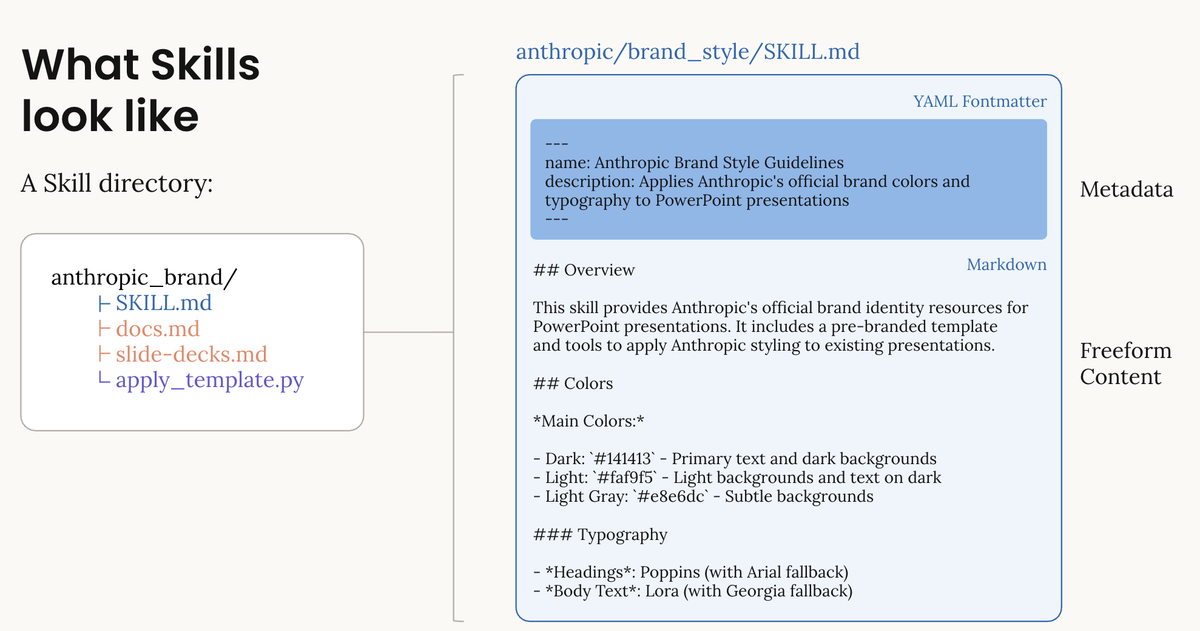
A Skill is a folder containing a SKILL.md file — structured metadata plus instructions that Claude loads when relevant to the current task. Skills can also bundle additional reference files and executable scripts that run deterministically.
The key design principle is progressive disclosure: at startup, Claude pre-loads only each skill's name and description. It reads the full contents only when it determines the skill applies. This means you can install many skills without bloating your context window, and you can package deep domain knowledge — team coding conventions, a PDF processing workflow, a data normalization procedure — without re-explaining it every session.
What Is MCP (Model Context Protocol)?
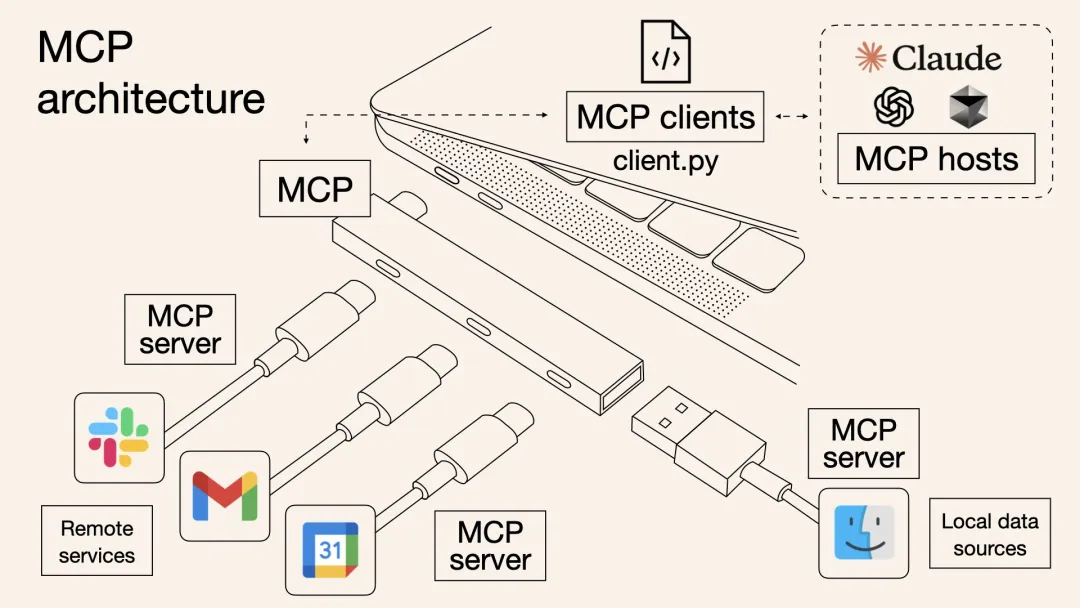
MCP is an open protocol standard that gives Claude a standardized way to connect to external tools, data sources, and services. Anthropic introduced MCP in November 2024 with exactly this framing: think of it as the USB-C port for AI applications — just as USB-C standardized device connections, MCP standardizes how AI models connect to external systems.
By early 2026, the ecosystem had grown to over 10,000 active public MCP servers — GitHub, Postgres, Notion, Stripe, Figma, Brave Search, and thousands more. In November 2025, Anthropic donated MCP to the Linux Foundation, co-founding the Agentic AI Foundation alongside Block and OpenAI. ChatGPT, Cursor, Gemini, Microsoft Copilot, and VS Code have all adopted it. It's now the de facto standard.
The MCP specification defines two sides: MCP servers expose tools and data, MCP clients (like Claude) connect to them. With MCP configured, Claude can query your database, create GitHub issues, search the web, interact with a browser — all through the same protocol, without custom integration work for each service.
What MCP** is not:** MCP doesn't give Claude procedural knowledge about how to use those tools in your specific context. It gives Claude access to a tool. Skills tell Claude the right way to use it for your workflow.
What Are Claude Agents and Subagents?
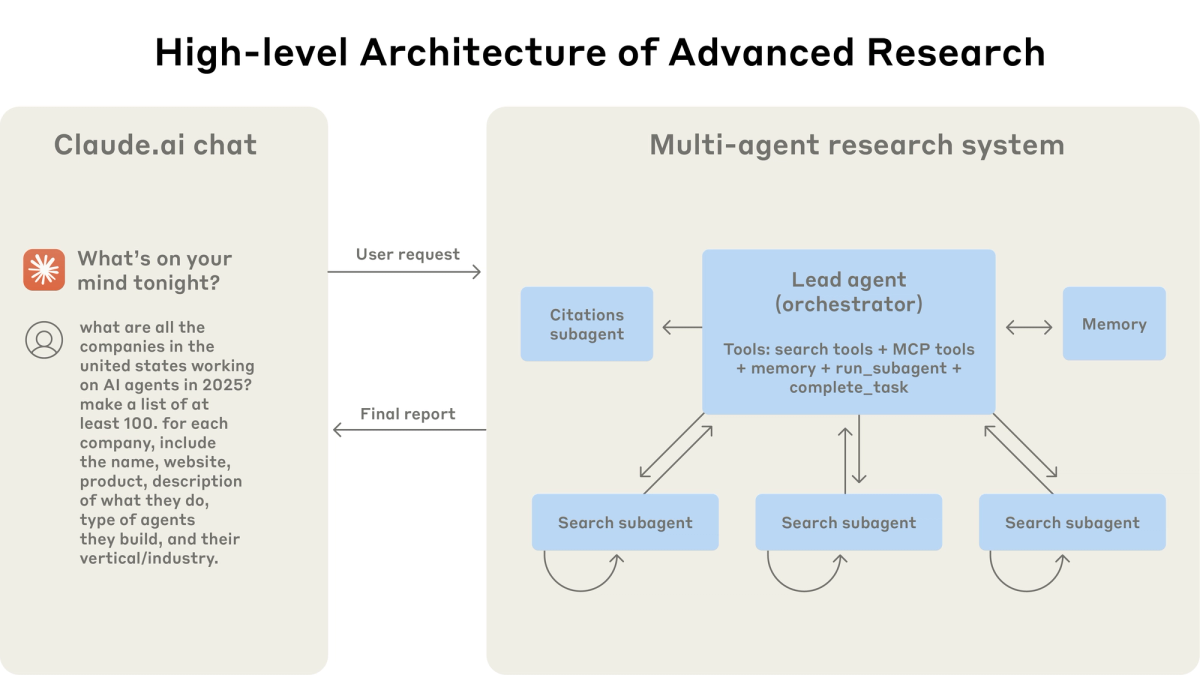
An agent is Claude operating autonomously across a series of steps — planning, executing, checking results, adjusting — without you directing every move.
A subagent is a specialized variant: a Claude instance that runs in its own isolated context window with its own system prompt and restricted tool access. When the main Claude orchestrator encounters a task matching a subagent's description, it delegates to that subagent, which works independently and returns only its final result. According to Anthropic's Agent SDK documentation, this buys you two things: parallelization (multiple subagents working simultaneously) and context isolation (exploratory work stays out of your main conversation).
Subagents are defined as Markdown files with YAML frontmatter in .claude/agents/ (project-level) or ~/.claude/agents/ (user-level). Claude Code ships three built-in subagents: Explore for codebase search, Plan for research during plan mode, and a general-purpose agent for complex multi-step tasks.
Agent Teams, which launched officially on February 5, 2026, go a step further — fully independent Claude Code instances that communicate with each other directly, rather than reporting back to a single orchestrator. Anthropic's engineering team describes subagents as ideal for context management and parallelization, while Agent Teams suit complex features with interdependent specialists.
One cost note: multi-agent workflows use roughly 4–7x more tokens than single-agent sessions. Design accordingly.
Side-by-Side Comparison Table
| Skills | MCP | Agents / Subagents | |
|---|---|---|---|
| What it is | File-based knowledge + code module | Protocol for connecting to external tools and data | Autonomous Claude instance with isolated context |
| What it gives Claude | Domain knowledge, procedures, executable scripts | Live access to external systems and services | Task delegation, parallelization, context isolation |
| Where it lives | SKILL.md folder in project or user directory | MCP server registered via claude mcp add | .claude/agents/ Markdown file with YAML frontmatter |
| How it loads | Discovered at startup; triggered dynamically when relevant | Tool definitions loaded at session start | Spawned on demand when orchestrator delegates |
| Context cost | Low — metadata only until triggered | Medium — tool definitions occupy context window | High — each subagent opens its own full context window |
| Can execute code? | Yes — bundled scripts run deterministically | Yes — via tool calls to the MCP server | Yes — inherits parent's permitted tools |
| Cross-platform? | Yes — open standard at agentskills.io | Yes — 10,000+ servers, adopted across all major AI platforms | No — Claude Code / Claude Agent SDK specific |
| Best for | Reusable workflows, team standards, domain procedures | Live data access, third-party service integration | Complex multi-step tasks, parallel workstreams |
For a closer look at how Skills compare to native tools and slash commands, see Claude Skills vs tools and commands.
When to Use Each — Decision Guide
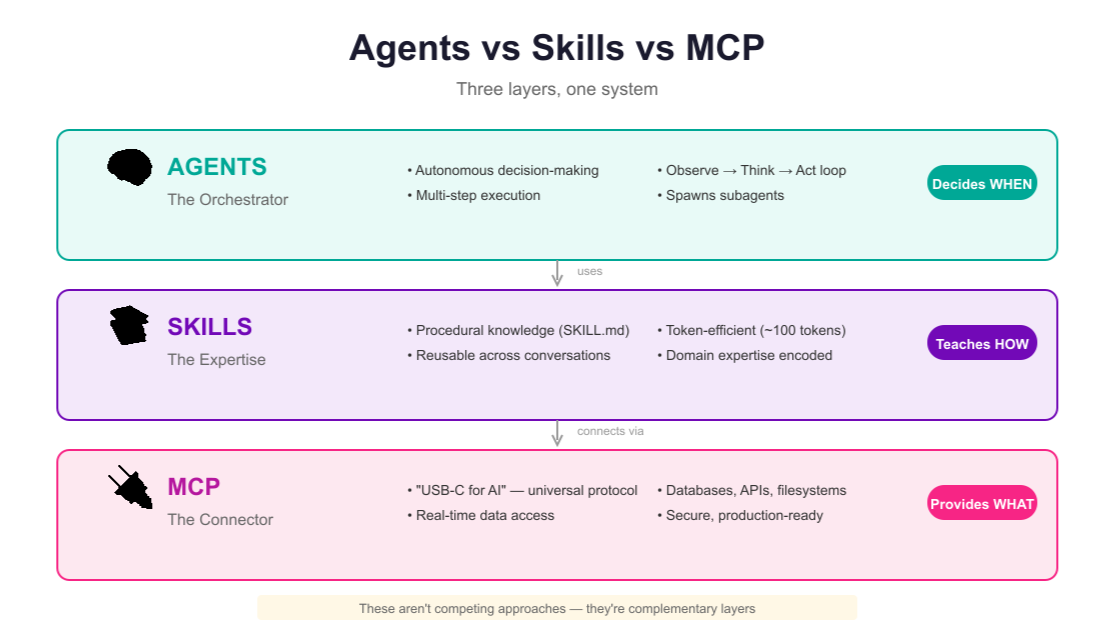
Skills Only
Use Skills when the problem is about knowledge consistency, not external connectivity. You want Claude to always handle a specific task the same way — your team's Git commit message format, a document generation procedure, a data validation workflow — without re-explaining it every session.
Good fit: encoding team standards, packaging repeatable procedures, bundling deterministic scripts for PDF extraction or spreadsheet normalization.
Not the right fit: anything requiring live data Claude doesn't already have.
MCP Only
Use MCP when the problem is about connectivity. Claude needs to reach something external — a database, a GitHub repo, a design tool — and you want that connection available across sessions without manual setup.
Good fit: reading Jira tickets and creating GitHub PRs, querying a live Postgres database, pulling Figma designs into a coding workflow.
Not the right fit: if you want Claude to follow a specific procedure when using those tools. MCP gives access; Skills encode the procedure.
All Three Combined
This is where the real leverage is. MCP provides the connections. Skills encode the domain procedures. A subagent handles the heavy lifting in isolation so your main context stays clean.
Pattern: you're building a weekly reporting workflow. An MCP server connects Claude to your analytics database and Notion. A Skill defines your team's normalization rules and report template. A subagent runs the full pipeline — querying the database, applying the normalization, writing the Notion report — while your main session handles something else.
Real-World Workflow Example
Here's a workflow I actually use: automated code review on every PR.
Setup:
- MCP: GitHub server + Brave Search
- Skill:
code-review-standards— team checklist, naming conventions, security patterns to flag, plus a pre-written Python script that runsastanalysis on changed files - Subagent:
pr-reviewerwith read-only tool permissions and a focused system prompt
What happens on trigger:
The pr-reviewer subagent gets the task. It uses the GitHub MCP server to fetch the diff. It detects Python files and triggers the code-review-standards Skill, which loads the checklist and runs the ast script. It uses Brave Search via MCP to check whether any flagged patterns map to known CVEs in the libraries involved. It returns a structured review to the main agent, which posts it to the PR as a GitHub comment.
Without the Skill, the subagent needs the review checklist hardcoded in its system prompt — a maintenance headache. Without MCP, it can't reach GitHub or Brave. Without the subagent, the full diff and analysis accumulates in my main context window across every PR. Each layer does something the others genuinely can't.
FAQ
Q: Is claude skills vs mcp really a meaningful comparison — aren't they for different things? Technically yes, but the confusion is real because both make Claude more capable for specific tasks. The practical distinction: MCP is infrastructure (connections to external systems), Skills are knowledge (how to use those systems correctly for your workflow). You almost always want both.
Q: Can a Skill replace an MCP server? No. A Skill can include a pre-written script Claude runs locally — useful for deterministic operations on data Claude already has. But it can't reach external APIs, live databases, or remote services at runtime. That's MCP's job.
Q: Do I need all three? Not for every workflow. For a simple repeatable task with no external data needs, a Skill alone is enough. For a single external service connection, MCP alone works. Subagents add value when you have parallel workstreams or want complex sub-tasks isolated from your main context — typically at team or production scale.
Related resources:
