
Both tools connect AI agents to Lark. Both are official. Both are open source under MIT. They're not interchangeable, and picking the wrong one means either over-engineering a notification script or under-powering an agent that needs to actually read and reason over Lark data. This article gives you the comparison table, the tradeoffs, and three questions that tell you which one to reach for.
Two Tools, Same Platform, Very Different Use Cases
What Lark CLI Is (larksuite/cli — Human + Agent CLI)
larksuite/cli is a Go binary distributed as an npm package (@larksuite/cli). It gives you a terminal interface to Lark's API across 11 business domains — messaging, docs, Base, sheets, calendar, mail, tasks, meetings, and more. It also ships 19 pre-structured AI Agent Skills in SKILL.md format, installable with a single npx skills add larksuite/cli -y -g command, which registers those skills directly into Claude Code or any compatible agent framework.
The design premise is that a human or an agent issues a command, it executes, and returns structured output. The agent doesn't need to manage auth state, token refresh, or API surface complexity — the CLI handles that and returns clean stdout. It's the right mental model for a postprocessing step: after the agent finishes its work, it calls lark-cli im +messages-send to notify a channel, or lark-cli base records update to sync a task status.
What Lark MCP Is (larksuite/lark-openapi-mcp — AI Agent Protocol Layer)
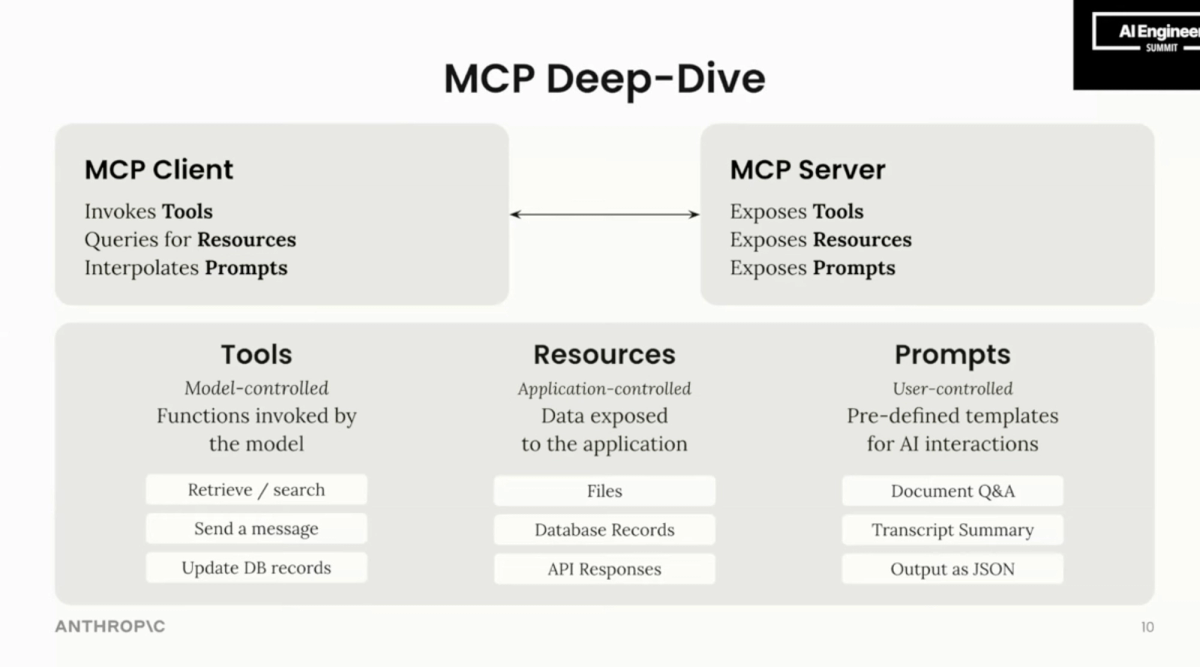
larksuite/lark-openapi-mcp exposes Lark's full OpenAPI surface as MCP (Model Context Protocol) tools. Instead of a human or script issuing commands, the LLM itself decides which Lark API to call, when to call it, and what arguments to pass — mid-conversation, mid-execution, in response to what it's reading or reasoning about. The package (@larksuiteoapi/lark-mcp) runs as an MCP server in stdio, SSE, or StreamableHTTP mode, and integrates directly into Claude, Cursor, Trae, or any MCP-compatible client.
The MCP server is in Beta (explicitly flagged in the official README and npm package). The API surface is comprehensive — nearly the complete Lark OpenAPI — but non-preset APIs haven't undergone compatibility testing, and the official warning is that AI models may not perform optimally when calling them. File and image upload/download are not currently supported. Loading all available tools without filtering with -t will exceed the context window on most models; the preset collections (preset.light, preset.im.default, preset.bitable.default, etc.) exist precisely to manage this.
Core Differences Side by Side
Comparison Table
| Dimension | Lark CLI (larksuite/cli) | Lark MCP (larksuite/lark-openapi-mcp) |
|---|---|---|
| Package | @larksuite/cli (npm) | @larksuiteoapi/lark-mcp (npm) |
| Runtime | Go binary, Node.js wrapper | Node.js 20+ |
| Status | Stable (MIT, actively maintained) | Beta (MIT, actively maintained) |
| Invocation model | Explicit shell command | LLM-driven tool call via MCP |
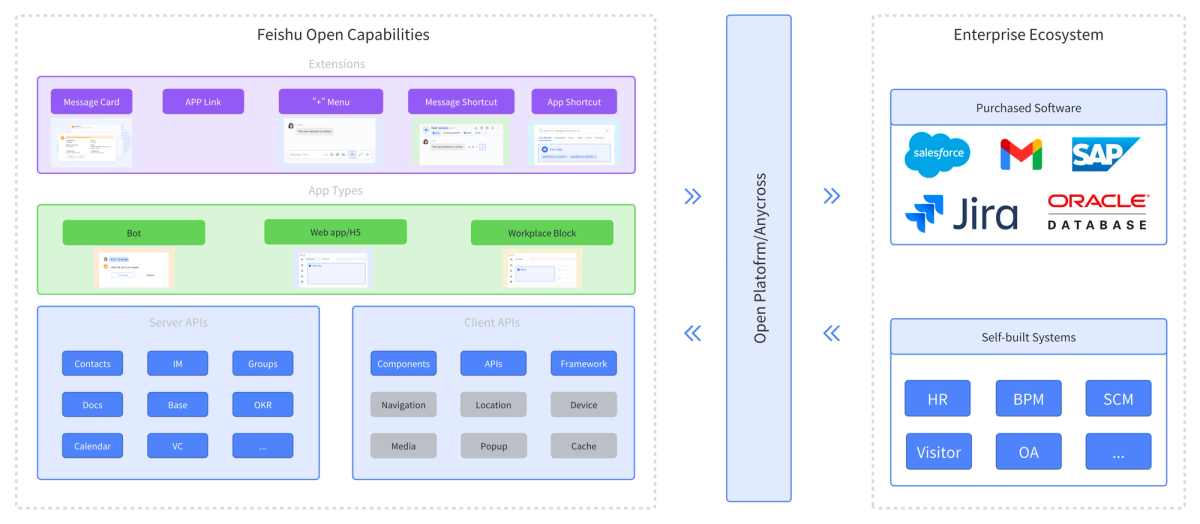
| API coverage | 200+ curated commands, 11 domains | Nearly complete Lark OpenAPI (1000s of endpoints) |
| Agent Skills | 19 pre-built SKILL.md files | Via MCP tool registry (no SKILL.md) |
| Setup complexity | Low — npm install -g, config init, auth login | Medium — Node.js 20+, MCP client config, OAuth setup for user-identity calls |
| Auth model | App ID + Secret (tenant token) or user OAuth; bot/user identity switching via --as | App ID + Secret (tenant token) or OAuth user token (--oauth); token-mode must be set explicitly to avoid fallback to wrong identity |
| File upload/download | Supported | Not currently supported |
| Context window impact | None (runs outside LLM context) | High if unfiltered; use preset tool sets to manage |
| Best for | Post-execution notification, CI hooks, script-driven pipelines, lightweight task sync | Agents that need to read/write Lark data during reasoning, AI assistants embedded in Lark, Cursor/Claude integration |
| Lark / Feishu support | Both (domain selection at login) | Both (--domainhttps://open.larksuite.com) |
How They Handle Authentication Differently
Both tools require the same prerequisite: a self-built Lark app with App ID and App Secret. After that, the auth models diverge.
Lark CLI stores credentials via lark-cli config init and handles token management internally. In CI, you set LARK_APP_ID and LARK_APP_SECRET as environment variables and the CLI fetches a fresh tenant access token per session. User OAuth (lark-cli auth login --recommend) is available for user-identity operations but isn't required for bot operations. Identity switching is explicit per-command: --as bot or --as user.
Lark MCP runs as a persistent server process. App credentials go into the server startup args. User identity requires a separate lark-mcp login step (opens a browser, stores token via OS keychain using keytar). A key gotcha: with --token-mode auto (the default), the LLM decides which token type to use, and it sometimes falls back to tenant_access_token when user_access_token is needed — causing permission errors on user-scoped APIs. For production use, set --token-mode user_access_token explicitly if you need user identity. Note also that user_access_token expires in 2 hours; you'll need to handle refresh for long-running server processes.
How They Handle Agent Invocation Differently
With Lark CLI, the agent (or your CI script) explicitly invokes a command as a subprocess. The LLM doesn't decide whether to call Lark — your orchestration logic does, and the CLI executes the specific operation you've wired in. This is deterministic: the agent can't accidentally read a doc it wasn't supposed to, because the command is hardcoded in your pipeline.
With Lark MCP, the agent decides autonomously which Lark APIs to call, when to call them, and with what arguments — in response to whatever it's reasoning about. This is powerful for open-ended tasks ("summarize the Lark doc linked in this task and check if it conflicts with the spec") but requires you to think carefully about what APIs you're exposing and what the agent might do with them. The official recommendation to use preset tool sets (-t preset.light or -t preset.im.default) instead of exposing the full API surface is both a context window optimization and a blast-radius control.
When Lark CLI Is the Right Choice
Script-Driven Pipelines and CI/CD Hooks
If you're running agent tasks in CI and want to notify a Lark channel when a pipeline step completes — pass or fail — lark-cli is the right tool. It's stateless, headless-friendly (env vars for credentials, --no-wait for non-blocking auth), and exits cleanly. There's no server process to manage, no MCP client to configure, and no context window to worry about. One command, one API call, done.
# In a GitHub Actions step
lark-cli im +messages-send \
  --as bot \
  --chat-id "$LARK_CHAT_ID" \
  --text "✅ Deploy complete: ${{ github.sha }}"
Human-in-the-Loop Workflows
The CLI's 19 AI Agent Skills are designed for interactive developer use — an engineer asking Claude Code to check their calendar, send a message to a specific person, or create a doc from agent output. The SKILL.md format means Claude Code loads the relevant skill into context only when needed, keeping token usage low. This is a different interaction model from MCP: instead of a persistent server your agent queries, it's a set of instructions the agent reads and then translates into CLI invocations.
Lightweight Notification and Task Sync
Updating a Base record to reflect that an agent completed a task, or posting a doc summary to a channel — these are simple, directional operations. The CLI's +messages-send, base records update, and docs +create cover them cleanly. You don't need the full Lark API surface or an MCP server for this.
When Lark MCP Is the Right Choice
Agent Needs Real-Time Read/Write Access to Lark
If your agent needs to read a Lark doc to inform a decision, query a Base table to understand task status, check a calendar to find available meeting slots, and then write back the results — all within a single reasoning chain — MCP is the right architecture. The agent can issue multiple sequential or conditional Lark API calls mid-conversation without you hardcoding every possible operation in a pipeline script.
The practical test: if you can specify exactly what Lark operations will happen in advance, use the CLI. If the agent needs to discover what to do based on what it finds in Lark, use MCP.
Building AI Assistants Directly Inside Lark
The MCP server has an SSE/StreamableHTTP mode designed for embedding — running as a backend for a Lark bot that responds to messages by calling LLMs and then writing results back to Lark. The official lark-samples/mcp_larkbot_demo demonstrates this pattern. For teams wanting an AI assistant that lives inside their Lark workspace and has full read/write access to docs, messages, and Base records, this is the intended use case.
Cursor / Claude / Multi-Agent Orchestration Scenarios
If you're using Cursor or Claude with MCP configured, adding Lark as a tool source means your coding agent can pull Lark docs, check task status in Base, and send messages without leaving the IDE or requiring you to wire shell commands. The stdio mode integrates cleanly into MCP client config:
{
  "mcpServers": {
    "lark-mcp": {
      "command": "npx",
      "args": [
        "-y", "@larksuiteoapi/lark-mcp", "mcp",
        "-a", "<your_app_id>",
        "-s", "<your_app_secret>",
        "-t", "preset.light",
        "--domain", "https://open.larksuite.com"
      ]
    }
  }
}
Use -t preset.light to start — it exposes the most commonly needed tools with a manageable token footprint. Add specific presets or individual tools as needed.
Can You Use Both?
A Hybrid Setup That Makes Sense
Yes, and for teams with both developer automation pipelines and interactive AI assistants, using both is common. The split is clean:
- MCP for agents that need bidirectional Lark access during execution — your coding assistant in Cursor, your AI-powered Lark bot, your multi-agent orchestration that reasons over Lark data
- CLI for the output layer — CI pipelines, shell scripts, post-task notification, one-directional task sync
The shared prerequisite (App ID + App Secret, same Lark app) means you don't need separate credentials. The two tools don't conflict; they operate at different points in the agent execution chain. Use Verdent-style parallel agents? Each agent's completion step can call lark-cli to post its result, while the orchestrator may use MCP to read a coordinating Base table that tracks which agents are running and what they found.
Decision Framework for Tech Leads
3 Questions to Answer Before Choosing
Question 1: Does the agent need to read from Lark to make decisions during execution?
If the agent's reasoning depends on what's in a Lark doc, message thread, or Base record — "summarize this document," "check if this task is already in progress," "find the spec that governs this change" — that's a real-time read requirement. Use MCP. If the agent only needs to write outputs to Lark after completing its work, use CLI.
Question 2: Is this running in a headless/CI environment, or does a person initiate it?
Headless environments (GitHub Actions, scheduled pipelines, cron jobs) favor CLI: stateless, env-var credentials, no server process to manage. Interactive developer workflows (Cursor, Claude Code, direct conversation) favor MCP: the agent can fluidly call Lark tools based on what the user asks for.
Question 3: How much do you care about determinism vs flexibility?
With CLI, you control exactly which Lark operation runs. The agent (or your script) issues a specific command; that command runs. No unexpected side effects from the agent deciding to call an API you didn't anticipate. With MCP, the agent has discretion — which is powerful but requires you to scope the exposed tool set carefully with -t presets and to think about what happens when the agent calls a Lark API you didn't intend.
FAQ
| If your answer is... | Use |
|---|---|
| Agent reads Lark data during execution → Yes | MCP |
| Headless CI/script-driven → Yes | CLI |
| Determinism matters more than flexibility → Yes | CLI |
| Building a Lark-native AI assistant → Yes | MCP |
| Both read during execution AND headless | MCP with service account, no OAuth |
| Simple notifications / task sync only | CLI |
Is Lark MCP Officially Supported by ByteDance/Larksuite?
Yes. Both larksuite/lark-openapi-mcp and larksuite/cli are maintained by the Lark/Feishu Open Platform team (Lark Technologies Pte. Ltd., a ByteDance subsidiary), both MIT licensed, and both have official documentation on the Lark developer portal. The MCP server carries a Beta label — meaning APIs may change between versions. The CLI does not carry a beta designation. Check both repos' release notes and pin your package versions in production.
Does Lark CLI Support MCP Protocol Natively?
No. Lark CLI is a shell tool; it doesn't expose an MCP server interface. The 19 AI Agent Skills it ships are SKILL.md files — Claude Code's own skill format — which instruct the agent to invoke CLI commands as subprocesses. This works well within Claude Code's agent loop but is not MCP-compatible. You can't add larksuite/cli to an MCP client config as a server. If you need MCP integration, use larksuite/lark-openapi-mcp.
Which One Works Better with Verdent-Style Multi-Agent Workflows?
For multi-agent parallelism — separate agents working on different workstreams simultaneously — both tools serve different layers. Lark CLI fits the notification layer: each agent calls lark-cli at the end of its task to post a completion message. Calls are stateless and parallel-safe. Lark MCP fits agents that need to read shared Lark state to coordinate — checking a Base table that tracks which branches are in flight, reading a shared spec doc, or querying calendar availability for a follow-up meeting. If agents need to write to the same Base record concurrently, serialize those writes in your orchestration logic — both tools have last-write-wins behavior on record updates.
What Are the Security Implications of Each Approach?
Lark CLI: Credentials are stored in your local config (set via lark-cli config init) or passed as environment variables. The security perimeter is your shell environment and CI secrets. In agent contexts, the CLI's official README warns explicitly that the agent operates under your authorized identity — scope permissions narrowly and prefer bot identity over user identity for automated pipelines.
Lark MCP: The MCP server runs as a persistent local process with your credentials baked into startup args (visible in process list). The token for user identity is stored via OS keychain (keytar). The broader security concern is blast radius: an MCP-connected agent has discretion over which Lark APIs to call, including writes to docs, Base records, and messages. Use -t presets to limit the exposed surface to what the agent actually needs. Don't expose the full Lark API surface to an agent handling untrusted input.
Can I Switch Between the Two Without Major Refactoring?
For post-execution notification and task sync: yes, switching from CLI to MCP (or vice versa) is a configuration change — you're replacing a shell command with a tool call, or vice versa, with equivalent API semantics. For agents that use MCP to read Lark data during reasoning: switching to CLI requires re-architecting from "agent decides what to query" to "you decide what to query and the agent processes the result." That's a real workflow change, not just a refactor. Make the choice early based on your actual execution model rather than planning to swap later.
Related Reading
- How Lark CLI Fits Into an AI Coding Agent Workflow — The architecture overview: where CLI sits in the agent execution chain and why it doesn't replace orchestration.
- Automate Dev Notifications with Lark CLI and AI Agents — The hands-on tutorial for teams that have chosen CLI and want working command examples.
- What Is Model Context Protocol? — MCP fundamentals: what the protocol actually does and why it enables a different integration model than CLI.
- Claude Code vs Verdent: Multi-Agent Architecture Compared — For teams choosing their agent layer before deciding how to connect it to Lark.
- Claude Skills vs MCP vs Agents: Key Differences — The SKILL.md format that Lark CLI uses for its 19 Agent Skills, explained in the context of the broader Claude ecosystem.
