
You've already felt the ceiling. The agent completes the task as it understood it. You review a diff that doesn't match what you wanted. Neither of you was wrong — the environment around the model was under-specified.
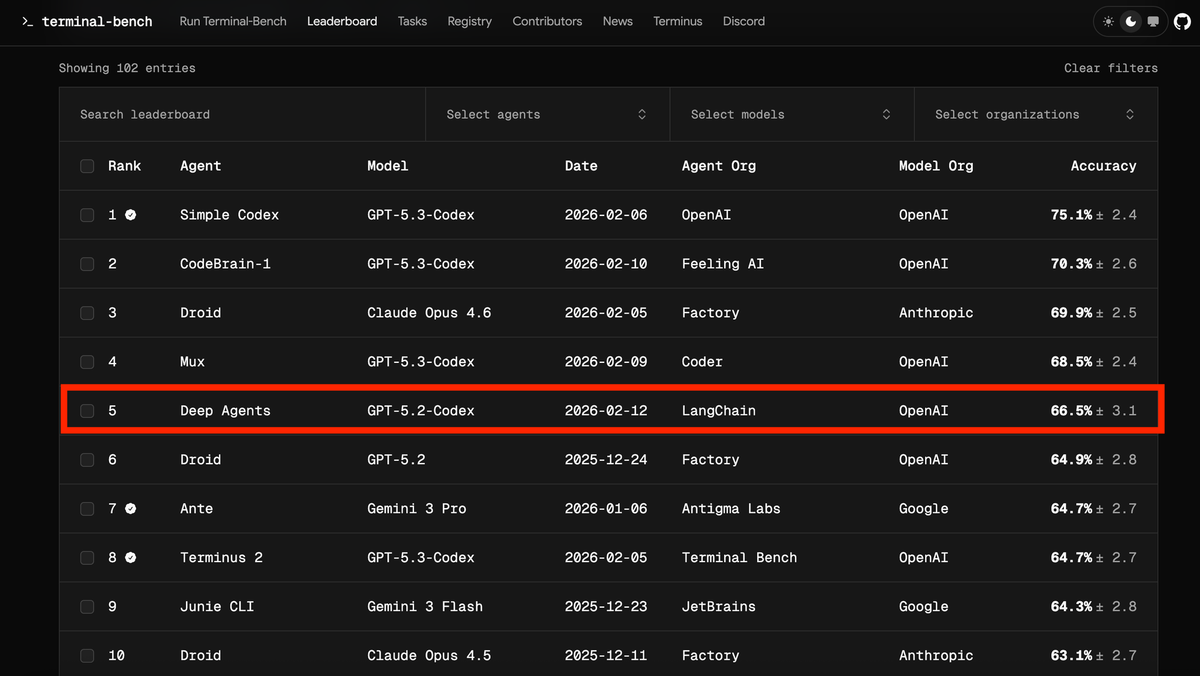
Harness engineering is the practice of fixing that environment: the context the agent receives before it plans, the constraints it operates under while executing, and the feedback loop that improves both. OpenAI named and defined it in their February 2026 harness engineering field report: five months, one million lines of code, zero manually written. The data point that makes the argument concrete: LangChain moved a coding agent from 52.8% to 66.5% on Terminal-Bench 2.0 by changing the harness, not the model.
This is a practical walkthrough — five steps, real shell commands, working code skeletons, and the failure modes that show up when each step is missing. No framework required to start; the first two steps need only a shell script and a text file.
Before You Build: What Your Harness Is For
A harness is not a better prompt. It is the complete system that determines what context the agent receives, what actions it can take, what it must verify before declaring done, and what happens when it gets something wrong. Before writing any configuration, two questions determine the scope of everything else.
Define the agent's goal — what "done" looks like before it runs
The most expensive errors in agentic coding happen when the agent and the engineer have different definitions of success. The agent completes the task as it understood it. The engineer reviews a diff that doesn't match what they wanted. Both parties were working correctly — the specification was ambiguous.
Before the agent runs, write down:
Task: Migrate the user authentication module from session-based to JWT
Done when:
  - All existing /auth/* tests pass
  - No session middleware is imported outside of auth/
  - JWT secrets read from environment, not hardcoded
  - Migration notes added to docs/auth-architecture.md
Not in scope:
  - Refresh token rotation (separate ticket)
  - Frontend changes
This is not a prompt. It is a specification that your harness will enforce. The done-when conditions become acceptance criteria that the agent must verify before returning. The not-in-scope items prevent scope creep that costs tokens and introduces bugs.
What goes into structured context vs what stays out
Not all context improves agent output. Irrelevant context dilutes attention and increases hallucination risk. A simple heuristic: include context that constrains what the agent can do, exclude context that's interesting but doesn't affect this task.
Structured context that belongs in the harness:
- File paths the agent is allowed to read and write
- Existing patterns it must follow (the function signature for this type of handler, the error format used by this module)
- Dependencies it can use (libraries already in the project, internal utilities)
- Architectural boundaries it cannot cross (which layers import from which other layers)
Context that should stay out:
- Full file contents when only a specific function is relevant
- Historical tickets and discussions (summarize the decision, not the debate)
- Documentation about unrelated parts of the system
Step 1 — Build a Repository Impact Map
The single most reliable improvement in harness engineering is making the agent look at real code before planning anything. Red Hat's Marco Rizzi documented this approach in April 2026 as the "repository impact map" technique — an angle covered in the InfoQ harness engineering roundup: before the agent writes a single line of code, it runs symbol analysis to understand what the task will actually touch.
Symbol analysis to ground the agent in real code
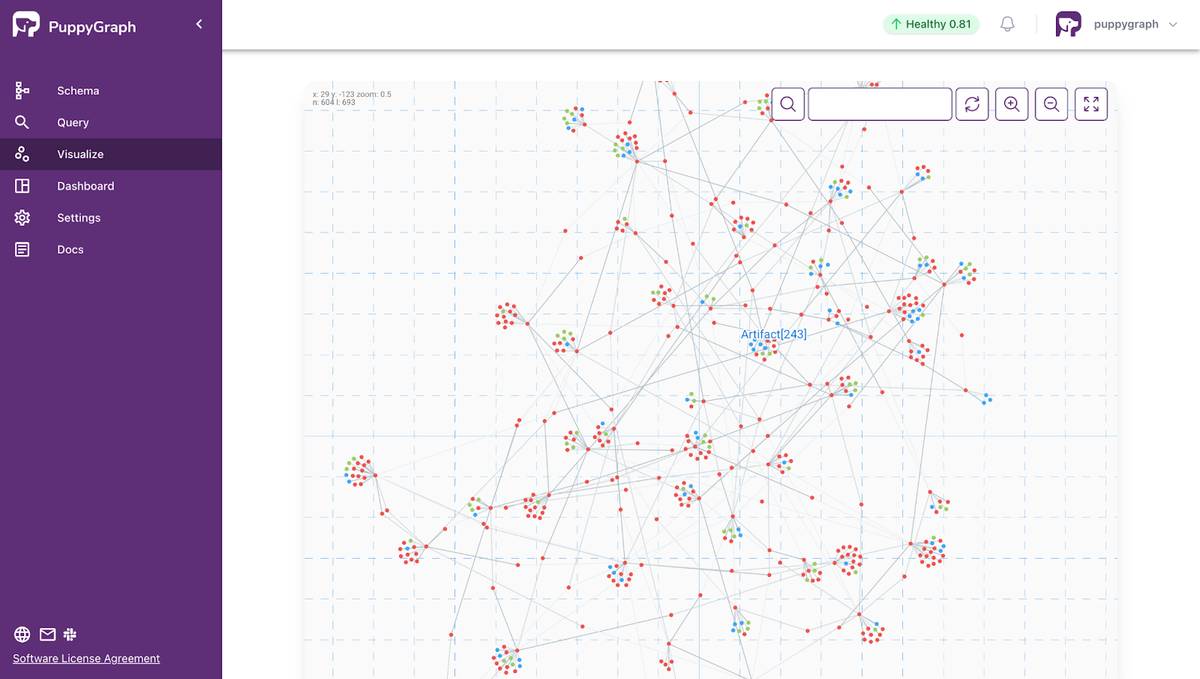
Symbol analysis is the process of identifying which files, functions, classes, and modules are relevant to a task — not by asking the agent to guess, but by running actual code analysis tools against the repository.
# Extract the call graph for the auth module before planning
ctags -R --fields=+n --languages=Python ./src/auth/ > .harness/auth_symbols.txt

# Find all files that import from auth/
grep -r "from auth" ./src --include="*.py" -l > .harness/auth_dependents.txt

# For TypeScript codebases
npx ts-morph-cli analyze --entry src/auth/index.ts --output .harness/auth_impact.json
The output becomes structured context the agent reads before forming a plan. It now knows the actual call surface — not an approximation based on filenames or past training data.
Example: What an impact map looks like for a refactor task
IMPACT MAP: auth module JWT migration
Generated: 2026-04-21T09:15:00Z

CORE FILES (agent may modify):
  src/auth/session.py       - SessionManager class, 4 public methods
  src/auth/middleware.py    - authenticate() called by 12 route handlers
  src/auth/models.py        - User model, token field missing

DEPENDENT FILES (agent must not break):
  src/api/routes/user.py    - imports authenticate from auth/middleware
  src/api/routes/admin.py   - imports authenticate from auth/middleware
  tests/auth/test_session.py - 23 tests, all must pass

BOUNDARY: do not touch
  src/payments/            - separate auth flow, out of scope
  src/third_party/         - vendor code, do not modify

EXISTING PATTERN (follow this for JWT):
  src/api_keys/jwt_util.py  - JWTEncoder class, already in use for API keys
The agent now has a concrete map of what it can touch, what it must not break, and where the existing pattern for JWT implementation already lives in the codebase. This eliminates the most common failure mode: hallucinated file paths and invented APIs.
Step 2 — Structured Task Specification
With the impact map in hand, the task specification can be precise rather than aspirational. Vague specifications cost more than good ones because the agent resolves ambiguity by making assumptions — and wrong assumptions discovered in a PR cost more than wrong assumptions discovered in a three-line plan.
File paths, existing patterns, acceptance criteria
A well-structured task specification has four parts:
## Task: JWT Migration for Auth Module

### Scope
Files to modify:
  - src/auth/session.py → replace SessionManager with JWTManager
  - src/auth/middleware.py → update authenticate() to validate JWT
  - src/auth/models.py → add `jwt_secret` field, read from env JWT_SECRET

Files to read (do not modify):
  - src/api_keys/jwt_util.py → follow this pattern for JWT encode/decode

### Pattern to follow
JWTEncoder in src/api_keys/jwt_util.py uses PyJWT 2.x with HS256 algorithm.
Replicate the same encode/decode pattern. Do not introduce a different JWT library.

### Acceptance criteria (verify before done)
1. `pytest tests/auth/ -v` passes (all 23 tests green)
2. `grep -r "from auth.session import Session" ./src` returns empty
3. `grep -r "JWT_SECRET" ./src/auth/` returns at least one match
4. docs/auth-architecture.md updated with migration note

### Out of scope
Refresh token rotation, frontend changes, admin-specific auth flows
Why vague specs cost more than good ones
An agent given "migrate auth to JWT" will make 8–12 implicit decisions during execution. Each one is a fork where the wrong choice costs correction time. Common examples: which JWT library to use, where to put the secret, how long tokens should live, whether to update error messages, whether to add logging.
A structured spec reduces those 12 forks to 1 or 2. The agent spends tokens on implementation, not on resolving ambiguity. The math is straightforward: a 20-minute investment in spec quality eliminates 45–90 minutes of correction cycles.
Step 3 — Plan Before Execution (The Human Checkpoint)
The most important gate in any agentic coding workflow is between planning and execution. An agent that can show you its plan before it touches any files gives you a point to catch wrong assumptions at the cheapest possible moment.
Why catching wrong assumptions in a 3-line plan beats catching in a PR
A wrong assumption caught in a plan costs 30 seconds of your attention and a redirect prompt. The same wrong assumption caught in a PR costs a review cycle, potentially a revert, and the context-switching cost of coming back to a half-finished change.
Enforce the planning gate explicitly in your specification or harness config:
HARNESS RULE: Before modifying any file, output a plan in this format:
  1. Files to modify: [list]
  2. Changes per file: [1-sentence description each]
  3. Verification steps: [list]
  4. Assumptions: [any decision not specified in the task]

Wait for approval before proceeding. If the plan contains any assumption,
highlight it with [ASSUMPTION] so the reviewer can evaluate it quickly.
This rule converts the agent's internal planning (which is invisible) into an explicit artifact you can review. It takes 60–90 seconds to read a well-formatted plan. It takes 20–40 minutes to review a bad PR.
How to review a generated plan (what to flag)
Review the plan for three things:
Wrong files. If the plan lists a file that wasn't in the impact map, either the impact map was incomplete or the agent drifted. Stop, update the map, restart.
Assumptions that contradict the spec. If the plan says "I'll use python-jose for JWT" and the spec says "follow the pattern in api_keys/jwt_util.py" (which uses PyJWT), that assumption is wrong before a single line of code is written. Two-second fix in the plan; 15-minute fix in the code.
Missing acceptance criteria. If the plan doesn't mention running the test suite, the agent won't run it unless it fails naturally. Add the verification step explicitly.
Step 4 — Extend the Harness with MCP
The planning gate handles what the agent assumes about the codebase. MCP (Model Context Protocol) handles what the agent knows about the live system — CI status, deployment state, runtime metrics, error logs. These are data sources that a local codebase snapshot can't provide.
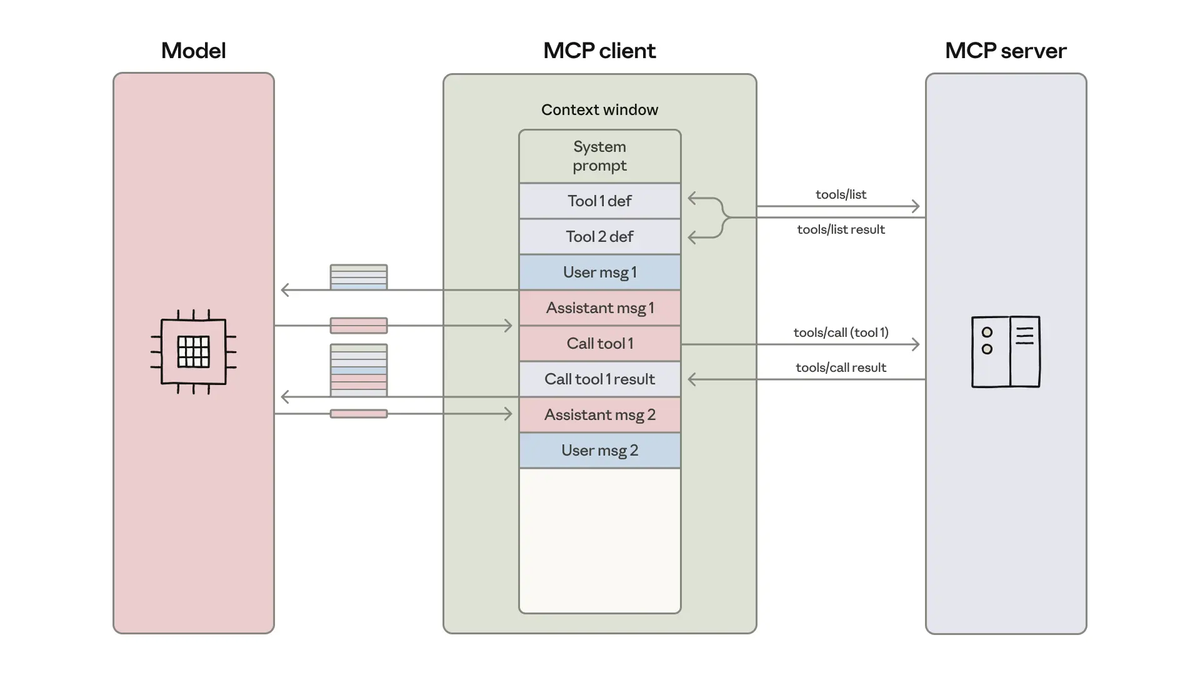
CI status, deployment logs, runtime metrics as real data
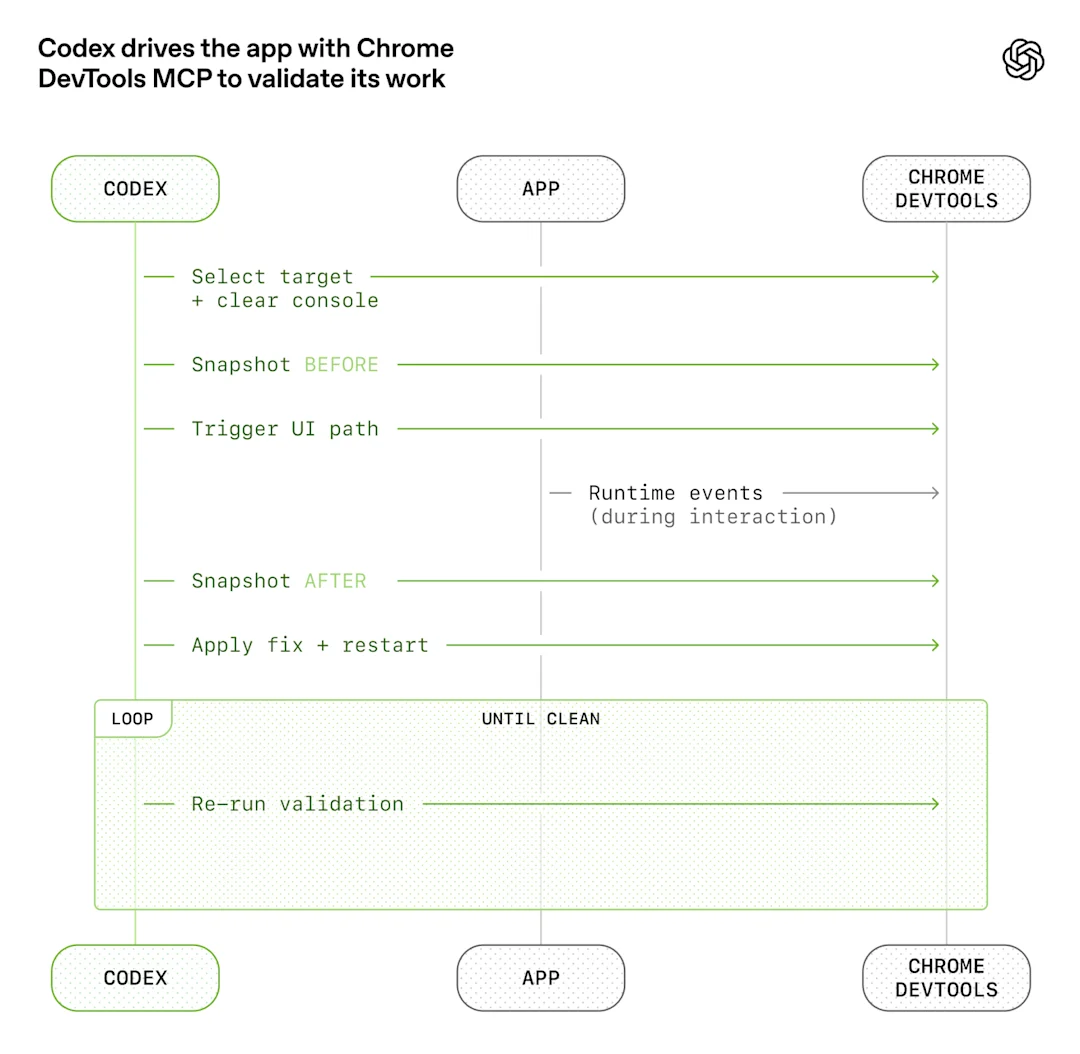
A harness without live system data makes decisions based on static code alone. A harness extended with MCP tools can inform the agent that the test suite was already failing before it started (don't mask a pre-existing failure), that the deployment it's supposed to verify is on version X not Y, or that the error pattern in the logs points to a different root cause than the stack trace suggests.
# Claude Code skill that reads CI status before proposing a fix
# Invoked at the start of any debugging or fix task

from mcp import ClientSession

async def get_ci_context(repo: str, branch: str) -> dict:
    """Pull CI status and last failure logs into harness context."""
    async with ClientSession() as session:
        ci_status = await session.call_tool("ci_status", {
            "repo": repo,
            "branch": branch,
            "last_n_runs": 3
        })
        if ci_status["status"] == "failing":
            failure_logs = await session.call_tool("ci_logs", {
                "run_id": ci_status["last_run_id"],
                "filter": "ERROR"
            })
            return {
                "ci_failing_before_change": True,
                "failure_summary": failure_logs["summary"]
            }
        return {"ci_failing_before_change": False}
This context goes into the planning prompt. The agent knows the CI was already red before it touched anything — which prevents it from incorrectly attributing a pre-existing failure to its own changes.
Tools: LangGraph, CrewAI, Codex hooks
LangGraph v1.1.8 (April 2026, Python ≥3.10) provides stateful graph orchestration for multi-step agentic workflows. For a harness that needs a plan-review-execute-verify cycle with human checkpoints, LangGraph's interrupt mechanism is the right tool:
from langgraph.graph import StateGraph, END, START
from langgraph.checkpoint.sqlite import SqliteSaver
from typing import TypedDict

class HarnessState(TypedDict):
    impact_map: dict
    task_spec: str
    plan: str
    plan_approved: bool
    changes_applied: bool
    verification_passed: bool

def build_coding_harness():
    graph = StateGraph(HarnessState)

    graph.add_node("analyze_repo", analyze_repository)    # build impact map
    graph.add_node("generate_plan", generate_plan)         # plan before coding
    graph.add_node("human_review", human_review_gate)      # interrupt for approval
    graph.add_node("execute_changes", execute_changes)     # apply code changes
    graph.add_node("verify_output", verify_output)         # run acceptance criteria

    graph.add_edge(START, "analyze_repo")
    graph.add_edge("analyze_repo", "generate_plan")
    graph.add_edge("generate_plan", "human_review")        # gate here
    graph.add_conditional_edges("human_review", route_on_approval, {
        "approved": "execute_changes",
        "rejected": "generate_plan"     # loop back with feedback
    })
    graph.add_edge("execute_changes", "verify_output")
    graph.add_edge("verify_output", END)

    checkpointer = SqliteSaver(".harness/state.db")
    return graph.compile(checkpointer=checkpointer, interrupt_before=["human_review"])
CrewAI v1.14.2 (April 2026, Python ≥3.10, <3.14) works well for multi-agent harnesses where distinct specializations matter — a planner agent, a coder agent, and a reviewer agent each with different tools and different scopes. CrewAI Flows provides the event-driven orchestration layer for chaining the three phases:
from crewai import Agent, Task, Crew
from crewai.flow.flow import Flow, listen, start

planner = Agent(
    role="Coding Planner",
    goal="Produce a concrete, verifiable implementation plan from impact map and task spec",
    tools=[repo_analysis_tool, symbol_search_tool],
    verbose=True
)

coder = Agent(
    role="Implementation Engineer",
    goal="Execute the approved plan exactly, verify acceptance criteria",
    tools=[file_read_tool, file_write_tool, test_runner_tool],
    verbose=True
)

reviewer = Agent(
    role="Code Reviewer",
    goal="Check implementation against spec and flag deviations",
    tools=[diff_tool, test_result_reader],
    verbose=True
)
Codex hooks (via AGENTS.md) enforce harness rules at the task level without an orchestration framework. For teams that don't need multi-agent coordination, a well-structured AGENTS.md with pre-task and post-task hooks is often sufficient:
# AGENTS.md

## Pre-task (run before any code change)
1. Read .harness/impact_map.md for this task
2. Output plan in standard format (files / changes / verification / assumptions)
3. Wait for [APPROVED] before proceeding

## Post-task (run after all changes applied)
1. Run: pytest tests/ -v --tb=short
2. Run: grep -r "FIXME\|TODO\|HACK" <modified_files>
3. Report: list of changed files with line counts

## Boundaries (never cross)
- Do not modify files outside the impact map without explicit permission
- Do not introduce new dependencies without listing them in [ASSUMPTION]
- Do not skip the verification step even if the task seems complete
Step 5 — Close the Feedback Loop
The harness only improves if failures feed back into the harness design. This is where most teams leave performance on the table: they fix the agent's output, not the harness condition that allowed the bad output.
Trace errors back to input, fix the harness not just the output
When an agent produces wrong output, diagnose at which step the failure originated:
Wrong file modified → impact map was incomplete
  Fix: Add the missed file to the symbol analysis query

Wrong library used → pattern reference was missing from spec
  Fix: Add explicit pattern reference to task spec template

Test suite not run → verification step was not in the plan gate checklist
  Fix: Add test run to the mandatory post-task checklist

Wrong assumption about API shape → API contract not in context
  Fix: Add API schema (OpenAPI/GraphQL) to structured context sources
The principle: if an error class recurs, stop describing it in prompts and start preventing it in the harness. A prompt instruction that says "don't use the wrong library" competes against the model's priors. A harness rule that specifies the exact library to use eliminates the decision point entirely.
Track error classes over time. A simple log of what went wrong on each agent run, categorized by failure type, gives you a backlog of harness improvements. Three runs with "hallucinated file path" → the impact map needs better coverage. Two runs with "ignored acceptance criterion" → the plan gate checklist needs that criterion added explicitly.
Common Failure Modes
Hallucinates file paths — symptom of missing context
If the agent consistently references files that don't exist, the impact map is incomplete or wasn't provided at all. The agent is reconstructing the codebase layout from training data and incomplete inference. Fix: run symbol analysis before planning, not after. The impact map must be generated from the actual repository state at task start, not from the agent's memory.
A secondary cause: the repository structure diverges from common conventions (e.g., non-standard module layout, monorepo with unusual nesting). Add an explicit directory tree for the relevant subtree to the structured context.
Plan looks right, code is wrong — missing acceptance criteria
If the plan matches the spec but the implementation fails verification, acceptance criteria weren't specific enough. "All tests pass" is not an acceptance criterion — it's a hope. "pytest tests/auth/ exits 0" is an acceptance criterion. The specificity gap between what the engineer imagined and what the agent executed is almost always visible in the plan's verification section.
Fix: after each failed verification, add the failing check to the acceptance criteria template. Build a library of criteria patterns from your own codebase over time.
FAQ
How is this different from writing a good CLAUDE.md?
A CLAUDE.md (or AGENTS.md) is one component of a harness — the persistent project context layer. A full harness also includes the runtime context assembly (impact maps generated at task time), the planning gate with human review, the feedback loop that updates the harness from failures, and optionally the orchestration layer (LangGraph or CrewAI) that enforces the workflow sequence. A well-written CLAUDE.md alone improves output consistency. A full harness also handles the workflow structure that determines when the model runs and what it has access to at each step.
Can I apply harness engineering incrementally?
Yes, and incrementally is the right way. Start with Step 1 (impact map) and Step 3 (planning gate). These two changes produce the most significant output quality improvement with the least infrastructure cost. You can implement both in a single AGENTS.md file and a short shell script for symbol analysis. Add MCP integration and orchestration frameworks (Steps 4–5) once the basic workflow is stable and you have a clear sense of what data sources your agents are missing.
Is this only for large teams?
No. The patterns are most visible in large teams because the failure modes are more expensive at scale, but the techniques apply at any team size. A solo developer with a complex codebase benefits from impact maps and planning gates for the same reason a large team does: the model doesn't know your codebase, and structured context is more reliable than hoping it infers correctly. The overhead of a well-structured AGENTS.md and a pre-task symbol analysis script is 2–3 hours of setup against a codebase the team will use for months.
Related Reading
