Plan structures, model availability, and enterprise features on both sides move fast. Everything below was checked against public vendor pages in August 2026 — re-verify on the official pricing and docs before you commit a team to either.
Picking an AI IDE used to be a preference question. Now it lands on someone's desk with a security review attached, usually a Tech Lead who just wants the team to stop switching tools every quarter.
Trae and Cursor both get shortlisted, and both are VS Code forks, which makes the surface comparison useless. The editor is not where they differ. What differs is how much of the development loop each expects to own, and how much administrative control sits above it.
Quick Verdict
If your bottleneck is writing code, Trae's agent-first direction gives you more leverage per prompt. If your bottleneck is reviewing code safely inside an organization that audits things, Cursor's governance layer is more explicitly documented.
That is the honest split. Neither one replaces the other, and any comparison that declares a winner is skipping the part where your compliance team gets involved.
Category Difference
Treating these as two entries on the same leaderboard hides the actual decision. They approach overlapping problems from different starting points.
Trae as AI IDE and agent platform
Trae is ByteDance's AI-native IDE — a VS Code fork with autocomplete, agentic chat, and SOLO, an autonomous agent that takes a natural-language brief and drives a multi-step build loop including scaffolding and terminal commands.
Trae ships two development modes you switch between in the top-left corner: IDE mode keeps the traditional flow where the developer controls the process, and SOLO mode lets the AI plan tasks and run the whole path from understanding requirements through code generation, testing, and preview. Agents act as MCP clients, so custom tooling attaches through the same protocol.
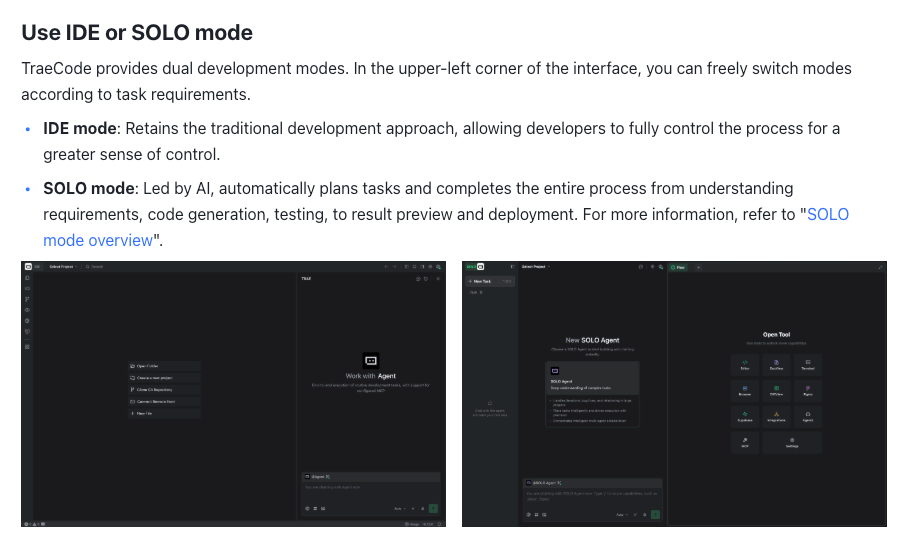
Two structural changes in 2026 matter more than any feature list. In February, Trae moved from fixed request caps to a token-based usage model, so AI work draws down a usage balance rather than a countable number of prompts. In March, SOLO shipped as a standalone app with two modes: Code for the agentic coding loop, and MTC for broader product work.
That second change is the one I would think about first. When the agent runs as its own application rather than a panel inside your editor, the thing you review at the end of a task changes shape — you are looking at a delivered result rather than a sequence of diffs you watched accumulate. Do not assume it slots into an existing review process without testing that assumption.
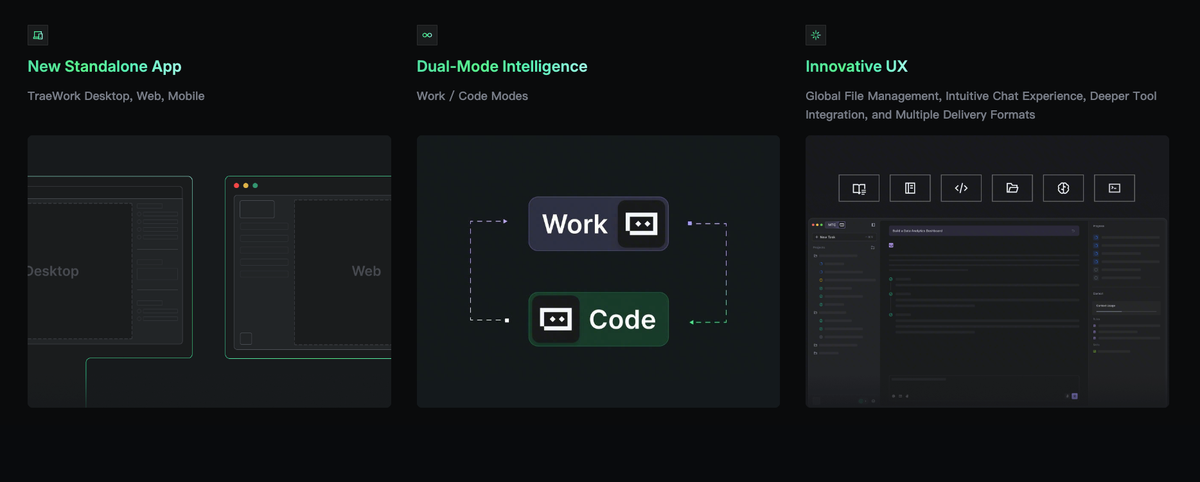
That direction continues in TRAE Work, which switches between Work, Code, and Design modes across desktop and web and keeps project files in one workspace. Whether that helps depends on whether your team already has a place where specs, data, and code live together — or whether it becomes a sixth place.
Trae also maintains an open-source CLI agent on GitHub, which matters if you want agent behavior inside pipelines rather than only inside a window.
One structural point deserves direct confirmation: public reporting through mid-2026 indicated no published enterprise tier. If your procurement process needs a named plan with contractual terms, ask the vendor rather than assuming parity.
Cursor as AI code editor workflow
Cursor is also a VS Code fork, built by Anysphere, and its plans are structured around a credit pool. Each paid tier includes an amount of model usage; once that allocation is consumed, additional usage continues as on-demand billing charged in arrears.
The practical consequence: the sticker price is the entry point, not the monthly bill. A developer running long agent sessions against a large repository burns the pool faster than someone using Tab completions and occasional chat. That is a budgeting question, not a product defect, but it needs modeling before rollout rather than after the first invoice.
Cursor's organizational layer is documented in more detail. Teams plans add centralized billing, usage analytics, shared rules and commands, and SSO. Enterprise adds pooled usage across the org, SCIM seat management, repository and model controls, audit logs, invoice or PO billing, and priority support.
Each of those has its own page rather than a marketing bullet — SSO, SCIM, RBAC and MDM policies sit under identity and access, and audit logging is documented separately under compliance. If your security review needs to cite something specific, that separation is useful.
Developer Workflow Comparison
Codebase context
Both tools index your repository so the AI reasons across files rather than the open buffer. The question worth testing is not whether indexing exists — it is what happens when context gets expensive.
Under token-based billing, context is a cost driver. Input tokens include your prompt, selected files, chat history, and whatever repository context gets pulled in. A vague prompt against a large monorepo costs more than a scoped prompt against three files, on both platforms.
So test it deliberately. Run the same task twice: once with the whole repository available, once with an explicit file scope. Compare output quality and usage consumed. That ratio tells you more about daily cost than any benchmark.
Also confirm how each handles files you would rather not upload. Trae's public materials describe a local-first approach where files are temporarily uploaded for embedding computation then deleted, with storage location tied to account region, and SOLO carries its own privacy mode setting. Cursor documents a Privacy Mode under which code is not used for training, with admins able to enforce it org-wide.

The thing worth checking is whether privacy mode is a per-developer toggle or something you can pin from above. A setting one person can turn off during a deadline is not a control.
Agent and automation depth
This is where the two genuinely diverge.
Cursor's agent operates inside the editing session. You invoke it, it proposes changes, you review diffs. Cloud agents and hooks extend the reach, but the mental model stays anchored to a developer in a file tree.
Trae's SOLO pushes toward autonomy: accept a brief, analyze requirements, write file structure, execute terminal commands, show previews.
Neither is universally better, and the tradeoff is not subtle. Autonomy reduces keystrokes and increases review surface. If the bottleneck is boilerplate, more autonomy helps. If it is reviewing changes safely in a system with subtle coupling, smaller diffs may serve you better.
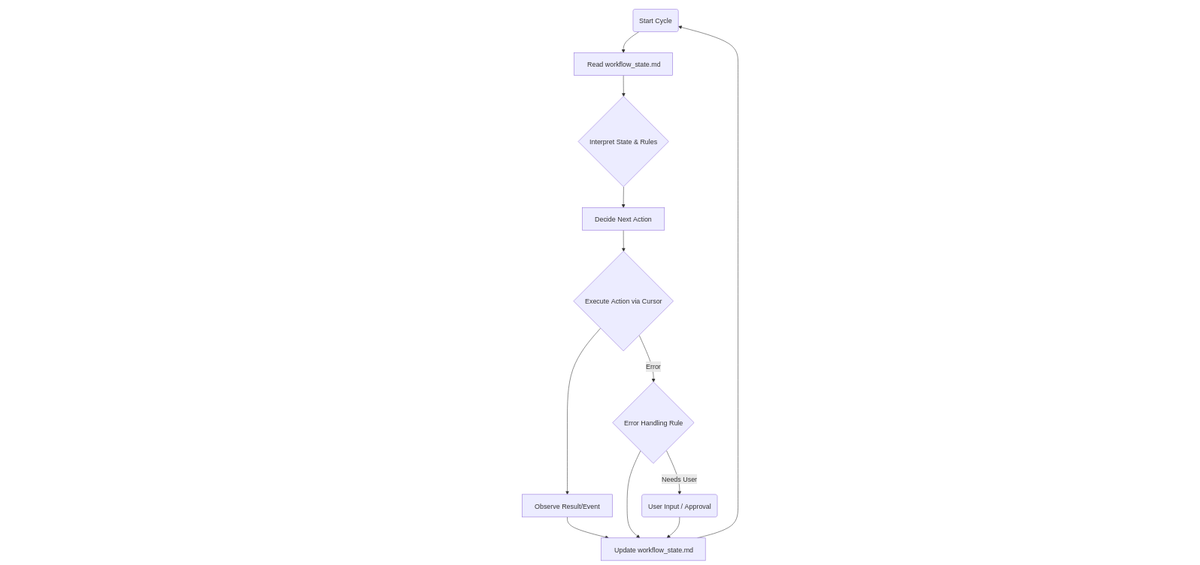
There is a third option comparison articles tend to skip. If neither default loop matches your review policy, building the loop yourself moves the control point from vendor settings to your own design — at the cost of owning the maintenance. For some teams that trade is worth it, and it is at least worth pricing before defaulting to a vendor's loop shape.
Evaluate this with a task where correctness is verifiable: seed a known bug into a medium repository, ask each tool to diagnose and patch, then measure time to passing tests plus the number of human interventions required.
Model choice and pricing checks
Both platforms offer selectable frontier models without requiring you to manage API keys, and both meter usage against an included allocation.
Model availability is the fastest-moving variable here. Third-party summaries routinely list versions already superseded, and availability differs by region due to provider agreements. Do not plan around a model list published in a review article, including this one — confirm what is available on the specific plan and region you intend to buy.
Same applies to pricing. Cursor's structure spans a free tier, individual paid plans, two Teams tiers, and custom Enterprise pricing. Trae lists five tiers with a low entry price and a token-based balance. The mechanics — what counts, what rolls over, what happens when the allocation runs out — matter more than the headline number.

Review and team governance
For a solo developer this section is optional. For a Tech Lead it is usually the deciding factor.
Ask both vendors the same questions:
- Can privacy or training settings be enforced org-wide, or only per user?
- Is billing centralized, and can spend be capped or alerted on?
- Are audit logs available, and what exactly do they capture?
- Is identity managed through SSO or SCIM provisioning?
- Can specific repositories or models be restricted?
- What is the documented support path and response commitment?
Cursor publishes answers to most of these across Teams and Enterprise. For Trae, confirm enterprise-tier availability directly, since public documentation through mid-2026 was less explicit on this layer than on individual plans.
One gap applies to both, and it is easy to miss. Audit logs tell you what an agent was permitted to do; they do not always show what it actually did, step by step, inside a task. Tracing an agent's execution trail is a separate capability from access logging, and if your review policy assumes the two are the same thing, that assumption is worth testing during the pilot rather than during an incident.
When to Choose Each
Trae fits better when cost of entry matters, the work is prototyping or scaffolding-heavy, you want agent-led delivery as the default, or you want an open-source CLI agent for pipeline use.
Cursor fits better when the organization needs documented governance — SSO, SCIM, audit logs, enforced privacy settings, pooled usage, invoiced billing — or when the workflow is review-centric and the editor session, not the agent brief, is the primary interface.
Either can fit an individual developer on non-sensitive code. At that scale the deciding factor is which interaction model produces less friction, and that is only discoverable by using both on real work.
Neither is the automatic answer for regulated repositories or code under strict client confidentiality. That decision runs through your security review, not through a feature table.
FAQ
Who owns IDE standardization in a team?
Usually a shared decision between engineering leadership and whoever owns security review. Editor choice looks like developer preference right up until it involves sending source code to a third party, at which point it becomes data governance. In practice: developers propose, security approves, and one person owns documenting the agreed configuration so it does not drift.
That last role is the one most teams leave unassigned. Deciding who designs and maintains how the agent loop runs is usually what separates a pilot that produces a decision from one that produces screenshots.
How should teams pilot Trae and Cursor fairly?
Identical tasks, identical repositories, fixed number of participants. Define the tasks before installing anything: one greenfield scaffold, one bug diagnosis with verifiable tests, one multi-file refactor, one review of a flawed pull request.
Record time to a working result, AI round-trips needed, human interventions required, and usage consumed. Run each task at the same scope on both tools. Comparing an agent-led brief on one against a scoped file edit on the other measures nothing.
What settings should be documented after a trial?
At minimum: privacy and training settings, model selections per task type, indexing scope and exclusions, usage allocations and overage behavior, and the review policy for agent-generated changes.
Document the reasoning, not just the values. Six months later the question will be why a setting was chosen, not what it was set to.
When should developers avoid switching IDEs?
During a release window, mid-migration, or when the current bottleneck is not editor speed. Switching resets muscle memory, extensions, keybindings, and debugging setup, and that cost lands the same week as everything else.
Switching also rarely fixes an unclear codebase. If a change takes three days because ownership is ambiguous and tests are thin, a faster editor just produces faster changes to something nobody can safely review.