
If you run Claude Code, Codex, Gemini CLI, and a couple of other coding agents across your projects, you've probably noticed there's no single place to see what they all did — each tool keeps its own session logs in its own format, and your spend is scattered across separate dashboards. AgentsView exists for exactly that gap. It's not another coding agent; it's a local-first viewer that reads the session files your existing agents already write and pulls them into one searchable place. Here's what it tracks, what it deliberately doesn't do, and whether it's worth installing.
Details below reflect the project's public GitHub repository and site as of June 2026. AgentsView is actively developed — confirm current behavior, supported agents, and licensing against the official repository before relying on specifics.
What AgentsView Is
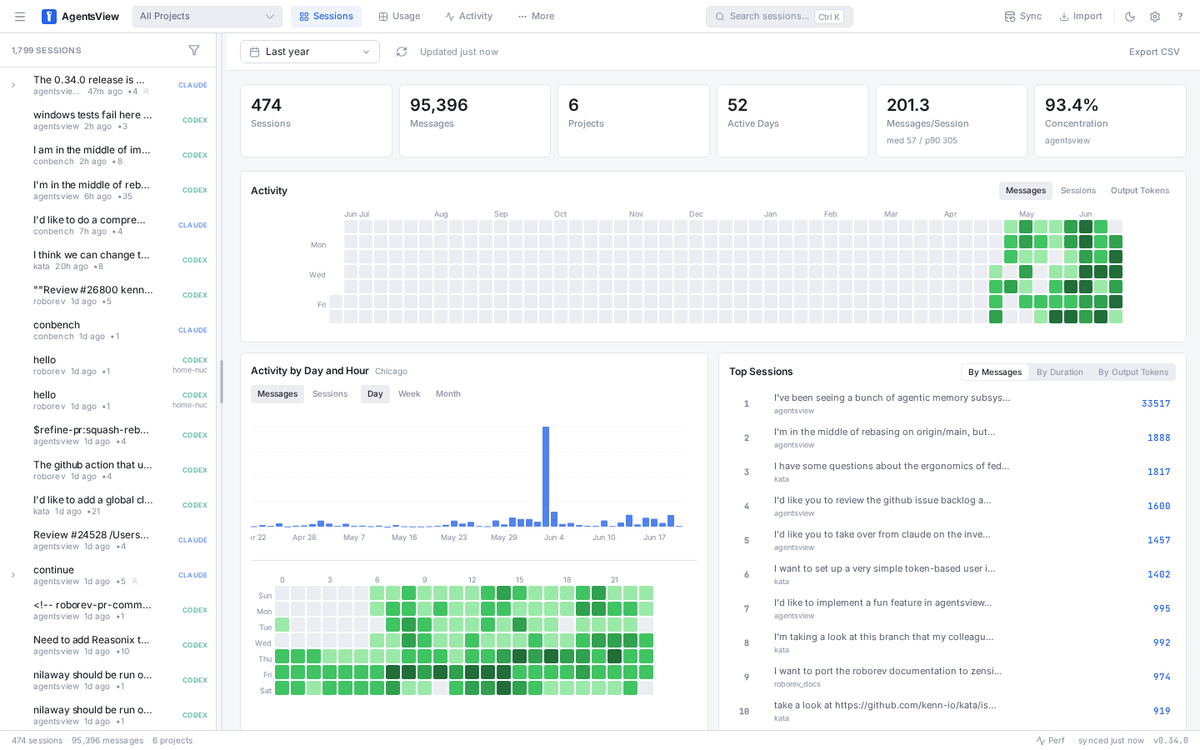
AgentsView is a local-first tool for searching, browsing, and analyzing the sessions your AI coding agents leave on disk. The project describes it as local-first session search, analytics, insights, and token-usage statistics for coding agents, supporting Claude Code, Codex, and (per the repository) more than 20 other agents. On first run, it discovers session files from every supported agent on your machine, syncs them into a local SQLite database, and serves a web UI at http://127.0.0.1:8080.
The core idea is reading, not doing. Your coding agents already write session logs as they work; AgentsView parses those files, stores the structured data in SQLite with full-text search, and gives you a browser-based way to look across all of it — every session, every project, every agent, in one place. It's observability for the agent work you're already doing, built on data that already exists on your disk.
What Problems It Solves for AI Coding Users
Session history across agent tools
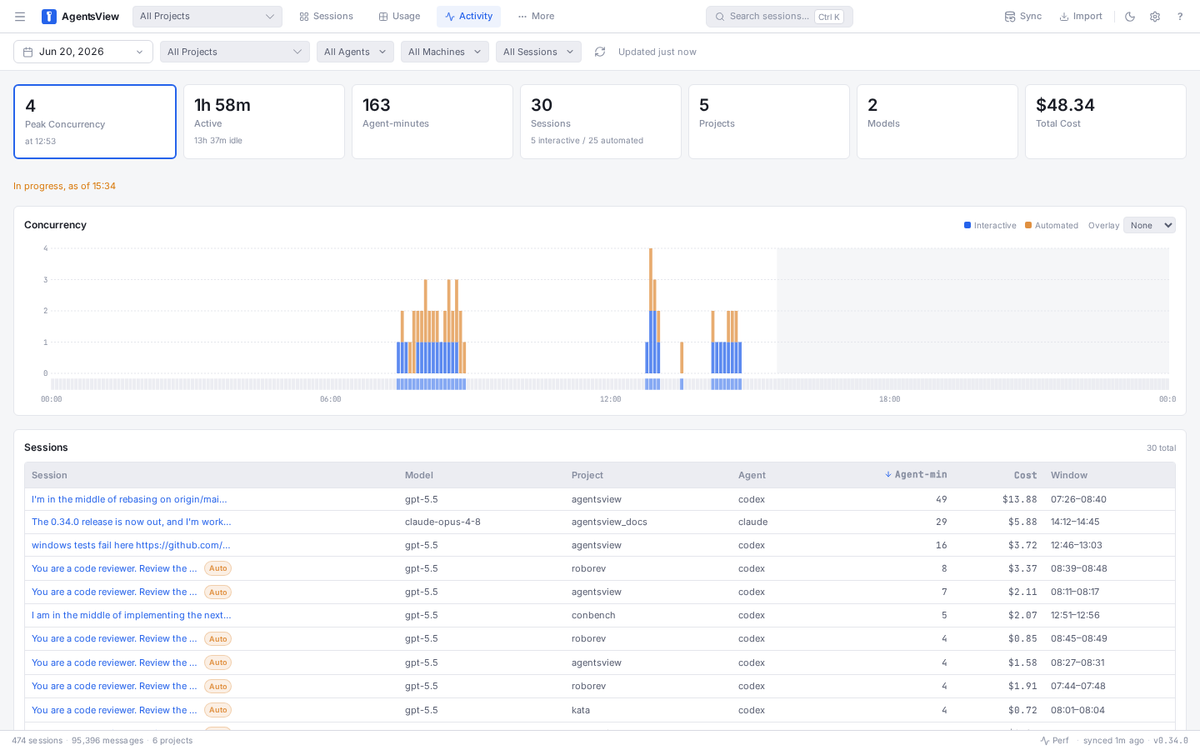
The first problem it addresses is fragmentation. Each coding agent stores its history in its own location and format, so reconstructing "what did my agents do this week" means hopping between tools. AgentsView unifies that: it scrolls through every session across all your projects and agents, shows the full conversation (user prompts, assistant responses, thinking blocks, and tool calls), and offers full-text search across all message content — so you can find the one session where you discussed a specific function or error message months later. One archive, one search, across every supported agent.
Cost, project, and failure visibility
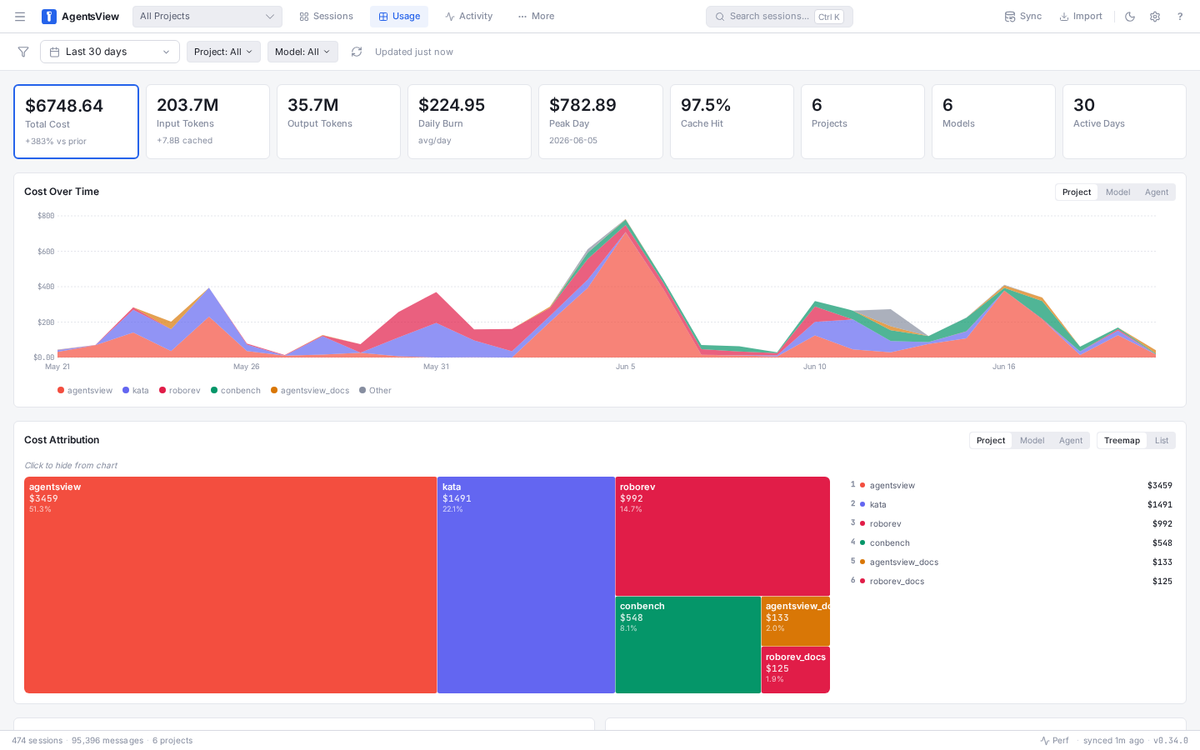
The second problem is visibility into spend and activity. AgentsView tracks token consumption and computes cost across your agents (cache-aware, since prompt-cache creation and read tokens are priced differently), and it attributes cost by project so you can see where your spend actually goes. Because it stores the full transcript including tool calls, it also gives you the material to look back at what happened in a given run — useful when you want to understand how a session unfolded. One important boundary: AgentsView reports the token usage that agents write to their own session files; it doesn't mint usage data on its own, so agents that don't record token counts (or strip them from local logs) won't show cost. The visibility is real but bounded by what each agent actually logs.
What AgentsView Is Not
Not a coding agent
AgentsView does not write code, run tasks, or act as an agent. It's a viewer — it reads the logs other tools produce. It has no model behind it doing engineering work, doesn't execute commands or edit files as part of its purpose, and isn't an orchestration layer that coordinates agents. The distinction matters because the name can read like an agent product; it isn't. AgentsView's entire job is observability over sessions that already happened, not generating or directing new work.
Not a replacement for Claude Code or Codex
Because it doesn't do the coding, AgentsView doesn't replace Claude Code, Codex, or any other agent — it complements them. You keep using your coding agents exactly as you do now; AgentsView sits alongside, reading what they wrote. It's additive: it gives you a view over your existing tools, not a substitute for any of them. If you stopped using your coding agents, AgentsView would have nothing to show — it depends entirely on the sessions those tools produce.
Local-First Architecture and Privacy Boundaries
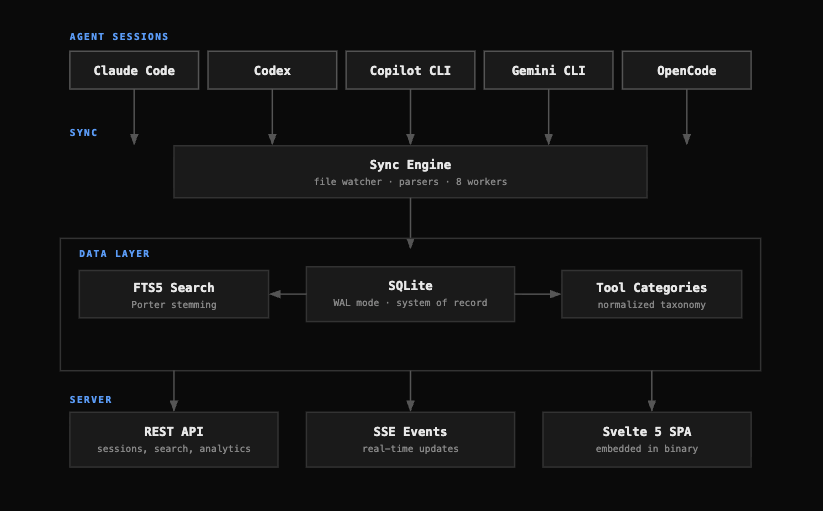
AgentsView is built local-first: it stores session data in a local SQLite database, serves an embedded web frontend, and by default uses no cloud services and no accounts. The server binds to 127.0.0.1 by default, and the project states that all session data stays on your machine. For developers whose code and agent transcripts are sensitive, that default-local design is the relevant property — adopting AgentsView doesn't, by itself, send your sessions anywhere.
There are optional features that change the data boundary, and they're worth understanding before you enable them. The project documents an optional PostgreSQL sync (pushing session data to a shared database for team or multi-machine setups) and the ability to configure Claude and Codex sources as S3 roots, so a central instance can read sessions other machines push to S3-compatible storage. Those are opt-in: the default is local-only, and the sync paths involve infrastructure you set up deliberately. The repository also describes a limited anonymous telemetry ping (application/version/OS/architecture, explicitly excluding session, project, prompt, file path, account, or machine identity) that can be disabled with an environment variable. Because these data-handling specifics are exactly the kind of detail that matters and can change, confirm the current behavior of local storage, the sync mechanisms, and telemetry against the project's latest README rather than assuming.
Benefits, Limits, and Risks
The benefit is straightforward: if you use multiple coding agents, AgentsView turns scattered, per-tool logs into one searchable, cost-aware archive you fully own, running locally. For heavy multi-agent users, that unified view (history, search, cost-by-project) is genuinely useful, and the local-first default keeps your data under your control.
The limits are inherent to what it is. AgentsView can only show what your agents write to disk — its cost and activity data are bounded by what each agent logs, so coverage varies by agent and an agent that doesn't record token counts won't show spend. It's a viewer, so it won't help you do the coding, only review it. And as an actively developed open-source project, specifics (supported agents, exact features, the maturity of newer areas like token-usage reporting) change over time, so the current README is the source of truth. The main risk to manage is the optional sync features: enabling PostgreSQL or S3 sync moves data off your local machine, which is a deliberate change to the privacy boundary you should make consciously, not by default. Used in its local-first default for what it's built for, the risk profile is low; the things to verify are the licensing and the data terms of any sync you turn on.
Who Should Try AgentsView
AgentsView fits developers and teams who genuinely run multiple coding agents and feel the fragmentation — senior developers and tech leads juggling Claude Code, Codex, Gemini CLI, OpenCode, and others, who want one place to search session history, understand where their agent spend goes, and review what their agents did. If that's your workflow, it solves a real, specific problem.
It's less useful if you use a single agent and are content with that tool's own logs and dashboards, or if you don't need cross-agent history and cost visibility — in that case AgentsView adds a tool without solving a problem you have. The honest test is whether the fragmentation across multiple agents is a real pain for you. If it is, AgentsView is worth trying in its local-first default; if you only run one agent, the value is thinner.
FAQ
Is AgentsView an AI coding agent?
No. AgentsView is a viewer for the sessions that AI coding agents produce, not an agent itself. It doesn't write code, run tasks, execute commands, or use a model to do engineering work — it reads the session logs your existing agents (Claude Code, Codex, and others) leave on disk and gives you a local app to search, browse, and analyze them. Think of it as observability over agent work that already happened, sitting alongside your coding agents rather than doing their job. You keep using your agents as normal; AgentsView just gives you a unified view across them.
Does AgentsView send my coding sessions to the cloud?
By default, no — AgentsView is local-first: it stores data in a local SQLite database, serves the UI bound to your local machine, and the project states that all session data stays on your machine with no cloud services or accounts required by default. There are optional sync features (a PostgreSQL sync for team or multi-machine setups, and configuring sources as S3 roots) that do move data off your local machine, but those are opt-in and set up deliberately. There's also a limited anonymous telemetry ping that excludes your session content and can be disabled. Because these specifics matter and can change, confirm the current data-handling and sync behavior in the project's latest README before relying on it for sensitive code.
Which agent tools can AgentsView read?
The repository states AgentsView supports Claude Code, Codex, and more than 20 other coding agents, discovering their session files automatically on first run. The supported list is broad and growing (the project keeps adding parsers for new agent formats), and coverage details — including which agents emit token/cost data versus just transcripts — vary by agent and evolve. Rather than rely on a fixed list, check the project's current README and supported-agents documentation for the up-to-date set, since an actively developed tool like this adds and refines agent support over time. If a specific agent matters to you, verify its current support and what data AgentsView extracts from it directly.
Can AgentsView help debug failed agent runs?
It can help you review what happened in a run, within the limits of what the agent logged. Because AgentsView stores the full session transcript — prompts, responses, thinking blocks, and tool calls — and offers full-text search, you can look back at a session to see the sequence of what the agent did, search for an error message, and understand how a run unfolded. That's useful context for diagnosing a failure. What it can't do is re-run the task, fix anything, or show you data the agent never wrote to its session file — it surfaces the recorded history, not a live debugger. So it's a helpful lens for reviewing and understanding past runs, bounded by what each agent actually recorded.
Conclusion
AgentsView is a local-first viewer that reads the session files your AI coding agents already write and turns them into one searchable, cost-aware archive across Claude Code, Codex, and many other agents. It's worth being precise about what that means: it's observability, not an agent — it reads what your tools did, doesn't write code, and complements rather than replaces Claude Code or Codex. Its value is concentrated in the multi-agent case, where unified history, full-text search, and cost-by-project visibility solve a real fragmentation problem; its limits are that it only shows what agents log, and its optional PostgreSQL and S3 sync features move data off your machine if you enable them. If you run several coding agents and want one local place to search and account for their work, AgentsView is built for exactly that — just confirm the licensing and current data-handling terms against the project's repository before you adopt it.
Related Reading
