
Most teams don't fail at agentic coding because they picked the wrong model. They fail because they never defined what the system around the model should do. The agent produces output. Nobody built the mechanism to catch wrong output early, feed signal back into the workflow, or enforce the boundaries that prevent an autonomous run from going sideways.
Six patterns address that. Each one targets a specific failure class. Most teams need two or three to start, not all six at once.
Before You Pick a Pattern: Define Your Agent's Failure Mode
The worst use of time in agentic engineering is adding infrastructure to a problem you haven't diagnosed. Before reaching for patterns, identify which of these three failure types is actually limiting you:
| Failure type | Symptom | Root cause |
|---|---|---|
| Context failure | Agent hallucinates file paths, invents APIs, modifies the wrong module | The agent was guessing about the codebase, not reading it |
| Direction failure | Agent completes the wrong task, or drifts mid-execution | Ambiguous spec, no plan gate, or no scope boundary |
| Output quality failure | Code runs but introduces regressions, ignores patterns, or passes obvious bugs | No structured verification, acceptance criteria aren't enforced |
Most teams have one primary failure mode, not all three simultaneously. Identifying yours before choosing patterns saves you from building verification infrastructure when your actual problem is context packaging.
What breaks first: context, direction, or output quality?
Run a short diagnostic: pick your last three agent sessions that produced bad output. For each, answer: did the agent work on the wrong files, misunderstand the goal, or produce plausible-but-broken code? The answer points to which pattern to start with.
Context failures → Pattern 5 first. Direction failures → Pattern 1 first. Output quality failures → Pattern 4 first.
Pattern 1 — Plan-First Development
Failure mode it solves: Direction failures. The agent begins executing before it has a shared definition of done with the engineer.
Always generate a structured plan before executing
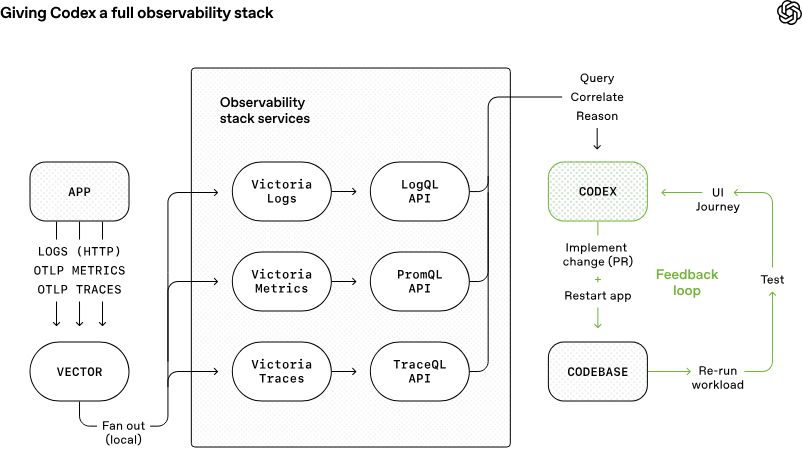
The planning gate forces the agent to surface its assumptions as readable text before touching any files. OpenAI's harness engineering field report documents this as the core discipline: engineers describe tasks and review plans, agents execute. Wrong assumptions caught in a three-line plan cost seconds to fix. Wrong assumptions caught in a PR cost hours.
The plan format matters. Freeform prose plans are hard to review quickly. A structured format that separates files, changes, verification steps, and assumptions lets a reviewer scan in 60 seconds:
PLAN: Migrate auth module from session to JWT

Files to modify:
  - src/auth/session.py        → replace SessionManager with JWTManager
  - src/auth/middleware.py     → update authenticate() to validate JWT
  - src/auth/models.py         → add jwt_secret field, read from env

Pattern to follow:
  - src/api_keys/jwt_util.py (PyJWT 2.x, HS256) — replicate this pattern

Verification:
  1. pytest tests/auth/ -v exits 0
  2. grep -r "from auth.session import Session" ./src returns empty

Assumptions:
  [ASSUMPTION] Using PyJWT — no other JWT library in repo
  [ASSUMPTION] JWT_SECRET env var already exists in .env.example

Out of scope:
  Refresh token rotation, frontend changes
[ASSUMPTION] tagging is the detail that makes reviews fast. It highlights exactly what the reviewer needs to evaluate — not the full plan, just the decision points.
How to design the plan approval step
Enforce the gate in your harness config, not just your prompt. In AGENTS.md or CLAUDE.md:
## Pre-task (before any code change)
1. Read .harness/impact_map.md for this task
2. Output plan in the format: files / pattern / verification / [ASSUMPTION] items
3. Wait for [APPROVED] before proceeding
4. If the plan contains a file not in the impact map, stop and flag it
The [APPROVED] token is the trigger. Without it, the agent waits. This turns an informal "does this look right?" into an enforced contract.
When to skip: Single-file bug fixes, exploratory sessions, any task under ~30 lines of change. The planning overhead isn't worth it for small, reversible edits.
Pattern 2 — Parallel Worktree Isolation
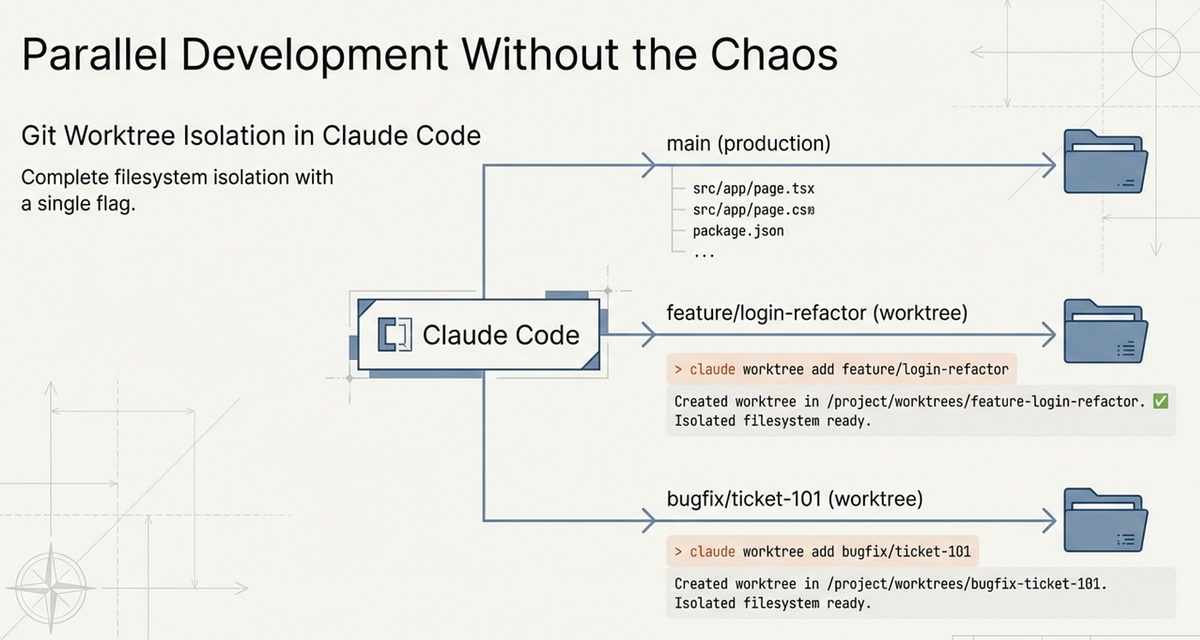
Failure mode it solves: Agents working in parallel writing conflicting changes to the same files, producing a codebase in an inconsistent intermediate state.
Why agents need branch isolation to work in parallel
Without isolation, two agents touching the same file produce a merge conflict that neither resolves correctly. With worktree isolation, each agent works in a detached branch on its own filesystem view. The main workspace stays clean until you explicitly integrate changes.
# Create an isolated worktree for each parallel agent task
git worktree add .worktrees/agent-auth-jwt -b agent/auth-jwt-migration
git worktree add .worktrees/agent-test-gen -b agent/test-generation

# Agent 1 runs in its own directory
cd .worktrees/agent-auth-jwt
# ... agent works here ...

# Agent 2 runs in its own directory
cd .worktrees/agent-test-gen
# ... agent works here ...
Each agent sees a complete copy of the repository at branch creation time. Changes one agent makes don't appear in the other's working tree. When both finish, you cherry-pick or merge:
# From main branch, integrate completed agent work
git merge agent/auth-jwt-migration --no-ff -m "integrate: JWT migration"
git merge agent/test-generation --no-ff -m "integrate: test generation"

# Cleanup when done
git worktree remove .worktrees/agent-auth-jwt
git worktree remove .worktrees/agent-test-gen
git branch -d agent/auth-jwt-migration agent/test-generation
Setup workflow and cleanup strategy
Tools like oh-my-codex automate this entirely — worktrees are created per worker at .omx/team/<n>/worktrees/worker-N with no flags needed. Verdent's native multi-agent mode uses the same isolation primitive. If you're doing this manually, the two-command setup above covers most cases.
When to skip: Sequential tasks where each step depends on the output of the last. Worktree isolation is for tasks that are independent enough to run in parallel. If agent B needs agent A's output to start, isolation adds overhead without benefit.
Pattern 3 — Role-Separated Agents
Failure mode it solves: The same agent that writes code reviews its own output. Models consistently overrate their own work; the agent that produced a bug is the worst reviewer of that bug.
Planner → Executor → Reviewer/Verifier
The three-role decomposition separates the cognitive modes that should stay separate:
| Role | Responsibility | Runs with |
|---|---|---|
| Planner | Decomposes the task, identifies files, specifies acceptance criteria | Stronger model (Claude Opus 4.7, GPT-5.4 xhigh) |
| Executor | Implements the plan, writes code, runs commands | Capable but cheaper model |
| Reviewer/Verifier | Checks the diff against the original spec, runs acceptance criteria, flags regressions | Different model or same model in a fresh context |
Anthropic's Prithvi Rajasekaran, engineering lead at Anthropic Labs, documented this directly: separating the agent doing the work from the agent judging it is a strong lever for improving output quality, particularly for subjective assessments where self-evaluation is systematically biased.
In practice with LangGraph (v1.1.8, Python ≥3.10):
from langgraph.graph import StateGraph, END, START

def build_review_pipeline():
    graph = StateGraph(TaskState)
    graph.add_node("plan",    run_planner)    # strong model, read-only
    graph.add_node("execute", run_executor)   # writes code
    graph.add_node("review",  run_reviewer)   # fresh context, different model

    graph.add_edge(START, "plan")
    graph.add_edge("plan", "execute")         # plan approval gate sits here
    graph.add_edge("execute", "review")
    graph.add_conditional_edges("review", route_on_review_result, {
        "pass":   END,
        "revise": "execute",                  # loop back with reviewer feedback
        "reject": "plan"                      # back to planning if spec was wrong
    })
    return graph.compile()
When to collapse roles vs keep them separate
Keeping all three roles is expensive — more context, more tokens, more latency. Collapse them when:
- The task is under 100 lines of change (executor self-review is adequate)
- The acceptance criteria are purely mechanical (tests pass / don't pass; no subjective quality judgment)
- You're in a cost-constrained environment and output quality issues are rare
Keep them separate when:
- The output will go to production without another human review pass
- The task involves architectural decisions or patterns that the executor tends to get wrong
- The task type has a history of plausible-but-incorrect output in your codebase
Pattern 4 — Verification Loops
Failure mode it solves: The agent declares a task complete without running the acceptance criteria. "I've implemented the changes" is not the same as "the tests pass."
Tests as the acceptance condition, not as an afterthought
The shift in framing matters. Anthropic's effective harnesses for long-running agents guidance treats verification as a first-class loop, not an afterthought. Most prompts treat tests as something to generate or update. Verification-loop thinking treats tests as the executable definition of done. The agent is not finished until a specific command exits 0.
Add this to every task specification:
Verification command (must pass before declaring done):
  pytest tests/auth/ -v --tb=short

Additional gates:
  mypy src/auth/ --ignore-missing-imports
  grep -r "from auth.session" ./src   # must return empty
The verification gate turns done from a subjective assessment into a binary outcome.
Automated test-run-fix cycles
The full pattern is: generate → verify → fix → verify, repeated until tests pass or retry budget is exhausted.
#!/bin/bash
# verification-loop.sh — run after agent makes changes
MAX_RETRIES=3
RETRY=0

while [ $RETRY -lt $MAX_RETRIES ]; do
  pytest tests/auth/ -v --tb=short > /tmp/test_output.txt 2>&1
  EXIT_CODE=$?

  if [ $EXIT_CODE -eq 0 ]; then
    echo "✅ All tests pass. Task complete."
    exit 0
  fi

  echo "❌ Tests failed (attempt $((RETRY+1))/$MAX_RETRIES)"
  cat /tmp/test_output.txt

  # Feed failure output back to agent
  RETRY=$((RETRY+1))
  # Agent reads /tmp/test_output.txt and attempts a fix
done

echo "🛑 Verification failed after $MAX_RETRIES attempts. Needs human review."
exit 1
Feed the test output — not just the exit code — back to the agent. The specific error messages are what the agent needs to fix correctly.
When to skip: Creative or research tasks where there's no executable acceptance condition. If you can't write a command that returns exit 0 for "done" and non-zero for "not done," the verification loop doesn't apply. Don't fabricate mechanical checks for tasks that require human judgment.
Pattern 5 — Context Packaging
Failure mode it solves: Context failures. The agent hallucinates because it has no grounding in the actual repository structure. Symbol analysis and impact maps give the agent a real map before it plans or executes.
Impact maps, symbol analysis, AGENTS.md, CLAUDE.md
The harness engineering guide covers impact map construction in detail. The short version: before the agent plans, run symbol analysis to identify which files, functions, and dependencies are actually relevant to the task.
# Generate impact map for auth migration task
ctags -R --fields=+n --languages=Python ./src/auth/ > .harness/auth_symbols.txt
grep -r "from auth" ./src --include="*.py" -l > .harness/auth_dependents.txt
Feed both files into the agent's context before the planning gate. The agent now knows what exists, not what it imagines exists.
The AGENTS.md / CLAUDE.md file is the persistent layer — rules that apply to every session, not just this task:
# AGENTS.md

## Architectural boundaries (never cross)
- src/payments/ imports nothing from src/auth/ — check before any change
- All database access goes through src/db/repository.py — no raw SQL elsewhere
- No new dependencies without listing them as [ASSUMPTION] in the plan

## Existing patterns (follow these)
- JWT handling: src/api_keys/jwt_util.py (PyJWT 2.x, HS256)
- Error responses: src/core/errors.py ErrorResponse class
- Environment variables: read via src/config.py Config class, never os.environ directly

## Pre-task
- Read .harness/impact_map.md before planning
- Output plan in standard format, wait for [APPROVED]
What to include vs exclude from agent context
The rule is simpler than most tutorials make it: include context that constrains decisions, exclude context that describes other things.
| Include | Exclude |
|---|---|
| File paths the agent is allowed to touch | Full file contents of files it will only read |
| Existing patterns it must follow | Historical tickets and Slack discussions |
| Acceptance criteria (exact commands) | Documentation about unrelated modules |
| Architectural boundaries | Previous failed attempts (confuses, not helps) |
| Dependency list (existing libraries only) | Speculative future requirements |
A 200-line AGENTS.md with dense, specific constraints outperforms a 2,000-line file with comprehensive documentation. Density and relevance beat comprehensiveness.
Pattern 6 — Feedback Loop Engineering
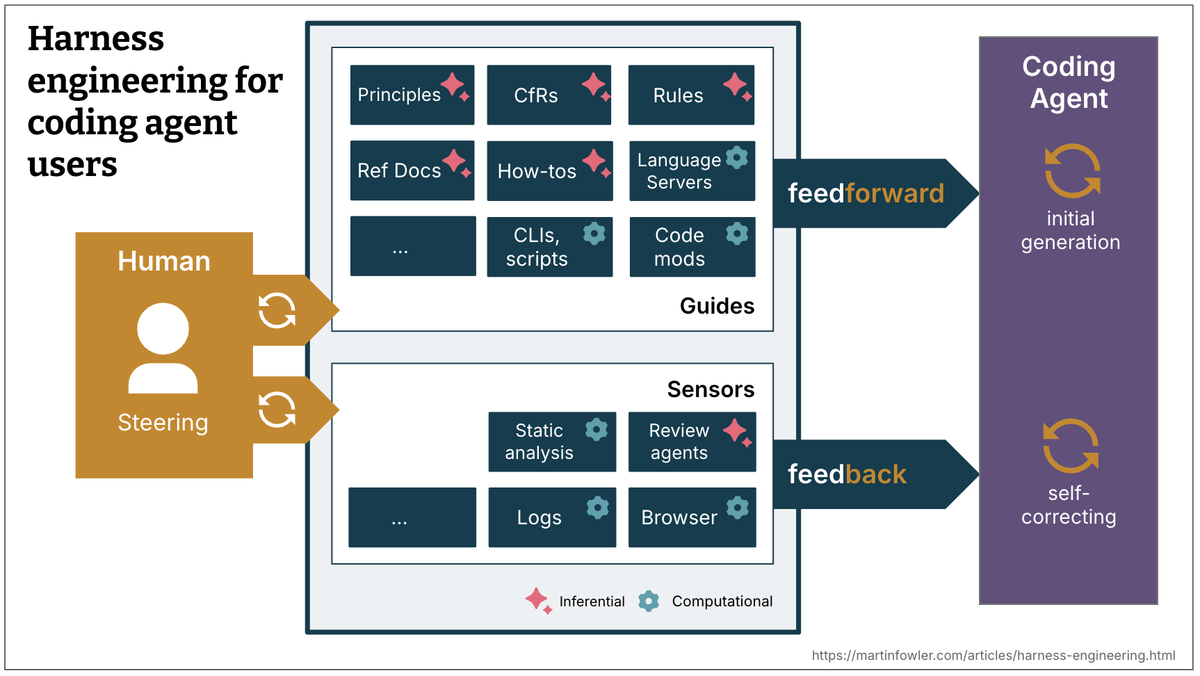
Failure mode it solves: Teams fix individual agent outputs without fixing the harness condition that allowed the bad output. The same error class recurs. The harness never improves.
How to trace agent errors back to input, not output
Every agent failure has a root cause in the harness, not the model. The categorization determines the fix:
Failure: agent modified wrong file
  Root cause category: CONTEXT
  Fix: impact map was incomplete → add missed file to symbol analysis query
  Harness change: update ctags command, add boundary check to pre-task rule

Failure: agent used wrong JWT library (python-jose instead of PyJWT)
  Root cause category: PATTERN
  Fix: existing pattern reference was missing → add explicit pattern file to AGENTS.md
  Harness change: add "JWT: follow src/api_keys/jwt_util.py" to pattern section

Failure: agent didn't run tests before declaring done
  Root cause category: VERIFICATION
  Fix: verification command wasn't in the spec → add to acceptance criteria template
  Harness change: add pytest command to task spec template default

Failure: agent made changes outside spec scope
  Root cause category: BOUNDARY
  Fix: out-of-scope boundary wasn't explicit → add "not in scope" section to spec
  Harness change: add out-of-scope field to task spec template
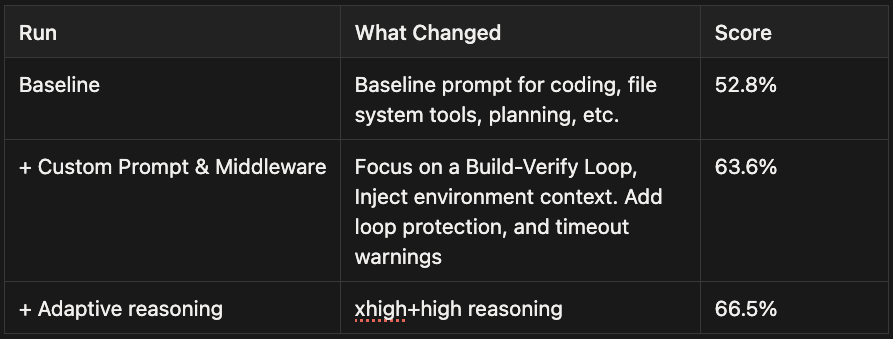
The important discipline: each error class gets a harness change, not a one-off prompt fix. This is the mechanism behind LangChain's 52.8%→66.5% Terminal-Bench improvement: systematic harness changes, not prompt tweaks. "Don't use python-jose" in a prompt competes against the model's priors and gets overridden. "Pattern reference: jwt_util.py" in AGENTS.md is always-on and doesn't compete.
The harness as software you maintain
This is the shift that separates teams making sustained progress from teams perpetually re-debugging the same issues. The harness — AGENTS.md, task spec templates, impact map generation scripts, verification loops — is software. It has a changelog. It gets better over time. Team members can contribute to it.
A minimal feedback log structure:
# .harness/IMPROVEMENTS.md

## 2026-04-18: Added JWT pattern reference to AGENTS.md
Trigger: agent used python-jose on auth migration task
Root cause: PATTERN — no existing pattern reference
Fix: added `JWT: src/api_keys/jwt_util.py` to AGENTS.md patterns section
Result: not recurred in 3 subsequent sessions

## 2026-04-15: Expanded auth impact map to include tests/auth/
Trigger: agent missed test files when analyzing auth dependencies
Root cause: CONTEXT — ctags command excluded test directory
Fix: updated ctags invocation to include ./tests/auth/
Result: impact map now includes 23 test files
Three entries in this log are worth more than 30 one-off prompt fixes. The log also trains new team members on which harness decisions were deliberate and why.
Combining Patterns: A Team Workflow Example
A mid-size engineering team running 2–3 parallel features per sprint can implement this as a complete loop:
Before a task starts:
- Run symbol analysis → generate impact map (Pattern 5)
- Agent reads impact map, produces structured plan (Pattern 1)
- Engineer reviews plan in 60 seconds, approves or redirects
During execution: 4. If the task has parallel-independent subtasks, spin up worktrees (Pattern 2) 5. If the task involves a judgment-heavy component, route to a separate reviewer agent (Pattern 3)
After execution: 6. Run verification loop automatically — tests must pass before the task is "done" (Pattern 4) 7. If tests fail, loop back to executor with failure output
After the sprint: 8. Review failed runs, categorize by root cause, add harness improvements (Pattern 6)
Verdent.ai implements this loop natively. The Plan Mode → approval gate → parallel agent execution → code verification cycle maps directly to Patterns 1, 2, and 4. Multi-agent teams in Verdent Deck run in isolated worktrees per agent, satisfying Pattern 2 without manual git configuration. The verification subagent (Review Subagent, multi-model) provides Pattern 3's separation between executor and reviewer. For teams already in the Verdent ecosystem, the patterns above describe what's already happening under the hood — understanding the structure helps you tune it.
FAQ
How many of these patterns do I need to start?
Start with one. Match it to your primary failure mode (context → Pattern 5, direction → Pattern 1, quality → Pattern 4). Add patterns when you hit the next bottleneck, not preemptively. Most teams that try to implement all six at once end up with a complex harness that nobody maintains. A two-pattern harness that gets improved after every sprint beats a six-pattern harness that stays frozen.
Which tools implement which patterns natively?
| Pattern | Claude Code | Verdent.ai | oh-my-codex (OMX) | LangGraph |
|---|---|---|---|---|
| Plan-First | CLAUDE.md rules | Plan Mode + approval | $ralplan + $ralph | interrupt() node |
| Parallel Worktrees | Manual | Native (Verdent Deck) | omx team (auto) | Custom state |
| Role Separation | Manual | Review Subagent | $team roles | Separate nodes |
| Verification Loops | Manual | Code Verification Agent | $ralph retry | Conditional edge |
| Context Packaging | CLAUDE.md | AGENTS.md + plan | AGENTS.md | State injection |
| Feedback Loop | Manual | Manual | IMPROVEMENTS.md | Manual |
"Native" means the tool handles the mechanism for you. "Manual" means you configure it yourself, but the tool doesn't prevent you from doing so.
How does Verdent.ai implement these patterns?
The Plan Mode → approval gate handles Pattern 1. Isolated parallel worktrees in Verdent Deck handle Pattern 2. The multi-model Review Subagent (Gemini 3 Pro, Opus 4.5, GPT 5.2 cross-checking each other's output) handles Pattern 3. The Code Verification Agent that runs tests in a loop handles Pattern 4. The AGENTS.md scaffolding and codebase indexing handle Pattern 5. Pattern 6 is always manual — no tool automates the discipline of maintaining a harness improvement log, though Verdent's session logs make the error history accessible.
Related Reading
