
I'll be honest — when Google launched Gemini 3.1 Flash-Lite on March 3, 2026, the speed numbers were what grabbed everyone's attention. 381 tokens per second. 2.5x faster time-to-first-token than 2.5 Flash. Fair enough. But the feature I keep coming back to is thinking levels — and almost nobody is talking about it seriously.
Here's why it matters: thinking levels let you run the same model across your entire workload, from a real-time translation pipeline to complex UI generation, and tune the reasoning depth per request. No model switching. No routing logic. Just one API parameter. For developers building at scale, that's a bigger deal than the raw speed number. This guide walks through exactly how it works and how to set it up.
What Are Thinking Levels?
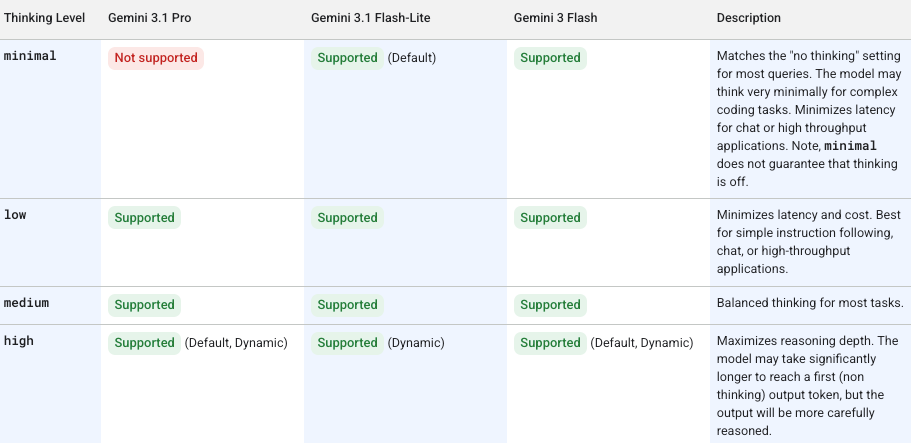
Thinking levels control how deeply Gemini 3.1 Flash-Lite reasons internally before generating a response. Per the official Gemini 3 API documentation, you set this via the thinking_level parameter, which controls the maximum depth of the model's internal reasoning process. Critically, Google treats these levels as relative allowances for thinking, not strict token guarantees — actual token usage varies by task complexity.
Four levels are available: Minimal, Low, Medium, and High.
| Level | Reasoning Depth | Latency | Token Cost | Default? |
|---|---|---|---|---|
| Minimal | Near-zero internal reasoning | Fastest | Lowest | No |
| Low | Basic reasoning pass | Fast | Low | No |
| Medium | Moderate reasoning chain | Moderate | Moderate | No |
| High | Full internal deliberation | Slowest | Highest | Yes |
One thing to internalize immediately: if you don't set thinking_level****, the model defaults to High. That means every API call you make without explicitly setting this parameter will use maximum reasoning tokens — and maximum cost. Set it deliberately.
Why Google Added This Feature
Before Gemini 3, controlling reasoning depth meant managing a numeric thinking_budget (a token count). It was functional but imprecise — developers had to guess how many tokens corresponded to "enough" reasoning for a given task type. The new thinking_level system replaces this with semantic labels that the model interprets as relative guidance.
The practical upshot: you can now architect a single-model pipeline where your simple classification calls use minimal, your content moderation uses low, and your UI generation uses high — all against the same gemini-3.1-flash-lite-preview endpoint. One model, one billing line, granular control. Google calls this "intelligence at scale," and the architecture actually backs that claim up.
Migration note: If you usedthinking_budget: 0with Gemini 2.5 Flash to disable thinking, usethinking_level: "minimal"for equivalent behavior in Flash-Lite. Do not send both parameters in the same request — it will return a 400 error. Per the Vertex AI documentation, thought signatures must still be handled even at minimal thinking level.
How to Set Thinking Levels in AI Studio
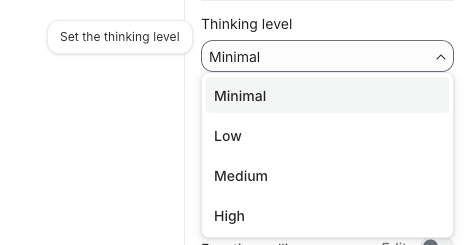
In Google AI Studio, thinking level appears as a dropdown in the model settings panel when gemini-3.1-flash-lite-preview is selected. Select your level before running a prompt — it applies to the current session.
For API calls, set it in the generationConfig object:
import google.generativeai as genai

model = genai.GenerativeModel("gemini-3.1-flash-lite-preview")

response = model.generate_content(
    "Classify this support ticket: 'My payment didn't go through'",
    generation_config=genai.GenerationConfig(
        thinking_level="low"
    )
)

print(response.text)
For REST API calls:
curl -X POST \
  "https://generativelanguage.googleapis.com/v1beta/models/gemini-3.1-flash-lite-preview:generateContent?key=$GEMINI_API_KEY" \
  -H "Content-Type: application/json" \
  -d '{
    "contents": [{"parts": [{"text": "Translate to French: Hello, how are you?"}]}],
    "generationConfig": {
      "thinking_level": "minimal"
    }
  }'
Low Thinking — When to Use It
Low thinking applies a basic reasoning pass before responding. It's faster and cheaper than medium or high, while still catching nuances that pure pattern-matching would miss.
Best for:
- Sentiment analysis and tone classification
- Simple data extraction from structured inputs
- FAQ matching and intent detection
- Translation of standard content (not highly technical or idiomatic)
- Content moderation on clear-cut cases
A real-world data point: one early-access developer reported sub-2-second completions at minimal thinking for customer support ticket classification, versus 5 seconds at medium — with medium catching nuances the quick pass missed. Low sits between those two points and is the right default for most high-volume, moderate-complexity pipelines.
# Low thinking — good for classification at scale
generation_config = genai.GenerationConfig(thinking_level="low")
High Thinking — When to Use It
High thinking enables full internal deliberation. The model reasons through the problem before generating output, which meaningfully improves accuracy on tasks with ambiguity, multi-step logic, or hierarchical structure.
Best for:
- UI and dashboard generation (HTML, React, structured JSON)
- Complex instruction-following with multiple constraints
- Code generation where correctness matters more than speed
- System simulations or multi-step agentic tasks
- Structured output that must maintain logical consistency across long sequences
Early testers at Latitude reported a 20% higher success rate and 60% faster inference compared to their previous model when using Flash-Lite with high thinking for complex storytelling tasks. Whering reported 100% consistency in item tagging — a task requiring precise multi-attribute classification — using the model in their production pipeline.
# High thinking — for complex generation tasks
generation_config = genai.GenerationConfig(thinking_level="high")
How Thinking Levels Affect Cost
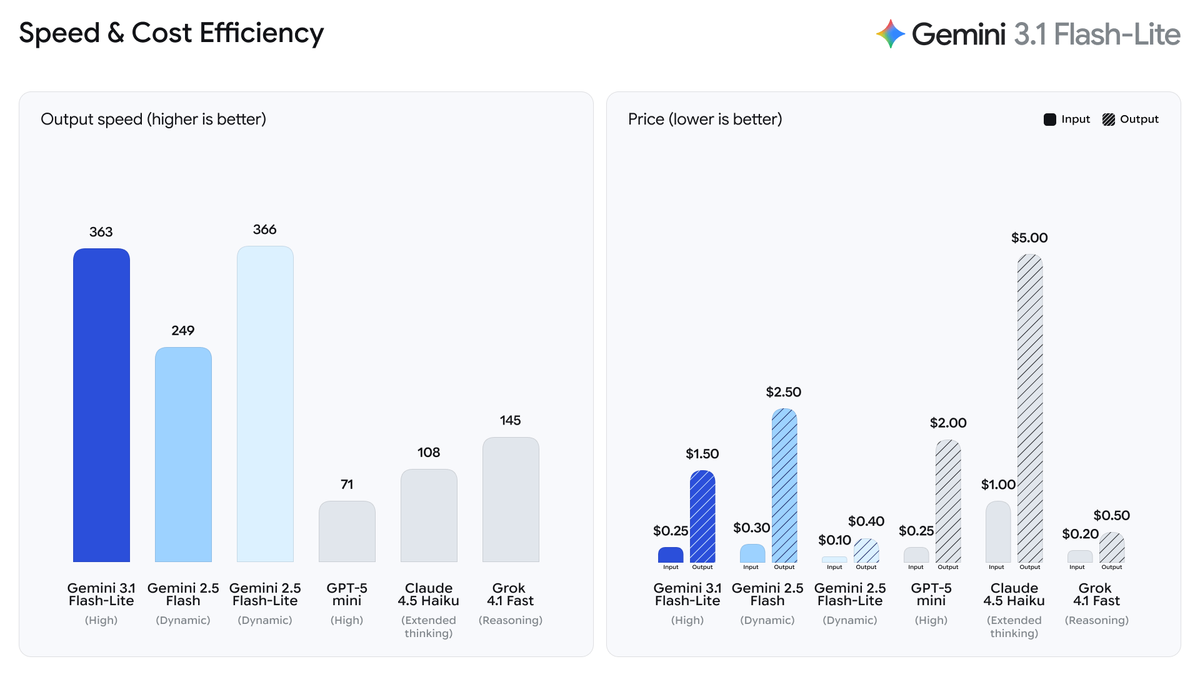
Thinking tokens are billed at the same rate as output tokens. Since thinking_level controls how many thinking tokens the model generates internally, your choice directly affects your API bill.
Pricing baseline for Gemini 3.1 Flash-Lite (as of March 2026, per Google's official pricing):
| Token Type | Price per 1M tokens |
|---|---|
| Input | $0.25 |
| Output (including thinking tokens) | $1.50 |
The cost difference between levels compounds at scale. Here's what that looks like for a pipeline processing 1,000 requests per day with ~400-token average outputs:
| Thinking Level | Avg. Output Tokens | Daily Cost (est.) | Monthly Cost (est.) |
|---|---|---|---|
| Minimal | ~420 | ~$0.63 | ~$18.90 |
| Low | ~470 | ~$0.71 | ~$21.30 |
| Medium | ~560 | ~$0.84 | ~$25.20 |
| High | ~700+ | ~$1.05+ | ~$31.50+ |
Estimates based on output-only cost at $1.50/1M tokens. Actual thinking token usage varies by task complexity.
The practical guidance is straightforward: by routing 80% of daily tasks to low or minimal and reserving high for the 20% that genuinely require deep reasoning, you can reduce API spend by 50–70% versus defaulting to high on every call.
One architectural pattern worth noting: because Flash-Lite supports thinking level control per request, you can use it as a routing layer. Flash-Lite at minimal reads incoming requests, determines complexity, and routes accordingly — simple tasks stay at low, complex tasks escalate to high or to a larger model. It's fast and cheap enough that the routing overhead doesn't meaningfully increase latency.
Recommended Settings by Use Case
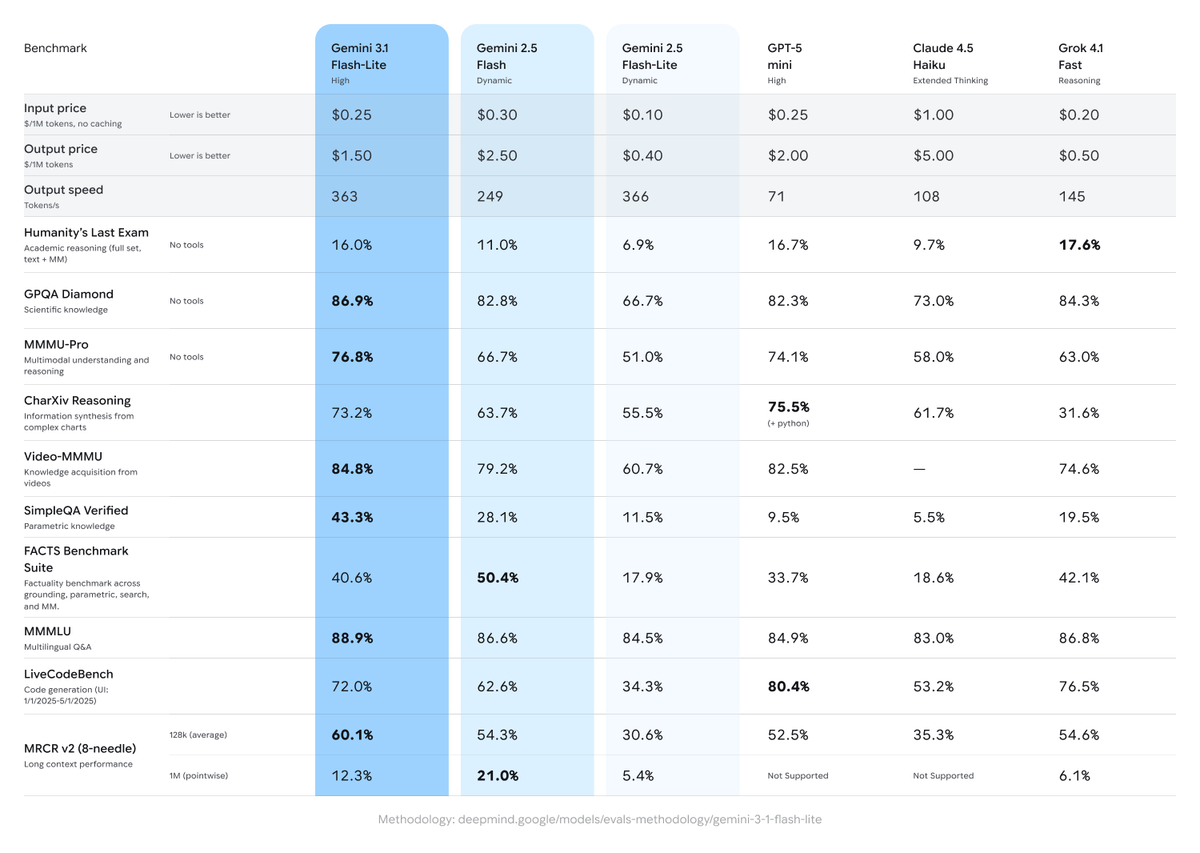
Based on the task taxonomy from Google DeepMind's Flash-Lite model page and real-world production data from early-access developers:
| Use Case | Recommended Level | Rationale |
|---|---|---|
| Real-time translation | Minimal | Speed-critical; low ambiguity |
| Content moderation (clear violations) | Low | Fast pass; clear signal |
| Sentiment & intent classification | Low | Pattern-rich; low reasoning depth needed |
| Data extraction from forms/docs | Low | Structured input; predictable output |
| Content moderation (edge cases) | Medium | Ambiguous cases need reasoning |
| Changelog / release note generation | Medium | Needs summarization logic across long inputs |
| FAQ drafting and response generation | Medium | Tone + accuracy balance |
| UI component generation (HTML/React) | High | Hierarchical structure; correctness matters |
| Complex code generation | High | Multi-constraint; logical consistency required |
| Agentic / multi-step task execution | High | State tracking across steps |
| Simulation generation | High | Long-range logical consistency |
Quick decision rule:
- Is the task high-volume with clear, structured input? → Minimal or Low
- Does the task involve ambiguous input or moderate reasoning? → Medium
- Does the task require generating hierarchical structures or following complex multi-part instructions? → High
- Are you unsure and API cost isn't a primary constraint? → Leave unset (defaults to High)
The model code for API access is gemini-3.1-flash-lite-preview — available now in Google AI Studio and Vertex AI. Preview status means no SLA and potential API changes before GA, so plan accordingly for production deployments.
You might also find these useful:
