
If you've used Codex CLI for anything beyond single-file tasks, you've hit its limits: no structured planning phase, no persistent state across sessions, no way to coordinate multiple agents working in parallel. oh-my-codex (OMX) is the layer that adds all of that without replacing Codex as the execution engine.
Current version: v0.13.1 (released April 7, 2026). Source: github.com/Yeachan-Heo/oh-my-codex, MIT license.
What Is oh-my-codex? (30-Second Answer)
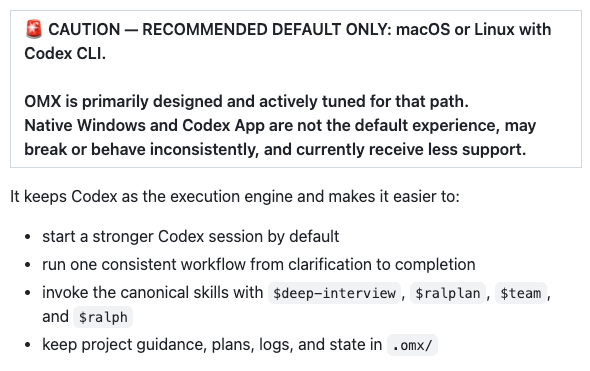
OMX is a workflow and orchestration layer that sits on top of the OpenAI Codex CLI. It keeps Codex doing the actual reasoning and code generation, and adds:
- A standardized four-step workflow (
$deep-interview → $ralplan → $ralph / $team) - tmux-based parallel workers, each in an isolated git worktree
- Persistent state and memory in a
.omx/directory that survives context pruning - Native Codex hooks (
PreToolUse/PostToolUse) wired through.codex/hooks.json - A heads-up display (
omx hud --watch) for monitoring live sessions - 33 specialized agent prompts and 36 workflow skills
The analogy from the official docs: "like oh-my-zsh, but for Codex." It doesn't fork or modify Codex. It wraps sessions with better prompts, state management, and team coordination.
OMX vs the raw Codex CLI — what it adds
| Raw Codex CLI | Codex CLI + OMX | |
|---|---|---|
| Planning phase | None | $deep-interview → $ralplan gate |
| Parallel workers | None | omx team N:executor via tmux |
| Git isolation per worker | None | Auto worktrees at .omx/team//worktrees/worker-N |
| Session state | None | .omx/ directory persists plans, logs, memory |
| Hooks | Not wired by default | Native .codex/hooks.json with PreToolUse/PostToolUse |
| Memory across context resets | Lost | Priority notepad + project memory file |
Package naming note: oh-my-codex repo vs npm naming
The GitHub repo, npm package, and CLI commands are all consistently named oh-my-codex. Install with:
npm install -g oh-my-codex
omx setup
OMX is listed on npm as oh-my-codex. This is different from the related project oh-my-claudecode (OMC), whose npm package is published as oh-my-claude-sisyphus — a naming mismatch worth knowing upfront.
Core Capabilities
$deep-interview → $ralplan → $ralph / $team: the main workflow
The four skills define OMX's canonical path from a vague prompt to running code.
$deep-interview — intent classification and clarification before any plan is formed. Intent classification happens upfront, so the subsequent plan reflects what you actually want.
$ralplan — generates a structured implementation plan with explicit trade-off review. Approval is enforced; execution doesn't start without it.
$ralph — "the boulder never stops rolling." A persistent completion loop that carries the approved plan to verified done, recovering from errors rather than stopping.
$team — coordinated parallel execution with N workers. Each worker gets an isolated git worktree automatically; the leader integrates changes incrementally.
# The main path: interview → plan → execute (single owner)
$deep-interview "migrate auth module from session to JWT"
# [answer questions, approve plan]
$ralph "carry the approved auth plan to completion"

# Parallel with 3 workers
$team 3:executor "execute the approved auth plan in parallel"
Parallel tmux-based workers with isolated git worktrees
Since v0.11.x, every omx team worker automatically gets its own git worktree at .omx/team/<session>/worktrees/worker-N. No flags needed. Workers write to isolated detached branches; the leader integrates them continuously, with conflicts surfaced in integration-report.md.
omx team 3:executor "refactor auth module"

omx team status refactor-auth-module
# worker-1: status=in_progress
# worker-2: status=completed
# integration: merged=2 conflicts=0

omx team resume refactor-auth-module   # resume after interruption
omx team shutdown refactor-auth-module # clean up
Mixed-provider teams work via OMX_TEAM_WORKER_CLI_MAP:
OMX_TEAM_WORKER_CLI_MAP=codex,claude,gemini \
  omx team 3:executor "full-stack implementation"
Each worker gets its own worktree regardless of provider.
Persistent memory and session state (.omx/ directory)
.omx/
├── logs/       — per-session execution logs
├── memory/     — project-level memory (survives context pruning)
├── plans/      — approved plan artifacts
├── research/   — autoresearch output
├── sessions/   — session metadata
├── state/      — runtime state
└── team/       — team worker state and worktrees
The priority notepad and project-memory.json survive context window resets. When Codex's context gets pruned, the memory layer retains critical project decisions and task state so the next session picks up where the last left off.
Native hooks for PreToolUse and PostToolUse
v0.13.1 wired OMX hooks natively through Codex's runtime contract (.codex/hooks.json), removing the external shim required in earlier versions. PreToolUse fires before any tool call; PostToolUse fires after. Destructive commands trigger warnings automatically; errors surface structured guidance.
omx doctor    # verify hook installation shape
omx exec --skip-git-repo-check -C . "Reply with exactly OMX-EXEC-OK"  # live smoke test
OMX vs oh-my-claudecode (OMC): What's the Difference?
Same author (Yeachan Heo). Same conceptual design. Different execution engine.
| oh-my-codex (OMX) | oh-my-claudecode (OMC) | |
|---|---|---|
| Execution engine | OpenAI Codex CLI | Claude Code |
| CLI prefix | omx | omc |
| npm package | oh-my-codex | oh-my-claude-sisyphus |
| GitHub repo | Yeachan-Heo/oh-my-codex | Yeachan-Heo/oh-my-claudecode |
| Plugin surface | AGENTS.md, .codex/hooks.json | Claude Code plugin marketplace |
OMX = Codex CLI orchestration
Codex is the primary execution engine. Claude and Gemini can appear as team workers via OMX_TEAM_WORKER_CLI_MAP, but Codex is the default and the best-supported path.
OMC = Claude Code orchestration plugin
OMC installs as a Claude Code plugin and runs inside Claude Code sessions. It can delegate tasks to Codex or Gemini workers via omc team, but Claude Code is the host. OMC's README explicitly points Codex users to OMX: "For Codex users: Check out oh-my-codex — the same orchestration experience for OpenAI Codex CLI."
If you're primarily a Codex CLI user, use OMX. If you're primarily a Claude Code user, use OMC.
Real-World Use Cases
Multi-agent parallel refactoring
A large refactor across 15+ files is where OMX's team mode earns its overhead:
$deep-interviewclarifies scope — which files, which pattern, what the acceptance criteria are$ralplangenerates the plan with file groups assigned to different execution unitsomx team 3:executor "execute the approved refactor plan"spawns three workers, each in its own worktree- The leader integrates completed branches incrementally; conflicts surface early in
integration-report.md
Workers that finish early can pick up additional tasks from the queue without manual coordination.
Async delegation for long-running tasks (no timeouts)
For tasks that outlast a single interactive session — large migrations, comprehensive test suites, research loops — $ralph provides the persistence layer. Ralph doesn't stop on tool failure or context reset; it logs state, recovers, and continues. omx autoresearch extends this to iterative research loops that self-terminate when the goal is satisfied.
Closing the terminal mid-task and resuming with omx team resume restores session state from .omx/. Raw Codex loses that state.
Installation and Setup (Overview)
npm install -g oh-my-codex
omx setup       # installs prompts, skills, AGENTS.md, hooks
omx doctor      # verify the install shape
omx exec --skip-git-repo-check -C . "Reply with exactly OMX-EXEC-OK"  # smoke test
omx setup installs 33 agent prompts, 36 workflow skills, generates AGENTS.md, configures .codex/config.toml, and wires hooks through .codex/hooks.json. Run omx doctor before relying on the runtime — it catches missing files and prerequisites that would otherwise produce silent failures.
When Not to Use OMX
OMX adds meaningful setup and planning overhead. It's the wrong tool when:
- The task is a targeted single-file change or a quick fix — the planning gate adds friction without payoff
- You're in exploratory mode and don't want structured gates
- You're on Windows and need production-grade reliability — OMX officially targets macOS and Linux; Windows support exists but is explicitly marked as non-default
- You're primarily a Claude Code user — use OMC instead
OMX is also not a CI replacement. The team runtime handles parallel execution within a session; your pipeline's test matrix and deployment gates are separate concerns.
FAQ
Does OMX replace Codex?
No. Codex remains the execution engine. OMX wraps sessions with structured workflow skills and team coordination, but all reasoning and code generation still runs through Codex. Removing OMX returns you to a normal Codex session.
Can I use OMX with Claude workers?
Yes, via OMX_TEAM_WORKER_CLI_MAP. Set it to include claude and omx team will spawn Claude CLI workers alongside Codex workers. Each worker gets its own git worktree regardless of provider. Claude Code CLI needs to be installed and authenticated separately.
Does it work on Windows?
Partially. OMX's README carries an explicit caution: macOS and Linux are the recommended path. Windows support exists — v0.13.1 includes PowerShell command resolution fixes and tmux reliability improvements — but it's listed as "not the default experience, may break or behave inconsistently." Treat OMX on Windows as experimental rather than production-ready.
How is it different from Superpowers?
Superpowers (v5.0.7) is a cross-platform skills framework — it works across Claude Code, Codex, Cursor, Gemini CLI, and others via mandatory SKILL.md files injected at session start. OMX is specifically a Codex CLI orchestration layer with tmux-based parallelism, persistent .omx/ state, and the $deep-interview → $ralplan → $ralph/$team workflow. Both enforce structure on top of raw agent sessions; Superpowers does it cross-platform via a skill system, OMX does it Codex-natively with a full team coordination runtime.
Related Reading
