
Six months ago, I watched a teammate describe a bug to Claude for fifteen minutes — copy-pasting error logs, stack traces, GitHub history, Jira comments. Claude gave a solid answer. My teammate then spent another ten minutes implementing it, switching between five tabs.
That's when I started digging into Model Context Protocol. Because I kept thinking: why is the AI only getting the pieces we remember to paste in? What if it could just look at the thing itself?
MCP is the answer to that question. It's the protocol that lets Claude — and any other AI client — actually connect to your tools instead of just talking about them. In this guide I'll walk through exactly what it is, how it works under the hood, which servers are worth running right now, and how to set up your first one. No theory-only explanations. Real setup commands, real servers, real use cases.
What Is Model Context Protocol?
The Model Context Protocol (MCP) is an open standard introduced by Anthropic in November 2024 to standardize how AI systems connect to external tools, data sources, and services. It provides a universal interface for reading files, executing functions, and handling contextual prompts — so any MCP-compatible AI client can connect to any MCP server without custom integration code.
Simple Definition
MCP is the bridge between an AI that knows things and an AI that does things. Before MCP, Claude could tell you how to fix a GitHub issue. With MCP, Claude can read the issue, write the fix, open the PR, and update the Asana task — all from a single prompt.
MCP defines the language both sides speak. It's model-agnostic, vendor-neutral, and open-source. Any AI, any tool, one shared protocol.
The Problem It Solves
Before MCP, connecting an AI assistant to external tools meant the "N×M integration problem": every AI application had to build a custom connector to every service it wanted to access. Ten AI tools, twenty services — that's potentially two hundred unique integrations to build, maintain, and update every time an API changes.
MCP transforms this into an N+M model. Each AI integrates once, as an MCP client. Each tool or service integrates once, as an MCP server. Everything becomes interoperable — not just within one company's ecosystem, but across the entire AI industry.
Block, one of the earliest adopters, built over 60 MCP servers for tools like Git, Snowflake, Jira, and Google Workspace to power their internal AI agent Goose. Instead of custom pipelines, engineers contributed modular tools that any agent in their organization could use.
How MCP Works
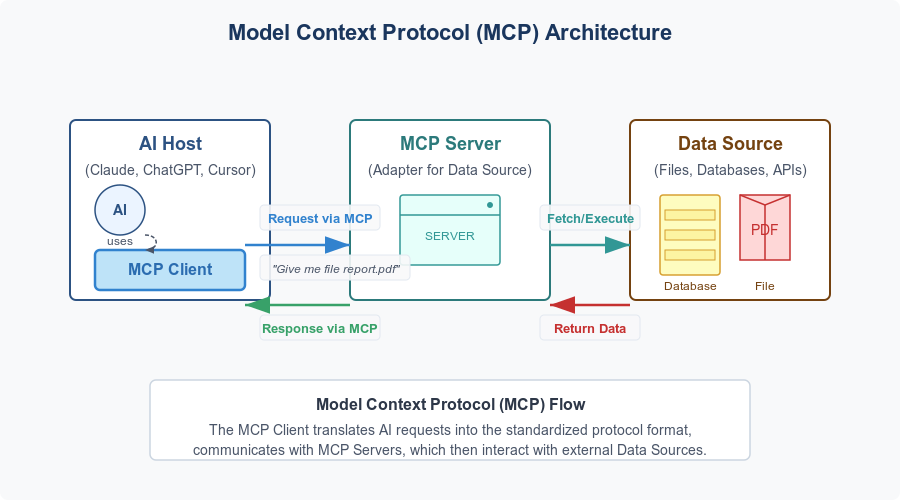
Architecture Overview
MCP is built on a clean three-layer model:
| Layer | Role | Example |
|---|---|---|
| Host | The environment where you talk to the AI | Claude Desktop, Cursor, VS Code, Claude Code |
| Client | Manages connections to MCP servers | The MCP layer inside Claude Desktop |
| Server | Exposes tools and data via the MCP protocol | GitHub MCP Server, Notion MCP Server |
Servers expose capabilities in three forms:
- Tools — executable functions (
create_issue,query_database,send_email) - Resources — read-only data pulled in as context (project docs, database schemas, file contents)
- Prompts — pre-built templates for specific workflows
The protocol runs over JSON-RPC 2.0, borrowing message-flow ideas from the Language Server Protocol — the same standard that made IDE intelligence interoperable across editors. MCP applies that same pattern to AI-to-tool communication.
The current MCP spec (updated November 2025) added async operation support, stateless Streamable HTTP transport, OAuth 2.1 authorization, server-side .well-known URL discovery, and structured tool annotations that describe whether a tool is read-only or can modify data. These additions matter for enterprise deployments where permission scoping and horizontal scaling are non-negotiable.
Real-World Analogy
Before USB-C, every device needed its own cable: Lightning for iPhones, micro-USB for Android, proprietary connectors for cameras. MCP does the same thing for AI integrations — one universal connector that works across every tool and every AI client.
The analogy matters because it clarifies what MCP isn't: it isn't a product, a platform, or a marketplace. It's a specification. Like USB-C didn't change what your devices can do, MCP doesn't change what Claude can reason about — it changes what Claude can reach.
MCP vs Other AI Integration Methods
| Method | Setup | Reusability | Maintenance | Security Model |
|---|---|---|---|---|
| Custom API integration | High — code per tool | None — app-specific | High — breaks on API changes | Ad hoc |
| OpenAI function calling | Medium | None — vendor-specific | Medium | Varies |
| MCP servers | Low — standardized install | High — works across all MCP clients | Low — maintained by tool owners | OAuth 2.1, standardized scoping |
| LangChain/custom agents | High | Low | High | Ad hoc |
The key column is Reusability. A GitHub MCP server built by GitHub works in Claude, ChatGPT Desktop, Cursor, VS Code, Copilot, and any other MCP-compatible client. You build it once; everyone benefits.
This is why the protocol achieved cross-industry adoption so quickly. In March 2025, OpenAI officially adopted MCP across its Agents SDK, Responses API, and ChatGPT Desktop — a significant signal that MCP was not an Anthropic-only bet. Google DeepMind's adoption followed in April 2025, with The Verge reporting that MCP addresses "growing demand for AI agents that are contextually aware."
The numbers tell the rest of the story. In one year, MCP became one of the fastest-growing open-source projects in AI: over 97 million monthly SDK downloads, 10,000 active servers, and first-class client support across Claude, ChatGPT, Cursor, Gemini, Microsoft Copilot, Visual Studio Code, and many more.
Best MCP Servers in 2026

The ecosystem now has thousands of servers. Here's where to start, organized by use case.
By Category: Productivity / Dev / Data
Productivity
| Server | What It Does | Best First Task | Official? |
|---|---|---|---|
| GitHub | Repos, issues, PRs, CI/CD | "List open bugs in my repo, show last modified date" | ✅ GitHub |
| Google Drive | Read, search, use Drive files as context | "Summarize the Q2 roadmap doc" | ✅ Anthropic |
| Notion | Read pages, databases, tasks in real time | "What tasks are assigned to me this week?" | ✅ Notion |
| Slack | Access channel threads, metadata, workflows | "Summarize the #eng-alerts channel from today" | ✅ Slack |
| Asana / Linear | Task management, project boards | "Create a ticket: fix login timeout, assign to me" | ✅ Both |
For Developers
Filesystem — Local file access with explicit permission gates. Claude can read, write, search, and organize files. Essential for any project where you don't want to copy-paste file contents into the chat. Install: npx @modelcontextprotocol/server-filesystem ~/Projects
GitHub MCP Server — Not just issue management. The official GitHub MCP Server covers repository operations, PR automation, branch management, code search, CI/CD monitoring, Dependabot alerts, and security findings. It's the single highest-ROI server for any engineer.
# Remote (recommended, requires Claude Code)
claude mcp add --transport http github https://api.githubcopilot.com/mcp/

# Local (works everywhere)
claude mcp add --transport stdio github -- npx -y @github/mcp-server
E2B — Gives Claude a secure cloud sandbox to actually run code. Ask Claude to write a data processing script and E2B can execute it, check the output, and iterate — all inside an isolated environment with zero risk to your local machine or production systems. Critical difference from every other code-generation flow.
Sentry — Connect Claude to your error tracking. Ask "what's causing the most 500 errors this week?" and get a real answer from your actual Sentry data, not a generic debugging lecture.
Stripe — The official Stripe MCP server (built by Stripe) exposes customer management, payment links, invoices, subscriptions, balance, and disputes. For anyone building payment features, this closes the loop between Claude and the actual payment data.
For Data
PostgreSQL / Supabase — Query your database in natural language, explore schema, debug data issues, write and validate migrations. Supabase's MCP server is Row Level Security-aware, meaning Claude operates within your existing auth model rather than bypassing it.
Prisma — Built directly into the Prisma CLI (npx prisma mcp). For TypeScript teams, this is the most direct path to having Claude understand your schema and manage migrations.
Chroma — Vector database MCP server for semantic search and document retrieval. If you're building RAG pipelines or need Claude to recall semantically similar documents across large corpora, Chroma is the go-to.
For discovery beyond this list, the official MCP Registry on GitHub is the canonical source. PulseMCP and Glama.ai add community curation layers with quality signals and usage data.
How to Use MCP with Claude
Step-by-Step
What you need first:
- Claude Desktop (latest) or Claude Code
- Node.js 18+ (
node --versionto check) - An Anthropic account — all Claude.ai plans support MCP
Option A: Claude Desktop (no terminal required)
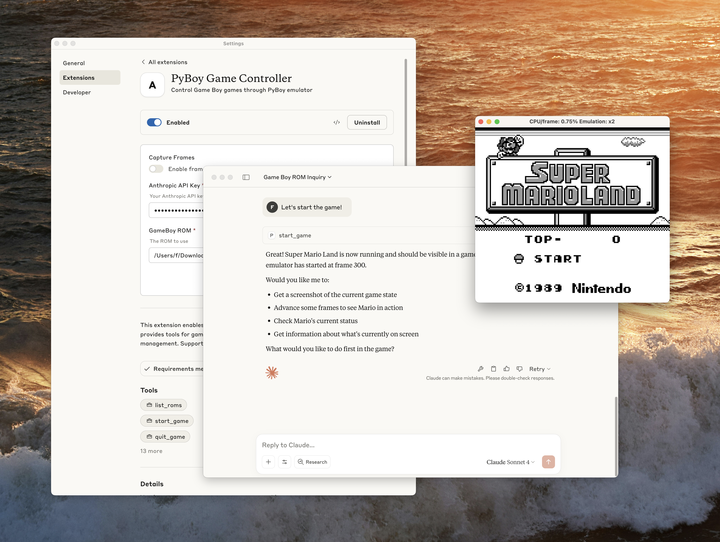
Desktop Extensions make this as easy as installing a browser extension.
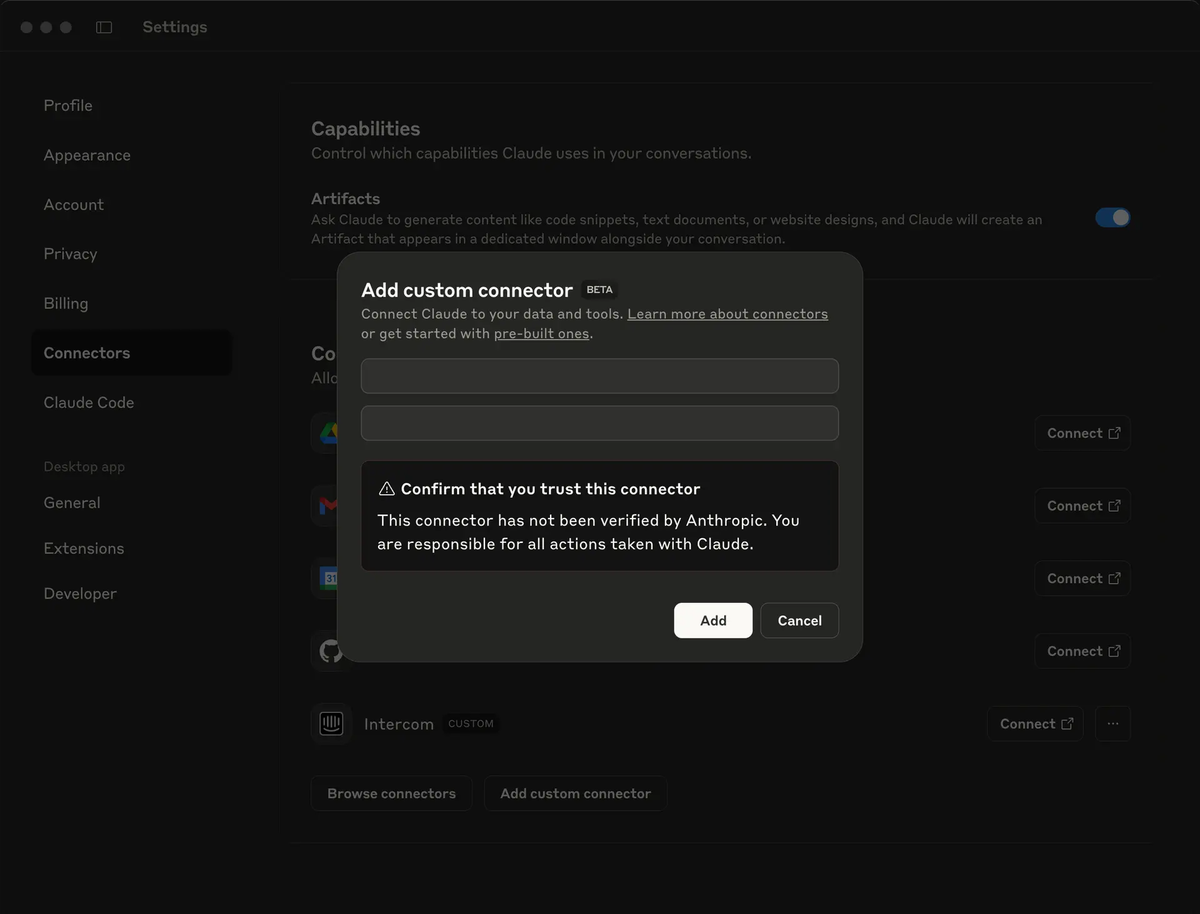
- Open Claude Desktop → Settings → Extensions → Browse Extensions
- Click any server you want — the built-in Node.js runtime handles all dependencies automatically
- Restart Claude Desktop
- Look for the
+button in the chat input → click Connectors to confirm your servers are live - Test with a real prompt: "List the last 5 issues in my GitHub repo"
Option B: Claude Code (terminal, full control)
# Add a remote server (HTTP — recommended for cloud services)
claude mcp add --transport http github https://api.githubcopilot.com/mcp/

# Add a local server (stdio — for local tools and scripts)
claude mcp add --transport stdio filesystem -- npx -y @modelcontextprotocol/server-filesystem ~/Projects

# Add shared team config (stored in .mcp.json, commit to repo)
claude mcp add --scope project --transport http asana https://mcp.asana.com/sse

# Check what's connected
claude mcp list

# Verify inside a session
/mcp
Claude Code supports three scope levels: local (current project, not committed), project (shared with teammates via .mcp.json), and user (available across all your projects).
Windows users: Local servers using npx require the cmd /c wrapper on native Windows:
claude mcp add --transport stdio my-server -- cmd /c npx -y @some/packageOne security rule that matters: Start every new server in read-only mode. Grant write access only after you've seen how Claude uses the tools in practice. Use dedicated API keys with minimum required permissions — never reuse production credentials for MCP connections.
The Future of MCP
MCP's governance move in December 2025 is the most significant signal about its trajectory. Anthropic donated MCP to the Agentic AI Foundation (AAIF), a directed fund under the Linux Foundation, co-founded by Anthropic, Block and OpenAI, with support from other companies. AWS, Google, Microsoft, Cloudflare, and Bloomberg joined as supporting members.
This is infrastructure governance — the same model that made HTTP, Linux, and the Language Server Protocol durable foundations. MCP is no longer dependent on any single company's roadmap.
The official MCP roadmap points to five near-term improvements: async operations for long-running tasks (no more blocking on minutes-long jobs), enterprise-scale stateless deployments, .well-known URL discovery so clients can browse server capabilities without connecting first, domain-specific protocol extensions for industries like healthcare and finance, and agent-to-agent communication standards for multi-agent workflows.
One pattern worth watching: Cloudflare's "Code Mode" — where agents write code to discover and call tools on demand rather than loading all tool definitions upfront — is delivering 98%+ token savings in some deployments. As context windows get more expensive to fill, on-demand tool discovery will matter more, not less.
OpenAI's decision to adopt MCP was accompanied by the announcement of the deprecation of the Assistants API, scheduled for sunset in mid-2026, compelling the entire developer ecosystem to migrate toward MCP-based architectures. That migration is already underway.
The trajectory is clear: MCP is the plumbing layer for agentic AI. The question is no longer whether to adopt it, but which servers to prioritize and how to govern access securely in your environment.
FAQs
Q: Is MCP only for Claude? No. MCP is a vendor-neutral open standard. Following its announcement, OpenAI, Google DeepMind, Microsoft, and hundreds of developer tools adopted it. Any MCP-compatible client — Claude, ChatGPT Desktop, Cursor, GitHub Copilot, Gemini, VS Code — can connect to any MCP server. That interoperability is the point.
Q: Do I need to code to use MCP? Not anymore. Claude Desktop's Extensions directory installs servers with a single click, handling all dependencies automatically. The terminal approach gives you more control, but it's not required to get started.
Q: Is it safe to give Claude access to my tools? All actions require explicit approval before execution, and you control which servers are connected. That said, use official servers from established providers, scope your API credentials tightly, and be cautious with community servers that could return untrusted web content — these can be vectors for prompt injection. Start read-only, verify behavior, then grant write access.
Q: What's the difference between MCP Tools, Resources, and Prompts? Tools are executable functions Claude can call (create an issue, run a query, send a message). Resources are read-only data pulled in as context (your docs, your schema, your file contents). Prompts are pre-built workflow templates. Most servers you'll use expose primarily Tools.
Q: How does MCP relate to RAG? They're complementary, not competing. RAG (Retrieval-Augmented Generation) is a technique for injecting relevant documents into context before the model responds. MCP provides the mechanism for retrieving and acting on that data — including from vector databases like Chroma or Pinecone that power RAG pipelines. MCP is the transport layer; RAG is an architectural pattern you can implement over it.
Q: Can I build my own MCP server? Yes. SDKs are available in Python, TypeScript, C#, Java, Kotlin, Ruby, and PHP. The official quickstart on modelcontextprotocol.io walks through building a working server in under an hour. If you have an internal tool, database, or API you want Claude to work with directly, a custom server is often the most direct path.
Q: What does Linux Foundation governance mean for MCP long-term? It means the protocol's development is community-driven, not controlled by Anthropic or any single vendor. Governance operates through Specification Enhancement Proposals (SEPs) and working groups — similar to how HTTP and the Linux kernel evolve. Corporate members have seats at the table; no single company can redirect the standard unilaterally.
Start with One MCP Server Today
Here's my honest recommendation: don't try to set up ten servers at once. Pick one that addresses a real friction point in your daily work, get it running, and build one habit around it before adding more.
For developers: start with GitHub. Ask Claude to summarize your open PRs or list recent bug reports. Notice what it's like when Claude isn't working from a description you typed — it's working from the actual data.
For everyone else: start with Google Drive or Notion. Ask Claude to summarize a document you've been meaning to read. That first moment where the AI actually opens something you didn't copy-paste — that's when MCP stops being abstract.
Start exploring: Download Claude Desktop, open Extensions, and connect your first server. Or head to the MCP server registry on GitHub to browse what's available for your specific stack.
