
It's tempting to read "Pro vs Turbo" as "complex work vs fast everyday coding" and route your tasks accordingly. Resist that — it's an assumption the names invite but the official release doesn't confirm. What ByteDance has actually established about Seed2.1 Pro and Turbo is narrower than the naming suggests, and choosing between them on the label rather than on evidence is how teams end up paying for the wrong variant. A wider ranking of tools in this category is available under Best Code Generators. This guide builds a selection framework the honest way: from what's officially confirmed, plus controlled tests you run yourself, rather than from a product-division story the vendor hasn't actually told. Here's how to decide which fits your workflow.
Model details and any figures below are ByteDance/Volcano Engine vendor-reported information as of June 2026; pricing, latency, context, regional availability, and API specifics need verification against current official docs before you decide. Confirm everything against the official ByteDance Seed site and the official Volcano Engine platform docs before relying on it.
What ByteDance Confirms About Pro and Turbo
Two differently sized models in the same family
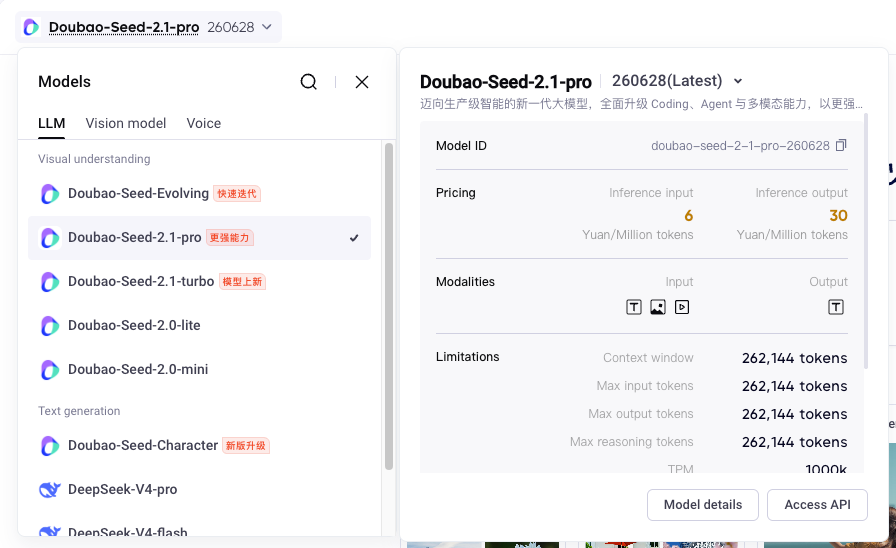
What's officially established is straightforward: Seed2.1 (released June 23, 2026) ships in two main coding-relevant variants. Doubao-Seed-2.1-Pro is described as the flagship "deep thinking" model; Doubao-Seed-2.1-Turbo is described as a lower-cost, lower-latency variant for large-scale production that ByteDance says has complete features with performance approaching Pro. That's the confirmed core: two differently-positioned models in one family, with Turbo framed as the more economical, faster-responding option and Pro as the flagship.
Notice what that does and doesn't say. It establishes a cost/latency difference (Turbo cheaper and faster) and a flagship/efficient framing. It does not officially establish a clean "Pro for complex tasks, Turbo for simple ones" division of labor — in fact, ByteDance's own framing that Turbo has "performance approaching Pro" cuts against assuming Turbo is meaningfully weaker. So the confirmed facts are the positioning and the cost/latency direction, not a task-type split you can route by.
What the official release does not yet establish
Several things you'd want for a confident choice are not pinned down by the public release and need verification against current official documentation: the exact pricing of each variant, their precise latency characteristics, their context-window sizes, regional availability, API access terms, and how you switch between them. The launch framing gives directions (Turbo cheaper/faster) but not the specific numbers a real cost or capacity decision requires.
Treat all of those as "verify before deciding." The naming and positioning tell you ByteDance's intent; they don't tell you the concrete operating parameters, and they especially don't license inferring a capability boundary from the names. "Pro" and "Turbo" are product labels, not measured capability tiers — the actual difference on your work is something the official release leaves for you to determine, which is exactly what the framework below is for.
A Developer-Focused Comparison Framework
Rather than accept a label-based split, compare the variants along the dimensions that actually matter for coding work — and treat each as a question to answer with evidence, not a foregone conclusion.
Long-horizon planning and coordinated code changes

The first dimension: how each variant handles long, multi-step tasks that require planning and coordinated changes across files. Pro's "deep thinking" framing suggests it's built for this, but "suggests" is the operative word — whether Pro's planning is actually better than Turbo's on your kind of long-horizon task, and by enough to justify its cost and latency, is something you measure rather than assume. Turbo's "approaching Pro" framing means you can't presume it falls down here. Test both on a genuinely long, multi-file task and compare the coherence of the plan and the changes.
Tool use, terminal work, and debugging recovery
The second dimension: agentic behavior — calling tools, working in a terminal, and recovering when something fails. This is where a lot of real coding-agent value lives, and it's distinct from raw code generation. Compare how each variant uses tools in your harness, how it handles terminal tasks, and critically how it recovers from a failed action (does it diagnose and adapt, or loop?). Recovery behavior often separates variants more than happy-path generation does, and it's invisible unless you deliberately test failure.
Response behavior, access, and operational constraints
The third dimension is operational: latency, cost, access, and the constraints of running each in production. Turbo is positioned as faster and cheaper, which matters enormously for high-volume or latency-sensitive workloads — but the magnitude of the difference, and whether Turbo's responses meet your quality bar at that speed, are things to confirm. The operational fit (can you afford Pro at your volume? does Turbo's latency meet your interactive needs?) is often the deciding factor, and it depends on numbers you need to verify rather than the positioning language.
How to Read the Official Evaluation Results
Coding tasks where Pro reports stronger results
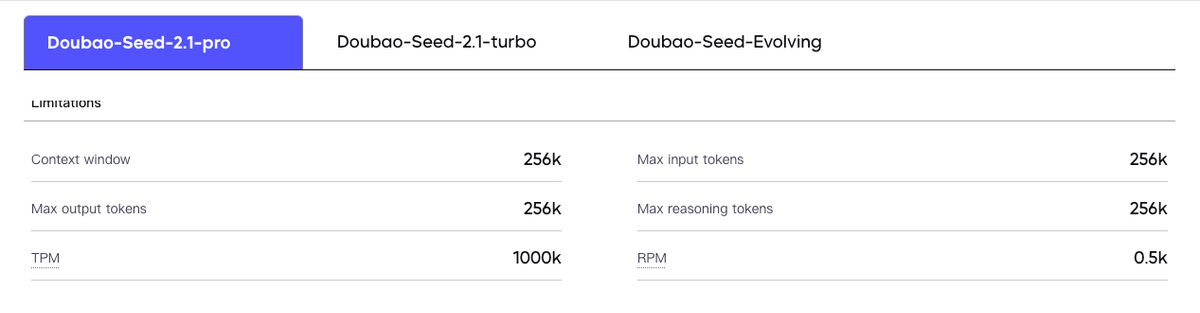
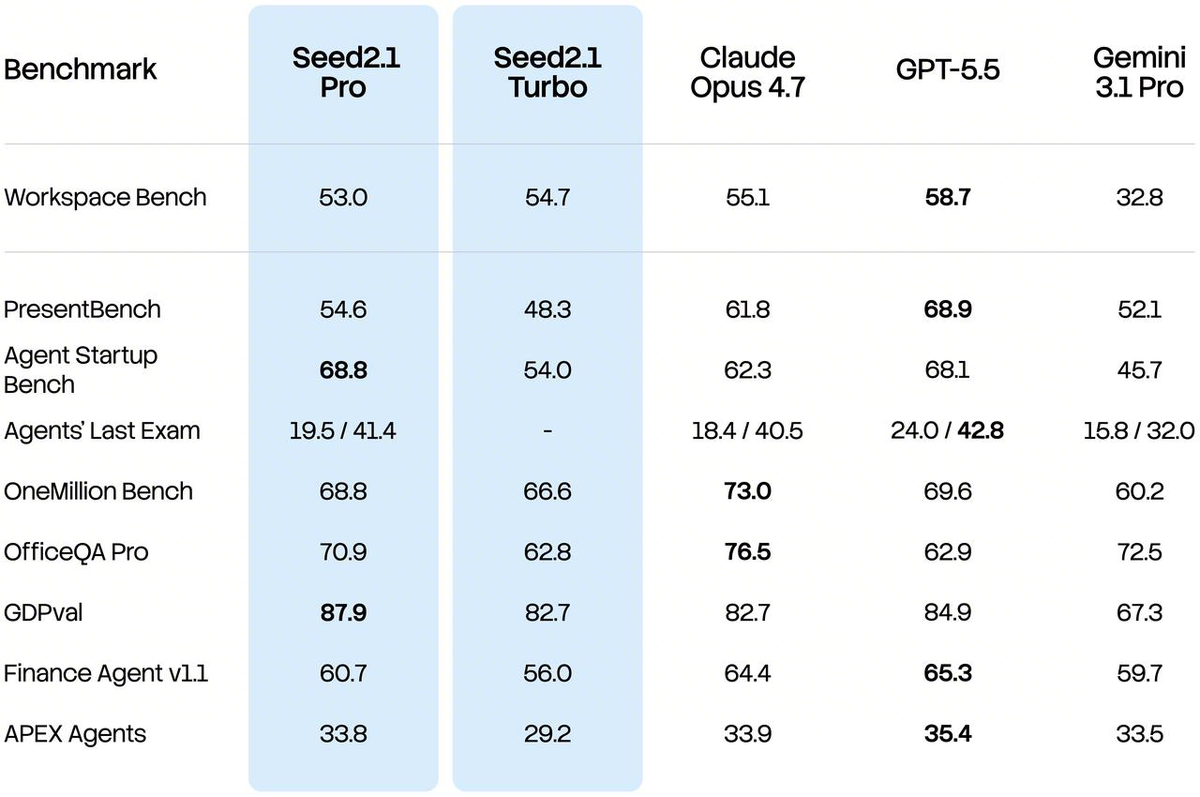
ByteDance reports benchmark results for Seed2.1 (top-tier placements on coding and agent evaluations), and where the reporting distinguishes Pro, it positions Pro as the stronger model on the hardest tasks. Read these as vendor-reported figures as of the publication date — they come from ByteDance's own evaluation under conditions it chose, not from independent verification. A Pro advantage in the vendor's benchmarks is a signal that Pro may lead on demanding tasks, not a measured guarantee that it leads on yours.
Tasks where Turbo remains competitive
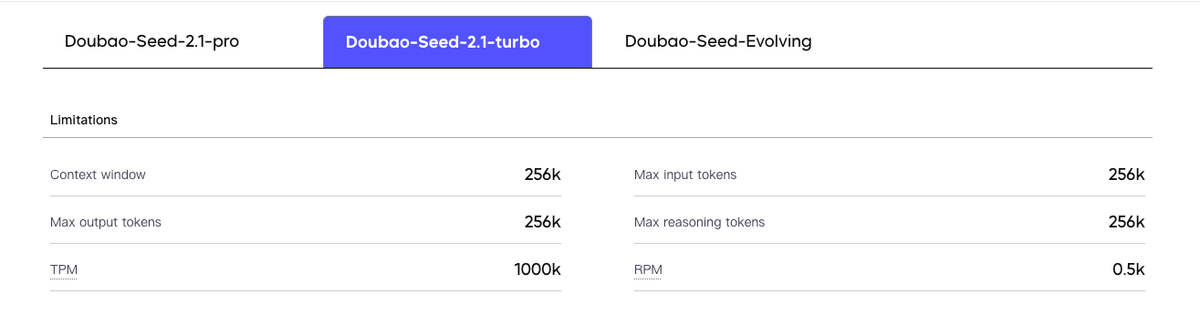
The flip side, also from the vendor's framing: Turbo is described as having "performance approaching Pro," which implies it stays competitive on a wide range of tasks while costing less and responding faster. Again, vendor-reported and as of publication — but the relevant takeaway is that the official framing itself doesn't paint Turbo as a weak sibling. If Turbo genuinely approaches Pro's performance on much of the work while being cheaper and faster, the routing question becomes "where does Pro's advantage actually justify its cost?" rather than "Pro for everything important." That's a question only your own testing answers.
Why benchmark tables cannot choose a workflow for you
The fundamental limit: a benchmark table measures performance on the benchmark's tasks under the vendor's conditions, which is not your workflow. Your codebase, languages, conventions, task distribution, harness, and quality bar all differ from the benchmark setup. So even a complete, honest benchmark comparison between Pro and Turbo can't tell you which fits your work — it can suggest where each is strong, but the decision depends on how they perform on your tasks at your cost and latency constraints. Use the vendor's results to form hypotheses about where each variant fits; use your own controlled tests to actually decide.
Test Both Variants in the Same Agent Harness
Keep repositories, prompts, tools, and approval gates consistent
The only comparison that decides it is a controlled one: run both variants through the identical setup and change nothing but the model. Same repository (or the same set of representative tasks), same prompts, same tools available, same harness, same approval gates. If you vary the harness between the two, you're no longer comparing Pro to Turbo — you're comparing two different systems, and the result tells you nothing clean about the models.
Hold everything constant except the model ID. This is the discipline that makes the comparison valid: any difference in outcome is then attributable to the variant, not to an incidental difference in how you ran them. Document the fixed configuration so the comparison is reproducible and so a later re-test (after a model update) measures the same thing.
Compare correction cycles, test recovery, and review burden
With the harness held constant, measure the things that actually predict your experience: how many correction cycles each variant needs to complete a task (fewer is cheaper in both time and tokens), how each recovers when tests fail, and how much human review burden each imposes (how much you have to fix before its output is mergeable). These operational measures often matter more than a benchmark score — a variant that's nominally strong but needs heavy correction on your tasks costs more than its headline suggests. Measure the full cost-per-completed-task, including the corrections, not just whether it eventually produces something.
Build a Task-Routing Policy
Use task risk and failure cost as routing criteria
Once your testing shows where each variant earns its place, route by task characteristics rather than by the model names. Useful routing criteria are risk and failure cost: high-stakes work where a mistake is expensive may justify the more capable (or more thoroughly-validated) variant regardless of cost, while high-volume low-stakes work may route to the cheaper, faster option where its quality is sufficient. The point is to route on properties of the task (how much a failure costs, how much latency matters, how complex the work is) that your testing has mapped to each variant's actual strengths — not on the assumption that "Pro = important, Turbo = routine."
Keep validation gates independent of model selection
Whatever you route where, keep your validation independent of which model produced the output. The tests, the review gates, the acceptance criteria should be the same regardless of whether Pro or Turbo did the work — because validation that varies by model lets a "trusted" model's output skip scrutiny it shouldn't. This separation (model selection is one decision, validation is another) is the discipline that workflow tools like Verdent build in by keeping the verification layer — independent tests, diff review, approval gates — separate from model choice, so the bar a change must clear doesn't depend on which model wrote it. Route by model; validate by a standard that doesn't move.
Define fallback behavior before deployment
Before you deploy a routing policy, decide what happens when the chosen variant fails or is unavailable. If Turbo can't complete a task to your bar, does it escalate to Pro? If a variant is rate-limited or down, what's the fallback? Defining this upfront prevents a failed routing decision from becoming a stuck workflow. A routing policy isn't just "which model for which task" — it's also "what happens when that choice doesn't work," and the fallback path is what keeps the system robust when reality diverges from the plan.
FAQ
What cost and access details require verification before choosing either variant?
The specifics that drive the decision, none of which you should assume from the positioning: the exact per-token pricing of Pro and Turbo (including any cache-hit or volume discounts), their latency under your load, their context-window sizes, the regions where each is available, the API access terms and rate limits, and the mechanism for switching or routing across them. These are the operating parameters a real cost and capacity decision needs, and they're exactly the kind of detail subject to change — so confirm each against the official Volcano Engine documentation for your situation before committing, rather than inferring from the launch framing. The names won't give you these numbers; the official docs will.
What operational overhead comes from running both variants together?
Running two variants adds coordination cost you should weigh against the benefit: a routing layer that decides which variant handles each task (and maintaining its logic as you learn), monitoring that tracks each variant's cost and performance separately, the fallback handling for when a routing choice fails, and the testing to keep your routing policy current as the models update. There's also the simpler cognitive overhead of reasoning about two models instead of one. The benefit (using the cheaper variant where it suffices, the stronger where it's needed) has to outweigh this overhead — for some teams a single variant everywhere is operationally simpler and worth the cost trade-off. Decide whether the routing savings justify the routing complexity for your scale, not just whether routing is possible.
When should neither variant receive direct repository write access?
When the work hasn't earned that trust yet, regardless of which variant it is. Keep either variant read-only — analyzing and proposing rather than writing and executing — until it has demonstrated, in your controlled tests, that it understands your codebase and produces sound changes you'd accept. High-stakes paths (security-sensitive code, production infrastructure, anything where a bad autonomous change is expensive) warrant keeping write access gated behind human approval indefinitely, for either variant. The model's capability tier doesn't change this: a more capable variant with unsupervised write access to critical code is still an unreviewed-change risk. Grant write access based on demonstrated reliability on your work and the stakes of the specific code, not on which variant it is.
What evidence should trigger a change in model-routing policy?
Treat the routing policy as something you revise on evidence, not set once. The signals that should trigger a re-evaluation: a shift in either variant's cost or performance (including a model update that changes behavior), a rise in correction cycles or review burden for tasks routed to a given variant (suggesting the routing no longer fits), a change in your own task distribution or quality requirements, or a fallback path firing often enough to indicate the primary routing is wrong. The principle is that a routing policy reflects what was true when you set it, and both the models and your workload change — so periodically re-run your controlled comparison and adjust. A policy that's never revisited silently drifts from optimal as the inputs shift underneath it.
Conclusion
Choosing between Seed2.1 Pro and Turbo isn't a matter of reading the names: the official release confirms two differently-positioned variants (Turbo cheaper and faster, Pro the flagship) but not a clean "complex vs simple" division you can route by — and ByteDance's own "Turbo approaches Pro" framing actively warns against assuming Turbo is the weaker choice. So build the decision on evidence: verify the cost, latency, context, and access details the launch framing leaves open; read the vendor's benchmarks as directional, not as a verdict; and run both variants through an identical harness on your own representative tasks, measuring correction cycles and review burden rather than headline scores. Then route by task risk and failure cost, keep validation independent of which variant ran, and define fallback before you deploy. Decide on what you measure, not on what the labels imply — that's the difference between a routing policy that fits your work and one that just trusts a product name.
Related Reading
- Seed2.1 for Coding Agents: Can It Deliver Software End to End?
- What Is SWE-bench? A Builder's Guide to Coding Agent Benchmarks
- What Is GLM-5.2? A Developer's Guide to Z.ai's Coding Model
- MiniMax M3 for Coding Agents: What Builders Should Know
- Agentic Engineering Patterns: Real Workflows for Dev Teams in 2026
