
Three weeks ago I was manually tracking which files to feed Claude Code in a session working across a 200K+ line backend service. Context budget anxiety — deciding what to exclude so I wouldn't blow the window mid-refactor — was genuinely part of the job. That calculation changed when Anthropic made the 1M context window generally available for Opus 4.6 and Sonnet 4.6. But "5x bigger window" is a reductive framing of what actually changed, and it glosses over real limits that will bite you if you don't understand them. Here's what it actually changes for large codebase work — and where you'll still hit walls.
What the 1M Token Context Window Actually Means
How It Differs from the Standard 200K Window
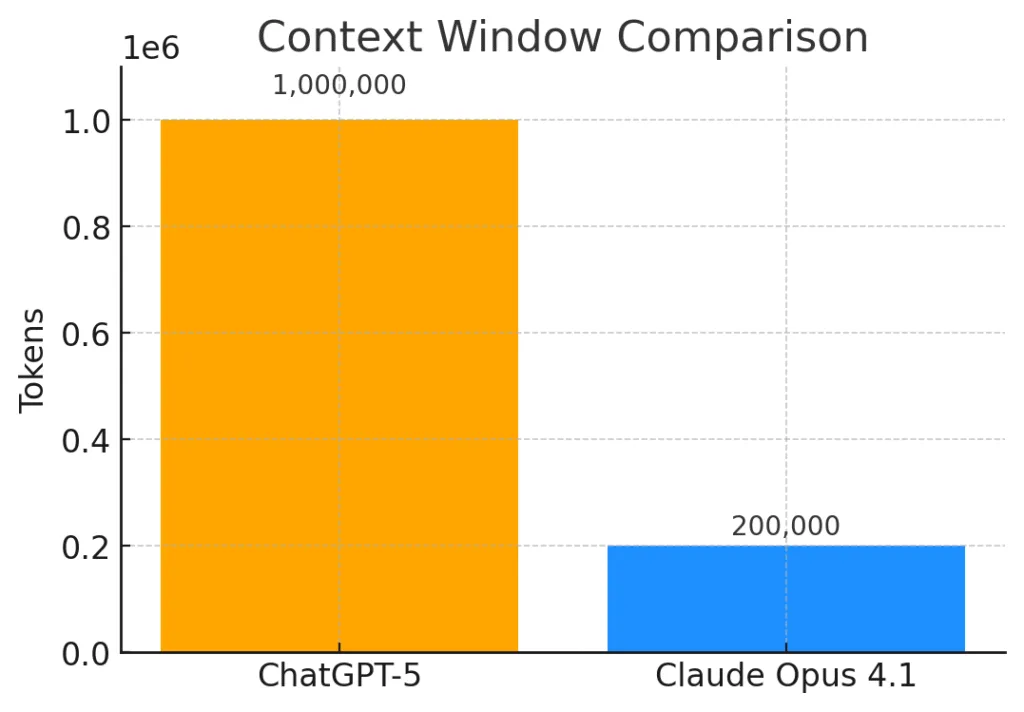
The 200K window was the default for Opus 4.5 and most previous Claude models. In a Claude Code session, that context fills faster than you'd expect: every file Claude reads, every tool call result, every iteration of generated code, every message in the conversation — all of it accumulates. A real debugging session working across 15 files with multiple test runs could burn 100K+ tokens in under 30 minutes.
The 1M window is a 5x expansion of that working memory. Practically, you have roughly 830K usable tokens after Claude Code's auto-compaction buffer (~33K reserved) and the ~83.5% usage threshold before compaction triggers. That's the operating envelope. At this scale, you can hold entire medium-sized monorepos, full documentation sets alongside the code they describe, and hundreds of tool call traces — simultaneously, without manually managing which files are loaded.
Anthropic CPO Jon Bell put a concrete number on the operational impact: a 15% decrease in compaction events since the 1M window shipped, measured across real Claude Code usage. Fewer compactions mean fewer moments where the agent loses the nuance of what it has been working on.
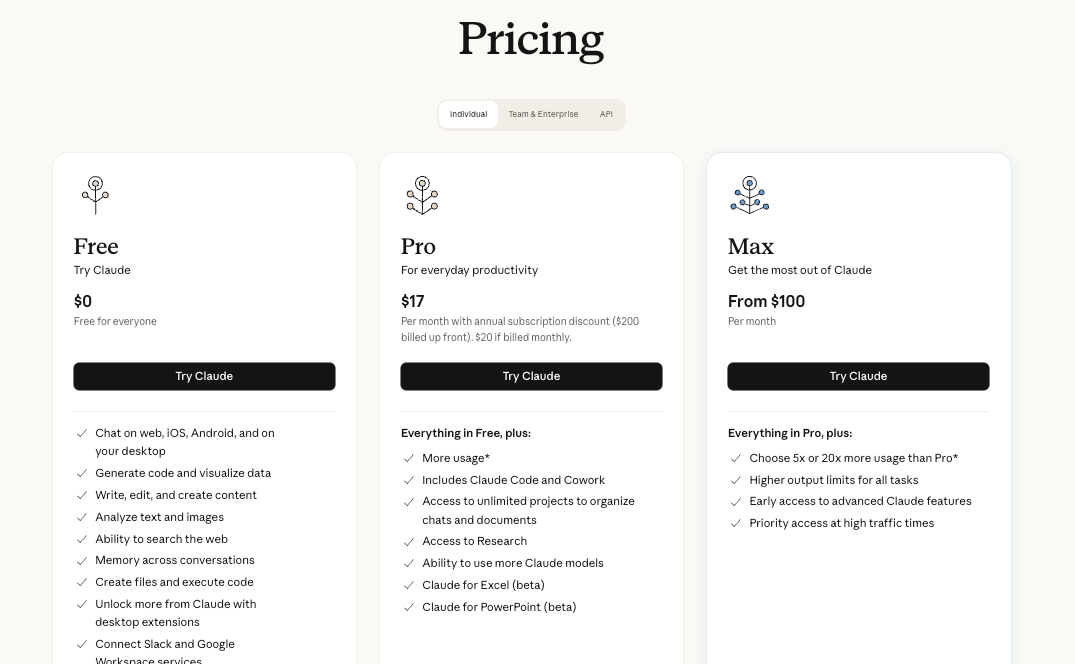
Which Plans Include It (Max, Team, Enterprise — Not Automatically on Pro)
This is the most important thing to get right before anything else. Per Anthropic's official Claude Code documentation:
| Plan | 1M Context in Claude Code | How to Access |
|---|---|---|
| Max (5x and 20x) | ✅ Included, automatic | Default with Opus 4.6, no config needed |
| Team (Standard and Premium) | ✅ Included, automatic | Default with Opus 4.6, no config needed |
| Enterprise | ✅ Included (note: 500K cap for some specific model configs) | Default with Opus 4.6, no config needed |
| Pro | ⚠️ Opt-in only | Type /extra-usage in Claude Code to enable; not on by default |
| Free | ❌ Not available | — |
Pro users get access, but it's not automatic. If you're on Pro and wondering why your context shows 200K, you need to explicitly opt in via /extra-usage. This distinction is the source of most confused "it's not working for me" reports.
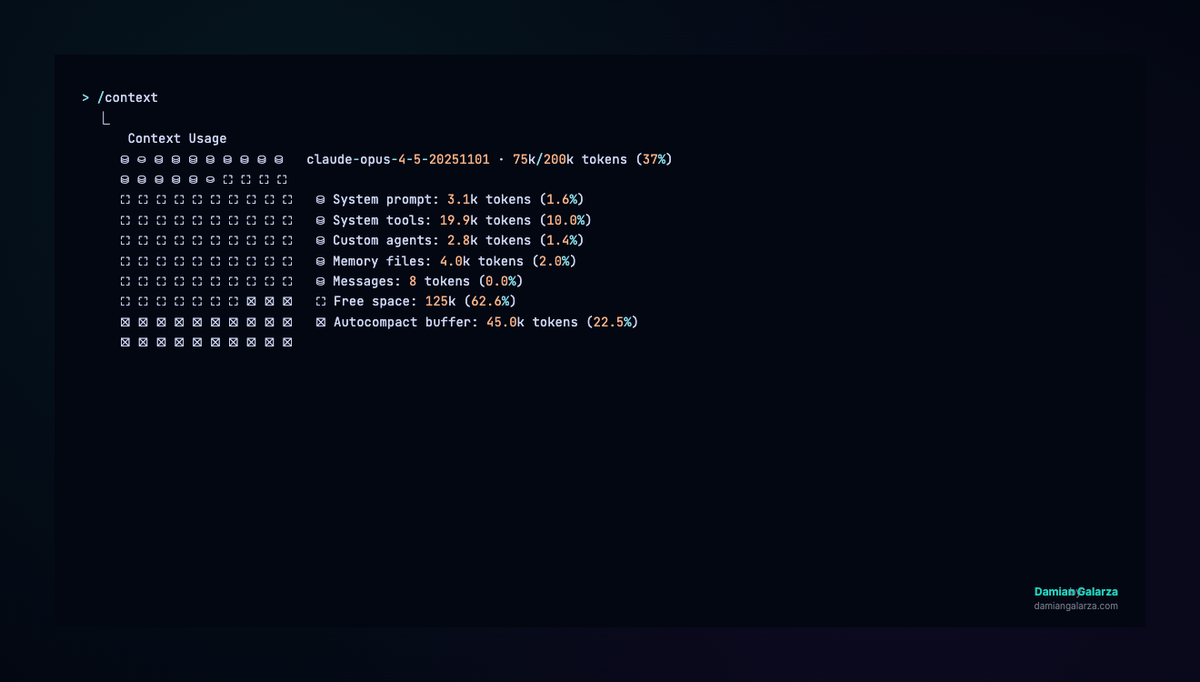
To verify your active context window in any session: run /context — it will show Xk/1000k tokens if 1M is active, or Xk/200k if it's not.
What Model Powers It (Opus 4.6, 64K Output Tokens)
The 1M window is currently available on Opus 4.6 and Sonnet 4.6. Other models, including Sonnet 4.5 and Sonnet 4, retain a 200K window — and Anthropic is retiring the 1M beta for those older models on April 30, 2026. If you're on those models via the API, migrate to Sonnet 4.6 or Opus 4.6.
One spec worth knowing: Opus 4.6 has a 64K output token limit, while Sonnet 4.6 supports up to 32K standard output (with 300K possible via a beta header on the Batches API as of March 2026). For most Claude Code sessions, output limits aren't the bottleneck — input context is. But for large single-turn generation tasks, it matters.
What Changes for Large Codebase Work
Full Repo Ingestion Without Chunking — What's Actually Feasible
At 1M tokens, you're looking at roughly 750,000 words of content — a mid-sized monorepo, all its documentation, and room for a long agent session on top. The practical shift: Claude can simultaneously see your API layer and the frontend consuming it, the database migration and the schema it modifies, the test suite and the implementation under test. Cross-file reasoning that previously required manually loading files in sequence can now happen in a single, coherent context.
Rough size estimates for reference:
- 50K tokens ≈ a single large service with documentation
- 200K tokens ≈ a full-stack app with tests
- 500K tokens ≈ a medium monorepo (core services, not generated output)
- 830K usable tokens ≈ where you're genuinely at the edge
The key caveat: these are estimates assuming clean TypeScript/Python source. Verbose codebases (Java with annotations, generated protobuf files, deeply nested XML configs) tokenize significantly less efficiently.
Cross-File Refactoring and Dependency Tracing at Scale
This is where the 1M window earns its keep. Tracing a type change through a large TypeScript codebase — following it from the type definition through every consumer, mock, test fixture, and serializer — is exactly the kind of work that used to require either multiple sessions or a RAG pipeline to manage. With 1M context, Claude can hold the entire dependency graph in view for a medium-sized service and reason across it without losing thread.
The same applies to framework migrations (React 18 → 19 across hundreds of components), API contract changes (updating a protobuf definition and finding every client that needs updating), and security audits across a full codebase. These are tasks where the context window was the limiting factor before, not the model's reasoning ability.
When Long Context Replaces the Need for RAG
Retrieval-augmented generation (RAG) pipelines exist largely because LLMs couldn't hold enough context to work with large document sets directly. The 1M window doesn't eliminate RAG, but it does change the calculus for specific use cases.
Where 1M context replaces RAG:
- Static codebases you need to reason across holistically (the entire context fits in one session)
- Single-session deep analysis where you need the full picture simultaneously, not recall from indexed chunks
- Debugging sessions where losing intermediate context is costly
Where RAG still wins:
- Codebases larger than ~830K usable tokens
- Multi-session workflows where you need persistent retrieval across restarts
- Frequently updated codebases where freshness matters more than holistic reasoning
- High-frequency query patterns where indexing amortizes cost
The decision point is roughly: if your codebase fits in 830K tokens and you need holistic reasoning, load it directly. If it doesn't fit, or if you need persistence across sessions, RAG is still the right architecture.
Real Constraints to Know Before You Rely on It
Needle-in-Haystack Degradation Beyond ~400–600K Tokens
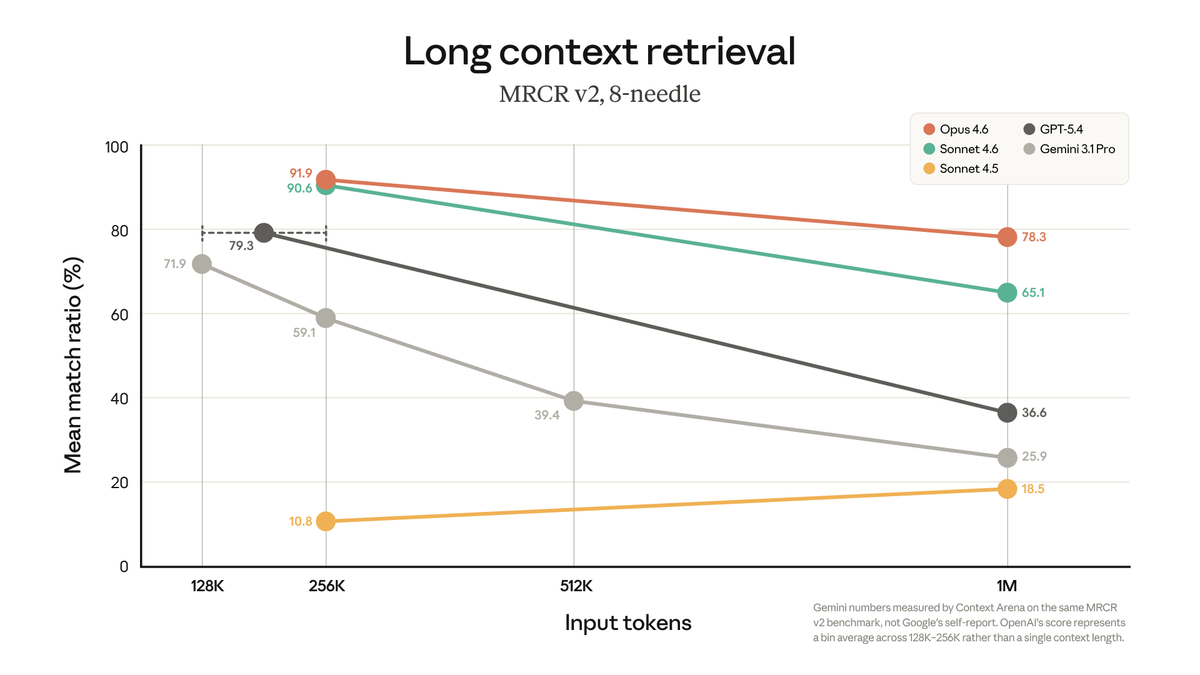
The 1M window is real. The degradation at high token counts is also real. Anthropic's own MRCR v2 benchmark — an 8-needle retrieval test at 1M tokens — shows Opus 4.6 at 78.3% accuracy. That's industry-leading. But it also means roughly 1 in 5 multi-needle retrievals fails on a controlled synthetic benchmark.
Independent testing by developers in real coding sessions found degradation beginning measurably around 400K tokens, with retrieval becoming unreliable past 600K on Sonnet 4.6. Opus 4.6 performs meaningfully better, but engineering teams working with the 1M window have reported that instruction adherence degraded even within what they expected to be the "safe zone" — the model would ignore design documents or misunderstand instructions that had worked reliably at 200K. Anthropic's own context windows documentation acknowledges this: "Studies on needle-in-a-haystack style benchmarking have uncovered the concept of context rot: as the number of tokens in the context window increases, the model's ability to accurately recall information from that context decreases."
A working heuristic from the available data: approximately 2% effectiveness loss per 100K tokens added. This is a rough extrapolation, not a guarantee — degradation is gradual and roughly linear rather than a cliff, but it compounds.
The practical implication: don't load everything you can just because you can. Curate what goes into the context. The window being large enough to hold everything doesn't mean it should.
Cost at Long Context vs Standard Pricing
The pricing structure changed significantly in March 2026: Anthropic removed the long-context premium that previously charged 2x input / 1.5x output for requests exceeding 200K tokens. The 1M window now uses standard per-token rates for Opus 4.6 and Sonnet 4.6.
What this means in practice: a 900K-token session costs the same per token as a 9K one. There's no pricing penalty for using long context. However, you are still paying for every token in the context window on every request. A session that accumulates 800K tokens of context will consume those tokens on every subsequent API call within that session. For plan-based users on Max/Team/Enterprise, usage is covered by subscription — but it burns through your allocation faster than shorter sessions.
For current per-token rates, check Anthropic's official pricing page directly — these numbers move.
Latency Impact on Agent Loops
The first message in a long-context session takes significantly longer to process. At 500K+ tokens of cold context, initial response times of 30+ seconds are reported by users. The good news: prompt caching handles subsequent messages efficiently — as long as the cache stays warm (5-minute TTL, reset on each use). Go AFK for 6 minutes mid-session and the next message at high context will incur the full cold-start penalty again.
For agent loops — where Claude Code is running multiple sequential tool calls — the latency impact is on the initial session load, not on each individual tool call. Once the cache is warm, the loop runs efficiently.
How to Structure Large Prompts for Best Results
Stable Prefix Design for Cache Hits
Prompt caching is your primary cost and latency optimization lever at long context. The cache stores a snapshot of the context at a specific breakpoint and reuses it for subsequent requests — but only if the prefix is identical. Any change to text before the cache breakpoint invalidates it.
The design principle: put stable content (system prompt, project files, documentation) at the top and before any cache breakpoint. Conversational content and dynamic tool outputs go after. A session that has the codebase loaded at the top and conversation appended to the bottom will get cache hits on every turn; one that interleaves dynamic content with the static codebase won't.
File Ordering by Relevance, Not Alphabetically
When loading multiple files into context, the model attends better to content at the beginning and end of the context window than to content buried in the middle. Load the files most critical to the current task first. If you're working on the authentication service, load the auth module, its tests, and its dependencies before the rest of the codebase.
This sounds obvious, but the natural instinct is to load files alphabetically or by directory structure — which puts your most relevant files wherever they happen to fall in that ordering.
What to Exclude (Build Artifacts, Lock Files, Generated Code)
Every token in the context is a token you're paying for and a token that slightly degrades the model's ability to find what it needs. Standard exclusions:
node_modules/,dist/,build/,.next/— never load thesepackage-lock.json,yarn.lock,bun.lockb— high token cost, near-zero reasoning value- Generated protobuf/GraphQL files — load the schema instead
- Test fixtures with large datasets — load the test, not the fixtures
- Binary assets, images, certificates — no useful signal for code tasks
Anthropic's own Claude Code best practices documentation is explicit: context management is the highest-leverage variable in session quality. Curate aggressively.
When 1M Context Is Not Enough (And What to Do)
Scenarios Where Chunking Is Still the Right Call
The 1M window doesn't cover everything. You'll still hit limits with:
- Large monorepos with multiple services — a genuine microservices monorepo with 20 services, each with thousands of files, will exceed 830K usable tokens
- Multi-session workflows — 1M context doesn't persist across sessions; every new session starts from scratch
- Codebase plus runtime data — if you need the codebase and significant log output, database dumps, or API response traces simultaneously, you'll overflow
- Long-running agent sessions — tool call outputs accumulate quickly; a session that runs 50+ tool calls on a large codebase will start approaching limits
For these cases, chunking strategies still apply: break the codebase into logical service boundaries, maintain a summary artifact that persists across sessions (the MEMORY.md pattern Claude Code uses internally), and design your workflow so each session has a scoped, achievable goal.
Multi-Agent Context Splitting as an Alternative
The other architecture for problems that exceed a single 1M window is to distribute the problem across multiple agents, each working with a focused, smaller context window. Instead of one agent holding the entire codebase, a coordinator agent delegates to specialized subagents — one for the auth service, one for the data layer, one for the frontend — each running in an isolated context. The coordinator aggregates their outputs without needing to hold all of their working context simultaneously.
This is the architecture Claude Code's own documentation recommends for research tasks: "Delegate research with 'use subagents to investigate X'. They explore in a separate context, keeping your main conversation clean for implementation." Tools that implement parallel agent execution with isolated worktrees — like Verdent's multi-agent mode — take this pattern further, running multiple specialized agents concurrently with context isolation enforced at the git level, which can be more efficient than a single long-context session for genuinely parallel workstreams.
FAQ
Does 1M Context Cost More?
No — Anthropic removed the long-context pricing premium in March 2026. For Opus 4.6 and Sonnet 4.6, standard per-token rates apply across the full 1M window. A request with 900K input tokens costs the same per token as one with 9K. For Max/Team/Enterprise subscribers, long-context sessions count against your subscription usage at the same rate as shorter sessions — they just burn through usage faster because you're consuming more tokens per session.
Can I Use It on the Free or Pro Plan?
Free plan: no. Pro plan: yes, but not automatically. Pro users must type /extra-usage in Claude Code to enable the 1M window. It's opt-in, not default — the default on Pro remains 200K. This is the most common point of confusion for Pro users who upgraded expecting automatic access.
How Does It Compare to Gemini's 1M Context for Coding Tasks?
Both Opus 4.6 and Gemini 3.1 Pro support 1M context windows, but their recall quality at that length differs significantly. Anthropic's MRCR v2 benchmark (8-needle retrieval at 1M tokens) shows Opus 4.6 at 78.3% vs Gemini at 26.3% — roughly a 3x advantage in multi-fact retrieval accuracy. On SWE-bench Verified (direct coding benchmark), Opus 4.6 at 80.8% and Gemini 3.1 Pro at 80.6% are statistically identical. The practical read: for coding tasks that require cross-file reasoning at high context length, Opus 4.6's recall advantage becomes relevant. For standard coding work that doesn't push the upper end of the window, the gap is negligible. Gemini 3.1 Pro has a cost advantage at high input volume — check both Anthropic's and Google's current pricing pages for up-to-date figures.
Does It Work in VS Code or Only the Terminal?
The 1M context window works across all Claude Code surfaces: the terminal CLI, the VS Code extension, and the JetBrains plugin. The context window is a model-level capability, not a CLI-specific one. Max/Team/Enterprise users on Opus 4.6 get it automatically regardless of which interface they're using. The /context command to check your current window size is available in both the terminal and IDE integrations.
Related Reading
