
You pulled Gemma 4, fired up a coding prompt, and the model seemed to forget half your file. The culprit usually isn't the model — it's that Ollama defaults Gemma 4 to a 4K context window, even though the model supports up to 256K. That silent default is the single most common reason local Gemma 4 coding setups underperform. This guide covers the full Gemma 4 Ollama setup for local AI coding: which variant fits your hardware, how to fix the context default, and where a local model's limits actually are.
Verified against the official Ollama library page and official sources as of June 2026. Model availability and tags change — confirm current details before relying on specifics.
Gemma 4 on Ollama in One Paragraph
Local model workflow for developers
Gemma 4 is Google DeepMind's open model family, released April 2, 2026 under the Apache 2.0 license. Ollama is the fastest path from a clean machine to a working local endpoint — install it, pull a Gemma 4 variant, and you have a private, offline-capable coding assistant running on your own hardware with no API costs and no code leaving your machine. The original Gemma 4 family shipped in four sizes (E2B, E4B, 26B MoE, 31B Dense), all multimodal, supporting 140+ languages and up to 256K context. For local AI coding, the practical question is matching the variant to your hardware and understanding what a local model can and can't do in an agent workflow.
The appeal of local AI coding is specific: privacy (code never leaves your machine), no per-token cost, and offline capability. The trade-off is that local models, running on consumer hardware, deliver less raw capability than frontier cloud models — a trade-off that's reasonable for many tasks and limiting for others.
Before You Start
Model availability and Ollama tags
As of June 2026, the Ollama library lists Gemma 4 under these tags:
ollama run gemma4:e2b      # Effective 2B — smallest edge model
ollama run gemma4:e4b      # Effective 4B — on-device default
ollama run gemma4:12b      # 12B Unified (added June 2026)
ollama run gemma4:26b      # 26B MoE, 4B active
ollama run gemma4:31b      # 31B Dense — workstation flagship
Running ollama pull gemma4 (no tag) grabs the default E4B variant. You'll need Ollama 0.22 or newer for Gemma 4 support — check with ollama --version and update if you're on an older build.
Hardware and memory checks
Approximate memory requirements (treat these as floors — add ~25% headroom for the KV cache, especially at long context):
| Variant | 4-bit | 8-bit | Typical fit |
|---|---|---|---|
| E2B / E4B | ~5 GB | ~15 GB | Phones, laptops, 16 GB Macs |
| 12B Unified | ~8 GB | ~14 GB | 16 GB consumer laptops |
| 26B MoE | ~18 GB | ~28 GB | 24 GB GPU / Mac |
| 31B Dense | ~20 GB | ~34 GB | Workstation-class |
QAT (quantization-aware training) variants reduce memory roughly 3× while preserving quality — worth using if available for your chosen size. Verify current memory figures at the official model card before committing to a variant, as quantization options evolve.
The critical setup step: Ollama silently defaults Gemma 4 to a 4K context window, which is wrong for a model with a 128K–256K window. For any serious coding use, override num_ctx in your Modelfile or API call:
# In a Modelfile:
FROM gemma4:e4b
PARAMETER num_ctx 32768
Or per-request via the API's options field. Without this, the model truncates context far below its real capacity — the most common cause of "the model forgot my code" complaints.
Which Gemma 4 Variant Fits Local Coding?
E4B for lighter local workflows
ollama run gemma4:e4b — 4.5B effective / 8B total parameters. This is the on-device flagship and the safe default for a 16 GB machine. For code explanation, small edits, and quick questions, E4B runs comfortably on a laptop and responds fast. It's the right starting point for most developers experimenting with local AI coding — if it's not capable enough for your tasks, you move up; if it is, you've got a fast, low-footprint assistant.
26B MoE for stronger local reasoning trade-offs
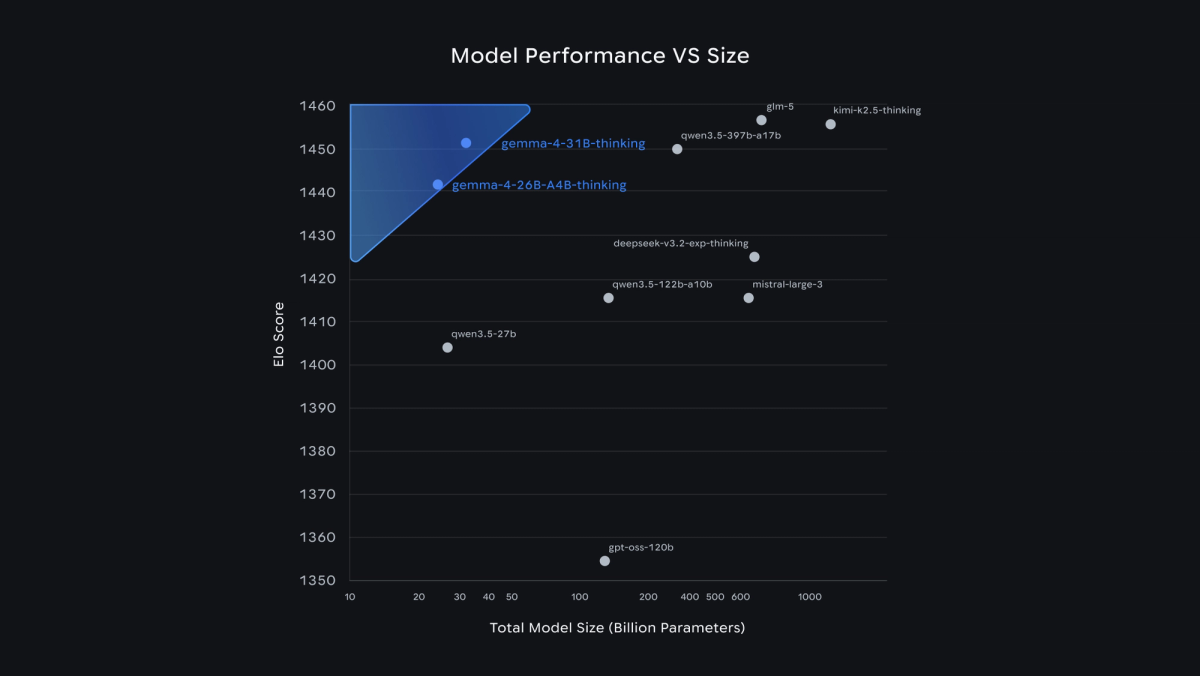
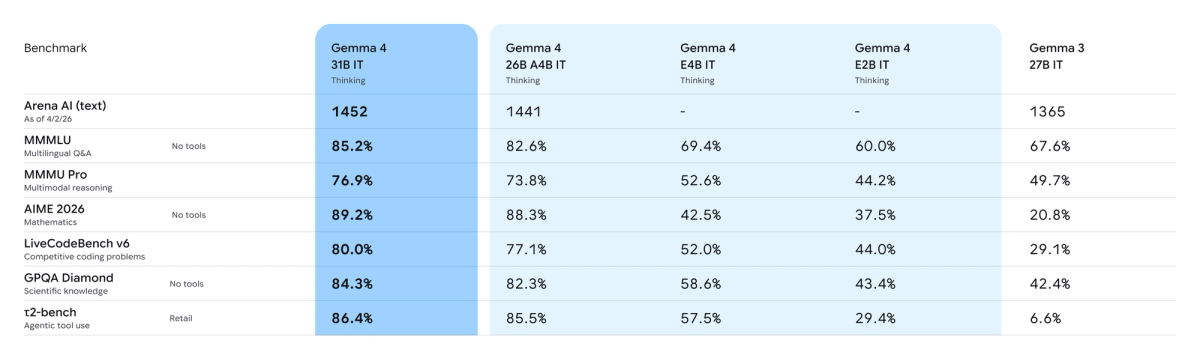
ollama run gemma4:26b — 26B total parameters with 4B activated per token (Mixture of Experts). The MoE design makes it faster than a dense model of the same total size because only a fraction of parameters activate per token. It's the upgrade path when E4B's quality isn't enough but you don't have workstation-class hardware — it runs on a 24 GB GPU or Mac. The 26B reached #6 on Arena's text leaderboard, strong for its activated-parameter count. Pick it when you want better reasoning than E4B and can accept the larger memory footprint.
31B Dense for higher-quality local experiments
ollama run gemma4:31b — full 31B parameters active per token. This is the strongest Gemma 4 variant (ranked #3 open model on Arena's text leaderboard) and the choice for maximum local quality. The trade-off is hardware: it needs workstation-class memory (~20 GB at 4-bit) and runs slower than the MoE since all parameters activate. Use it when answer quality matters more than latency and you have the memory budget. For most laptop-based local coding, 31B is more than the hardware can comfortably handle — it's a workstation choice.
What About Gemma 4 12B Unified?
Why it is separate from the original four-model Gemma 4 lineup
Here's a point of frequent confusion: Gemma 4 12B Unified is not part of the original Gemma 4 launch. The original family released April 2, 2026 with four sizes — E2B, E4B, 26B MoE, and 31B Dense. Google released Gemma 4 12B Unified separately on June 3, 2026 as a follow-up expansion, not as the original "12B Dense" of the lineup.
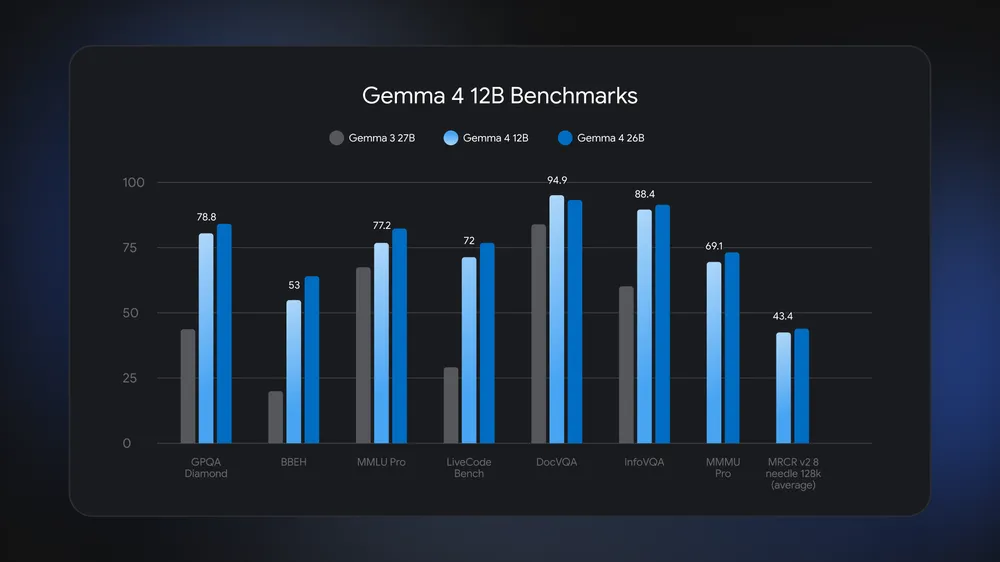
The 12B Unified is architecturally distinct: it's an encoder-free multimodal model where vision and audio inputs flow directly into the LLM backbone (no separate multimodal encoders), and it's Google's first mid-sized model with native audio input. Google positions it as bridging the gap between the edge-friendly E4B and the more advanced 26B MoE, with performance nearing the 26B at less than half the memory footprint — small enough to run on a 16 GB consumer laptop.
When to mention it carefully
If you're choosing a Gemma 4 variant for local coding, the 12B Unified is a legitimate option (it's in the Ollama library as gemma4:12b), and its laptop-friendly footprint with near-26B reasoning is genuinely useful. The thing to get right is the framing: it's a distinct June 2026 release with a unified multimodal architecture, not the original lineup's "12B." When comparing variants, treat it as the mid-tier bridge option it was designed to be — between E4B and 26B MoE — rather than conflating it with the original four-model family. Verify its current Ollama availability and behavior at the official sources, as it's the newest addition.
Local AI Coding Workflow
Code explanation
The most reliable local-coding use case: explaining code. Point Gemma 4 at a function, a file, or an error message and ask what it does or why it's failing. This works well even on smaller variants (E4B) because explanation doesn't require generating large correct outputs — it requires understanding, which local models handle reasonably. With num_ctx set appropriately, you can feed substantial code context and get useful explanations entirely offline.
Small edits and tests
For scoped edits — refactoring a function, adding a small feature, writing a unit test — Gemma 4 (especially 26B or 31B) is capable. The pattern that works: give it a clear, well-scoped task with the relevant code in context, and review the output carefully. Community testing rates Gemma 4 as a decent local coding model, roughly comparable to GPT-4.1-class output on some tasks, with the caveat that smaller variants occasionally produce minor syntax errors (an extra bracket, a misplaced separator) that need manual fixing.
Repo context limits
This is where local models hit their ceiling. A 256K context window sounds large, but loading a real repository into context is constrained by memory (long context inflates the KV cache, which inflates RAM/VRAM needs) and by the model's actual ability to reason over large context on consumer hardware. For single-file or few-file tasks, local Gemma 4 works well. For tasks requiring understanding across a large codebase — the kind of cross-file reasoning a frontier cloud model handles — a local model on a laptop will struggle. Match the task scope to what the hardware can hold and reason over.
When to Use Local AI Coding Instead of Cloud
Local AI coding with Gemma 4 makes sense when: privacy is a hard requirement (code that can't leave your machine for compliance or confidentiality reasons), you want zero per-token cost for high-volume experimentation, you need offline capability, or you're learning and want a free, private sandbox. For these cases, a local Gemma 4 setup is genuinely valuable.
Cloud models remain the better choice when: you need frontier-level capability on hard tasks, you're doing large-codebase reasoning that exceeds local hardware, or completion quality matters more than privacy and cost. Most developers end up using both — local models for private, scoped, high-volume work and cloud models for the hardest tasks.
One framing worth keeping clear: the model and runtime (Gemma 4 + Ollama) are the model layer. The workflow layer — how tasks get planned, how agents are coordinated, how changes are verified before integration — is a separate concern. A local model gives you private inference; it doesn't provide the orchestration and verification structure that workflow-layer tools (like Verdent's Plan-First, multi-agent, worktree-isolated approach) focus on. For simple local assistance, the model layer is all you need; for structured multi-step agent work, the workflow layer matters regardless of whether the underlying model is local or cloud.
FAQ
Can I run Gemma 4 with Ollama?
Yes. Install Ollama 0.22 or newer, then run ollama pull gemma4 for the default E4B variant, or specify a tag (gemma4:26b, gemma4:31b, gemma4:12b, gemma4:e2b). Gemma 4 is Apache 2.0 licensed and runs fully locally. The one essential setup step: override the num_ctx parameter, since Ollama defaults Gemma 4 to a 4K context window despite its 128K–256K capacity. Verify current tags and requirements at the official Ollama library page.
Which Gemma 4 model should I use locally?
Match it to your hardware. E4B (the default) for 16 GB laptops and lighter tasks — fast, low-footprint, good for code explanation and small edits. 26B MoE for a 24 GB GPU/Mac when you want stronger reasoning at reasonable speed (only 4B parameters activate per token). 31B Dense for workstation-class hardware when maximum quality matters more than latency. The 12B Unified is a laptop-friendly mid-tier option with near-26B reasoning. Start with E4B; move up only if its quality isn't enough for your tasks.
Is Gemma 4 12B the main Gemma 4 coding model?
No. The original Gemma 4 family (April 2, 2026) shipped in four sizes: E2B, E4B, 26B MoE, and 31B Dense. The 12B Unified was a separate follow-up release on June 3, 2026 — an encoder-free multimodal model positioned as a mid-tier bridge between E4B and 26B, not the lineup's original "12B Dense." It's a legitimate local coding option, but it's a distinct later addition with a different architecture, not the flagship coding model of the family. The 31B Dense is the highest-quality variant; the 26B MoE is the balanced workhorse.
When should developers use local AI coding instead of cloud models?
When privacy is a hard requirement (code can't leave your machine), when you want zero per-token cost for high-volume work, when you need offline capability, or when you're learning in a free private sandbox. Local Gemma 4 handles code explanation, scoped edits, and tests well. Use cloud models instead when you need frontier-level capability, large-codebase reasoning beyond local hardware, or when completion quality outweighs privacy and cost. Many developers use both — local for private scoped work, cloud for the hardest tasks.
Related Reading
