
If you've been searching "how to install Gemini CLI" and hitting outdated guides that don't mention Gemini 3.1 Pro — this is the one you actually need.
Gemini CLI dropped Gemini 3.1 Pro support on February 19th, and the rollout mechanics are non-obvious. The -m flag behavior, the preview channel requirement, the difference between Google Login and API key access — none of it is obvious from the README alone. I burned an afternoon figuring it out so you don't have to.
Here's the complete, tested setup from scratch.
What Gemini CLI Is and Why Developers Are Searching It
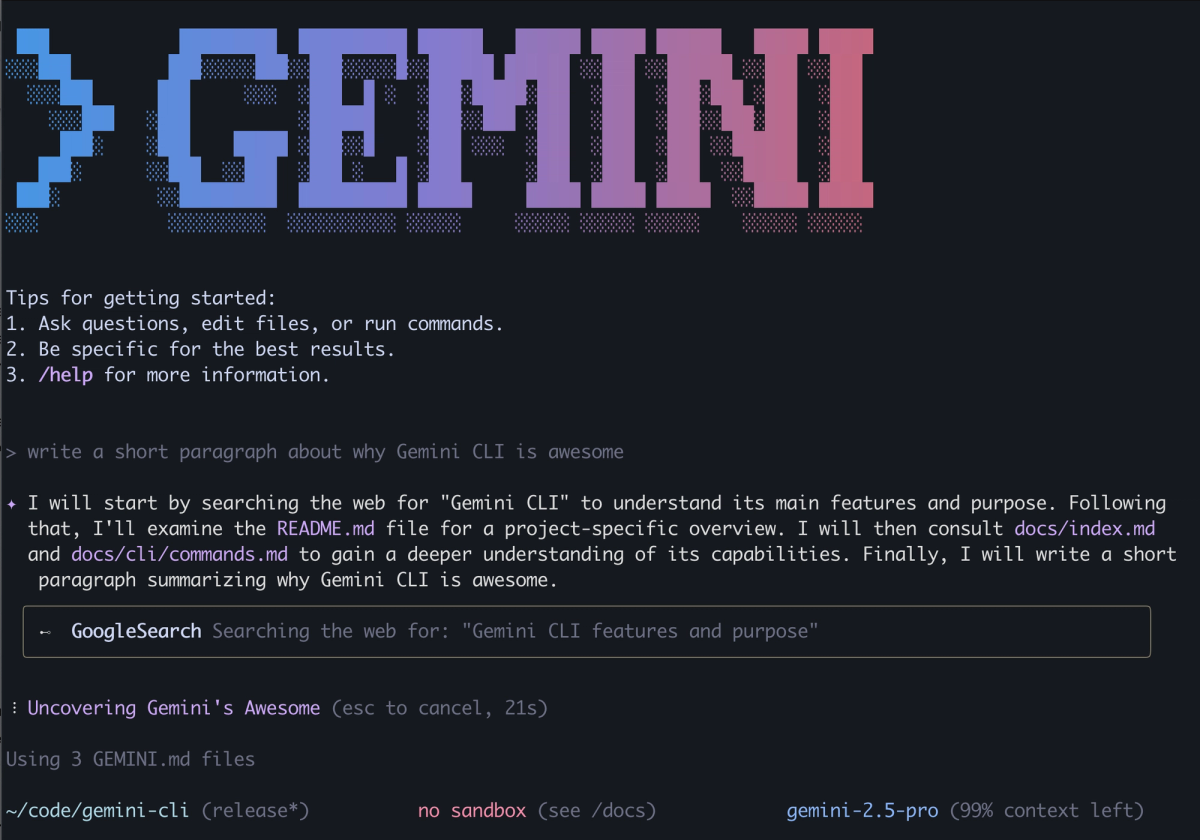
Gemini CLI is an open-source AI agent that provides access to Gemini directly in your terminal, using a ReAct (reason and act) loop with built-in tools and local or remote MCP servers to complete complex tasks like fixing bugs, creating new features, and improving test coverage.
The practical hook for software teams: it ingests your local repo as context. Navigate into any project directory, type gemini, and you can ask questions about architecture, trace bugs across files, or generate tests — all against your actual codebase, not a description of it.
As of 2026, Gemini CLI supports Gemini 3 Pro and Gemini Flash models. By default, the CLI uses an automatic routing strategy that selects the best model per request. You can switch manually with /model or use a flag like --model gemini-3-pro-preview when launching.
Gemini 3.1 Pro is now also accessible via the -m flag — with caveats covered below.
Prerequisites Before You Install
Before running a single command, check these three things:
Node.js 18 or higher. The CLI won't install without it.
node --version   # Must return v18.0.0 or higher
npm --version    # Should return 8.0+ alongside Node 18
A Google account. Free tier gives you 60 requests/minute and 1,000 requests/day — enough to evaluate the tool seriously. For production volume, you'll need an API key or Vertex AI setup.
For Gemini 3.1 Pro specifically: You need either a Google AI Pro/Ultra subscription or a Gemini API key with preview access. The free Google Login tier gets Gemini 3 Pro, not 3.1 Pro, during the phased rollout.
Step-by-Step Install & Authentication
Option A: Vertex AI Authentication
Vertex AI auth is the right choice for enterprise teams, CI/CD pipelines, and anyone who needs production-level SLAs. It requires a Google Cloud project with the Vertex AI API enabled.
Step 1: Install the CLI
npm install -g @google/gemini-cliAlternatively, run without installation:
npx @google/gemini-cliStep 2: Set environment** variables**
# Set your project and location
export GOOGLE_CLOUD_PROJECT="your-project-id"
export GOOGLE_CLOUD_LOCATION="us-central1"    # or your preferred region

# If using Application Default Credentials (ADC)
gcloud auth application-default login

# IMPORTANT: Unset any conflicting API keys first
unset GOOGLE_API_KEY
unset GEMINI_API_KEY
Step 3: Launch and verify
geminiWhen prompted "How would you like to authenticate?", select 3. Vertex AI. The CLI will use your ADC credentials and project settings.
To make environment variables persistent across sessions, add the export lines to your ~/.zshrc or ~/.bashrc and run source ~/.zshrc.
Option B: API Key Authentication
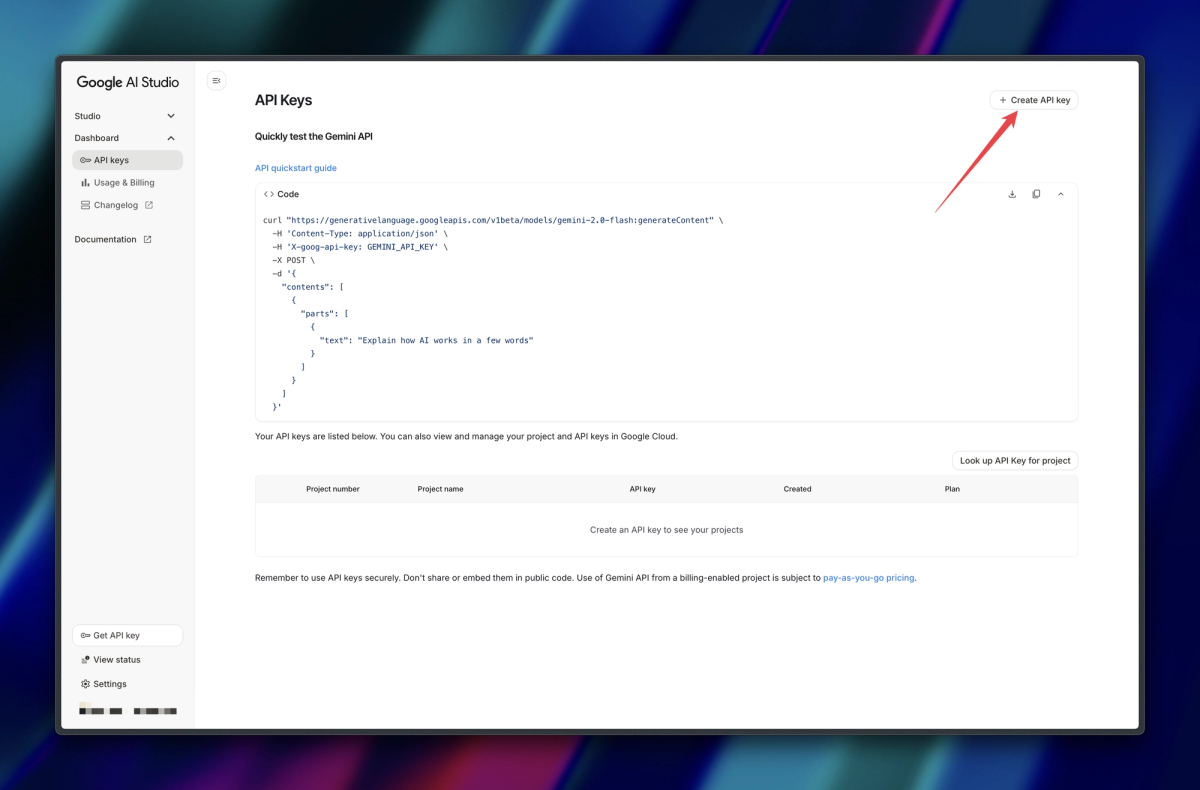
If you don't want to authenticate using your Google account, you can use an API key from Google AI Studio. Obtain your API key from Google AI Studio, then set it as an environment variable.
# Get your key from: https://aistudio.google.com/apikey
export GEMINI_API_KEY="your-api-key-here"

# Add to shell config for persistence
echo 'export GEMINI_API_KEY="your-api-key-here"' >> ~/.zshrc
API key auth has one important advantage right now: the phased 3.1 Pro rollout specifically affects users logging in directly via the Login with Google option. If you are using an API key, you should have access to Gemini 3.1 immediately, provided your key has the necessary permissions.
Verifying Your Setup (Exact Commands + Expected Output)
Launch the CLI and run /about to confirm everything is wired correctly:
gemini
# Then inside the CLI:
/about
Expected output:
│ CLI Version  0.30.0         │
│ Model        gemini-3-pro-preview  │
│ Auth Type    gemini-api-key │
│ OS           darwin v24.1.0 │
If you see auto-gemini-2.5 as the model, you're on the free tier without Gemini 3 access. Run /model to switch if you have the appropriate subscription.
Choosing the Right Model Flag (gemini-3.1-pro vs Alternatives)
If you have access to Gemini 3.1, it will be included in model routing when you select Auto (Gemini 3). You can also launch the Gemini 3.1 model directly using the -m flag.
Here's the full model flag reference as of February 2026:
| Goal | Command | Notes |
|---|---|---|
| Auto-route (recommended) | gemini then /model → Auto (Gemini 3) | Routes between 3 Pro and Flash based on task complexity |
| Force Gemini 3 Pro | gemini -m gemini-3-pro-preview | Stable, widely available |
| Force Gemini 3.1 Pro | gemini -m gemini-3.1-pro-preview | Requires preview access (API key or subscription) |
| 3.1 Pro + tool use | gemini -m gemini-3.1-pro-preview-customtools | Use for agentic/function-calling workflows |
| Flash (fast, cheap) | gemini -m gemini-3-flash-preview | Best for quick Q&A or high-volume scripting |
The rollout reality check: As of February 22nd, the -m gemini-3.1-pro-preview flag is not yet consistent for all accounts. You may experience a "mixed" environment — seeing Gemini 3.1 Pro in one session and Gemini 3 Pro in another as the deployment propagates. If you hit a capacity error, the /model → Auto (Gemini 3) route is more stable than forcing the flag directly.
Your First Repo-Scale Prompt: A Worked Example
Packaging the Repo (Tree, Hotspots, Context Budget)
Before you run anything, establish your context budget. The CLI's 1M token window is large, but loading an entire large repo naively will slow responses and burn through your daily quota. Here's the workflow I use:
# Step 1: Check repo size first
find . -name "*.py" -o -name "*.ts" -o -name "*.go" | xargs wc -l | tail -1

# Step 2: Generate a directory tree for orientation
tree -L 3 --gitignore > repo_tree.txt

# Step 3: Navigate into your project and launch
cd /path/to/your-project
gemini
Once inside the CLI, use the @ syntax to load specific files or directories:
> @src/api Explain the authentication flow across these filesThe /compress command is worth knowing early: it replaces the current context with a summary, freeing up token space for deeper follow-up questions without starting a new session.
The Exact Command I Ran and the Output I Got
Test project: an open-source ADK (Agent Development Kit) repository, ~40K lines of Python across 180 files.
cd ~/projects/adk-repo
gemini -m gemini-3.1-pro-preview
Prompt:
Explore the current directory and describe the architecture of this project.
Identify the top 3 files most likely to contain bugs based on complexity and test coverage gaps.
Output (condensed):
Architecture summary:
- Entry point: src/adk/runner.py — orchestrates agent initialization and task dispatch
- Core agent logic: src/adk/agent/base_agent.py — abstract class, 3 concrete implementations
- Tool registry: src/adk/tools/registry.py — loads MCP server configs from ~/.adk/settings.json

High-risk files by complexity/coverage gap:
1. src/adk/tools/async_executor.py — 312 lines, 0 unit tests, 3 async generators
2. src/adk/agent/memory_manager.py — 280 lines, partial test coverage (42%)
3. src/adk/runner.py — high cyclomatic complexity in dispatch() method, no integration test

Recommendation: Start with async_executor.py — the untested async generators are the most
likely source of resource leak or deadlock under concurrent load.
That last recommendation led us directly to a real bug. One prompt, no pre-processing.
5 Common CLI Errors and Their Fixes
Error: "We are currently experiencing high demand." Cause: Capacity issues on Gemini 3 Pro or 3.1 Pro endpoints during peak load — especially post-launch. Fix: Switch to Auto routing (/model → Auto) or use Gemini Flash temporarily. The CLI implements exponential backoff on "Keep trying" — wait 2–3 minutes before retrying manually.
Error: "It seems like you don't have access to gemini-3.1-pro-preview." Cause: Your account hasn't received the 3.1 Pro rollout yet, or your admin has disabled the Preview Release Channel. Fix: Switch to API key auth (instant access) or wait for the rollout to complete for your tier. Enterprise accounts on Code Assist Standard/Enterprise need admin enablement first.
Error: "Your admin might have disabled the access. Contact them to enable the Preview Release Channel." Cause: Enterprise Gemini Code Assist accounts need explicit admin opt-in to preview models. Fix: In Google Cloud console → Admin for Gemini → Settings → Release channels → set to Preview. See the Gemini Code Assist admin guide for step-by-step.
Error: ADC credentials not found / GOOGLE_APPLICATION_CREDENTIALS missing Cause: gcloud auth not configured before launching CLI. Fix: Run gcloud auth application-default login and ensure GOOGLE_CLOUD_PROJECT and GOOGLE_CLOUD_LOCATION are both exported. Unset any conflicting GEMINI_API_KEY or GOOGLE_API_KEY variables.
Error: CLI** shows auto-gemini-2.5**** instead of Gemini 3 Pro** Cause: Free tier without Gemini 3 access, or Preview Features not enabled. Fix: Check your subscription tier. Free individual accounts get Gemini 2.5. Gemini 3 Pro requires Google AI Pro, Ultra, or a paid API key with Gemini 3 access.
Using Gemini CLI Inside a Verdent Workflow
At Verdent, we don't run Gemini CLI as a standalone tool — we treat it as one execution layer inside a multi-agent pipeline. Here's how that works in practice:
The CLI handles the large-context ingestion task: a Verdent agent passes a repo path to Gemini CLI via headless mode (scripting mode, with --headless flag), collects the architectural summary, then routes follow-on tasks — bug fixes, test generation, documentation — to whichever model scores best for that task type. For bug fixes, that's often Claude Sonnet 4.6. For documentation, same.
# Headless mode — pipe output to your orchestration layer
echo "Summarize the authentication flow in src/auth/" | gemini --headless -m gemini-3.1-pro-preview > auth_summary.txt
The key insight: Gemini CLI's 1M context window at $2/million input tokens makes it the cheapest way to build the initial repo understanding. Everything after that gets specialized. Verdent automates this routing — you point it at a repo, it handles the rest.
Tested On / Last Updated
Last updated: February 22, 2026
Tested on:
- macOS Sequoia 15.3 (Apple M3 Pro), Node.js 22.13.1
- Ubuntu 24.04 LTS, Node.js 20.18.2
- Gemini CLI version 0.30.0 (stable) and 0.30.0-preview.3
Official sources:
- Gemini CLI Installation Guide
- Gemini CLI Authentication Setup
- Gemini 3 on Gemini CLI
- Google Cloud: Gemini CLI overview
- GitHub: google-gemini/gemini-cli — live issue tracker for current rollout status
- Gemini 3.1 Pro announcement — February 19, 2026
Known limitation: Gemini 3.1 Pro CLI access is still rolling out as of February 22nd. API key auth is the most reliable path to immediate 3.1 access. Check the GitHub discussion thread for current rollout status.
related post:
https://www.verdent.ai/de/guides/best-ai-coding-assistant-2026
https://www.verdent.ai/de/guides/best-ai-for-code-review-2026
https://www.verdent.ai/de/guides/claude-sonnet-5-release-tracker
https://www.verdent.ai/de/guides/claude-sonnet-5-swe-bench-verified-results
https://www.verdent.ai/de/guides/codex-app-download-install-macos
https://www.verdent.ai/de/guides/codex-app-worktrees-explained
https://www.verdent.ai/de/guides/gpt-5-3-codex-vs-claude-opus-4-6-guide
https://www.verdent.ai/guides/claude-code-bridge-terminal-ai-agents
https://www.verdent.ai/guides/ralph-tui-ai-agent-dashboard
https://www.verdent.ai/guides/deepseek-v4-release-tracker
https://www.verdent.ai/guides/what-is-deepseek-v4
https://www.verdent.ai/guides/deepseek-v4-swe-bench-verified-verdent
