
Agent S started at the edge of what computer-use agents could do. By Agent S3, the framework reaches 69.9% on OSWorld — within striking distance of the 72% human performance baseline. That trajectory, across three versions in roughly a year, is one of the clearest illustrations of how fast the computer-use agent research line is moving. This article maps what each version changed, how to read the GitHub project, and — importantly for builders — where computer-use agents and coding agents are different tools for different jobs.
Verified against github.com/simular-ai/Agent-S, May 2026. This is research code under active development — verify current state and benchmark figures at source.
Agent S in One Paragraph
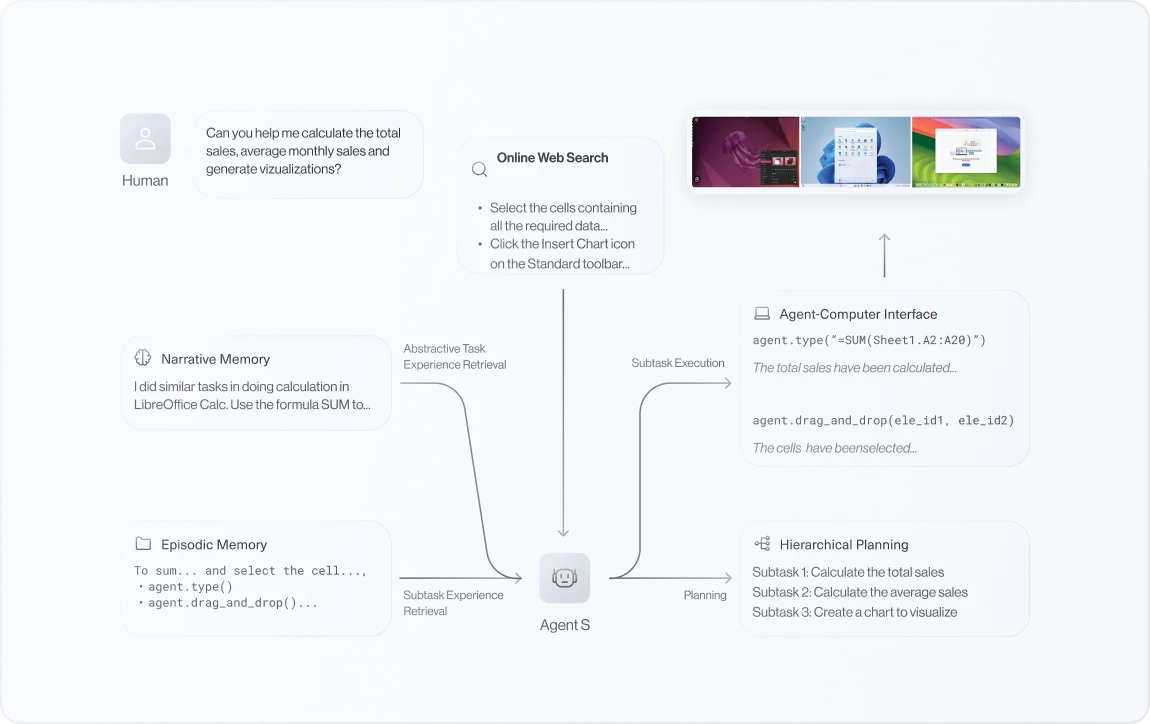
A computer-use agent research line
Agent S is an open-source agentic framework from Simular AI that, in the project's own description, "uses computers like a human" — observing the screen, reasoning about what to do, and performing actions through a graphical interface (clicking, typing, navigating). It's distributed as the gui-agents Python library. The original Agent S paper was accepted to ICLR 2025 and won a Best Paper Award at the ICLR 2025 Agentic AI for Science Workshop. The line has progressed through Agent S2, Agent S2.5, and Agent S3, each advancing the state of the art on computer-use benchmarks like OSWorld, WindowsAgentArena, and AndroidWorld.
Why builders should care about desktop agents
Computer-use agents matter to builders because they represent a different automation primitive than API integration. Instead of calling an API, a computer-use agent operates software the way a person does — through the UI. This opens automation of tasks that have no API: legacy desktop applications, web apps without programmatic access, and cross-application workflows that span tools with no shared integration layer.
For builders evaluating automation strategies, understanding the computer-use agent research frontier helps calibrate what's realistic. Agent S3's near-human OSWorld performance signals that UI automation is becoming viable for an expanding set of tasks — while the gap to 100% reliability signals where human oversight remains necessary.
Agent S vs Agent S2 vs Agent S3
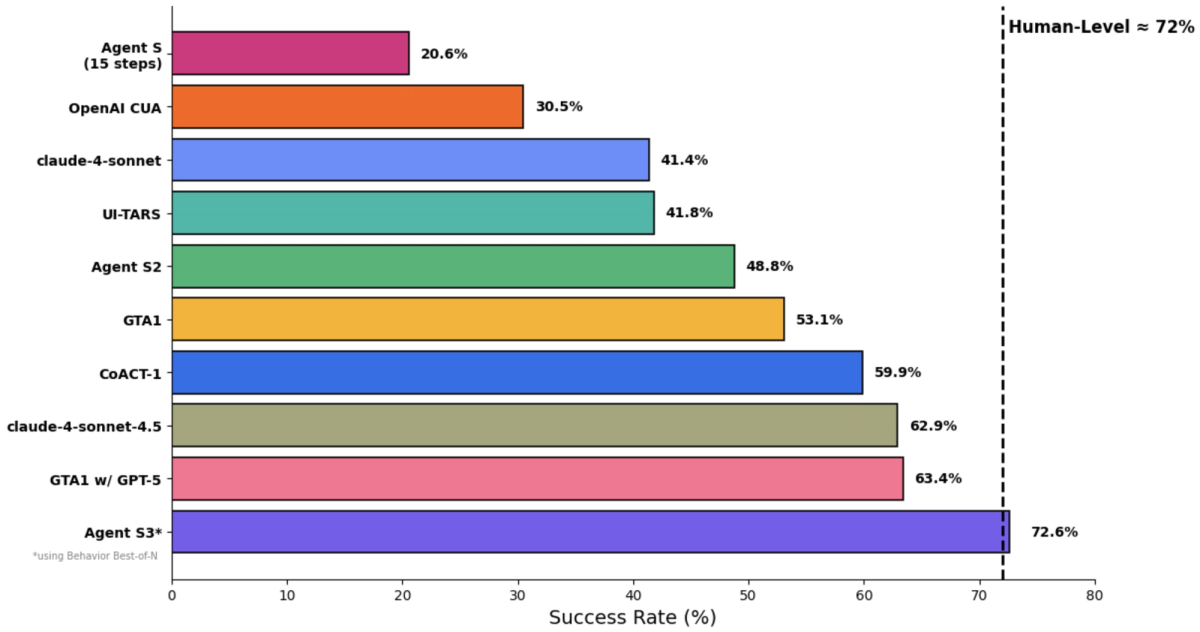
What Agent S introduced
The original Agent S (paper and codebase released October 2024) established the framework's core idea: an Agent-Computer Interface that lets an AI agent interact with a computer autonomously, learning from past experiences to perform complex GUI tasks. It introduced the experience-augmented hierarchical planning approach and demonstrated that a structured agent framework could meaningfully outperform naive approaches on computer-use tasks. The ICLR 2025 acceptance and Best Paper Award reflected its research significance.
What Agent S2 changed
Agent S2 (released March 2025 with gui-agents v0.2.0) was a substantial step up. It set new state-of-the-art results on OSWorld, WindowsAgentArena, and AndroidWorld simultaneously — and notably, it outperformed OpenAI's CUA/Operator and Anthropic's Claude 3.7 Sonnet Computer-Use at the time. The Agent S2 paper was accepted to COLM 2025.
Architecturally, Agent S2 introduced a compositional, modular approach: a planning component combined with a separate grounding model (OSWorldACI) that translates the agent's intended actions into executable code via pyautogui. The separation of planning from grounding — deciding what to do versus translating that into precise screen coordinates and actions — was a key design improvement.
Agent S2.5 (August 2025, gui-agents v0.2.5) refined this further with the project's stated goals of "simpler, better, and faster," achieving a new SOTA on OSWorld-Verified. The 2.5 release emphasized simplification — reducing complexity while improving performance.
What Agent S3 adds
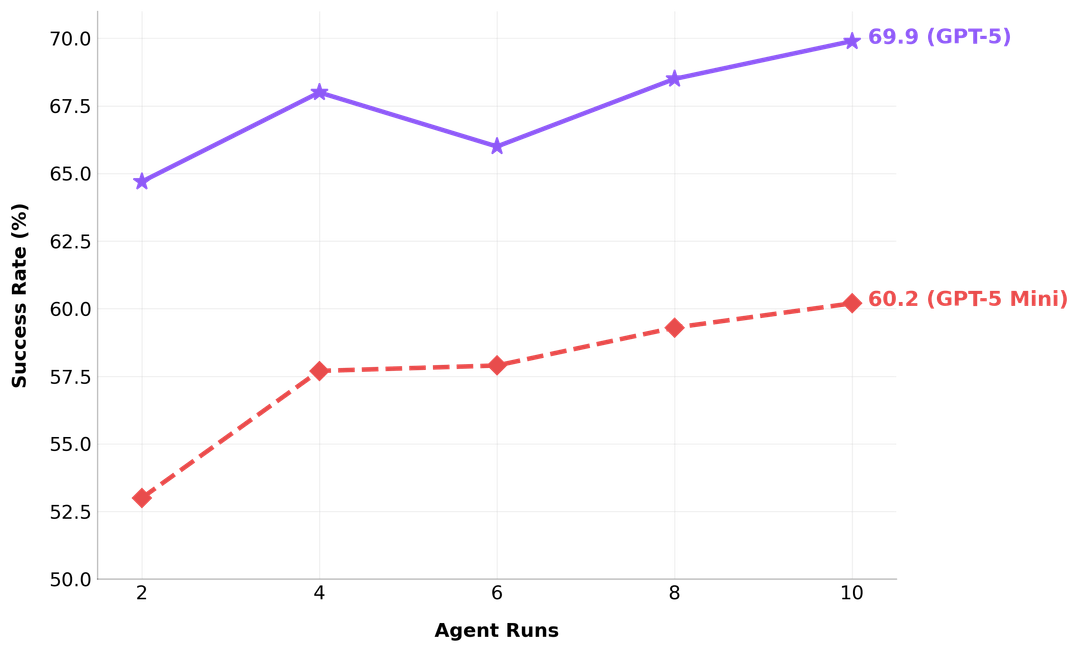
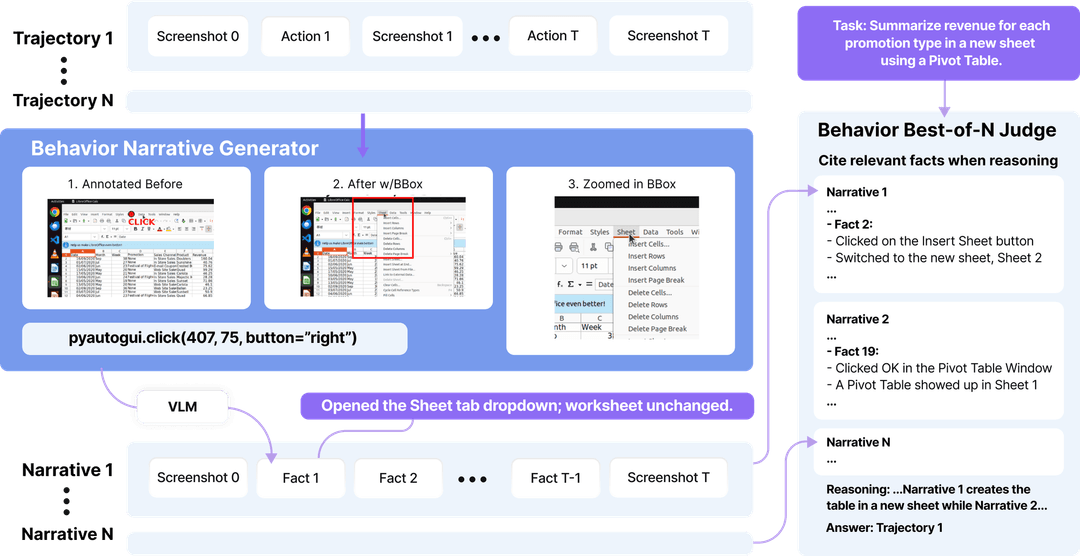
Agent S3 (released October 2025 with a technical paper) is the current state of the art in the line. The headline numbers: 69.9% on OSWorld, approaching the 72% human performance baseline, with strong generalization to WindowsAgentArena and AndroidWorld. Agent S3 alone reaches 66% in the 100-step OSWorld setting, exceeding the previous SOTA of 63.4% — and with the addition of Behavior Best-of-N (a technique for selecting among multiple candidate behaviors), it climbs to the 69.9% figure.
The project describes Agent S3 as "simpler, faster, and more flexible" than its predecessors — continuing the simplification trend from S2.5. The combination of higher benchmark performance and reduced complexity is the notable achievement: the line didn't get better by getting more complicated.
| Version | Released | Key advance | Benchmark milestone |
|---|---|---|---|
| Agent S | Oct 2024 | Agent-Computer Interface, hierarchical planning | ICLR 2025, Best Paper Award |
| Agent S2 | Mar 2025 | Compositional planning + grounding separation | SOTA on OSWorld/Windows/Android; beat OpenAI CUA & Claude 3.7 CU |
| Agent S2.5 | Aug 2025 | Simplification | SOTA on OSWorld-Verified |
| Agent S3 | Oct 2025 | Behavior Best-of-N, further simplification | 69.9% OSWorld (human ~72%) |
How to Read the Agent S GitHub Project
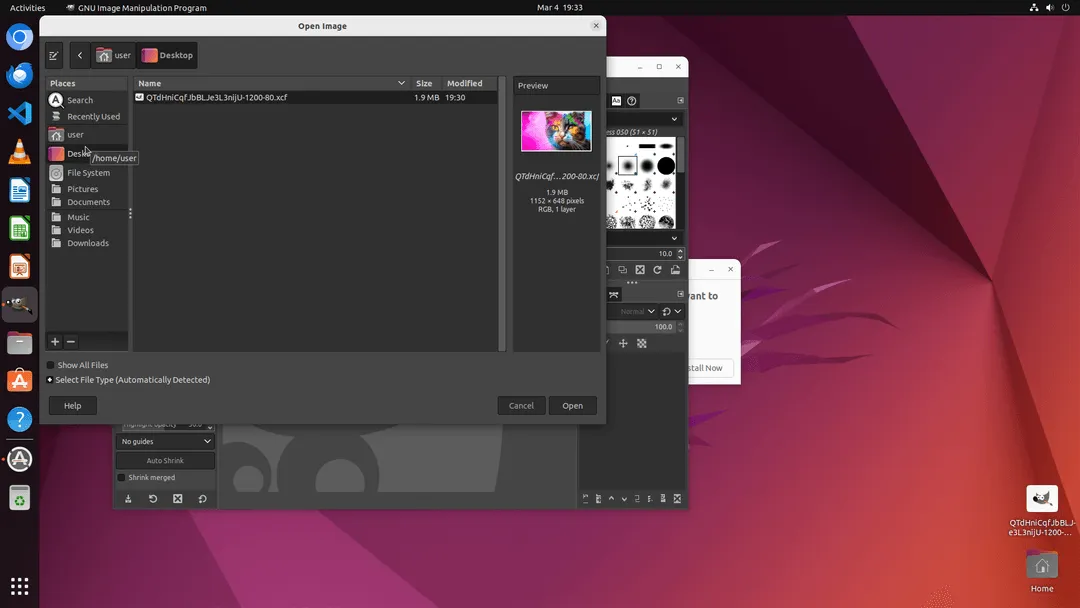
Repo structure and examples
The official repository is simular-ai/Agent-S. Note that several forks and mirrors exist under other usernames — the canonical source is the simular-ai organization repo. When evaluating, the elements worth inspecting:
- The
gui-agents** library**: The pip-installable package. Check the version number against the README's announced version to confirm you're getting the release you expect. - models.md: Documents the supported models. Agent S supports multiple LLMs for the planning component (gpt-4o is a common default) and separate grounding models. This matters because the agent's performance depends on the model combination.
- Example code: The README includes Python examples showing how to instantiate the agent (
AgentS2/ the S3 equivalent) and the grounding agent (OSWorldACI). These examples are the fastest way to understand the agent's actual interface.
Research code vs production product
This is the most important framing for builders: Agent S is research code, not a production product. It's a framework that demonstrates state-of-the-art computer-use capabilities, published alongside academic papers. That has implications:
- The code prioritizes reproducing research results over production robustness
- Breaking changes between versions are expected as the research evolves
- There's no SLA, no enterprise support, no production deployment guarantees
- The benchmark numbers (69.9% OSWorld) are research benchmarks, not production reliability metrics
Treating Agent S as a foundation to learn from and prototype with is appropriate. Treating it as a drop-in production automation tool is not what it's designed for.
What builders should verify before testing
Before running Agent S, two practical checks:
Permissions and safety: Agent S controls your computer through pyautogui — it moves your mouse, types, and clicks. The example repos carry an explicit warning: "This gives AI control of your computer." Run it in a controlled environment (a VM or a dedicated test machine), not on a system with sensitive data or production access. Terminal accessibility permissions are required on macOS.
Current version and model requirements: Verify the current gui-agents version, the required Python version (3.11 has been specified in example setups), and which models you need API access to. The planning and grounding models may have separate requirements. Consult the official repository for current setup instructions, as research code changes frequently.
Computer-Use Agents vs Coding Agents
This distinction is the practical heart of the article for builders deciding what to use.
UI control and browser/desktop actions
Computer-use agents like Agent S operate at the UI layer. They see the screen (via screenshots), reason about what to do, and act through mouse and keyboard. Their domain is anything a human does through a graphical interface: filling forms, navigating applications, clicking through workflows, operating software that has no API. The output is actions performed in the UI.
This is powerful for automation of GUI-bound tasks, but it's inherently constrained by the reliability of perceiving and acting on a visual interface — which is why even SOTA performance is at 69.9%, not 99%.
Codebase edits, tests, and pull requests
Coding agents operate at a different layer entirely. They work with code: reading files, editing source, running tests, executing build commands, and producing diffs and pull requests. Their domain is the software development lifecycle — understanding a codebase, making changes, verifying those changes pass tests, and producing reviewable output.
A coding agent doesn't click buttons on a screen. It reads src/auth.py, modifies a function, runs pytest, and produces a diff. The verification mechanisms are different: tests pass or fail, types check or don't, the diff is reviewable. The output is code changes, not UI actions.
Tools like Verdent operate in this coding-agent space — Plan-First task decomposition, parallel agents on isolated Git worktrees, and verification gates before changes are integrated. The concerns are codebase-specific: is the change correct, do the tests pass, is the diff reviewable. This is a fundamentally different problem than the UI-control problem Agent S addresses.
Where the workflows overlap
The overlap is real but narrower than it first appears. A computer-use agent could, in principle, operate a code editor's GUI to make changes — but that's a clumsy way to edit code compared to a coding agent that works with files directly. Conversely, a coding agent can't operate a legacy desktop app with no API.
The practical division: use computer-use agents for GUI-bound tasks that have no programmatic alternative; use coding agents for software development work where direct file and test access is available. The workflows overlap when a task involves both — for example, an end-to-end test that requires driving a browser UI (computer-use territory) to verify code changes (coding-agent territory). Even there, the right architecture usually keeps the two concerns separate rather than forcing one agent type to do both.
What Agent S3 Means for AI Agent Builders
Better task execution is not the same as safer software changes
Agent S3's benchmark improvement is a research achievement in UI task execution. For builders, it's important not to over-translate this into "agents can now safely make software changes." Computer-use task success and safe software modification are different properties. An agent that successfully navigates a UI to complete a task has demonstrated execution capability — not that the changes it made are correct, safe, or reviewable.
This matters because the excitement around computer-use benchmarks can blur into assumptions about coding agent safety. A 69.9% OSWorld score says nothing about whether an agent should be allowed to modify production code without review. Those are unrelated questions.
Why governance and verification still matter
For any agent that takes actions — computer-use or coding — the governance requirements are the same regardless of benchmark performance. Higher task success rates reduce the frequency of errors; they don't eliminate the need for the safeguards that catch errors when they happen. Permission controls, action review, audit trails, and verification before consequential actions remain necessary whether the agent scores 50% or 95% on a benchmark.
For coding agents specifically, this means: tests must pass, diffs must be reviewable, and consequential changes (production deploys, schema migrations) must have human approval — regardless of how capable the agent is. Capability and governance are independent. A more capable agent that bypasses governance is more dangerous, not less.
When to Use This Research as Inspiration
Evaluating computer-use agent patterns
Agent S's architecture — the separation of planning from grounding, the experience-augmented hierarchical approach, the modular design — is worth studying for anyone building automation that involves UI interaction. The papers and code document patterns that generalize beyond the specific framework. Even if you don't deploy Agent S directly, the design ideas inform how to structure a computer-use automation system.
Designing internal automation workflows
For teams building internal automation, Agent S's approach to GUI tasks is a reference point for what's achievable and how to structure it. If your automation involves operating software without APIs, the computer-use agent pattern (perceive, plan, ground, act) is the relevant architecture. The reliability ceiling (SOTA at ~70% on hard benchmarks) is the relevant constraint to design around — build in verification and human checkpoints for tasks where errors are costly.
Knowing when coding agents are the better layer
The most useful takeaway for many builders is recognizing when computer-use is the wrong tool. If the task is software development — editing code, running tests, managing a repository — a coding agent that works with files directly is the right layer, not a computer-use agent operating an editor's GUI. If the task is operating a GUI application with no API, computer-use is the right layer. Matching the agent type to the task structure is the decision Agent S's research helps clarify.
FAQ
What is Agent S?
Agent S is an open-source agentic framework from Simular AI that enables AI agents to use computers through a graphical interface — observing the screen, planning, and performing mouse and keyboard actions autonomously. It's distributed as the gui-agents Python library. The original paper was accepted to ICLR 2025 and won a Best Paper Award at the associated Agentic AI for Science Workshop. It's research code, published with academic papers, not a production product. Verify current capabilities at the official repository.
How is Agent S3 different from Agent S2?
Agent S3 (October 2025) advances on Agent S2 (March 2025) in both performance and design. Performance: Agent S3 reaches 69.9% on OSWorld (with Behavior Best-of-N), approaching the ~72% human baseline, versus Agent S2's earlier SOTA results. Design: Agent S3 is described as "simpler, faster, and more flexible," continuing a simplification trend that began with Agent S2.5. The line's progression has been toward higher performance with reduced architectural complexity rather than added complexity.
Can developers use Agent S from GitHub?
Yes — the gui-agents library is open-source and installable from the simular-ai/Agent-S repository. It requires API access to supported models (for planning and grounding), a compatible Python version (3.11 has been specified in example setups), and careful handling since the agent controls your computer's mouse and keyboard. Run it in a controlled environment. Consult the official repository for current installation instructions, as research code changes frequently.
Is a computer-use agent the same as a coding agent?
No. Computer-use agents (like Agent S) operate software through the graphical interface — clicking, typing, navigating UIs — and are suited to GUI-bound tasks without APIs. Coding agents (like Claude Code, Codex, or multi-agent platforms) work with code directly — reading files, editing source, running tests, producing diffs and pull requests. They operate at different layers: UI actions versus codebase changes. For software development work, a coding agent is the appropriate tool; for operating GUI applications without programmatic access, a computer-use agent is.
When should builders care about Agent S3?
When you're evaluating UI-automation strategies, designing internal automation that involves operating software without APIs, or studying computer-use agent architecture for your own systems. Agent S3's near-human OSWorld performance signals what's becoming achievable in UI automation. If your work is software development rather than GUI operation, coding agents are the more relevant tool category — Agent S is research worth understanding, but not necessarily the tool you'd deploy.
Related Reading
- AI Coding Agents Need Better Search: What AnySearch Shows About the Next Workflow Layer
- Codex Chrome Extension: What It Does and When to Use It
- Inside Codex's Three-Tier Browser Tool Architecture
- Agentic Engineering Patterns: Real Workflows for Dev Teams in 2026
- Codex Mobile Remote Control Changes AI Coding Workflows
