Seeing a Supabase publishable key in browser DevTools is expected. Seeing another user’s private records through that client is a security failure. The useful check is whether the database rejects access the current caller should not have.
Keep publishable keys in public clients, keep privileged credentials out, and enforce authorization where requests reach data. This tutorial uses current Supabase guidance checked on September 21, 2026, with a development-only example and explicit acceptance tests.
What a Supabase Publishable Key Does
A Supabase publishable key identifies an application component accessing the project. Supabase Auth separately identifies a signed-in user. The key is not a password for a person or proof that a request came from your website.
With no user session, the Data API request uses the anon role. With a valid user session, it uses authenticated. Both remain subject to applicable database permissions and RLS policies.
Assume anyone can copy a Supabase frontend key from the shipped application. Minification, an environment-variable name, or a hidden UI button cannot make it confidential.
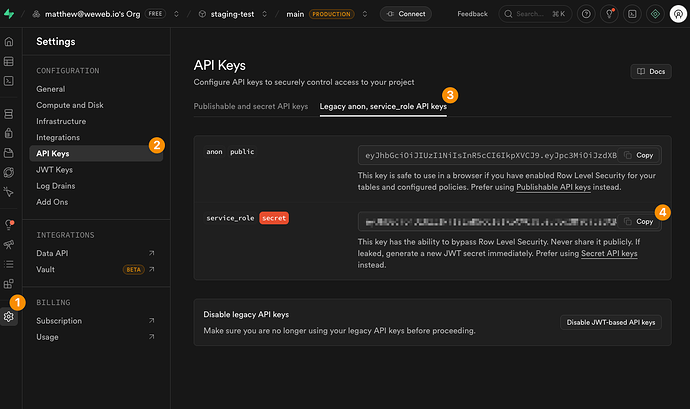
Publishable, Anon, Secret, and Service-Role Keys
| Key | Format | Intended placement | Authorization consequence |
|---|---|---|---|
| Publishable | sb_publishable_... | Browser or other distributed client | Uses caller context and applicable RLS |
| Legacy anon | Long-lived JWT | Existing public-client integrations | Low-privilege predecessor to publishable keys |
| Secret | sb_secret_... | Controlled backend only | Elevated service_role access; bypasses RLS |
| Legacy service_role | Long-lived JWT | Controlled legacy backend only | Privileged credential; bypasses RLS |
The new and legacy key systems can coexist. Creating a replacement does not invalidate an existing key automatically.
A backend that uses privileged credentials must perform its own authorization checks. Moving a query behind an API route does not secure it if that route returns whatever record ID the caller supplies.
Why a Public Key Is Not an Authorization Rule
The browser is controlled by the person using it. They can change a request, remove a client-side filter, or call an endpoint without opening your UI. A condition such as .eq('owner_id', user.id) improves query intent but cannot replace database enforcement.
Row Level Security as the Data Boundary
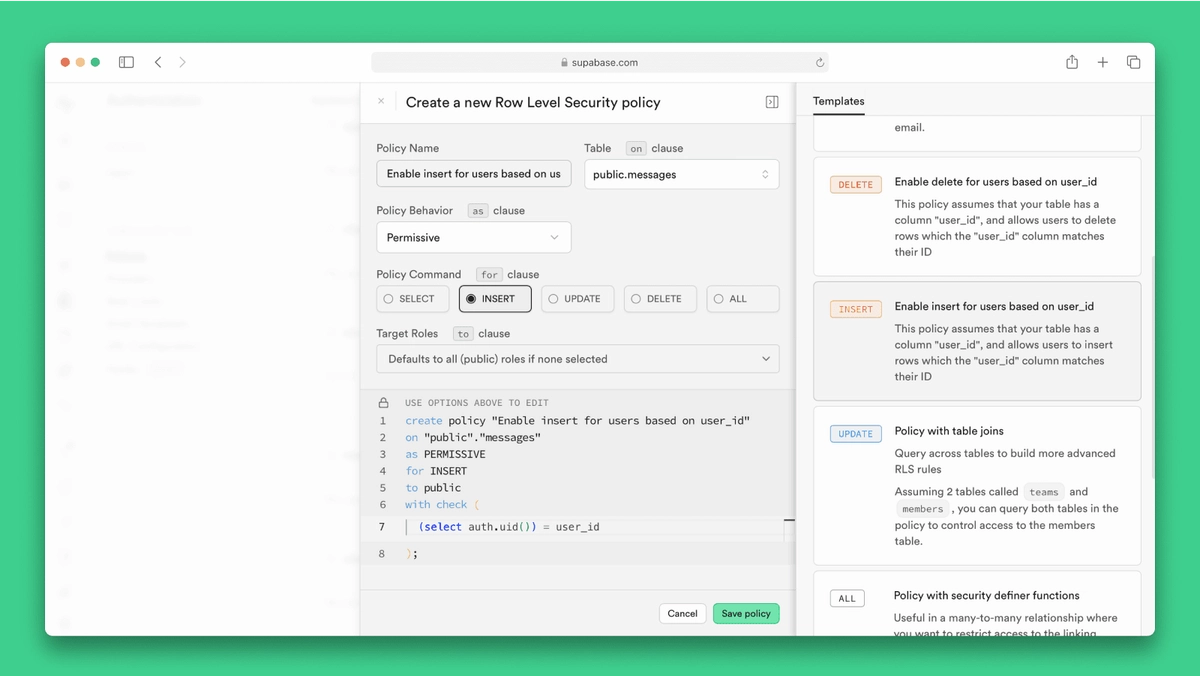
Table privileges and RLS solve different problems: grants allow a role to perform an operation, while policies determine which rows it may access or create. Enable Supabase RLS on exposed tables and review both layers.
This example allows signed-in users to read and create only their own notes. Run it once in a fresh development project, using an exposed public schema and a new table name. It intentionally provides no update or delete capability.
begin;

create table public.private_notes (
  id uuid primary key default gen_random_uuid(),
  owner_id uuid not null default auth.uid()
    references auth.users(id) on delete cascade,
  body text not null
);

alter table public.private_notes enable row level security;

revoke all on public.private_notes
  from public, anon, authenticated;
grant usage on schema public to authenticated;
grant select, insert on public.private_notes to authenticated;

create policy "Read own notes"
on public.private_notes for select to authenticated
using ((select auth.uid()) = owner_id);

create policy "Create own notes"
on public.private_notes for insert to authenticated
with check ((select auth.uid()) = owner_id);

commit;
The default owner is a convenience. The WITH CHECK expression rejects a supplied owner that differs from the caller. PostgreSQL distinguishes existing-row visibility from new-row checks; both matter when extending the example to updates.
Policies for Anonymous and Authenticated Users
Without an authenticated session, auth.uid() returns null. Here, unauthenticated callers also lack table privileges, so they cannot read or insert notes.
Do not confuse that with Supabase anonymous sign-in. A user created through signInAnonymously() has the authenticated role and would receive owner-scoped access under these policies. If your product requires permanent accounts, add a condition based on the verified is_anonymous claim.
Review existing policies before adapting this example. Adding an owner policy beside an existing permissive policy can leave broader access intact. Also audit exposed views, database functions, and Storage policies separately; securing one table does not secure every API surface.
Add the Key to a Frontend Safely
For a Vite application, install @supabase/supabase-js and use the client setup pattern with your development project’s URL and publishable key.
Example .env.local, containing placeholders only:
VITE_SUPABASE_URL=https://YOUR_PROJECT_REF.supabase.co
VITE_SUPABASE_PUBLISHABLE_KEY=sb_publishable_YOUR_KEY
Create a shared browser client:
import { createClient } from '@supabase/supabase-js'

export const supabase = createClient(
  import.meta.env.VITE_SUPABASE_URL,
  import.meta.env.VITE_SUPABASE_PUBLISHABLE_KEY
)
These public variables become part of the client build. Keep the environment file out of source control for configuration hygiene, while assuming its publishable value is visible after deployment. Never put a Supabase secret key or legacy service_role key in a VITE_ variable or client-imported module.
After signing in through Supabase Auth, the client sends the user’s session with requests. Create a note without choosing its owner:
const { data, error } = await supabase
  .from('private_notes')
  .insert({ body: 'Development test note' })
  .select('id, owner_id, body')

if (error) throw error
Do not substitute a privileged key when this fails. Check the session, grants, and policy instead.
Test the Boundary Before Deployment
Create two development Auth users, A and B. Use isolated browser profiles so their sessions cannot overwrite each other. Have each user insert a note through the public client, then record the resulting note IDs and user IDs locally.
Run these checks through the Data API with the publishable key and the relevant user session. The SQL editor’s privileged context is not a substitute. These are expected outcomes, not claims that tests ran against your project.
| Request | Expected result for this example |
|---|---|
| Signed out: read or insert | Permission error; no data access |
| A: insert without owner_id | Success; stored owner is A |
| A: insert with B’s owner_id | Rejected; no row created |
| A: select B’s known note ID | Successful query with an empty array |
| B: select A’s known note ID | Successful query with an empty array |
| A: select without an owner filter | Only A’s rows |
| A: update or delete a note | Permission error; no mutation |
Check returned rows and persisted state, not only HTTP status: an empty RLS-filtered result can be a successful response. Inspect the production build for privileged credentials, then rerun the same boundary tests after policy migrations.
Respond to an Exposed Secret Key
Treat privileged-key exposure as an incident. Follow a secret revocation and rotation process:
- Contain the leaking deployment or logging path and preserve relevant evidence without copying credentials into tickets.
- Revoke the compromised credential promptly; active misuse may justify service interruption.
- Issue a replacement and deploy it only to trusted backend components through protected secret storage.
- Verify the old credential fails and legitimate backend work succeeds.
- Audit accessible logs, data changes, and affected services for the exposure window; absence of logs does not prove absence of access.
For legacy credentials, follow the migration and deactivation procedure, accounting for applications still using legacy keys. Removing a value from Git or rebuilding the frontend does not revoke it.
FAQ
Should a Supabase Publishable Key Be Used During Server-Side Rendering?
Yes, for user-scoped access. Use the SSR client with request-specific cookies. Verify identity with getClaims() or an appropriate server-confirmed user lookup; do not trust an unvalidated cookie session. Keep privileged administrative clients separate and prevent shared caching of user-specific responses.
Is the Legacy Supabase Anon Key Still Supported?
As checked on September 21, 2026, existing legacy keys remain usable until disabled, while Supabase’s migration notice targets deprecation by the end of 2026. Prefer publishable keys for new integrations and check current migration requirements before changing an older application.
Can a Supabase Publishable Key Be Restricted to Specific Domains?
Do not treat it as a domain-bound credential. It is copyable and usable outside your frontend. CORS controls browser access to cross-origin responses; it does not establish user ownership or prevent requests from non-browser clients. Keep authorization in grants, policies, and protected server logic.
Should Publishable Keys Be Removed from Client-Side Logs?
Prefer logging a configuration label rather than the full value. A publishable key’s visibility alone is expected, but request dumps may include access tokens, session identifiers, or personal data. Redact those fields and limit log retention and access.
How Can Multiple Environments Use Different Supabase Keys Safely?
Use separate development, staging, and production environments, pairing each URL with its corresponding key. Scope deployment variables accordingly, keep migrations consistent, and run the same permission tests in each environment. Verify the target project before applying migrations or promoting a build.
Conclusion
Supabase API key security is demonstrated by what an unauthorized caller cannot do. Ship the publishable key with tested grants and policies; keep privileged credentials behind independently authorized server operations. Approve deployment when cross-user reads and forged-owner writes fail through the actual client path.