
Last week a teammate asked if we were switching our Verdent agent orchestrator to Gemini 3.1 Pro after Google's February 19 launch. My honest answer: "Yes—but only after the eval passes."
That answer used to take a lot of explaining. Most teams I talk to treat model evaluation like a formality—run a few manual prompts, feel good about the outputs, ship it. I've been that team. It cost us two production regressions and about 14 hours of incident response.
What I'm sharing here is the exact eval harness we run at Verdent before promoting any new model. The structure didn't appear fully formed—it came out of those failures. If you're considering rolling out Gemini 3.1 Pro (and with its 80.6% SWE-bench Verified score and new MEDIUM thinking level, you probably should be), this is how to do it without flying blind.
Why You Need an Eval Before Rolling Out Any New Model
Here's what I keep seeing: a new frontier model drops, the benchmarks look incredible, and within 48 hours engineering teams are swapping it in "to see how it performs." That's not an eval—it's a gamble with production.
The problem isn't that the benchmarks lie. No single "best overall" model exists, and the optimal choice depends on the specific use case. Gemini 3.1 Pro leads on 13 of 16 tracked benchmarks and tops on abstract reasoning and tool coordination—but Claude Opus 4.6 narrows leads SWE-Bench Verified (80.8% vs 80.6%) and human evaluators consistently prefer its outputs for expert office tasks. What matters is whether the model performs well on your tasks in your codebase.
An eval harness answers three questions that no public benchmark can:
- Does this model regress on the specific task types we care about?
- Does it stay within scope, or does it introduce unrequested changes?
- Is the output quality consistent enough to trust in a gated pipeline?
None of that is answerable from a leaderboard. Build the harness.
Step 1 — Define Your Eval Goal (Bugfix / Refactor / Feature Dev)
Before you write a single eval task, decide which capability you're actually evaluating. This sounds obvious but most teams skip it, then wonder why their results are noisy.
We run three separate eval suites at Verdent, each with different scoring weight:
| Eval Type | Primary Signal | Secondary Signal | Typical Task Count |
|---|---|---|---|
| Bugfix | Test pass rate (fail→pass) | Diff size (smaller = better) | 20–30 tasks |
| Refactor | No regression on existing tests | Reviewer time to approve | 15–20 tasks |
| Feature dev | Acceptance criteria met | Code review round count | 10–15 tasks |
Pick the one that matches your actual production use case. Running all three at once when you're trying to answer "should we use this for bug triage?" is a waste—you'll get signal dilution. Define the goal, then define the task set.
Step 2 — Build a Task Set from Your Own Repo History
Public benchmarks measure general performance. Your eval measures your performance. The only way to build that is from your own incident and PR history.
The "Top 20 incident replay" method
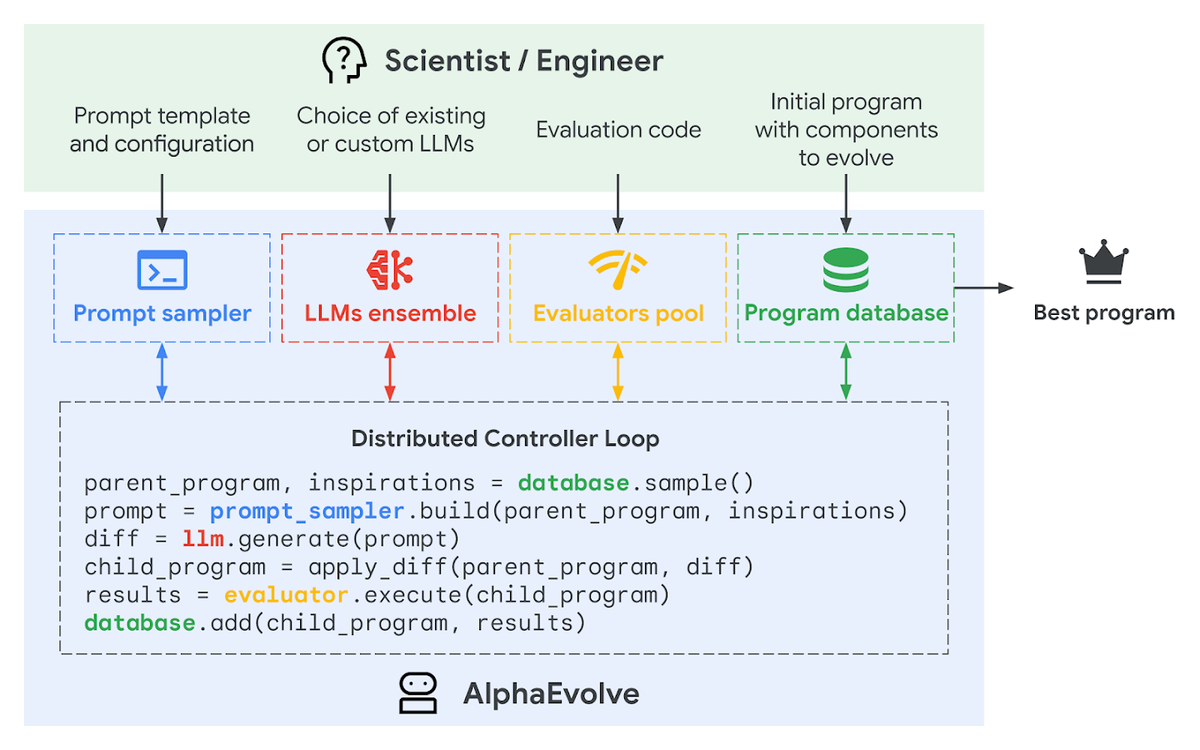
Pull your last 20 production bugs or highest-priority PRs and replay them as eval tasks. The selection criteria:
- The issue had a clear, verifiable resolution (a test that went from failing to passing)
- It represents a task type you expect to run through the model repeatedly
- It doesn't require context that can't be included in a prompt (no tribal knowledge)
For each incident, you need: the issue description, the relevant code files at the time of the bug, and the ground-truth patch. That's your eval task.
Why 20? Statistically, 20 tasks gives you about ±10% confidence interval on pass rate. It's enough to detect meaningful regressions without requiring weeks of task construction. We've found this number to be the practical minimum.
How to anonymize and standardize tasks
Before running evals, standardize every task into a common format:
eval_task = {
    "id": "INC-2025-0147",
    "type": "bugfix",
    "description": "Context deadline exceeded under load in agent dispatcher",
    "relevant_files": ["internal/dispatcher/task.go"],
    "context_lines": 60,  # lines around the bug site
    "ground_truth_patch": "diff --git a/...",
    "pass_condition": "TestAgentDispatcherTimeout passes",
    "scope_constraint": "Modify only internal/dispatcher/task.go"
}
Anonymize anything that would reveal internal system names, customer data, or proprietary logic. Replace with generic equivalents. The model doesn't need your actual company name to debug a context propagation bug.
Step 3 — Scoring Rubric
Pass@1, test pass rate, diff size budget, reviewer time
We score every eval task across four dimensions. Each has a hard threshold and a weighted score:
| Dimension | Definition | Weight | Hard Fail Threshold |
|---|---|---|---|
| Pass@1 | Does the first attempt produce a passing patch? | 40% | < 60% → fail eval |
| Test pass rate | % of existing tests that still pass after patch | 30% | Any regression → flag |
| Diff size budget | Lines changed ÷ lines required for minimal fix | 20% | > 2x minimal → scope creep flag |
| Reviewer time | Estimated minutes a senior dev would spend approving | 10% | > 15 min → usability flag |
Why diff size matters: This is the one teams always skip, and it's the one that bites them. A patch that changes 200 lines when a 10-line change would suffice isn't wrong—it's risky. Every extra line is a potential regression vector and a review burden.
How we weight each dimension
The 40/30/20/10 split reflects a simple priority: correctness first, safety second, scope discipline third, usability last. You may want to adjust for your team. A team with a very fast CI/CD cycle might weight reviewer time lower; a team shipping to a regulated environment might flip the regression weight to 40%.
Document whatever weights you choose before you run the eval. Changing them afterward to make a model look better is how teams end up shipping regressions they convinced themselves didn't exist.
Step 4 — Failure Taxonomy
Not all failures are equal. When a task fails, categorizing the failure type tells you more than the raw score.
We use four failure categories:
Hallucinated APIs
The model generates code that calls a function or method that doesn't exist in the provided context. This is the most disqualifying failure type. One hallucinated API in a production patch costs hours to track down.
Detection: Run a static import checker on every generated patch. Any unresolved symbol that wasn't in the input context is a hallucination.
Partial fixes
The model correctly identifies the problem but only fixes one of multiple failure cases. The primary test passes; an edge case test doesn't. Common in race conditions and async bugs.
Detection: Run the full test suite, not just the directly related test. We've found partial fixes account for about 30% of our "passed at first glance" failures.
Flaky test generation
The model generates regression tests that sometimes pass and sometimes fail depending on execution order or timing. These are worse than no tests—they erode trust in your test suite.
Detection: Run generated tests 5 times in sequence. Any variance → flaky. This adds maybe 90 seconds of CI time per eval task. Worth it.
Scope creep
The model modifies files, functions, or signatures that weren't part of the task. Even correct scope creep is a red flag—it means the model can't constrain itself, which is unsafe in a gated pipeline.
Detection: Diff the generated patch against the scope_constraint field in your task definition. Any touch outside the declared scope is an automatic scope creep flag.
Here's a simple Python checker:
import subprocess

def check_scope(patch_diff: str, allowed_file: str) -> bool:
    """Returns True if patch only touches the allowed file."""
    changed_files = []
    for line in patch_diff.splitlines():
        if line.startswith("diff --git"):
            # Extract filename: "diff --git a/path/to/file.go b/path/to/file.go"
            parts = line.split(" ")
            changed_files.append(parts[-1].lstrip("b/"))

    violations = [f for f in changed_files if f != allowed_file]
    return len(violations) == 0, violations
Step 5 — Rollout Plan: Shadow Mode → Gated Merge
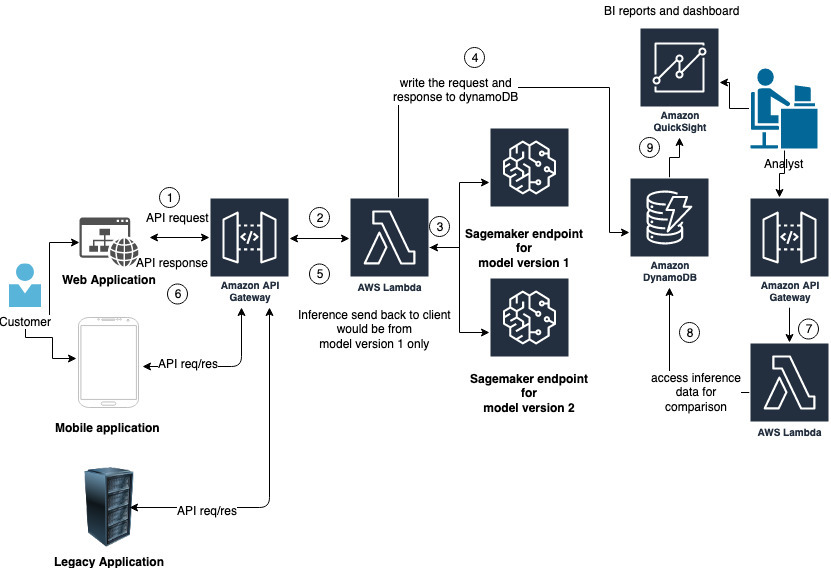
Passing the eval harness doesn't mean shipping immediately. Our rollout has three gates:
Gate 1 — Shadow mode (Week 1): Run the new model in parallel with the current model on all incoming tasks. Don't use its output for anything. Just collect and compare. Look for systematic divergence in failure taxonomy—if Gemini 3.1 Pro shows 3x more scope creep than your current model on real tasks, that's a signal the eval harness missed.
Gate 2 — Gated merge on non-critical paths (Week 2): Enable the model on tasks categorized as low-risk: documentation generation, test scaffolding, code comments. No patches to core business logic yet. Watch reviewer feedback.
Gate 3 — Full enable with monitoring (Week 3+): Enable on all task types with automated scope and regression checks wired into CI. Any scope creep violation → auto-revert + alert.
The MEDIUM thinking level available in Gemini 3.1 Pro is worth configuring at Gate 2—it's the right default for routine bugfix and refactor tasks, balancing cost and reasoning depth. Importantly, if you don't specify thinking_level, the API defaults to HIGH—the most expensive setting. Set it explicitly.
Our Actual Go/No-Go Thresholds (With Rationale)
Here are the exact numbers we use. They're not universal—adjust for your codebase and risk tolerance.
| Metric | Go Threshold | No-Go | Rationale |
|---|---|---|---|
| Pass@1 rate | ≥ 70% | < 60% | Below 60% = coin flip economics |
| Regression rate | 0% | Any | No acceptable regression in existing tests |
| Hallucinated API rate | 0% | > 0% | One hallucinated API in prod = hours of debugging |
| Scope creep rate | ≤ 10% | > 20% | Some scope creep is noise; consistent creep is a model characteristic |
| Flaky test rate | ≤ 5% | > 15% | Some flakiness from async tests is expected |
| Mean diff size ratio | ≤ 1.5x | > 2.5x | 1.5x over minimal is acceptable; 2.5x is a refactoring risk |
Why 70% for Pass@1? Because at Verdent, tasks that fail Pass@1 go to a human for triage. If the model fails more than 30% of the time, you're not getting efficiency—you're getting a different kind of toil. Your threshold depends on your human triage capacity.
The 0% thresholds on regression and hallucination aren't negotiable. One escaped regression from an AI agent is enough to undo weeks of trust-building with your engineering org.
Eval Template Download (Verdent GitHub)
We've open-sourced the eval harness template. It includes the task format schema, the four-dimension scoring rubric, the scope checker, and the flaky test runner.
The repo includes:
eval_task_schema.json— standardized task formatscore.py— rubric scorer with configurable weightsscope_check.py— diff-based scope violation detectorflaky_runner.sh— runs generated tests 5x and reports variancego_nogo.py— compares scores against configurable thresholds
You can plug any model into the harness by swapping the API call. We run it against gemini-3.1-pro-preview via the Gemini API and against our current production model on every release cycle.
Last Updated
| Item | Detail |
|---|---|
| Model evaluated | gemini-3.1-pro-preview (released February 19, 2026) |
| Thinking level used | MEDIUM for bugfix/refactor; HIGH for multi-file feature tasks |
| SWE-Bench Verified (Gemini 3.1 Pro) | 80.6% —Google DeepMind model card |
| SWE-Bench Pro (scale.ai, Jan 2026) | Average frontier model drop to ~43–46% on harder benchmark— reinforces the need for your own eval |
| API pricing | $2/M input, $12/M output (≤200K context) —official pricing page |
| Last verified | February 25, 2026 |
related post:
https://www.verdent.ai/guides/what-is-gemini-3-1-pro
https://www.verdent.ai/guides/gemini-3-1-pro-vs-claude-opus-4-sonnet-4
https://www.verdent.ai/guides/gemini-3-1-pro-pricing
https://www.verdent.ai/guides/gemini-cli-setup-repo-prompt
https://www.verdent.ai/guides/gemini-3-1-pro-repo-code-review
