
A working Base44 app can have almost no audience and still need a larger plan: a week of permission fixes, new screens, and integration changes spends build credits before traffic arrives. Once people use the app, a different credit pool starts to matter. Base44 pricing is therefore a two-ledger decision: what it costs to change the app and what it costs to run it.
The prices and allowances below were checked against Base44's public pages on September 24, 2026. The project budgets are explicit planning examples, not a bill, a hands-on test, or a promise that every prompt costs the same amount.
Base44 Pricing at a Glance
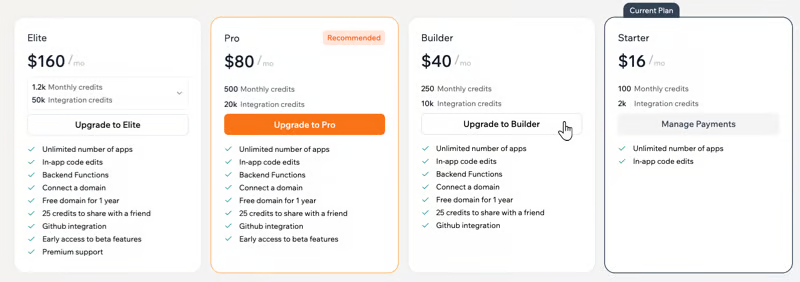
Base44 offers Free, Starter, Builder, Pro, and Elite. Its pricing page shows these US-dollar rates and monthly credit allowances as of this check:
| Plan | Monthly billing | Effective monthly price with annual billing | Message credits/month | Integration credits/month |
|---|---|---|---|---|
| Free | $0 | $0 | 25 | 100 |
| Starter | $20 | $16 | 100 | 2,000 |
| Builder | $50 | $40 | 250 | 10,000 |
| Pro | $100 | $80 | 500 | 20,000 |
| Elite | $200 | $160 | 1,200 | 50,000 |
The annual column is a monthly equivalent paid on a yearly commitment, not a month-to-month price. Taxes, promotions, and third-party charges can change the invoice. Free gives a maximum of five message credits per day within its 25-credit monthly cap.
The cheapest plan with enough message credits is only a candidate. Check the feature you actually need: custom domains start at Starter, while the pricing page places GitHub integration and model selection in Builder and above. Base44's public pages can differ in wording as features roll out, so verify the plan card and in-product checkout for the account you will use.
What Plans and Credits Pay For
Building and Iteration Usage
Message credits pay for AI work while building: planning, adding features, fixing logic, or revising copy. Base44 says there is no fixed cost per message. Its published examples put a simple visual change around 0.5 credit, a small feature around 1, a complex module around 2, and an app-wide change around 3–4. Those are illustrations based on standard models and average complexity, not rates to multiply blindly into a monthly forecast. The actual amount appears after a message runs.
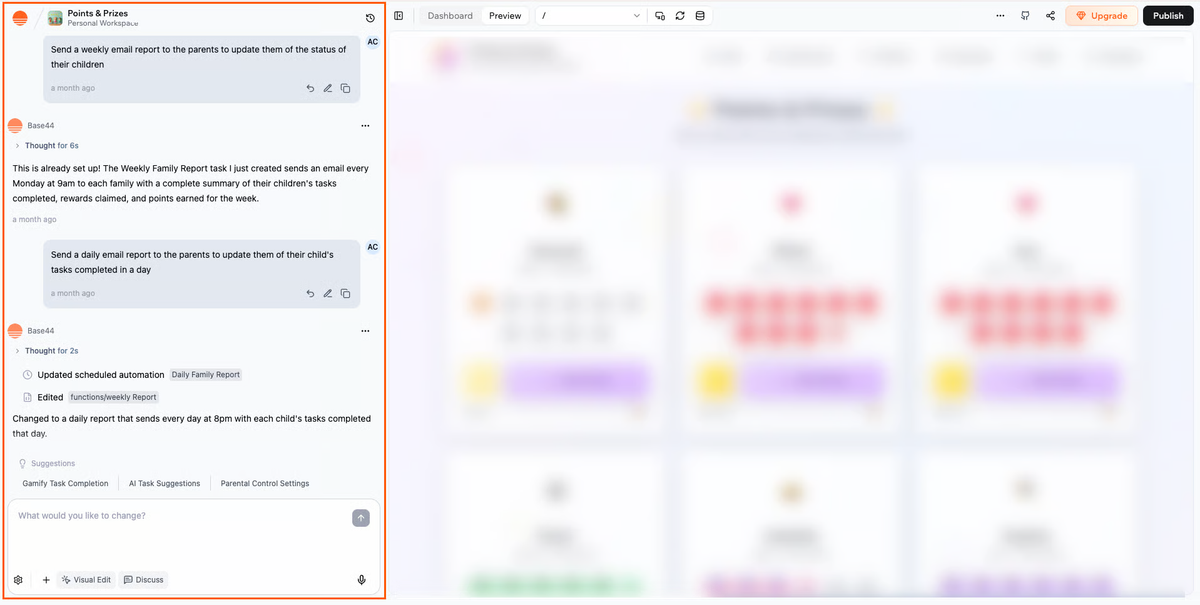
After the first version, a change may need several AI passes. Manual visual edits and direct text or layout changes do not use message credits, so reserve prompts for work that needs them.
Hosting, Integrations, and Other Cost Areas
Integration credits are drawn when a running app uses Base44's built-in services, such as email, image generation, LLM calls, workflows, or in-app agents. A backend function invocation may also use a small amount. Ordinary database reads and writes do not use integration credits under Base44's current credit guidance. The page lists examples, but says costs vary by action, model, and sometimes workspace; an app's usage screen is the source of truth for actual spend.
Base44 includes hosting and cloud storage, but live operation has limits. When integration credits run out, credit-requiring actions pause until reset or a plan change. Third-party services with your own keys bill separately, as do maintenance and domain renewal.
Estimate the Cost of an App Project
Consider a hypothetical intake form with a staff dashboard and one email per submission.
First, list AI changes by scope: 12 small fixes, 6 feature changes, and 2 larger changes. Base44's illustrative values yield 12 × 0.5 + 6 × 1 + 2 × 3 = 18 message credits. Twice as many AI passes would suggest 36. Both are sensitivity checks, not forecasts; actual cost varies by task and model.
Second, model live actions. At 300 submissions with one standard built-in email each, Base44's example rate suggests roughly 300 integration credits, before workflow steps, functions, AI calls, or retries. A custom-domain sender has a different example rate. Test a representative flow and read App usage by source.
Prototype, Pilot, and Ongoing Development Scenarios
Prototype: Few users, frequent design changes. Free can test the build flow, but its daily cap may interrupt a concentrated session.
Pilot: A small audience and real email and permission rules. Starter may cover the illustrative counts, if its features meet the app's needs.
Ongoing development: Several apps or weekly multi-file changes. Builder or higher may be justified by features or capacity even with low traffic. Track per-app use for two cycles.
Cost Limits to Check Before Upgrading
The critical limit is the one reached first. Check message use, integration use by source, plan features, and reset date. Assign someone to review the dashboard before adding an LLM call or automated email to a busy path.
Test a low-credit state: which function stops, what do users see, and how will the team notice? A failed payment, downgrade, and exhausted credits have different consequences.
Which Plan Fits Which Builder
Use Free for a disposable prototype, Starter for a small app needing more edits and live actions, and Builder when GitHub integration, model choice, or more capacity is needed. Choose Pro or Elite from measured demand and required support, not an expectation of better generated code.
Ask which pool ran out first: message credits from iteration or integration credits from app use? If neither did, identify the missing feature before buying a larger allowance.
FAQ
Do Unused Base44 Credits Roll Over?
No for the monthly message and integration allowances described in Base44's credit resets. They expire at the end of the credit cycle. Promotional or separately granted credits may have different terms, so check their expiry in the workspace before budgeting against them.
Are Failed Build Attempts Deducted from Base44 Credits?
They can be. Base44 says credits spent on AI mistakes and tool behavior are non-refundable because the builder still performed work. Its guidance recommends reverting an unwanted result instead of spending another prompt merely to undo it. If there was a platform error or unresolved issue, send support the app link, prompt, time, and screenshots; do not assume an automatic refund.
Can a Team Share Credits Across Multiple Base44 Apps?
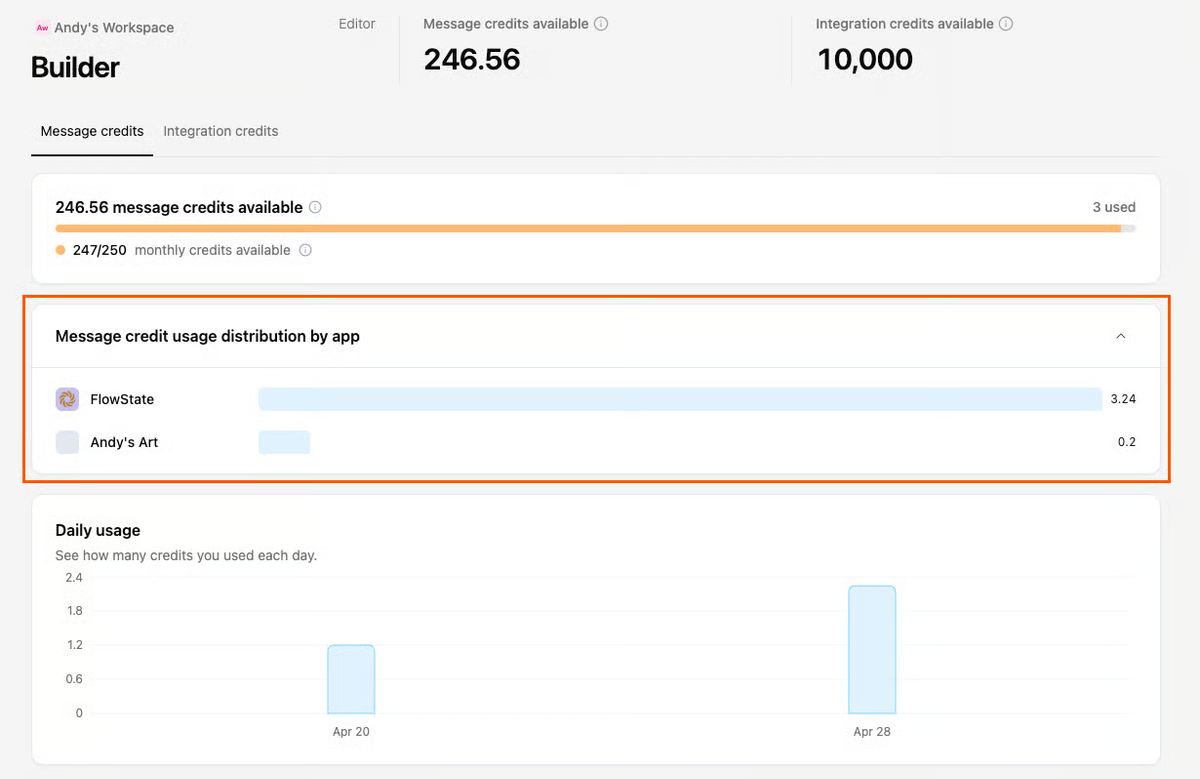
Yes. Workspace credits are shared across members and apps. The usage page breaks out the current cycle by app, so a team can see which app consumed message and integration credits. This is a common pool, not a guaranteed reservation for each project.
Does Base44 Bill Separately for Collaborators?
The public plan table includes multi-user editing and collaboration, and Base44's workspace member guidance describes shared access. The reviewed self-service pricing pages do not list a separate per-collaborator seat fee; collaborators can still consume the shared credits. Confirm any enterprise contract, workspace limits, or add-on charges before treating this as a universal procurement term.
What Happens to a Published App After a Base44 Downgrade?
Base44 says a downgrade takes effect at the end of the current billing period. Its billing guidance says that after cancellation to Free, apps stay live, but paid-only features may become unavailable and the workspace is limited to five apps. Test the particular app's domain, private access, backend functions, connectors, and credit-consuming features before scheduling a downgrade; “live” does not guarantee every workflow keeps working.
Conclusion
Base44's plan price is the predictable line; iteration and live actions are the lines that need measurement. Start with the two ledgers, run one controlled change and one representative app action, and read the actual credit totals before upgrading. A plan is adequate when its feature access and both credit pools cover the next release and the traffic you can reasonably expect—not merely when it was enough to publish the first version.