
Claude Code and Cursor are often compared as if they're the same kind of tool. They're not. Cursor is an AI-native IDE — a code editor with agent capabilities built in. Claude Code is a terminal agent — no editor, no GUI, just an AI agent that lives in your shell and works with your files directly. The choice between them is less "which is better" and more "do you want to work in an editor or in the terminal." For builders, that distinction shapes everything downstream.
Pricing and features verified as of May 2026. Both tools update frequently — confirm current details at cursor.com and claude.com/product/claude-code before deciding.
Quick Answer
Pick Claude Code if: you live in the terminal, you want a scriptable agent for automation and CI/CD pipelines, you value Claude's model quality for complex reasoning, or you want features like /ultrareview (multi-pass code review), task budgets, and Claude Code Routines (scheduled automation). Claude Code suits terminal-native developers and teams building agent automation.
Pick Cursor if: you want a visual IDE with integrated AI, you prefer to see your code in an editor with inline suggestions and visual diffs, you depend on VS Code extensions, or you want Tab autocomplete as a core part of your workflow. Cursor suits developers who want AI assistance integrated into a familiar editor experience.
The honest framing: this isn't a feature-by-feature contest where one wins. It's a workflow choice. A terminal-native developer will be more productive in Claude Code; an editor-centric developer will be more productive in Cursor. Many builders use both.
Terminal Agent vs AI IDE
Claude Code positioning
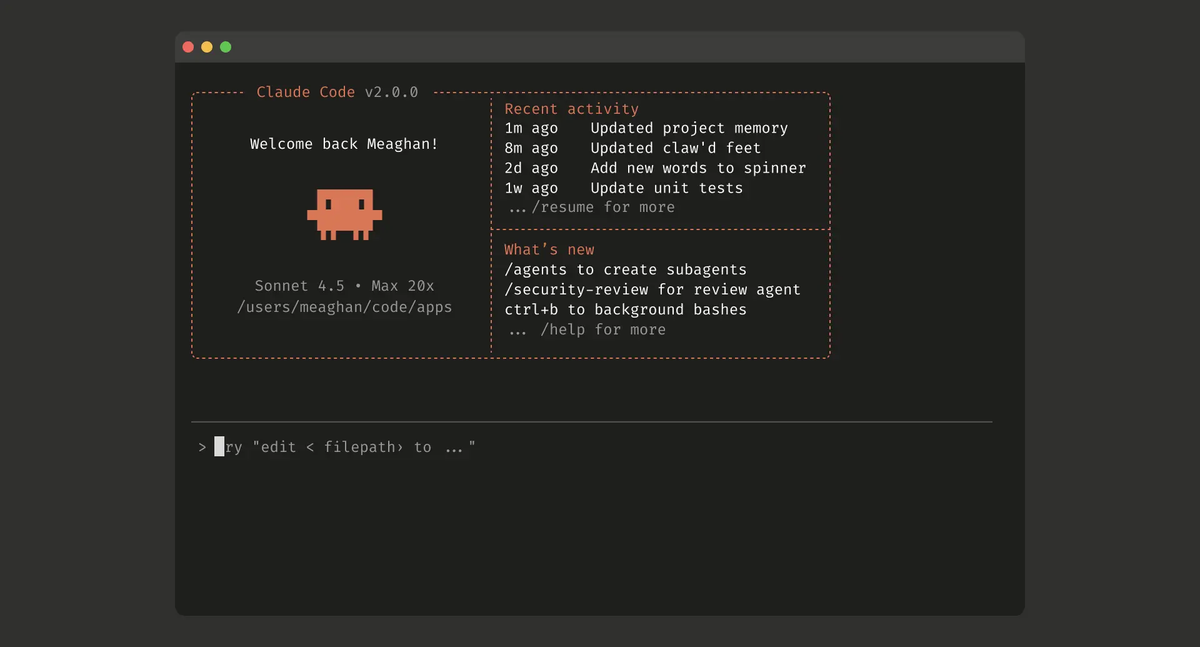
Claude Code is Anthropic's terminal coding agent. It installs as a CLI (npm install -g @anthropic-ai/claude-code, though the native installer is now preferred), runs in your shell, and works directly with your files and git. There's no editor — you describe tasks, the agent reads files, makes changes, runs commands, and produces diffs.
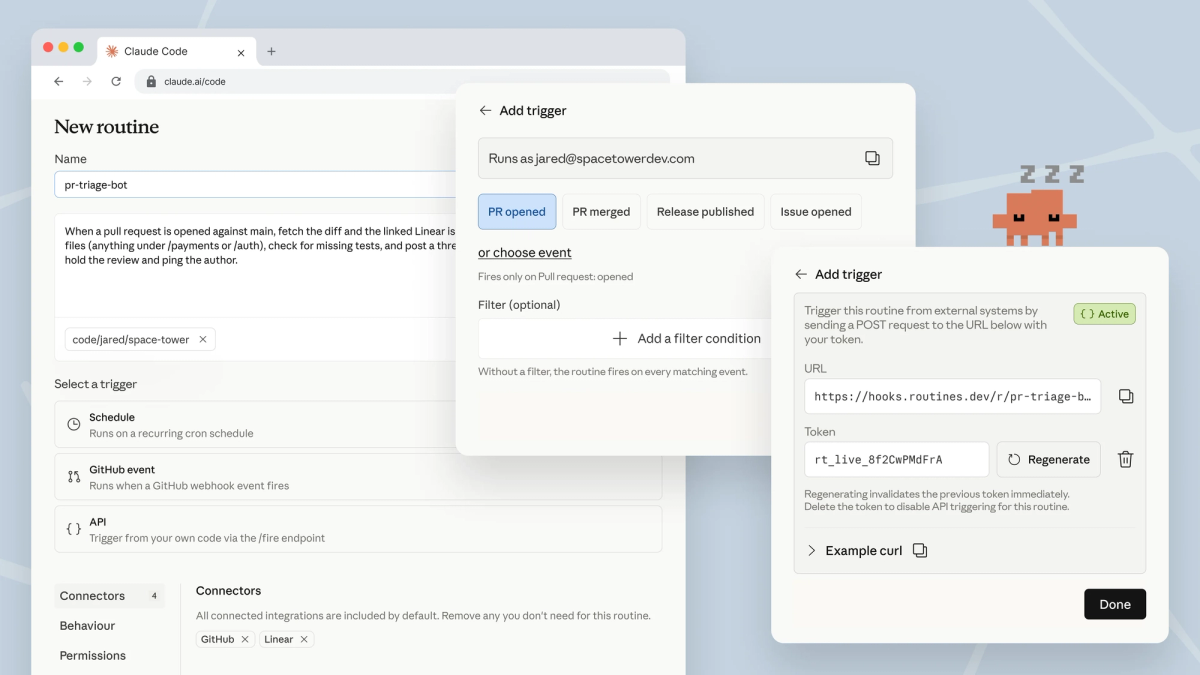
Its strengths are agentic depth and automation. /ultrareview runs multi-pass code review. Task budgets cap the token spend of an agent loop. Claude Code Routines schedule agent runs triggered by time, API calls, or GitHub webhooks. The subagent system (Task tool) spins up independent agent instances for subtasks. And because it's a CLI, it scripts cleanly into CI/CD pipelines and automation. It runs on Claude's models (Sonnet 4.6, Opus 4.8) and can use DeepSeek V4 as a backend via environment variables.
Cursor positioning
Cursor (see cursor.com) is a VS Code fork rebuilt around AI. You get a full visual editor — file tree, tabs, inline suggestions, visual diffs — with AI agent capabilities integrated. Tab completion offers inline autocomplete as you type. Agent mode (in Composer) handles multi-file changes. The @-mention system gives explicit control over what context the AI sees. Background Agents run async in cloud sandboxes, and Bugbot reviews PRs inline.
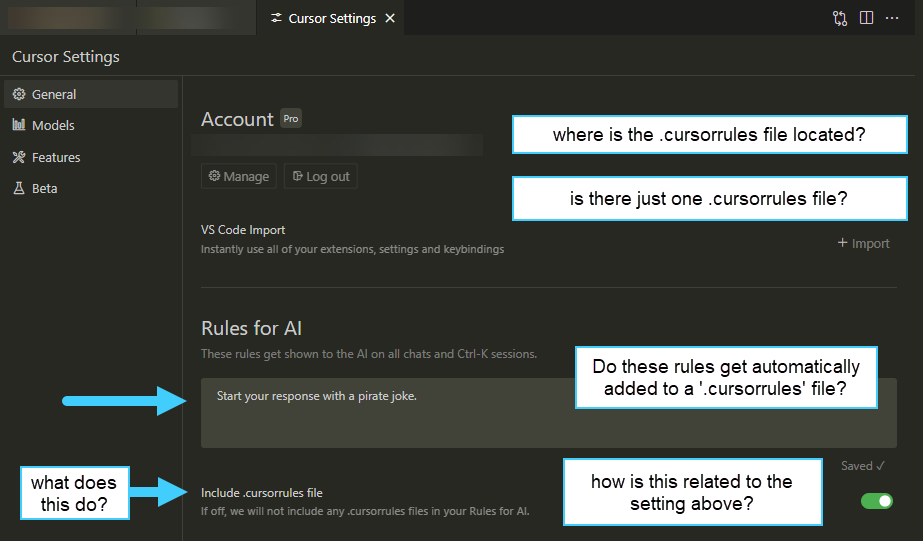
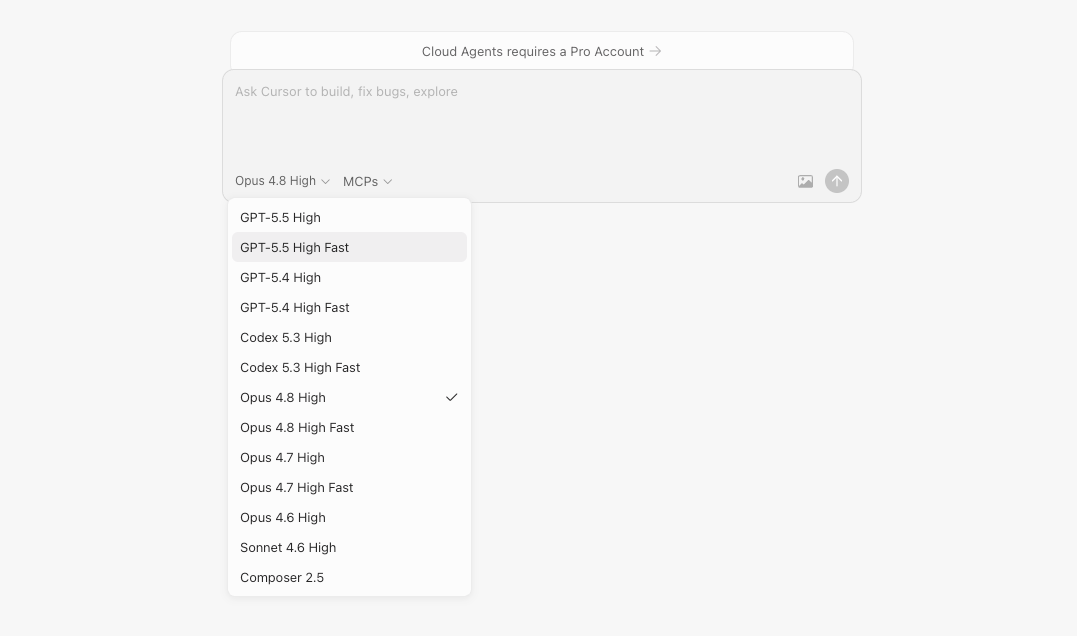
Its strengths are the editor experience and configurability. If you want to see your code, edit it directly alongside the AI, and have autocomplete woven into your typing, Cursor's IDE model fits. The .cursorrules (Rules) system encodes team conventions, and Cursor supports broad model selection (Claude, GPT, Gemini, its own Composer model) plus bring-your-own API keys.
The cursor cli vs claude code framing is worth a note: Cursor is primarily an IDE, though it has added some CLI capability. Claude Code is CLI-first with no editor. If you specifically want a terminal-native agent, Claude Code is purpose-built for that; Cursor's strength remains the IDE.
Comparison Table
| Claude Code | Cursor | |
|---|---|---|
| Type | Terminal agent (CLI) | AI IDE (VS Code fork) |
| Interface | Shell / terminal | Visual editor |
| Install | npm i -g @anthropic-ai/claude-code (native installer preferred) | Download the Cursor app |
| Inline autocomplete | ❌ (no editor) | ✅ Tab completion |
| Visual diffs | Terminal diffs | ✅ Visual editor diffs |
| Agent | CLI agent loop + subagents (Task tool) | Agent mode (Composer) |
| Code review | /ultrareview (multi-pass) | Bugbot (PR review) |
| Automation | Routines (schedule/API/GitHub) | Background Agents, Automations |
| Scheduled/async | Routines | Background Agents (cloud sandbox) |
| Conventions | CLAUDE.md / AGENTS.md | .cursorrules / Rules |
| Models | Claude (Sonnet/Opus); DeepSeek V4 via env | Claude, GPT, Gemini, Composer, Auto |
| BYO API key | ✅ | ✅ |
| CI/CD scripting | ✅ Native (CLI) | Via Background Agents |
| Pricing | Included in Claude Pro $20 / Max $100–200 | Pro $20 / Pro+ $60 / Ultra $200 |
Setup
Claude Code installs as a CLI and authenticates via Claude OAuth or API key. Setup is a single install command plus auth — no application to manage, just a binary in your PATH. Cursor installs as a desktop application (the editor itself) and authenticates on launch. Cursor's setup is heavier (it's a full IDE) but familiar to anyone who's installed VS Code.
Codebase context
Claude Code reads files directly from the filesystem, guided by CLAUDE.md / AGENTS.md for project conventions and @-references within sessions. Cursor uses @-mentions in the editor for explicit context and indexes the open workspace. The practical difference: Claude Code's context is built from what it reads during the agent loop; Cursor's is built from the editor's view of your workspace plus explicit mentions. Both work well; the mental model differs (shell session vs editor workspace).
Agent workflow
This is the core difference. Claude Code's agent workflow is conversational in the terminal — you describe a task, the agent works, you review the diff in the terminal or via git. Cursor's agent workflow is editor-integrated — you trigger Agent mode, watch changes appear in the editor, and review them visually with inline diffs.
For complex multi-step tasks, both are capable. Claude Code's subagents and /ultrareview give it depth for autonomous work; Cursor's visual feedback makes it easier to follow what the agent is doing step by step. Terminal-native developers often find Claude Code's flow faster; editor-centric developers find Cursor's visual feedback clearer.
Git integration
Claude Code works directly with git from the terminal — it's in the same environment as your git commands, so committing, branching, and reviewing diffs is native to the workflow. Cursor has git integration through its VS Code base (source control panel, visual diffs, commit UI). Both handle git well; Claude Code's is terminal-native, Cursor's is GUI-based.
Pricing
Claude Code is included in Claude subscriptions: Pro at $20/month, Max at $100 or $200/month. API-key usage is available at Claude API rates. Cursor is Pro at $20/month, Pro+ at $60, Ultra at $200, with a usage-based credit model and unlimited Auto mode. At the $20 entry tier, both are comparably priced. The difference is what you're paying for: Claude Code's subscription centers on Claude model access for the terminal agent; Cursor's centers on the IDE plus a multi-model credit pool. Both offer free tiers with limits.
Where Claude Code Wins
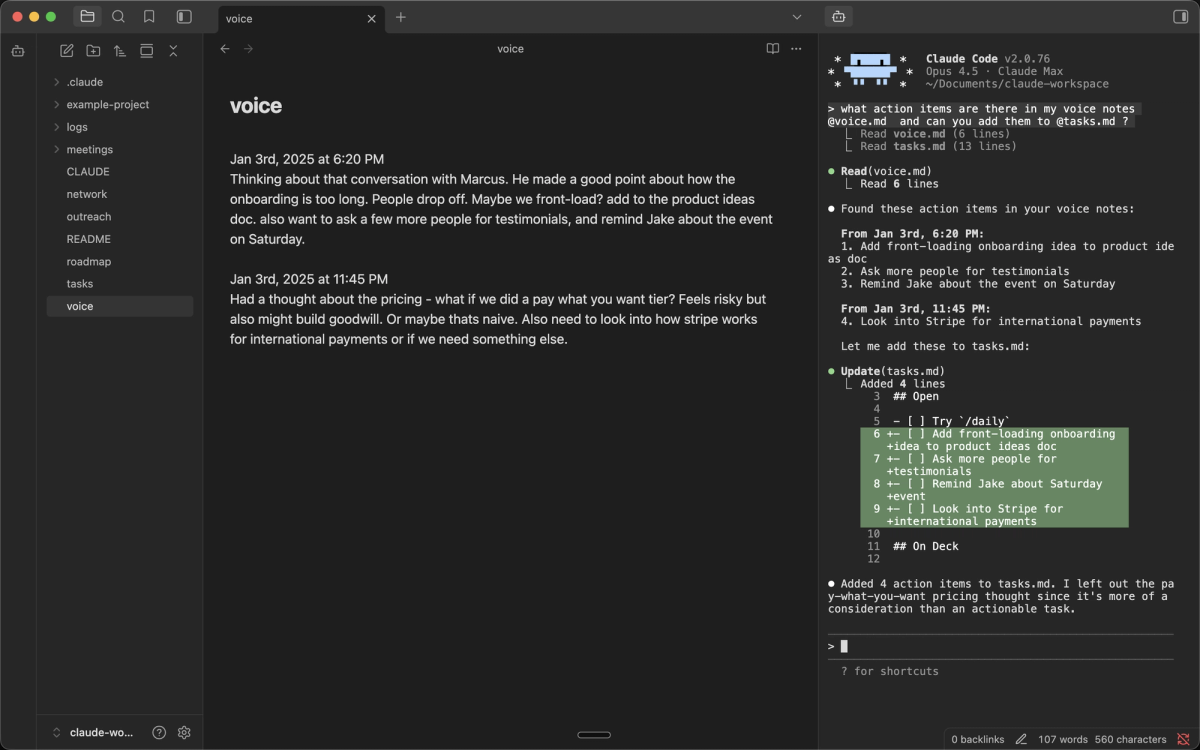
Terminal-native workflow. If you live in the shell — tmux, vim/neovim, terminal-centric development — Claude Code fits your existing habits without asking you to adopt a GUI editor. No context-switching to a separate application.
Automation and CI/CD. As a CLI, Claude Code scripts cleanly into pipelines. You can invoke it non-interactively, integrate it into CI workflows, and trigger it from automation. Cursor's Background Agents handle some async work, but Claude Code's CLI-native scriptability is more flexible for pipeline integration.
/ultrareview and agentic depth. Multi-pass code review (/ultrareview), task budgets for cost control, and Routines for scheduled automation give Claude Code agentic features oriented toward autonomous and team workflows. For teams where code review quality is a priority, /ultrareview on Claude Opus 4.8 is a strong differentiator.
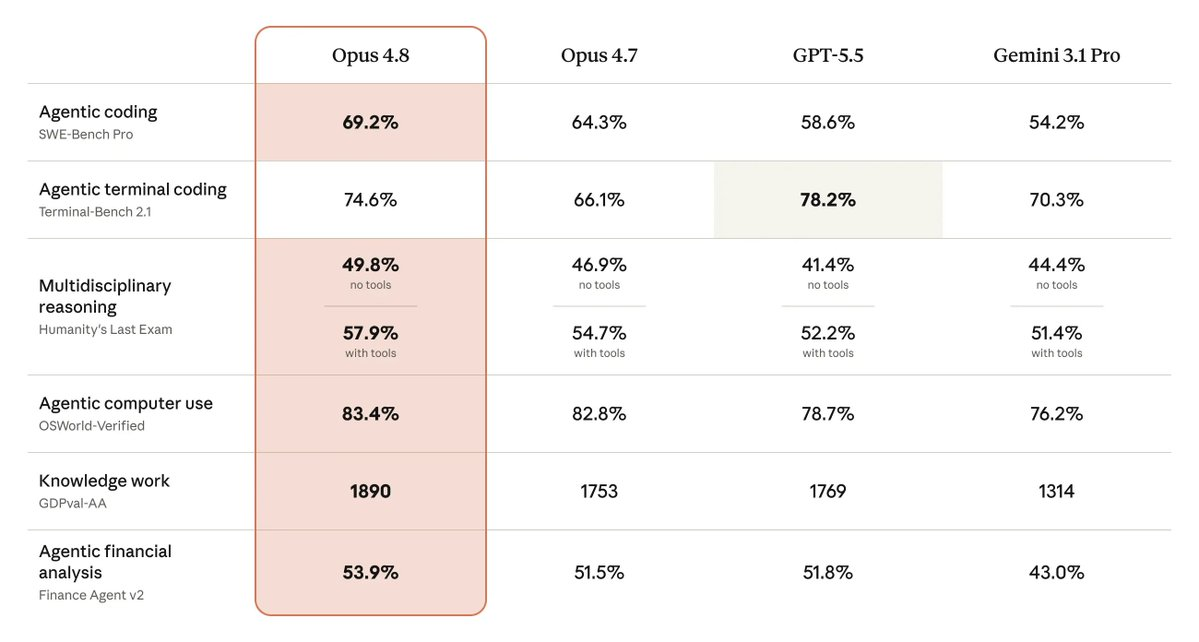
Claude model quality. Claude Code runs on Claude's models natively, with access to the full effort range (high/xhigh/max) and Claude-specific features. For workflows where Claude Opus 4.8's coding performance (69.2% SWE-Bench Pro, Anthropic-reported) is the priority, Claude Code is the native path.
Scriptable and composable. Being a CLI means Claude Code composes with other shell tools, can be wrapped in scripts, and fits Unix-philosophy workflows in a way a GUI IDE can't.
Where Cursor Wins
Visual editor experience. If you want to see your code, edit it directly, and have AI woven into a familiar editor, Cursor's IDE model is the better fit. Visual diffs, inline suggestions, and the editor's full feature set are things a terminal agent can't provide.
Tab autocomplete. Cursor's inline Tab completion — AI suggestions as you type — is a core productivity feature with no equivalent in a terminal agent. For developers who rely on autocomplete in their flow, this alone can decide the choice.
VS Code extension compatibility. As a VS Code fork, Cursor imports your extensions, themes, and settings. If you depend on specific VS Code extensions, Cursor preserves that ecosystem; Claude Code has no editor and therefore no extension model.
Lower friction for editor-centric developers. Developers who already work in VS Code or a similar editor find Cursor's transition nearly frictionless. Adopting a terminal agent is a bigger workflow change for developers who aren't already terminal-native.
Multi-model flexibility in one interface. Cursor's model selection (Claude, GPT, Gemini, Composer, Auto) lets you switch models within the editor for different tasks. Claude Code is Claude-centric (though it supports DeepSeek V4 via env vars).
When You Need Multi-Agent Execution
Both Claude Code and Cursor are, at their core, single-developer tools — even Claude Code's subagents and Cursor's Background Agents extend a single developer's session rather than orchestrating a fleet of independent agents with isolation and verification.
For most builders, that's the right model. You don't need multi-agent orchestration for typical coding work. The point where it matters is structurally parallel work: a feature requiring frontend, backend, and test changes developed simultaneously on isolated branches, or a large migration where multiple agents work on different parts of the codebase without interfering. At that scale, the central challenge shifts from single-task quality to coordination — keeping parallel agents from conflicting, verifying each agent's output before integration, and maintaining a clean main branch.
This is where multi-agent coding platforms operate as a distinct layer. Tools like Verdent focus on Plan-First task decomposition, parallel agents on isolated Git worktrees, and verification gates before integration — the orchestration and isolation concerns that neither a terminal agent nor an IDE agent is built to solve. This isn't a replacement for Claude Code or Cursor for everyday work; it's a different layer for genuinely parallel tasks. A common pattern is using Claude Code or Cursor for daily development and a multi-agent platform for the specific work whose structure benefits from parallel execution.
FAQ
Is Claude Code better than Cursor?
Neither is universally better — they're different kinds of tools. Claude Code is a terminal agent; Cursor is an AI IDE. Claude Code is better for terminal-native developers, automation, CI/CD scripting, and workflows that value /ultrareview and Claude's agentic depth. Cursor is better for developers who want a visual editor with integrated AI, Tab autocomplete, and VS Code extension compatibility. The right choice depends on whether you work in the terminal or in an editor — a workflow preference, not a capability ranking. Try both: each has a free tier.
Should solo builders use Claude Code or Cursor?
Depends on your working style. Solo builders who are terminal-native, want automation, and value Claude's model quality lean Claude Code. Solo builders who want a visual editor, rely on autocomplete, and prefer seeing changes in an IDE lean Cursor. Many solo builders use both — Cursor for interactive editor work and Claude Code for terminal automation and complex agent tasks. If you're not sure, start with the one that matches where you already spend your time (terminal vs editor).
Can I use Claude Code and Cursor together?
Yes, and many builders do. They operate at the filesystem level and don't conflict. CLAUDE.md (Claude Code) and .cursorrules (Cursor) can coexist in the same repository. A common pattern: Cursor for interactive editing and visual diff review, Claude Code for terminal-driven automation, complex multi-step agent tasks, and CI/CD integration. Since both commit through git, there's no conflict as long as you're not running both simultaneously in the same working tree.
When does a multi-agent platform make more sense?
When your work is genuinely parallel — multiple parts of a feature developed simultaneously, large migrations needing coordinated changes across many files, or workflows where throughput (not single-task quality) is the bottleneck. Both Claude Code and Cursor are single-developer-centric; their subagent and background features extend one session rather than orchestrating multiple isolated agents. Multi-agent platforms (like Verdent) operate at that orchestration layer with Plan-First decomposition, Git worktree isolation, and verification gates. Most builders don't need this for everyday work — consider it when a specific task's structure is parallel enough that sequential single-agent execution becomes the limiting factor. For a three-way IDE comparison, see how Windsurf, Cursor, and Claude Code each fit different workflows: Windsurf and Cursor are AI IDEs, while Claude Code is the terminal-agent option.
Related Reading
