Choosing between Cline and Cursor can look like an editor preference until a team asks who chooses the model, where repository context travels, and who pays when an agent keeps working. This comparison uses vendor documentation checked on September 17, 2026, an editorial setup probe, and reproducible reports from GitHub contributors. Verdent also sells an AI coding agent; readers should weigh that commercial interest. No matched Cline-versus-Cursor coding run or performance winner is claimed.
Cline vs Cursor in Brief
| Decision point | Cline | Cursor |
|---|---|---|
| Usual starting point | Add the agent to an existing editor, then select a model provider and approval settings | Install an integrated AI coding environment, then select a plan and model |
| Model bill | Free individual extension; inference billed through Cline or your provider | Free limited plan or paid seat with included usage; possible on-demand charges |
| Data path | Your own key can send content directly to the model provider; Cline-provided keys change that path | AI requests pass through Cursor's backend, including bring-your-own-key requests |
| Team control | Enterprise offers central billing, identity, provider limits, and logs by custom contract | Teams and Enterprise offer central administration; some controls are Enterprise-specific |
These are defaults, not code-quality verdicts. Cline's repository includes the VS Code extension, CLI, desktop app, and SDK, but says its JetBrains plugin is not currently open-sourced. Cursor also has editor, CLI, and Cloud Agent surfaces. You can install Cline in Cursor; choose the agent, billing path, and administration you intend to operate.
The Decision Scenario
The editorial probe used a small, synthetic Python authorization repository. Its requested fix was precise: deny access when the user is inactive or the record is archived, even if that user is an admin; preserve three existing permissions. A clean baseline was committed (0272ad6), then python3 -m unittest -v was run. Three of five tests passed; the two new denial tests failed. That is an observed, reproducible starting condition, not a result produced by either agent. The repo was chosen to make an unauthorized broad refactor visible in a diff, not to stand in for a production codebase.
The setup probe also resolved isolated CLI versions: Cline 3.0.62 and Cursor Agent 2026.09.15-d2fe57e. An authenticated, comparable coding run did not complete. There are therefore no defensible claims here about which tool fixed the tests faster, spent fewer tokens, or wrote better code. A team pilot should give both agents the same commit, failing tests, allowed paths, model and billing account, and command-approval policy. Record the final diff, test output, human interventions, and invoice line items; a setup check alone cannot establish task performance.
Setup and Development Environment
Extension-Led and Integrated Workflows
Cline can install as an extension in an established editor. That preserves existing debugging and keybindings, while setup shifts to provider credentials, model choice, permissions, and usage monitoring.
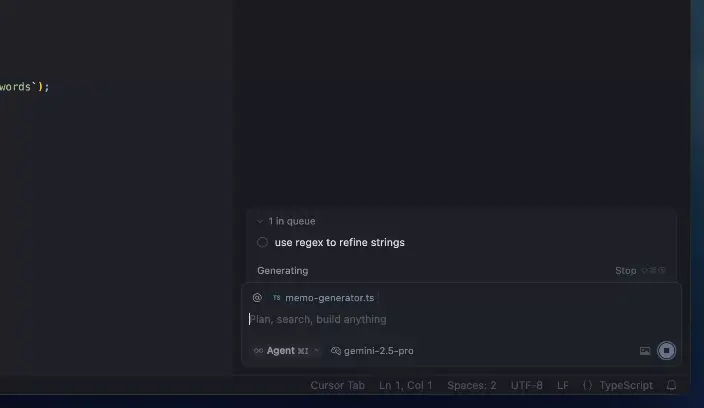
Cursor asks you to adopt its integrated environment. Its Agent can search, edit, and run terminal commands alongside the model picker and rules system. Pilot the migration with a real workspace: required extensions and the debugger must still work.
Model Access and Configuration
Cline's model-provider options include cloud, gateway, and local routes. Provider terms and token prices become part of the decision. Repeated tool calls and large context can outweigh the zero seat price; monitor cost per accepted task.
Cursor supplies a model picker and accepts supported provider keys, yet BYOK requests still reach Cursor's backend for prompt construction. Individual BYOK model costs go to the provider; Teams and Enterprise also apply Cursor's Token Rate to third-party requests. Check plan scope and region before budgeting.
Control, Context, and Agent Actions
Both agents need repository instructions. Cline reads .clinerules/ and cross-tool formats; Cursor uses scoped .cursor/rules. A rule to run tests is guidance; verify the terminal output and changed files.
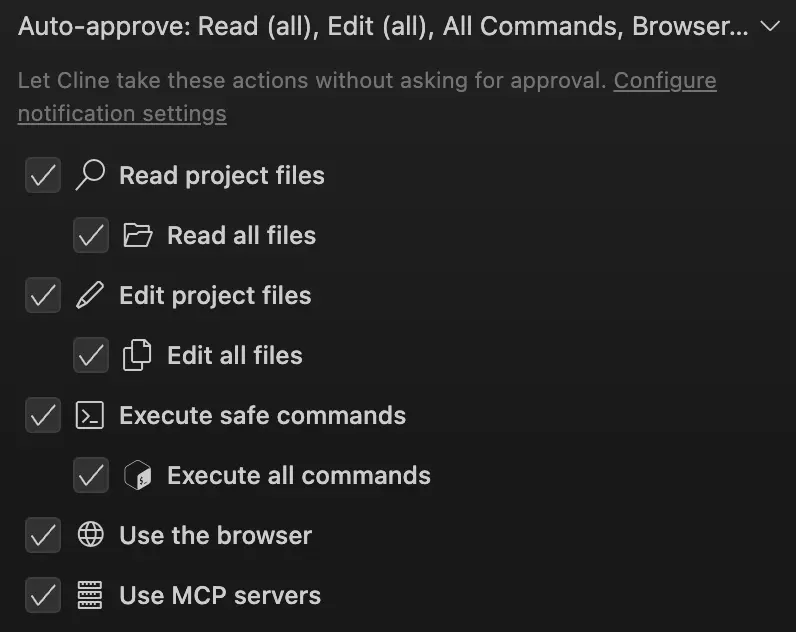
Cline's extension Auto Approve settings distinguish reads, edits, commands, browser use, and MCP calls. Its CLI README documents a different starting point: tool calls are auto-approved by default; --auto-approve false requires review, and a required approval is denied when terminal input/output is not interactive. Approval policy must therefore be checked for the surface being deployed, not inferred from the product name. Cursor's terminal Run Modes include Auto-review, Allowlist, and Run Everything. For the sample task, allow reads, review dependency changes and broad commands, and reserve merge authority for a human.
GitHub offers a useful reality check, with attribution and limits. In Cline issue #13263, rvnlord supplied environment details and reproduction steps for truncated tool output and file reads in the 4.1.9 Next VS Code extension. The report is still open; it is a versioned user observation, not a measured property of every current Cline installation. In Cursor advisory GHSA-82wg-qcm4-fp2w, credited researcher Dan Lisichkin documented an Allowlist bypass in Cursor 2.2 and earlier, patched in 2.3. These records do not compare code quality. They show why a pilot should record exact versions, inspect what context reached the model, and test the configured approval boundary with harmless commands before granting repository access.
Context has a budget. Cursor can attach files, terminal output, and diffs; Cline can use rules and selected files. On either surface, retain the original test log outside the chat, note any truncation or omitted files, and inspect the complete diff. For the authorization fixture, a passing test is insufficient if the agent weakens an existing assertion or changes files outside the allowed paths.
Usage Costs and Team Administration
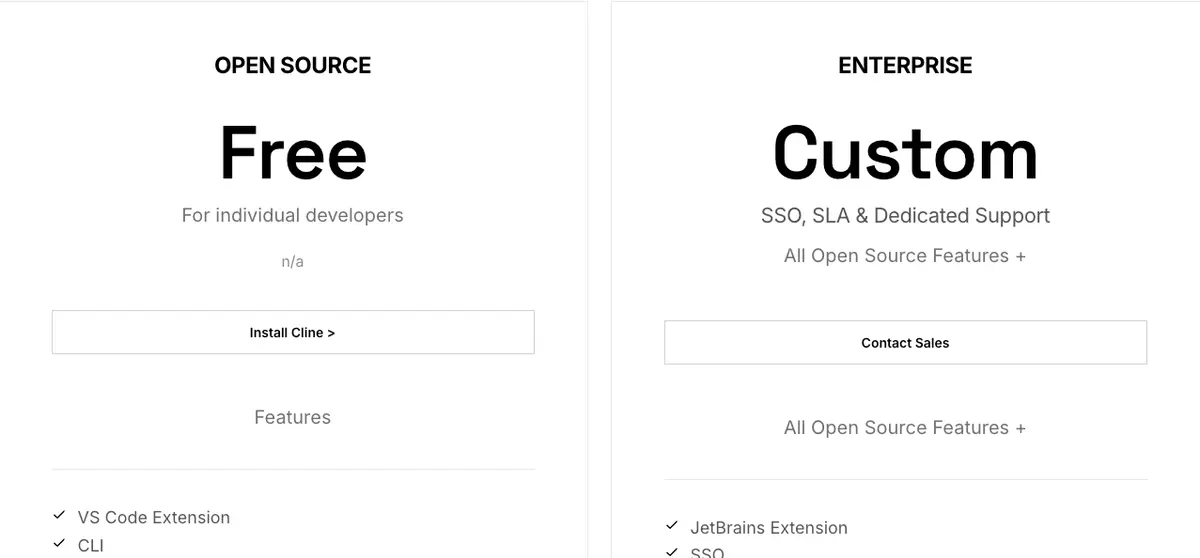
As checked on September 17, 2026, Cline lists its individual open-source extension as free; inference is paid through a provider key or Cline. Custom-priced Enterprise lists SSO, centralized billing, role-based access, provider limits, a dashboard, and authentication logs. Those features do not come with the free extension; assess the component and agreement you will deploy.
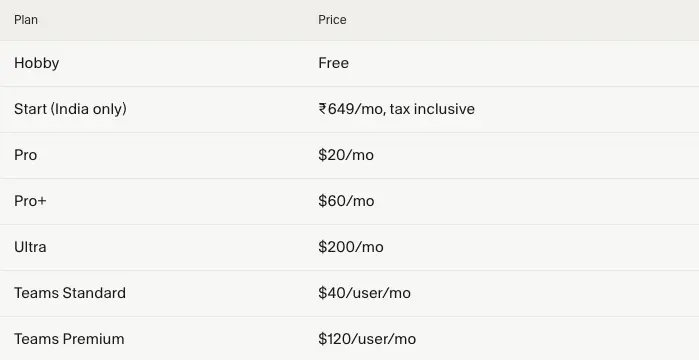
Cursor lists Hobby as free, Pro at $20/month, Pro+ at $60/month, Ultra at $200/month, Teams Standard at $40/user/month, and Teams Premium at $120/user/month. Enterprise is quoted separately. Paid plans include model usage, while on-demand usage can be billed after the included amount is spent. Teams receive centralized management; Cursor documents pooled usage, SCIM, audit logs, and more advanced controls for Enterprise. Plan and feature availability can change, so use these figures as a dated procurement snapshot.
Price the same accepted change: Cline = inference + contracted team costs; Cursor = seats + usage beyond allowances + separately billed services. Add setup and review time. Provider invoices and product usage belong in separate columns; a seat price cannot predict a long agent session's bill.
Limitations and Trade-Offs
Cline makes the team responsible for provider selection and contracts. Own-key user content goes directly to the provider; Cline-provided keys involve Cline in the request. “Open source” does not describe every plugin or hosted service. Local inference still needs a task-level quality check.
Cursor's backend remains in the BYOK request path. Privacy Mode limits training use, not data movement; Cloud Agents add storage and retention. Cursor's security guidance layers rules with sandboxing, hooks, and review. Neither vendor's features prove your codebase will need less review. The editorial probe stopped before an authenticated paired agent run, and the cited GitHub reports involve different products, versions, and tasks; they cannot be turned into a comparative failure rate.
Which Tool Fits Which Developer
Choose Cline first if you want to keep an established editor, control the provider account and model route, and are willing to own that configuration. It also deserves a closer look when direct-to-provider BYOK is a policy requirement. Price the actual inference path and confirm Enterprise terms before a managed rollout.
Choose Cursor first if the team wants an integrated editor and a centrally administered plan, and accepts Cursor's backend in the AI request path. It has a more explicit public route for organization-wide privacy settings, admin controls, and a US-only Enterprise data-residency program, but each control has a plan and feature scope. A strict residency team should read those exclusions before treating “US-only” as a blanket promise.
If both remain viable, run the same task, test, and review rubric. Require both previously failing tests to pass, the three preservation tests to stay green, and the diff to contain only the intended permission change. End with an approved model, repository scope, command policy, billing owner, and merge evidence.
FAQ
Can Cline and Cursor Use the Same Repository Rules?
Yes, for a shared baseline: Cline recognizes AGENTS.md, and Cursor supports it as project instructions. Keep common architecture and test requirements there. Tool-specific rule directories have different scoping and metadata, so verify which files each client loaded in the actual workspace. A shared filename does not guarantee identical interpretation or enforcement.
Do Cline and Cursor Offer Comparable Data Processing Agreements?
Do not assume parity from two privacy pages. Cursor publishes a DPA, and its privacy guidance describes DPA coverage for Teams and Enterprise, not individual plans. Cline's public privacy notice explains its own-key and Cline-key data paths; the reviewed public material did not establish an equivalent DPA scope for every Cline configuration. Ask Cline for the proposed Enterprise DPA and compare parties, processors, transfers, deletion, and notice terms against the exact provider contract you will use.
Can Either Tool Meet an Organization's Code-Residency Requirements?
That depends on the required region and every enabled data path. Cursor currently describes US-only inference, processing, and storage for supported Enterprise features and models, with exclusions including BYOK, external MCPs, and some integrations; EU and Iceland inference-only coverage is on request. For Cline, a direct provider or local-model configuration may give the organization more routing control, but Cline's Enterprise page alone is not a residency guarantee. Map extension telemetry, provider requests, logs, backups, and any hosted features before approval.
How Long Does Each Tool Retain Deleted Prompt History?
There is no responsible single number across both products. Cline says it does not collect own-key user content, so provider and local history terms matter; its public notice does not give one universal post-deletion interval for all modes. Cursor's Cloud Agent conversation can be deleted on demand, while its VM snapshots expire after 90 days of inactivity and cannot be deleted on demand. Cursor's account-deletion and Enterprise-retention controls are separate again. Request a written schedule for the exact prompt-history surface, plan, backup, and provider before setting a deletion policy.
Can Security Teams Audit Each Tool's Current Subprocessor List?
Cursor's DPA points to a maintained subprocessor list and update notice process; security teams can use its Trust Center subscription process to track changes. The reviewed Cline public pages did not provide an equally clear consolidated list for all configurations. With Cline BYOK, the chosen provider and any gateway require their own subprocessor review; for Cline-hosted or Enterprise services, request the current vendor schedule and change-notice terms directly. Check the list again at contracting, because an old screenshot is not a current audit.
Conclusion
The Cline vs Cursor decision turns on the route your team is prepared to operate. Cline lets a developer keep the editor and choose more of the model and provider stack; Cursor packages more of the environment and team administration together. The reproducible baseline and GitHub reports sharpen the questions to ask, while leaving the head-to-head outcome open. Put the same task through both with a fixed repository, model, approval policy, and review bar. Choose the configuration whose data path, total usage bill, and controls your team can explain and support after the first month.