
I spotted DeepSeek-TUI on GitHub Trending last week and almost scrolled past it. Another DeepSeek wrapper, I assumed. Then I read the README more carefully — dual-binary Rust architecture, native thinking-mode streaming, 1M-token context built into the design from day one, and a parallel sub-agent primitive called RLM that fans out up to 16 cheap V4-Flash children in one call. That's not a wrapper. That's a model-specific harness built by someone who clearly spent serious time with DeepSeek V4's API economics. This is what it actually is, how it's structured, and who should care.
DeepSeek-TUI in One Paragraph
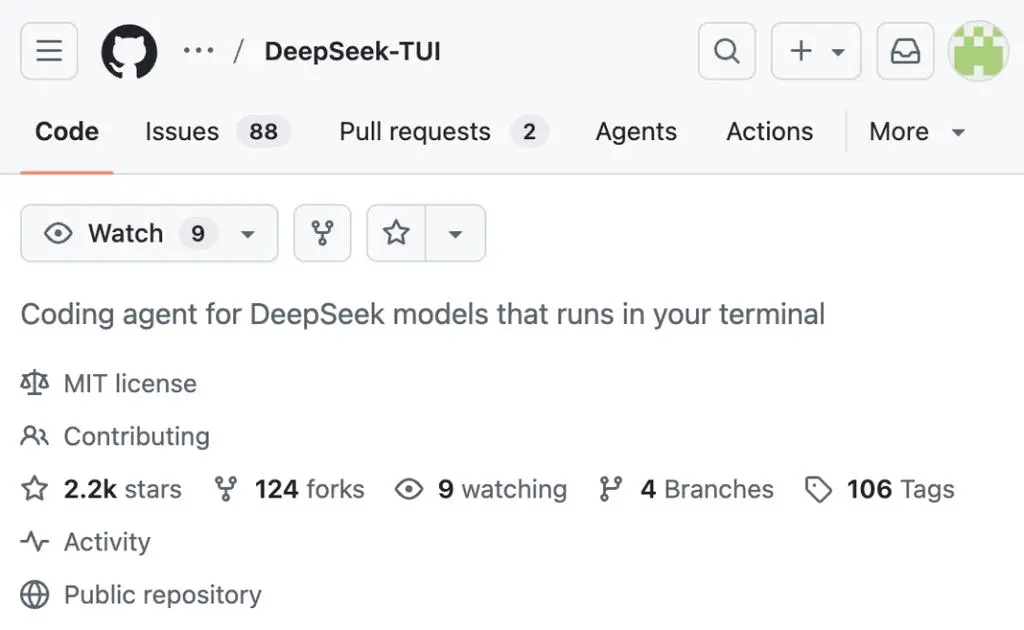
DeepSeek-TUI is an open-source terminal coding agent built around DeepSeek V4, created by independent US developer Hunter Bown under the GitHub handle Hmbown. It is not an official DeepSeek product. The project launched January 19, 2026, hit v0.8.8 across 37 releases, and reached approximately 2.3K GitHub stars in early May 2026 after appearing on GitHub Trending. It runs as a keyboard-driven TUI in your terminal, gives DeepSeek's frontier models direct access to your workspace — reading and writing files, running shell commands, searching the web, managing git, orchestrating sub-agents — and is licensed MIT. Installation takes one command: npm install -g deepseek-tui (the npm package is just a downloader; no Node runtime is required at runtime).
The Dual-Binary Architecture
deepseek dispatcher + deepseek-tui runtime
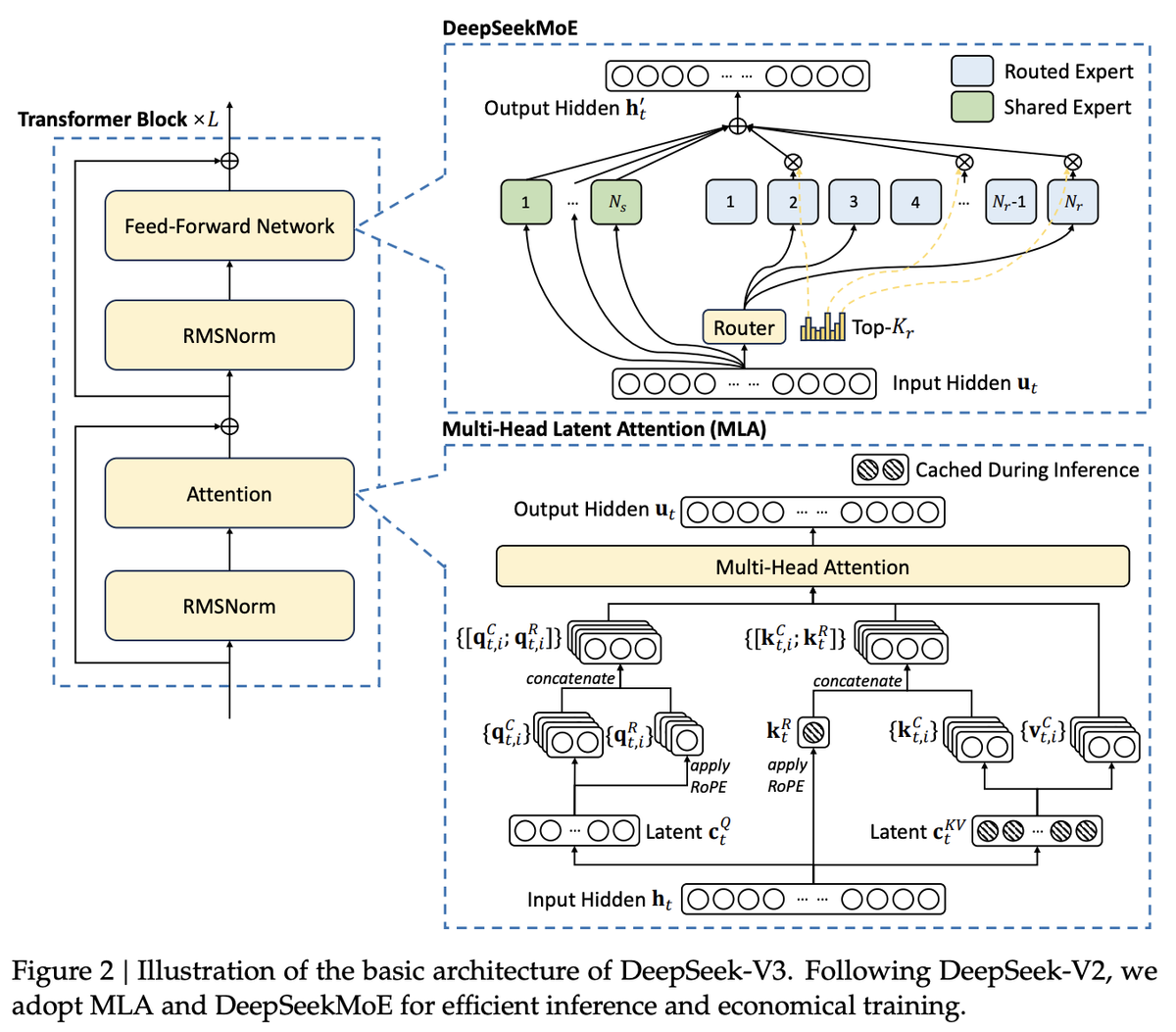
DeepSeek-TUI ships as two required binaries. The deepseek binary is the dispatcher CLI — it handles authentication, configuration, model selection, and session management, then delegates actual agent execution to deepseek-tui. Running either binary alone produces a MISSING_COMPANION_BINARY error; both must be on your PATH.
The separation is deliberate. The dispatcher provides the stable user-facing interface (commands, config, auth) while the runtime handles the live agent loop and TUI rendering. Updates to one don't necessarily break the other's interface.
# Both binaries required — install via npm (downloads prebuilt binaries):
npm install -g deepseek-tui

# Or via Cargo (builds from source, requires Rust 1.85+):
cargo install deepseek-tui-cli --locked   # provides `deepseek`
cargo install deepseek-tui --locked        # provides `deepseek-tui`

# Or Homebrew (macOS):
brew tap Hmbown/deepseek-tui && brew install deepseek-tui
Rust + ratatui, single binary pair, no Node/Python
Both binaries compile to native Rust. Runtime footprint is minimal — the tool reports roughly 12MB RAM at idle. The ratatui library provides the terminal UI layer: split panes for chat, code previews, and command history, keyboard-driven navigation throughout. There is no Electron, no Python runtime, no Node daemon running in the background. The npm install path is a convenience downloader only; the actual binaries are precompiled Rust.
Prebuilt binaries cover Linux x64/ARM64, macOS x64/ARM64 (Apple Silicon), and Windows x64. Platform support is genuine: v0.8.8 specifically fixed a Windows path separator bug and ARM64 Linux prebuilt availability that was missing in earlier releases.
Engine loop and tool registry
The internal architecture: deepseek (dispatcher) → deepseek-tui (companion binary) → ratatui interface ↔ async engine ↔ OpenAI-compatible streaming client.
Tool calls route through a typed registry with seven categories:
| Tool category | What it covers |
|---|---|
| shell | Shell command execution, sandboxed per workspace trust level |
| file ops | Read, write, patch, search across workspace files |
| git | Stage, commit, branch, diff operations |
| web | Web search (DuckDuckGo with Bing fallback), URL fetch |
| sub-agents | Spawn child agent sessions for parallel subtasks |
| MCP | Connect to Model Context Protocol servers via stdio |
| RLM | Fan out 1–16 V4-Flash children for parallel reasoning |
Results stream back into the transcript in real time.
Why It's a Model-Specific Harness, Not a Wrapper
Built around DeepSeek V4's 1M context and prefix cache
Generic OpenAI-compatible wrappers treat context as something to manage around the model's limits. DeepSeek-TUI treats V4's 1M context window as a design primitive. The cost estimator tracks cache hits separately from cache misses — V4's cached input tokens cost 1/10th of uncached — and the CHANGELOG shows direct responses to DeepSeek's pricing updates (the v0.8.8 cache-hit price update to 0.003625/0.0028/0.0145 per 1M tokens reflects DeepSeek's live pricing changes applied directly to the TUI's cost estimator).
The auto-compact feature handles context growth with replacement-style summarization near the active model limit. This is opt-in (auto_compact = false by default); the manual alternative is explicit /compact when you want to control when summarization happens.
Native thinking-mode streaming
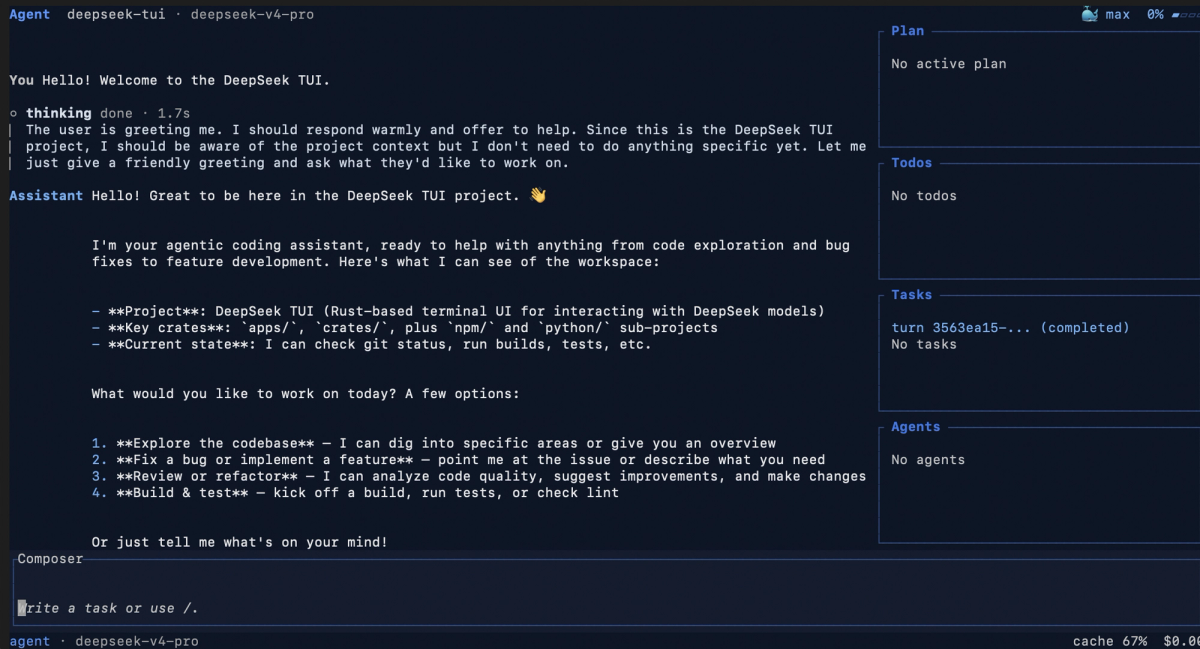
DeepSeek V4-Pro surfaces reasoning traces as reasoning_content in API responses. DeepSeek-TUI renders these directly in the terminal — you watch the model's chain-of-thought unfold line by line as it works. This isn't reconstructed from output; it's the raw thinking stream displayed in a dedicated pane.
The CHANGELOG entry for thinking-mode is specific about what's being handled: "thinking-mode tool turns now checkpoint the engine's authoritative API transcript, including assistant reasoning_content on reasoning-to-tool-call turns with no visible assistant text." The implementation deals with a real API edge case — turns where the model thinks but doesn't produce visible text before calling a tool — which generic wrappers typically handle incorrectly or not at all.
How this differs from OpenAI-shaped wrappers that "also support DeepSeek"
Most tools that advertise DeepSeek support added it by accepting a base_url parameter pointing at DeepSeek's OpenAI-compatible endpoint. They work, but they were designed around a different model's behavior. DeepSeek-TUI's system prompts, cost tracking, context compaction strategy, and RLM architecture are all designed specifically around V4's API economics and capabilities. The CHANGELOG's note that "system prompts redesigned with decomposition-first philosophy... teach the model to todo_write before acting, update_plan for strategy, and sub-agents for parallel work" reflects tuning for V4's specific behavior — not a generic prompt template.
Three Modes: Plan, Agent, YOLO
Plan: read-only exploration
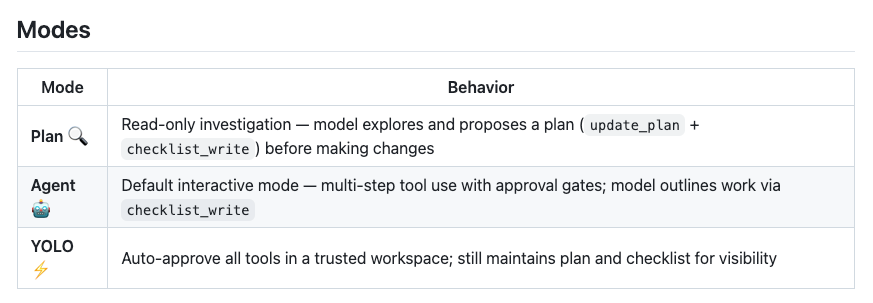
Plan mode restricts the agent to read operations. It can read files, search the codebase, analyze structure, and produce a plan — but cannot execute shell commands, write files, or make git commits. Use it when you want to understand what the agent would do before it does anything, or when you're exploring an unfamiliar codebase and want analysis without side effects.
Agent: default, with tool-call approvals
Agent mode is the default. Every tool call that modifies state — writing a file, running a shell command, committing to git — requires your explicit approval before execution. You see the proposed action, approve or reject it, and the agent proceeds. This is the right mode for most real coding work: you stay in control of what actually happens to your repository.
YOLO: auto-approve inside trusted workspaces
YOLO mode disables approval prompts. The agent executes tool calls automatically as they arise. The CHANGELOG specifically notes that v0.8.8 fixed a bug where git -C ... was auto-approved in YOLO mode without the workspace trust check — which is the kind of bug that matters in production. YOLO mode is appropriate for trusted workspaces where you've reviewed the task and want the agent to run to completion without interruption.
RLM (rlm_query) — Parallel Sub-Agents
1–16 deepseek-v4-flash children fanned out
rlm_query is DeepSeek-TUI's parallel reasoning primitive. When the main agent calls rlm_query, it fans out between 1 and 16 concurrent sub-agent calls, each running on deepseek-v4-flash by default. Children can be promoted to V4-Pro on a per-call basis when the subtask needs more reasoning depth.
The CHANGELOG documents the design intent: "Inspired by Alex Zhang's RLM work and Sakana AI's published novelty-search research, but trimmed to what an agent loop actually needs." This is not a research artifact — it's a practical tool for batched analysis tasks.
Use cases: batched analysis, decomposition, parallel reasoning
RLM fits tasks that decompose into independent subtasks you'd want to run simultaneously: analyzing multiple files for a common pattern, running parallel research queries, evaluating multiple implementation approaches at once. At V4-Flash's pricing ($0.14/$0.28 per million tokens even at the discount-reverted rate), fanning out 16 parallel calls costs a fraction of what a single V4-Pro call costs.
Skills and MCP Support
Skill discovery walks .agents/skills, .claude/skills, and global ~/.deepseek/skills
The skills system is the most direct overlap with Superpowers and similar structured-agent frameworks. Skills are directories containing a SKILL.md file with a name, description, and instructions. The agent can auto-select relevant skills via load_skill when task descriptions match skill descriptions.
Discovery order per the README: .agents/skills → skills → .opencode/skills → .claude/skills → ~/.deepseek/skills. The inclusion of .claude/skills in the discovery path is intentional — teams already using Claude Code's skill system can reuse those skill directories without restructuring.
Community skills install directly from GitHub with /skill install github:<owner>/<repo> — no backend service required.
MCP servers via stdio
MCP integration follows the standard stdio transport: define server entries in the config, deepseek-tui mcp init scaffolds the directory structure, and deepseek-tui setup bootstraps both MCP and skills directories in one step. The implementation is standard MCP client protocol; any MCP server that works with Claude Code or other MCP-capable agents should work here.
Where It Sits Among Terminal Coding Agents
Same category as Claude Code, Aider, Cline, OpenCode
DeepSeek-TUI is a terminal coding agent — the same product category as Claude Code (Anthropic, closed), Aider (open-source, multi-model), Cline (VS Code extension), and OpenCode (open-source, multi-model TUI). All of these give an LLM direct access to a local workspace via a terminal or IDE panel, execute tool calls against real files, and manage multi-turn agent loops.
| DeepSeek-TUI | Claude Code | Aider | OpenCode | |
|---|---|---|---|---|
| Primary model | DeepSeek V4 | Claude | Any | Any |
| Model lock-in | Soft (DeepSeek-focused) | Hard (Claude only) | None | None |
| UI | ratatui TUI | Terminal CLI | Terminal CLI | TUI |
| Runtime | Rust binary | Node | Python | Go |
| Open source | ✅ MIT | ❌ | ✅ | ✅ |
| RLM / parallel sub-agents | ✅ | ❌ | ❌ | ❌ |
| Thinking-mode streaming | ✅ (V4 native) | ✅ (Claude native) | Varies | Varies |
Trade-off: model lock-in vs DeepSeek-native efficiency
The trade-off is explicit: DeepSeek-TUI's architecture decisions — cost estimator tuned to V4 pricing, context compaction calibrated to V4's limit, RLM using V4-Flash as the cheap parallel worker — are tightly coupled to DeepSeek's models and API economics. Using it with a different provider (NVIDIA NIM, Fireworks, SGLang) is supported at the configuration layer, but those providers all serve DeepSeek models; this is not a path to running GPT-5.5 or Claude through the same TUI.
That lock-in is the correct tradeoff if V4 is your model of choice. If you want a model-agnostic terminal agent, Aider and OpenCode are the right alternatives.
Who Should Try It (and Who Should Skip)
Try DeepSeek-TUI if:
- You're already using DeepSeek V4 via API and want a Claude Code-equivalent terminal workflow without building your own agent loop
- DeepSeek's cost economics are a primary factor in your tooling decisions — the built-in cost estimator and cache hit/miss tracking make V4's pricing advantages visible per turn
- You want parallel sub-agent capability (RLM) without adding orchestration infrastructure
- You're self-hosting DeepSeek V4 via SGLang and want a polished frontend for it
Skip DeepSeek-TUI if:
- Your primary models are Claude, GPT-5.5, or Gemini — the tool will technically accept other API-compatible endpoints but is not designed or tuned for them
- You need a stable, GA-released tool for production workflows — v0.8.8 is actively developed with frequent releases; behavior at v0.9.x or v1.0 may differ
- You're on an enterprise environment with controlled software procurement — MIT license is permissive, but the rapid release cadence and community-project status matter for security review
FAQ
Is DeepSeek-TUI an official DeepSeek product?
No. It's created by Hunter Bown (GitHub: Hmbown), an independent US developer. DeepSeek (the company) is not involved. The name is descriptive, not official branding.
Can I use it with models other than DeepSeek V4?
The configuration supports NVIDIA NIM, Fireworks AI, and self-hosted SGLang — but all of these are paths to running DeepSeek models on different infrastructure, not paths to using GPT or Claude. The tool is designed specifically for DeepSeek's V4 API behavior.
How is it different from the azevedoguigo/deepseek-tui-client repo?
Completely different scope. azevedoguigo/deepseek-tui-client is a minimal terminal chat client for DeepSeek — it's a conversation UI, not a coding agent. It has no tool registry, no file operations, no git integration, no sub-agent system. The name overlap is coincidental; they're not related projects.
What does "thinking-mode streaming" actually show on screen?
DeepSeek V4-Pro surfaces its chain-of-thought reasoning as reasoning_content in API responses — a separate field from the final answer. DeepSeek-TUI renders this in a dedicated pane in real time as the model works. You see the model's reasoning steps as they arrive, then the final response. On non-reasoning turns or with V4-Flash (which has lighter thinking), the reasoning pane is minimal or absent.
Does it run on Windows / WSL?
Yes to both. Native Windows x64 prebuilt binaries are available; Scoop is the documented Windows package manager path per the official install guide. WSL works through the standard Linux binary. The v0.8.8 CHANGELOG specifically includes a Windows path separator fix (display_path now uses MAIN_SEPARATOR_STR so Windows shows ~\projects\foo rather than ~\projects/foo), which signals active Windows maintenance rather than theoretical support.
Related Reading
