I came to Deep Code CLI from DeepSeek-TUI, which had just hit GitHub Trending with 25,000+ stars. A smaller, quieter project in the same ecosystem — Node.js instead of Rust, DeepSeek V4-optimized but OpenAI-compatible, with a companion VSCode extension that shares the same config file. The pitch is simpler: get a working terminal coding agent on DeepSeek without compiling Rust. This is my honest assessment after installing it, running a few real tasks, and comparing it to what I already had.
Verified against github.com/lessweb/deepcode-cli and api-docs.deepseek.com as of May 2026.
What Deep Code CLI Is and Isn't
Project origin and current status
Deep Code CLI (@vegamo/deepcode-cli) is a community-built terminal coding agent, not an official DeepSeek product. It is also not related to the official "DeepSeek Code Harness" that DeepSeek's internal team began hiring for in May 2026. The project lives at github.com/lessweb/deepcode-cli, published to npm under the @vegamo scope, and is documented in DeepSeek's own API integration guide — which is the closest thing to an official endorsement, though DeepSeek is listing it as a community integration rather than a product.
Star count and commit cadence should be verified directly at the GitHub repository before relying on this review's snapshot — both have been changing. As of late May 2026, the project has significantly fewer stars than DeepSeek-TUI but shows recent commit activity and an active issues tracker.
Naming disambiguation: There are at least three unrelated projects using variations of "DeepCode CLI" on GitHub. The one reviewed here is lessweb/deepcode-cli / @vegamo/deepcode-cli. Do not confuse it with guocong-bincai/deepcode-cli (a multi-model assistant with Doubao, Gemini, DeepSeek) or unrelated security tools with similar names.
How it positions vs DeepSeek-TUI
Deep Code CLI and DeepSeek-TUI solve the same problem — terminal coding agent for DeepSeek V4 — but make different architectural bets. Deep Code is Node.js; DeepSeek-TUI is Rust. Deep Code installs with npm i -g; DeepSeek-TUI downloads prebuilt Rust binaries. Deep Code has a companion VSCode extension sharing the same config; DeepSeek-TUI is terminal-native with no first-party IDE surface.
The honest comparison of current state: DeepSeek-TUI has substantially more stars, more features (RLM parallel sub-agents, sandbox isolation, LSP diagnostics, YOLO mode), and a faster release cadence. Deep Code CLI is smaller, simpler, and arguably easier to get running for developers already in a Node.js environment.
Who it's actually built for
Deep Code CLI makes the most sense for: developers who want a working DeepSeek V4 agent without a Rust toolchain, teams that want a VSCode extension and terminal agent sharing the same SKILL.md conventions without setting up separate tools, and developers who want OpenAI-compatible model flexibility (Deep Code isn't hard-locked to DeepSeek — any OpenAI-compatible endpoint works). It's not the right tool if you need parallel sub-agents, sandboxed execution, or the broader feature surface of DeepSeek-TUI.
Install and First Run
Prerequisites
- Node.js 18 or later
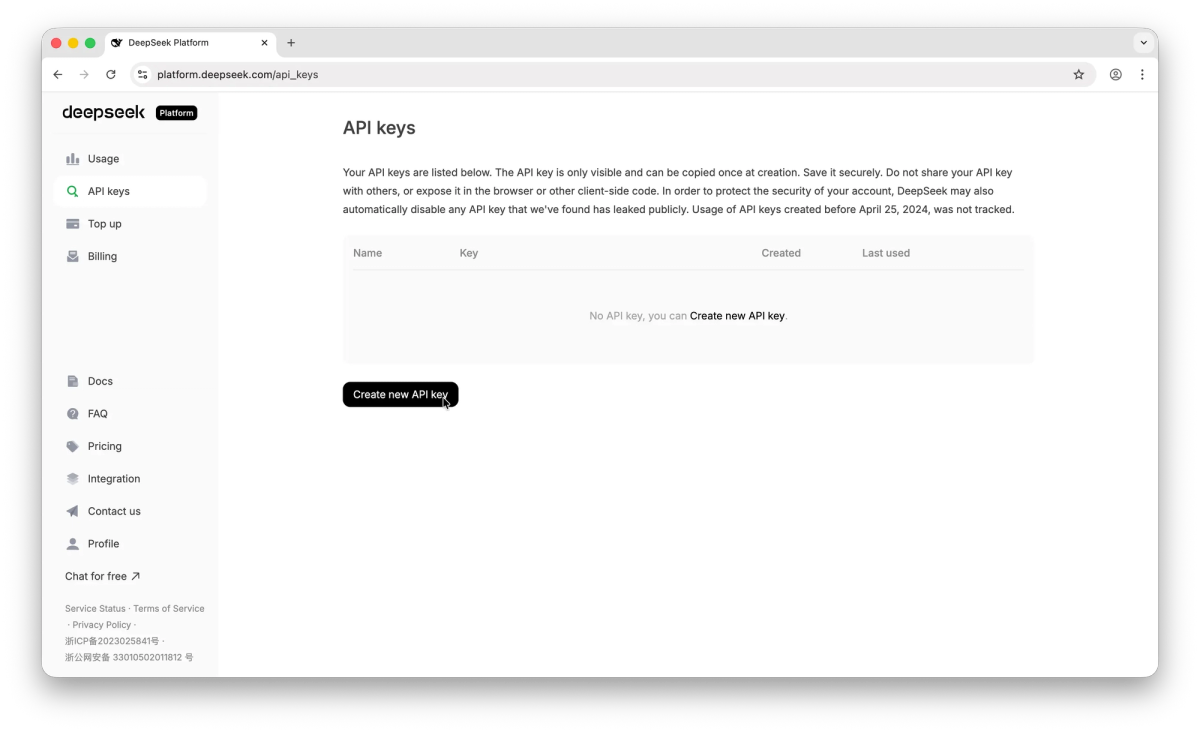
- A DeepSeek API key from platform.deepseek.com
- npm (comes with Node.js)
Install
npm install -g @vegamo/deepcode-cli

# Verify:
deepcode --version
If deepcode isn't found after install, your npm global bin isn't on PATH. Fix with npm bin -g and add that path to your shell profile.
~/.deepcode/settings.json configuration
Create this file before first launch:
{
  "env": {
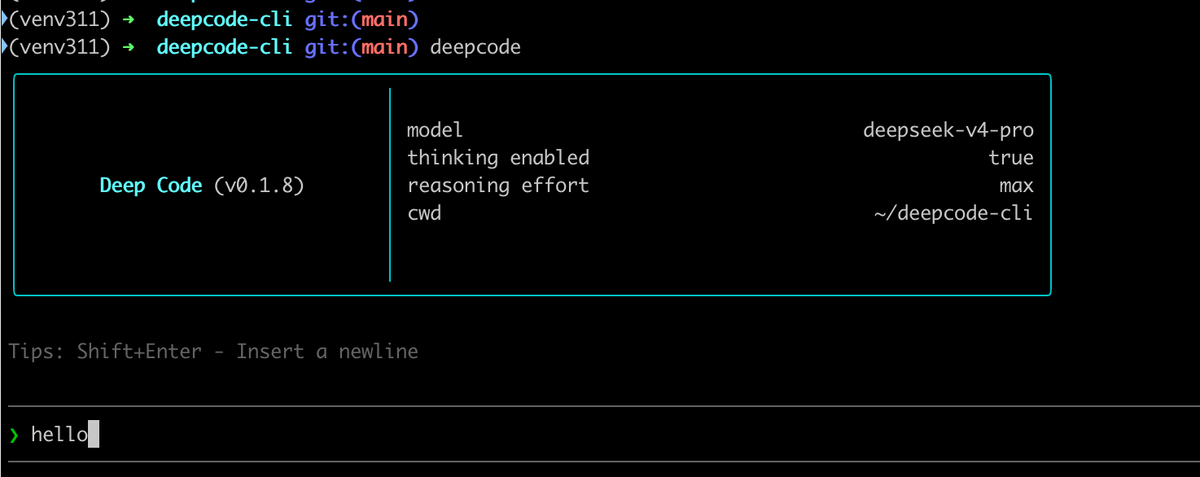
    "MODEL": "deepseek-v4-pro",
    "BASE_URL": "https://api.deepseek.com",
    "API_KEY": "sk-your-deepseek-key"
  },
  "thinkingEnabled": true,
  "reasoningEffort": "max"
}
This config is shared with the Deep Code VSCode extension — configure once, use in both surfaces. The MODEL field accepts any model name your BASE_URL supports, which is how OpenAI-compatible endpoints work in this tool.
For a lighter-cost setup using DeepSeek Flash:
{
  "env": {
    "MODEL": "deepseek-v4-flash",
    "BASE_URL": "https://api.deepseek.com",
    "API_KEY": "sk-your-deepseek-key"
  },
  "thinkingEnabled": true,
  "reasoningEffort": "high"
}
First command and what successful output looks like
cd your-project
deepcode
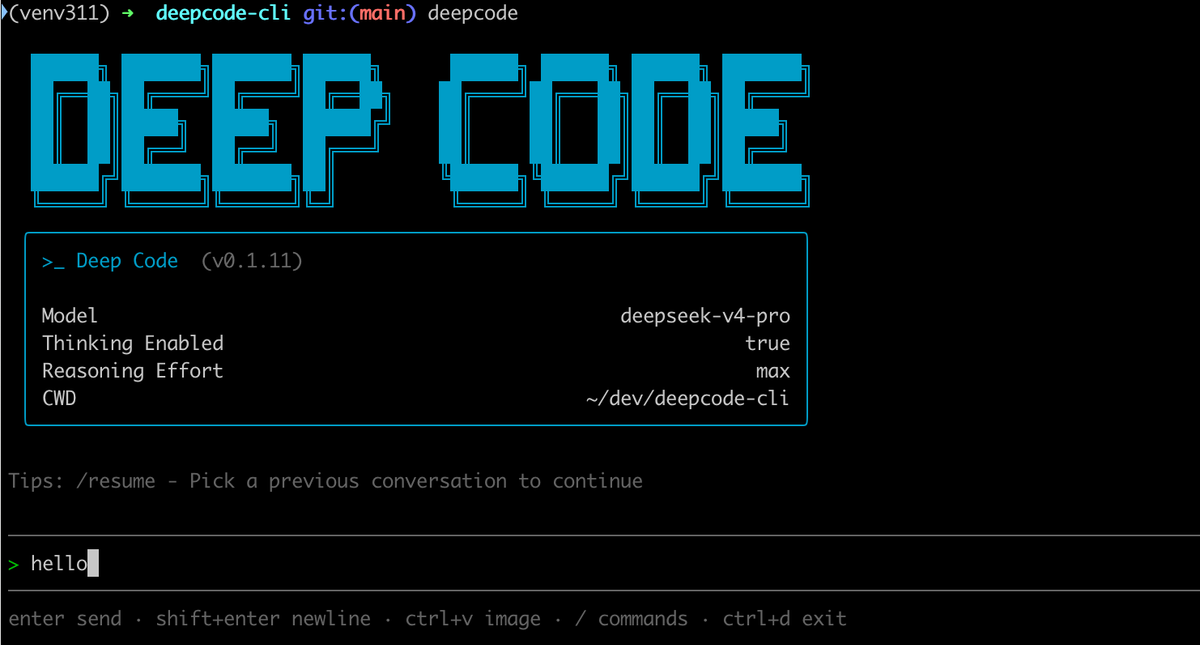
At launch, you get a terminal prompt with the current model and settings visible. A working session responds immediately to a simple task:
> Explain what this file does: src/auth.pyIf you see the DeepSeek thinking tokens streaming before the response, thinkingEnabled: true is working. If you see only the final response without a reasoning block, thinking mode isn't active or the model doesn't support it with your current settings.
Core Features, Tested
Thinking mode and reasoning effort levels
Deep Code exposes DeepSeek V4's thinking mode directly via the settings file:
"thinkingEnabled": true/false— enables or disables the reasoning step"reasoningEffort": "max"/"high"/"off"— controls how much reasoning budget the model applies
In practice with V4-Pro at max effort, the thinking block adds visible latency before the response — typically a few seconds on a moderate task. The quality difference between high and max is noticeable on complex multi-step tasks; for simple single-file edits, high or off saves tokens without meaningful output degradation. off disables thinking entirely, which is appropriate for fast lookups, explanations, and context-free completions where latency matters more than depth.
Agent Skills via SKILL.md
Deep Code discovers skills from two directories:
- User-level:
~/.agents/skills/— available in all sessions on the machine - Project-level:
./.agents/skills/— project-specific, loaded when you rundeepcodein that project directory - Legacy compatibility:
./.deepcode/skills/also works for older setups
Each skill is a directory containing a SKILL.md file with a name, description, and instructions. The agent loads relevant skills based on task descriptions. If you've already maintained SKILL.md files for Claude Code or DeepSeek-TUI, Deep Code can read the same files — the format is compatible.
MCP server integration
MCP integration is documented in the repository. The configuration approach follows the standard stdio transport model. Verify current MCP configuration syntax against the live README before setting up — the MCP config schema is less widely community-tested than DeepSeek-TUI's at this stage.
Context caching behavior
Deep Code notes in its README that context caching is supported and reduces costs. DeepSeek V4's pricing model charges significantly less for cached input tokens (~10% of uncached rate). In practice, repeated stable content at the start of your context — system prompt, SKILL.md content, unchanged file content — benefits from caching across turns in a long session. The cost savings are real for extended sessions; for short one-off tasks, the cache doesn't have time to warm.
VSCode extension status
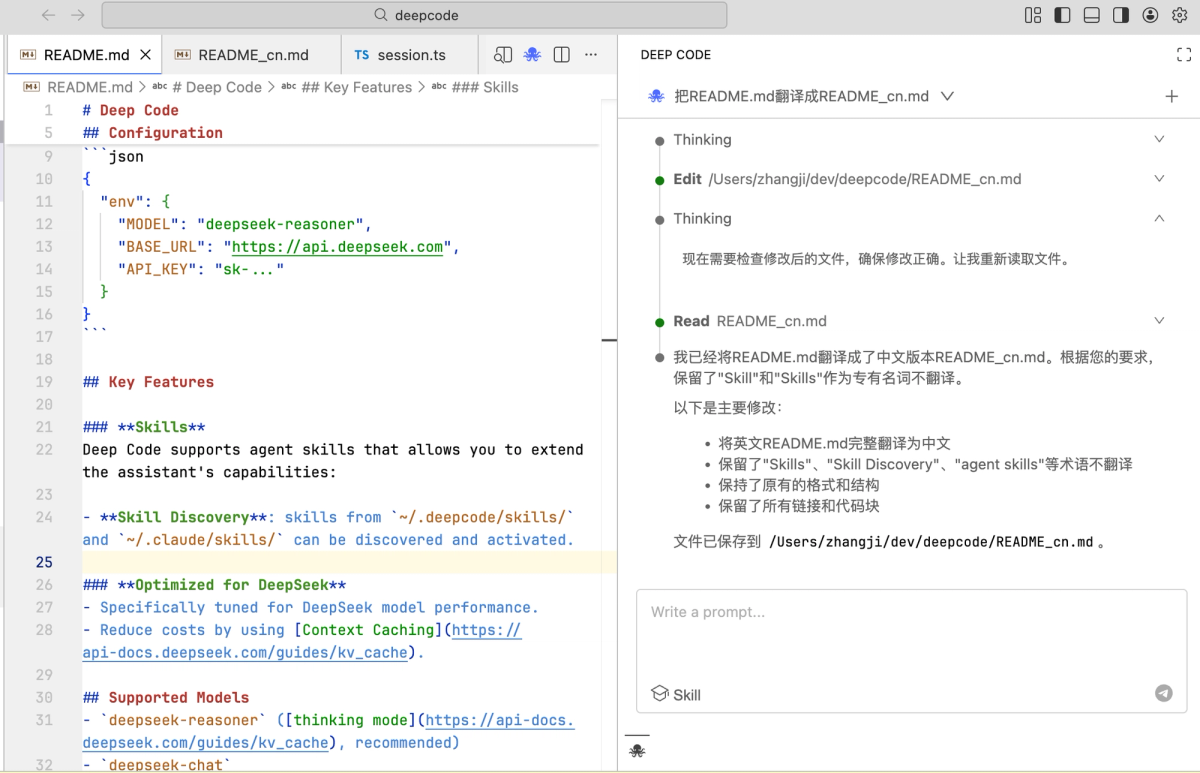
The Deep Code VSCode extension lives at github.com/lessweb/deepcode — a separate repository from the CLI — and is published to the VSCode Marketplace. It shares ~/.deepcode/settings.json with the CLI, so you configure the model and API key once. The extension brings the same thinking mode and Skills support into the VS Code editor panel.
Multimodal input note: the README explicitly states that DeepSeek V4 does not support multimodal input. The extension supports multimodal (image paste), but recommends Volcano Ark's Doubao-Seed-2.0-pro model for image input tasks, not DeepSeek V4.
Image paste, slash commands, web search
These features are documented; behavior should be verified on your machine and model configuration. Web search availability depends on model support at your configured BASE_URL. Slash commands follow a similar pattern to other terminal agents — check the project's README for the current command list.
How It Performs in Real Coding Tasks
A small refactor (single-file edit + tests)
For a straightforward refactor — extracting a utility function from a module and updating the import — Deep Code performed reliably. The model correctly identified the extraction target, created the new function with appropriate scope, and updated the call site. With thinking mode on and max effort, the reasoning step correctly identified potential edge cases before editing.
Compared to DeepSeek-TUI on the same task: the outputs were similar. Deep Code's Node.js approach added no noticeable friction for this use case.
A multi-file feature (planning + execution + verification)
A feature touching three files — an API handler, a service layer, and a test file — showed more variance. Deep Code completed the handler and service changes cleanly, but the test generation required an additional prompt to match the project's existing test conventions. The agent didn't check whether the tests actually passed (there's no built-in test runner feedback loop comparable to what harness-engineered workflows provide).
This is where project-level Skills help significantly: if your .agents/skills/ directory includes a skill that describes your test conventions, the agent starts with the right context rather than guessing.
Where it consistently gets stuck
Context limit management: On longer sessions with large file loads, the agent doesn't proactively summarize or compact context. Sessions that load many files can hit cost-efficiency issues as context grows.
Error recovery: When a generated change is syntactically incorrect, Deep Code reports the error but doesn't always self-correct without additional prompting. DeepSeek-TUI's LSP integration surfaces type errors immediately post-edit; Deep Code doesn't have equivalent LSP integration at this stage.
Parallel tasks: Deep Code is a single-agent tool. There's no equivalent to DeepSeek-TUI's RLM parallel sub-agents.
Limits and Known Issues
Project maturity
Deep Code CLI is younger and has fewer contributors than DeepSeek-TUI. Check the GitHub repository for current commit cadence, open issue count, and the most recent release date before committing to it for a production workflow. Community tools at this stage can stall, accelerate, or fork unpredictably — knowing the current activity level matters.
The fact that DeepSeek's official API documentation lists it as an integration is a positive signal, but DeepSeek's support team won't troubleshoot problems with it. You're on your own if something breaks.
Windows and macOS edge cases
The README documents macOS and Linux as primary targets. Windows support is noted but not as prominently featured. If deepcode isn't found post-install on Windows, the npm global bin path fix is the most common resolution. VS Code integration via the shared settings file works on Windows where the settings path follows the OS convention.
What Claude Code does that Deep Code CLI can't (yet)
/ultrareviewmulti-pass code review (Anthropic-native)- Task budgets (Anthropic beta feature)
- xhigh reasoning effort level (Anthropic model feature)
- RLM-equivalent parallel sub-agents (DeepSeek-TUI exclusive in this ecosystem)
- LSP post-edit diagnostics (DeepSeek-TUI exclusive)
- Sandbox isolation (YOLO mode with workspace trust — DeepSeek-TUI)
Deep Code CLI vs DeepSeek-TUI: Quick Comparison
Language and architecture
| Deep Code CLI | DeepSeek-TUI | |
|---|---|---|
| Language | Node.js | Rust |
| Install | npm i -g @vegamo/deepcode-cli | npm wrapper (Rust binaries) or cargo |
| IDE surface | VSCode extension (lessweb/deepcode) | Terminal-native only |
| Config | ~/.deepcode/settings.json | ~/.deepseek/config.toml |
| OpenAI-compatible other models | ✅ Yes | DeepSeek-family only |
Feature surface
| Deep Code CLI | DeepSeek-TUI | |
|---|---|---|
| Language | Node.js | Rust |
| Install | npm i -g @vegamo/deepcode-cli | npm wrapper (Rust binaries) or cargo |
| IDE surface | VSCode extension (lessweb/deepcode) | Terminal-native only |
| Config | ~/.deepcode/settings.json | ~/.deepseek/config.toml |
| OpenAI-compatible other models | ✅ Yes | DeepSeek-family only |
Which to pick for which workflow
Deep Code CLI if: you want a simpler Node.js install without Rust binaries, you want a VSCode extension sharing the same config as your terminal agent, or you need OpenAI-compatible model flexibility beyond DeepSeek.
DeepSeek-TUI if: parallel sub-agents matter, LSP diagnostics after edits matter, sandbox isolation matters, or you want the more actively developed and community-tested option.
Managed multi-agent platforms (like Verdent) if: you need cross-model routing, parallel worktree execution across isolated branches, and platform-level verification built in — a different product category from either terminal agent.
Who Should Use Deep Code CLI
Solo developers on tight token budgets
Deep Code CLI's BYOK model means you pay DeepSeek API rates directly — the same cost structure as DeepSeek-TUI. For developers already comfortable in the Node.js ecosystem who want a working DeepSeek agent without learning a new toolchain, it's a low-friction entry point. The default deepseek-v4-flash configuration keeps costs low for lighter daily use.
Teams that want project-level SKILL.md conventions
If your team has already invested in SKILL.md files for other tools (Claude Code, DeepSeek-TUI), Deep Code CLI reads the same .agents/skills/ directory. The VSCode extension sharing the config means the same conventions work in terminal and IDE sessions without duplication. This makes it easier to standardize conventions across a team that uses different surfaces.
When DeepSeek-TUI or Claude Code is the better answer instead
- Choose DeepSeek-TUI when you need RLM parallel sub-agents, LSP integration, or a more feature-complete terminal experience.
- Choose Claude Code when you need Anthropic-native features (/ultrareview, task budgets) or Claude's model quality for complex reasoning.
- Use this setup: if you want DeepSeek V4 through Claude Code, the env var approach documented separately gives you Claude Code's UX with DeepSeek's costs.
FAQ
Is Deep Code CLI official?
No. It's a community project under lessweb/deepcode-cli. DeepSeek lists it in their API integration documentation as a community integration, which is the extent of the endorsement. It's not related to DeepSeek's internal Harness team or the upcoming official DeepSeek Code product.
Is the project actively maintained?
Check the GitHub repository directly for current commit activity and open issues before relying on any review's snapshot. At the time of this review, recent commits and an active issues tracker were visible; that can change.
Windows support status?
Documented but less tested than macOS/Linux. Standard Node.js and npm Windows caveats apply. The deepcode command should work in PowerShell and Windows Terminal after fixing the npm global bin path if needed.
Pricing model (BYOK only or hosted)?
BYOK (bring your own key). Deep Code CLI connects directly to whatever BASE_URL you configure — DeepSeek's API by default — using your own API key. There's no hosted subscription; you pay the model provider directly. Effective cost depends on DeepSeek's current rates plus any promotional discounts in effect.
Can I plug other models in?
Yes. Any OpenAI-compatible API endpoint works by setting env.BASE_URL to the endpoint URL and env.MODEL to the model name. The README documents Volcano Ark's Doubao as an example. This model flexibility is one of Deep Code CLI's advantages over DeepSeek-TUI, which is more tightly coupled to DeepSeek's model family.
VSCode extension stability?
The extension is in the VSCode Marketplace and shares the same config file as the CLI. It's younger than more established extensions and behavior may vary across VS Code versions. Test it on a non-critical project before integrating it into your primary workflow.
Verdict
Deep Code CLI is a working terminal coding agent for DeepSeek V4 with a Node.js stack, a shared-config VSCode extension, and Skills support. It does what it advertises. The gap vs DeepSeek-TUI is real and significant: fewer stars, less feature surface (no parallel sub-agents, no LSP, no sandbox), and a younger project. If you're choosing between the two, DeepSeek-TUI is the more capable and more actively community-tested option.
The case for Deep Code CLI is specific: you want Node.js (not Rust binaries), you want the VSCode extension + terminal agent sharing config, and you want model flexibility beyond DeepSeek's family. If any of those apply, it's worth an install. If they don't, DeepSeek-TUI covers more ground.
Related Reading