
There are two ways to run MiniMax M3 for coding, and they're not equally easy. The hosted API is a base-URL-and-key change away from working in your existing OpenAI-compatible setup. Self-hosting the open weights is real — the weights are out — but M3 is a 428B-parameter model, so "self-host" means multiple data-center GPUs, not your laptop. This guide covers both paths: API setup, the honest hardware reality of self-hosting, working with the 1M context window without burning tokens, and the license check you can't skip before shipping commercially.
Verified against MiniMax's official API docs, the SGLang deployment docs, and the Hugging Face model card as of June 2026. Pricing and endpoints change — confirm current details at the official MiniMax API documentation before building.
Two Ways to Run M3
Hosted API / MiniMax Code
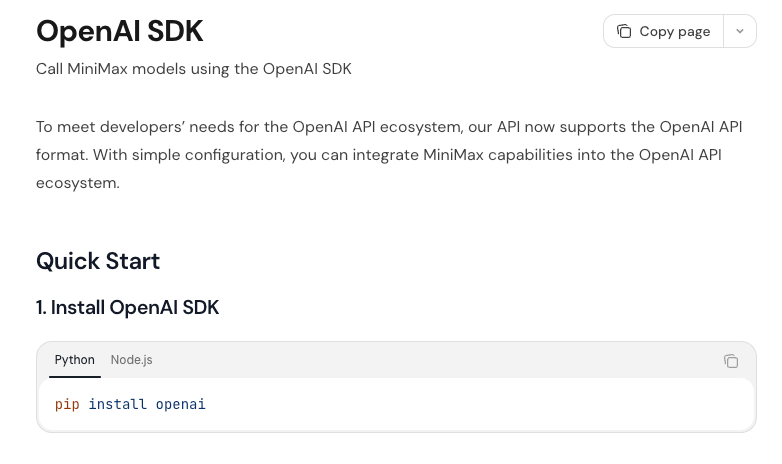
The fast path. M3 is served through MiniMax's OpenAI-compatible API — you point an OpenAI SDK at MiniMax's endpoint with your API key, set the model to MiniMax-M3, and you're running. MiniMax also offers an Anthropic-compatible endpoint, so tools expecting either format work. For a first-party agent experience, MiniMax Code is MiniMax's own coding agent built on the model. This is the path for almost everyone — no infrastructure, working in minutes.
Self-host the open weights
The control path. M3's weights are released on Hugging Face (MiniMaxAI/MiniMax-M3), so you can run the model on your own infrastructure — code never leaves your machines, no per-token cost, full control. The catch is hardware: M3 is a 428B-parameter MoE, which means serving it requires a multi-GPU data-center setup, not consumer hardware. Self-hosting is viable for teams with the infrastructure and a real reason (data residency, sustained high volume), but it's a serious deployment, not a quick local run. We'll cover the honest requirements below.
API Setup
Token Plan vs pay-as-you-go key
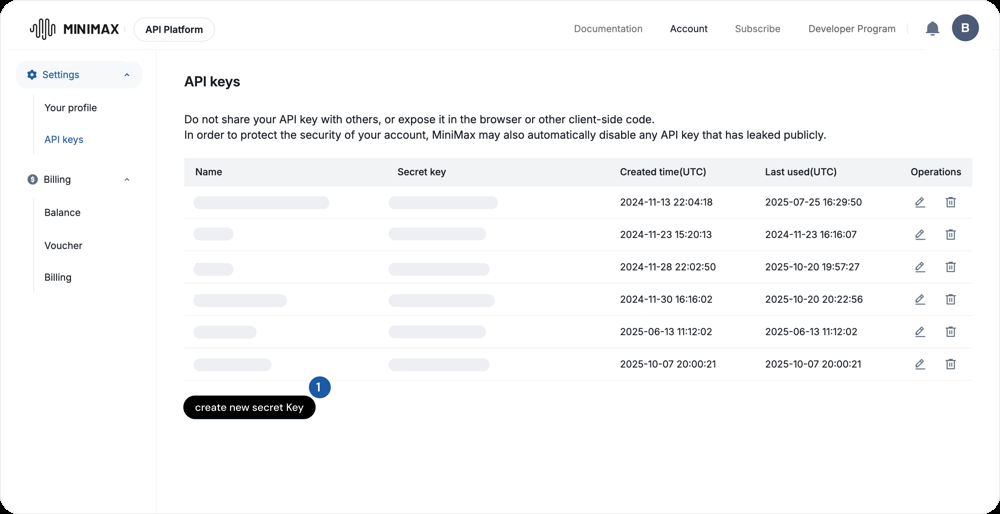
MiniMax offers access through its platform — you'll need an API key from your MiniMax account. Plans differ in throughput and billing (a subscription-style Token Plan versus pay-as-you-go API billing); pick based on your expected volume. For evaluation, pay-as-you-go lets you test without commitment; for sustained production traffic, a plan may be more economical. Check the current plan structure on MiniMax's platform, since these details change.
Endpoint
The OpenAI-compatible base URL is https://api.minimax.io/v1. Configure your OpenAI SDK with that base URL and your MiniMax key, set the model to MiniMax-M3, and existing OpenAI-format code works with minimal change:
from openai import OpenAI
client = OpenAI(
    base_url="https://api.minimax.io/v1",
    api_key="YOUR_MINIMAX_API_KEY",
)
response = client.chat.completions.create(
    model="MiniMax-M3",
    messages=[{"role": "user", "content": "Refactor this function..."}],
)
For tools that expect the Anthropic format, MiniMax's Anthropic-compatible endpoint lets you point Anthropic-format clients at M3 the same way. Verify the exact endpoint paths in the official docs, since they can change.
Verify streaming and tool calling
Before building on M3, verify the two things a coding agent depends on: streaming (set stream: true and confirm chunks arrive incrementally for responsive output) and tool calling (confirm the model correctly emits tool/function calls in your harness with the right arguments). These are the capabilities an agent loop relies on, and testing them first — with a simple tool definition — saves debugging later. M3 supports both; the point is confirming they behave correctly in your specific setup before you wire up a full agent.
Self-Hosting the Weights
The ~428B MoE hardware reality
Be clear-eyed about the requirements. M3 is a Mixture-of-Experts model with roughly 428B total parameters (about 22B active per token). Serving the full model requires holding all 428B parameters in GPU memory — the quantized MXFP8 build is around 440GB, which means a multi-GPU node (the official SGLang configuration uses tensor parallelism across 8 GPUs). This is data-center or high-end cloud-GPU territory, not a single consumer card and not a laptop. Anyone suggesting you can casually run M3 locally on consumer hardware is misleading you; plan for serious infrastructure or a GPU-cloud rental.
SGLang and Transformers paths
The supported inference paths are production-grade serving engines. SGLang has official MiniMax-M3 support — its documentation provides the launch command (sglang serve --model-path MiniMaxAI/MiniMax-M3 with tensor parallelism and the appropriate attention/MoE backends) and serves an OpenAI-compatible endpoint locally, which means your client code is identical to the hosted API (just a different base URL). vLLM is another high-throughput serving option. The Hugging Face Transformers path works for direct model loading. SGLang is well-suited to the multi-turn, tool-calling patterns common in agentic coding; vLLM is strong for high-concurrency serving. Whichever you choose, follow the official deployment configuration rather than a blog's — the serving flags for a 428B MoE with sparse attention are specific.
Check the license
The step you cannot skip: M3 is released under the MiniMax Community License, not a standard permissive open-source license like Apache 2.0 or MIT. "Open weights" does not automatically mean "free for any commercial use." Before self-hosting M3 in anything commercial, read the actual license terms — there are commercial-use conditions, and you need to confirm your use case is permitted. This is a genuine compliance step, not a formality; verify the current license terms directly on the model card before shipping.
Working with the 1M Context Window
When long context helps vs wastes cost
M3 supports up to 1M tokens of context (with a guaranteed minimum of 512K), and the MSA architecture is designed to make that economical. But a large window is a ceiling, not a target. Long context helps when the task genuinely needs it — reading across many files for a migration, correlating logs with source, understanding a large codebase in one pass. It wastes cost (and can dilute focus) when you fill it with irrelevant context just because it's available.
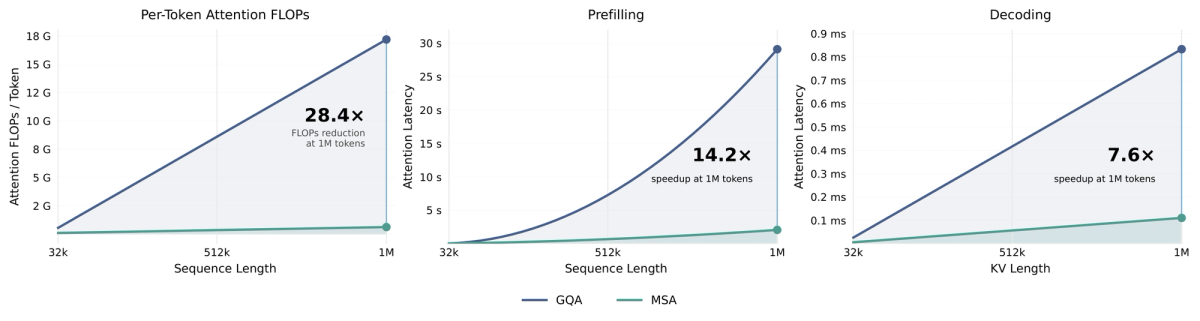
The discipline: load the context the task needs, not the maximum the window allows. Each token costs money on the API, and on self-hosted setups long context inflates memory use (note that self-hosted deployments on limited hardware may not support the full 1M window, often capping lower). The 1M window is a capability to use deliberately for genuinely large-context tasks, not a default to fill every call.
Cost and Permission Checks
Hosted = code leaves your machine
The hosted API is cheap and easy, but it means your code transits MiniMax's infrastructure. Standard API pricing is around $0.60 per million input tokens and $2.40 per million output (a launch-week promotional rate at half that has likely expired — verify current pricing). That's inexpensive relative to closed frontier models. But for code you can't send to a third party (compliance, confidentiality), the hosted path isn't an option regardless of price — your data leaving your machine is the deciding constraint.
Self-host keeps it in-house
Self-hosting keeps code on your infrastructure — the deciding advantage for data-residency requirements. The trade-off is the hardware cost: running multiple data-center GPUs has a real fixed cost, which only pencils out at sustained high volume. At low volume, the hosted API is far cheaper than idle GPUs; at high sustained volume (or where data can't leave), self-hosting wins. Do the math on your actual throughput before committing to self-hosting for cost reasons — for most teams, the API is the economical choice, and self-hosting is for data-residency needs.
Common Setup Issues
A few issues that catch people setting up M3:
- Wrong base URL or model string — the most common API issue. Confirm the base URL (
https://api.minimax.io/v1) and exact model ID (MiniMax-M3) against the current docs; a typo in either produces auth or not-found errors. - Tool calling not firing — if the model isn't emitting tool calls, check that your harness uses the OpenAI function-calling format the endpoint expects, and that your tool definitions are well-formed. Test with a single simple tool first.
- Self-host out-of-memory — if a self-hosted deployment OOMs, you likely underprovisioned GPU memory for a 428B model, or set the context length too high for your hardware. Reduce
--max-model-len/ context length and confirm your tensor-parallel size matches your GPU count. - Context length capped below 1M — self-hosted setups on limited hardware often can't serve the full 1M window; this is a memory constraint, not a bug. Set a context length your hardware supports.
- License assumption — assuming "open weights" means unrestricted commercial use. Read the MiniMax Community License before shipping.
FAQ
How do I get started with the MiniMax M3 API for coding?
Get an API key from your MiniMax account, then point an OpenAI SDK at the OpenAI-compatible base URL (https://api.minimax.io/v1) with your key and model MiniMax-M3. Existing OpenAI-format code works with just the base URL and model string changed. Before building, verify streaming (for responsive output) and tool calling (for agent loops) behave correctly in your setup. MiniMax also offers an Anthropic-compatible endpoint for tools expecting that format. Confirm current endpoint and pricing details in the official MiniMax API documentation.
Can I use MiniMax M3 inside Claude Code or similar agent frameworks?
Yes, through the compatible endpoints. M3 offers both OpenAI- and Anthropic-compatible APIs, so frameworks that let you set a custom base URL and key can point at M3. For Anthropic-format tools (like Claude Code's backend config), use the Anthropic-compatible endpoint; for OpenAI-format tools, the OpenAI-compatible one. The setup mirrors pointing any tool at a custom model: set the base URL, supply your key, select the model ID. Confirm tool-calling works in your harness before relying on it.
How do I handle the 1M context window without burning through tokens?
Treat the window as a ceiling, not a target. Load only the context the task needs — relevant files for the change, not the whole repo because you can. Each input token costs money, so filling a 1M window with irrelevant context is paying for tokens that don't help (and can dilute the model's focus on what matters). For genuinely large-context tasks (migrations, cross-file reasoning), the large window is valuable; for typical scoped work, send a focused context. On self-hosted setups, also note that limited hardware may cap the usable context below 1M due to memory, so don't assume the full window is available locally.
What does it actually cost to run MiniMax M3 on real coding tasks?
On the hosted API, standard pricing is around $0.60/$2.40 per million input/output tokens (a launch promo at half that has likely expired — verify current rates), which is inexpensive relative to closed frontier models. Real per-task cost depends on your token usage — how much context you load and how much the model generates — so the discipline of sending focused context directly controls cost. Self-hosting has no per-token cost but a real fixed hardware cost (multiple data-center GPUs), which only beats the API at sustained high volume. For most teams, the API is the economical choice; measure your actual token usage per task to estimate real cost.
Can I run MiniMax M3 locally now that the weights are out?
The weights are released, so self-hosting is genuinely possible — but "locally" needs a reality check. M3 is a 428B-parameter model; serving it requires multiple data-center GPUs (the quantized build is ~440GB, the official SGLang setup uses 8-GPU tensor parallelism), not a laptop or single consumer card. You can self-host on serious infrastructure (or rented cloud GPUs) via SGLang, vLLM, or Transformers, but it's not a casual local run. Two caveats: limited hardware may cap context below 1M, and the MiniMax Community License has commercial-use conditions to verify before shipping. Self-host if you have the hardware and a data-residency or high-volume reason; otherwise use the API.
Conclusion
For almost everyone, the answer to "how do I run MiniMax M3" is the hosted API: point an OpenAI- or Anthropic-compatible client at MiniMax's endpoint, verify streaming and tool calling, and you're working in minutes at low per-token cost. Self-hosting is real and valuable — the weights are out — but it's a data-center deployment (428B parameters, multi-GPU, SGLang or vLLM), not a local convenience, and it only makes economic sense at sustained high volume or where code can't leave your infrastructure. Whichever path you take, two checks are non-negotiable: send focused context rather than filling the 1M window for its own sake, and read the MiniMax Community License before any commercial use. Match the path to your real constraints, and M3 is a capable, cost-effective option for coding agents.
Related Reading
