
The DeepSeek API gives you model access in two lines of config change. What it doesn't give you is a coding agent. That distinction is the whole point of this guide: the API is the model layer — the reasoning engine — but a working coding agent needs repo context, tool permissions, planning, diff review, tests, and rollback paths around it. Builders who treat the API as a drop-in coding workflow ship something that generates code but can't safely change a real codebase. Here's how to think about the API as one layer in a larger system.
Verified against api-docs.deepseek.com, May 2026. API details change — confirm current endpoints, models, and pricing at the official documentation before building.
What DeepSeek API Means for Coding Agents
Model access is not the same as an agent workflow
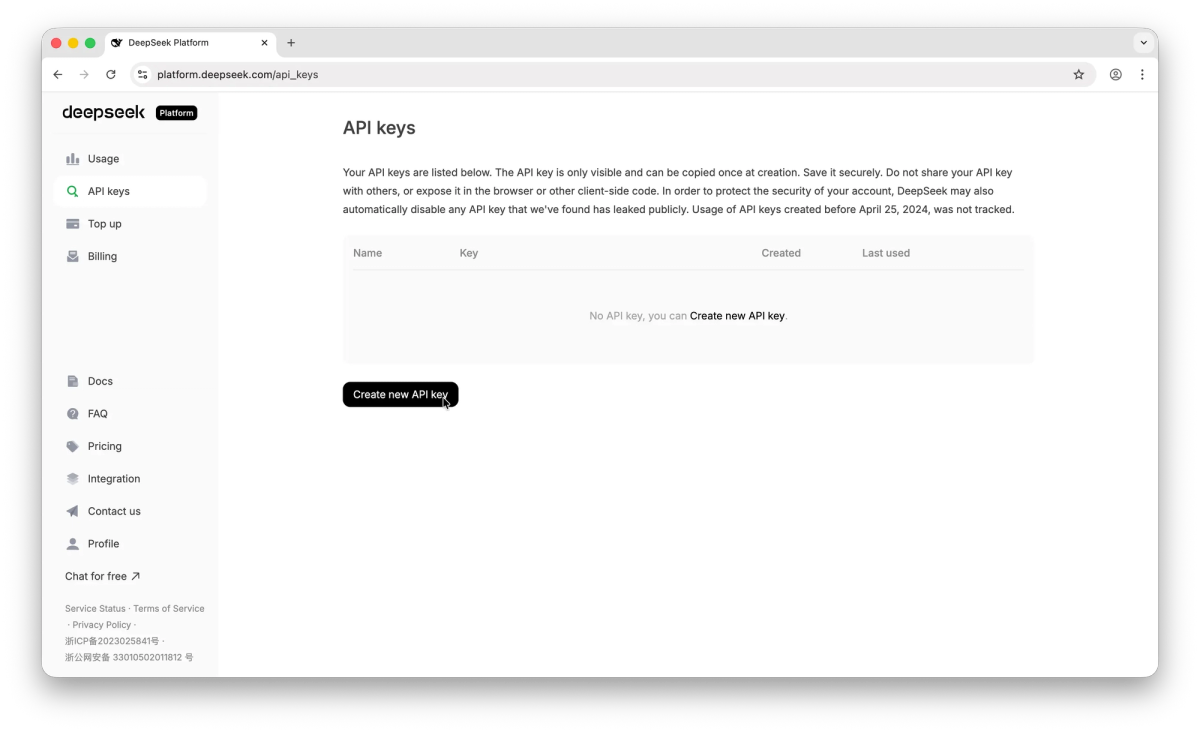
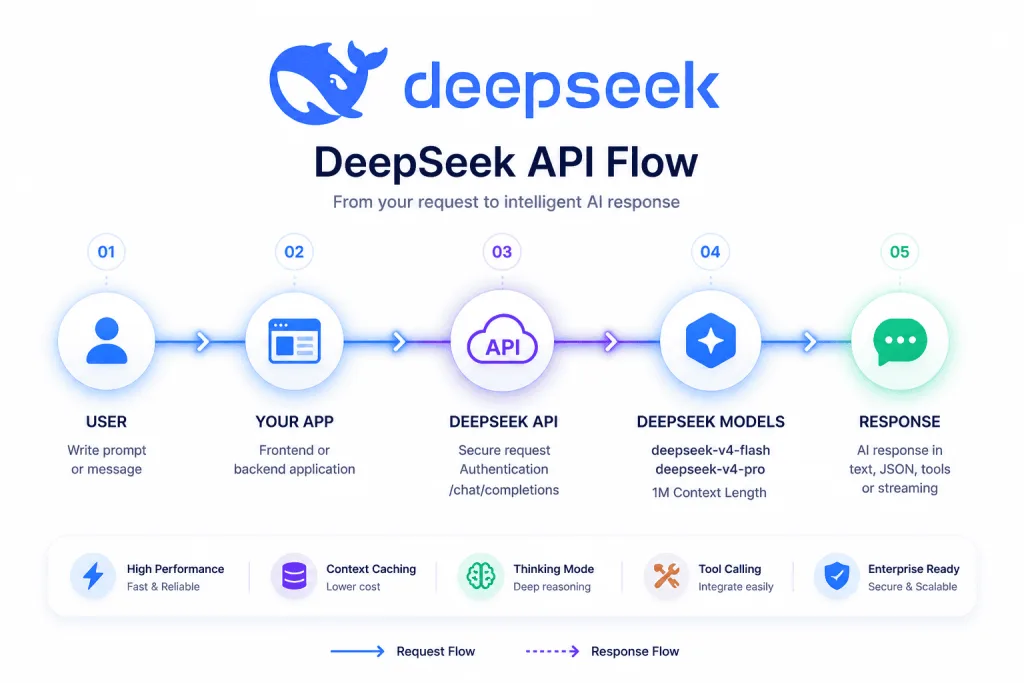
The DeepSeek API is an HTTP service that takes a prompt and returns a model response. It's compatible with both the OpenAI Chat Completions format (https://api.deepseek.com) and the Anthropic Messages format (https://api.deepseek.com/anthropic) — the same API key works for both. Authentication is a standard bearer token in the Authorization header, with the key created in the DeepSeek Platform console.
That's the model layer. A coding agent is everything around it: the loop that reads files and decides what to change, the tool definitions that let the model run commands, the context management that decides what code to send, the verification that confirms the output is correct, and the rollback path for when it isn't. The API provides the intelligence; the agent provides the structure that turns intelligence into safe code changes.
A critical implementation detail: the DeepSeek /chat/completions API is stateless. The server doesn't remember previous requests — your agent must concatenate the full conversation history and resend it with each call. This is standard for chat-completion APIs, but it's a reminder that the API is a stateless reasoning function, not a stateful agent. The state lives in your code.
Where DeepSeek fits in builder tooling
DeepSeek V4 ships two models through the API: deepseek-v4-pro (the flagship, for complex reasoning and agentic loops) and deepseek-v4-flash (the efficient tier, for fast iteration and high-volume subagent work), both with a 1M-token context window. Note the legacy aliases deepseek-chat and deepseek-reasoner retire on July 24, 2026 — use the explicit V4 model IDs.
For builders, DeepSeek's appeal in the coding agent space is the combination of competitive model capability, aggressive pricing, and broad compatibility. Because the API speaks OpenAI and Anthropic formats, it drops into existing tooling — you can point Claude Code, OpenCode, or your own agent loop at DeepSeek by changing the base URL and key, without rebuilding your integration (see the Agent Integrations guide).
Common Coding Agent API Patterns
Chat-based coding assistants
The simplest pattern: send a prompt with code context, get a response. A chat-based assistant where the developer pastes or references code and asks for changes, explanations, or debugging help. The agent is thin — it formats the request, calls the API, and presents the response.
from openai import OpenAI

client = OpenAI(
    api_key="sk-your-deepseek-key",
    base_url="https://api.deepseek.com"
)

response = client.chat.completions.create(
    model="deepseek-v4-pro",
    messages=[
        {"role": "system", "content": "You are a coding assistant."},
        {"role": "user", "content": "Refactor this function: ..."}
    ]
)
This pattern works for assistance but isn't an agent — there's no autonomous file modification, tool use, or multi-step execution. The developer applies the suggestions manually.
Terminal and TUI agents
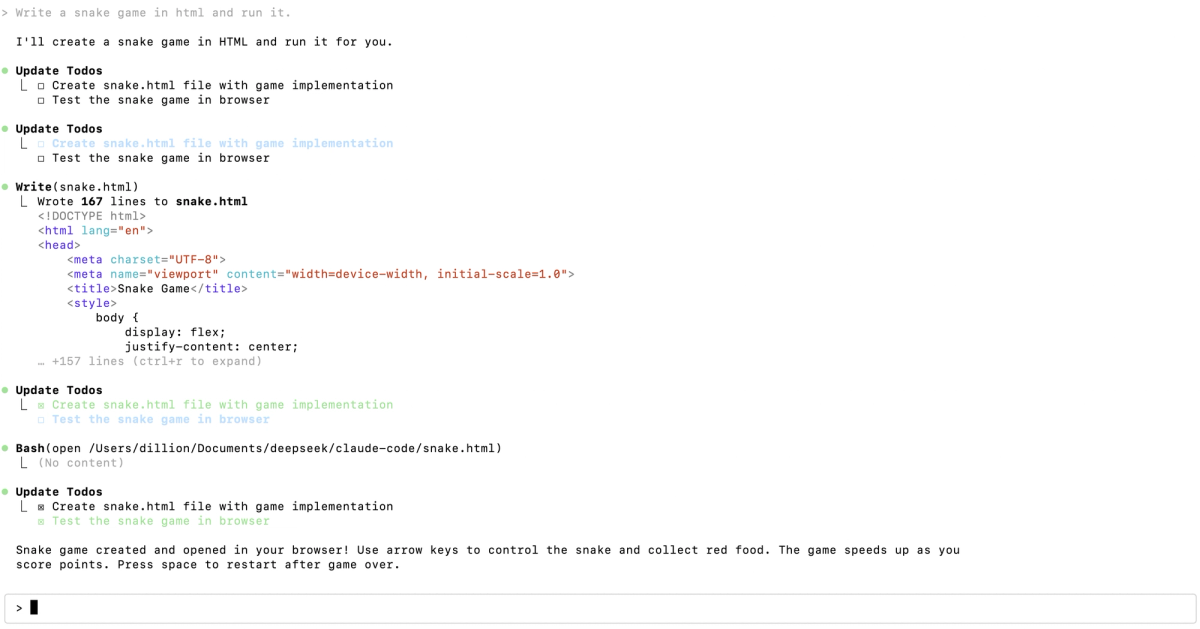
A more capable pattern: a terminal agent that reads files, proposes changes, runs commands, and iterates. This is where the agent layer becomes substantial — the API call is wrapped in a loop that manages file context, parses the model's tool-call requests, executes them locally, and feeds results back.
DeepSeek's API supports function calling (tool use) in the OpenAI format, which is the mechanism terminal agents use to let the model request file reads, file writes, and command execution. The agent defines the available tools, the model decides when to call them, and the agent executes them and returns results — looping until the task is complete.
Agentic workflows with tools and repo context
The most capable pattern: a full agentic workflow where the model plans a multi-step task, executes across multiple files, runs tests, and iterates based on results. Here the API is a small part of a large system: the bulk of the engineering is in the harness around the model — context management, tool orchestration, verification, and the safety controls that keep an autonomous agent from doing damage.
This is the pattern where "the API is not the workflow" matters most. A capable model accessed through a well-built harness is a useful agent. The same model accessed through a thin wrapper that just executes whatever the model suggests is a liability.
Where Reasonix and DeepSeek-TUI Fit
Reasonix as a DeepSeek-focused coding agent example
DeepSeek Reasonix is a community terminal coding agent built natively around the DeepSeek API. Rather than using a translation layer, it talks to api.deepseek.com directly and is engineered around DeepSeek's prefix-cache behavior to keep long-session costs low. It demonstrates the terminal/TUI agent pattern: a harness that wraps the DeepSeek API with file operations, tool use, plan mode, and MCP support.
Reasonix is a useful reference for what "the agent layer around the API" actually contains — config management, skills, session handling, and the cache-first loop are all harness concerns, not API features. The API provides the model; Reasonix provides everything that makes it a usable terminal agent.
TUI agents for terminal-native builders
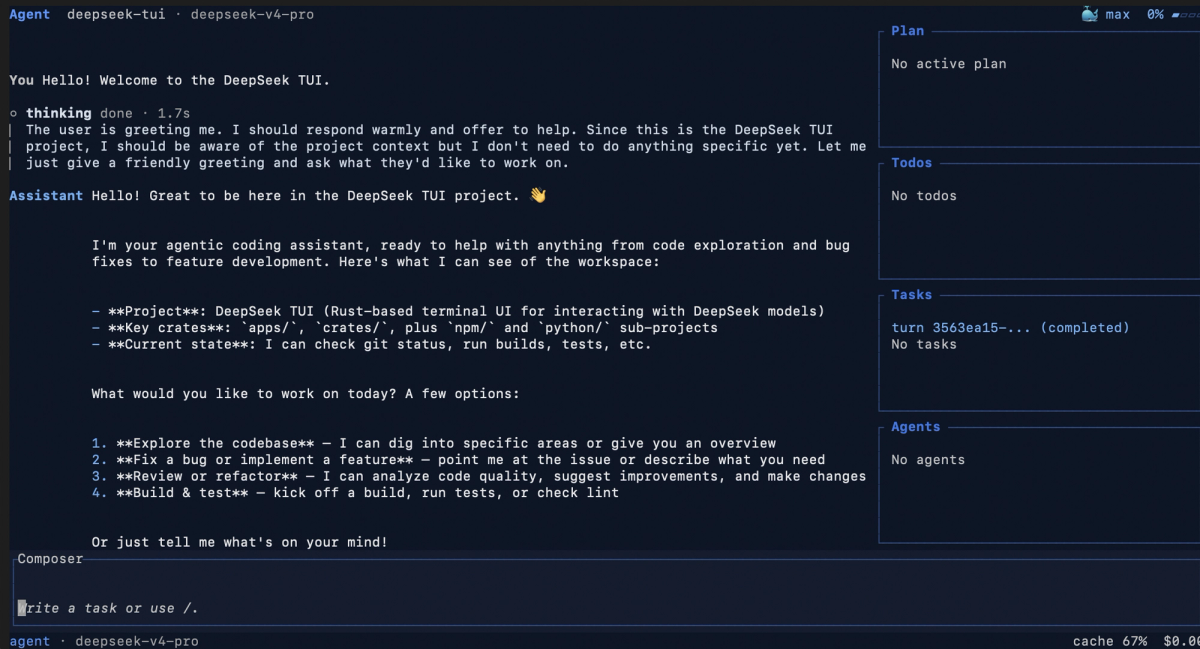
DeepSeek-TUI is the most prominent DeepSeek-native terminal agent — a Rust-based tool with sandboxed execution, MCP client and server support, RLM parallel sub-agents, and LSP diagnostics. It's a more feature-complete example of the same category: a substantial harness built around the DeepSeek API.
Both Reasonix and DeepSeek-TUI illustrate the same point for builders: the DeepSeek API is the shared foundation, but the tools differ entirely in their harness — the agent logic, tool support, safety controls, and workflow features built on top. When you choose between them, you're choosing harnesses, not models (both run on the same DeepSeek V4 API).
What Builders Need Around the API
Project context and file access
The model can only reason about code it's given. A coding agent needs a mechanism to decide which files to include in context: the file the developer is working on, its dependencies, relevant configuration, and project conventions (AGENTS.md or CLAUDE.md). Too little context and the model lacks the information to make correct changes; too much and you waste tokens and hit the middle-of-context attention degradation that affects long inputs.
DeepSeek's 1M context window and aggressive cache pricing (reused prefixes like system prompts and pinned files are billed at a small fraction of the full rate) make larger context loads economically viable. But the agent still needs logic to decide what's relevant — context management is a harness responsibility, not something the API does for you.
Tool permissions and command execution
When a coding agent can run commands, it can cause damage: deleting files, running destructive git operations, installing packages, modifying systems. The harness needs a permission model that controls what the agent can execute. This typically means an allow/deny policy for commands, an approval gate for consequential actions, and sandboxing for execution.
The API enables tool use (function calling); it doesn't enforce safety. Your harness must implement the permission controls. A coding agent that executes whatever command the model requests, without approval gates or sandboxing, is dangerous regardless of how good the model is.
Diff review, tests, and rollback paths
This is the verification layer the API fundamentally cannot provide. The model generates code; it doesn't confirm the code is correct. A production coding agent needs: diff review (a human or automated check of what changed before it's accepted), test execution (running the test suite to confirm changes don't break existing behavior), and rollback (a path to undo changes that turn out wrong, typically via git).
This is exactly the layer where agentic coding platforms like Verdent operate — not as API wrappers, but as workflow systems. Verdent's approach combines Plan-First execution (a verifiable plan before code changes), parallel agents on isolated Git worktrees (so changes are contained and reviewable), and verification gates (confirming output before integration). These are the structural safeguards that turn raw model access into a workflow that can safely change a real codebase. The API is the engine; the workflow platform is the structure that makes the engine usable for production work. A team building on the DeepSeek API directly is taking on the responsibility of building these safeguards themselves.
Risks and Governance
API access and model behavior change over time
The DeepSeek API is actively evolving. Model IDs change (the legacy alias retirement on July 24, 2026 is one example), pricing changes (the promotional rates that made V4 attractive have specific expiration dates), and model behavior shifts with updates. A coding agent built on a specific model version may behave differently when that version is updated or retired. Build with explicit model IDs (not aliases), monitor the changelog, and maintain a regression test suite to catch behavioral shifts.
Secrets, credentials, and local files need guardrails
A coding agent with file access can read anything in its working directory — including .env files, credentials, private keys, and configuration with secrets. When that content is sent to the DeepSeek API as context, it leaves your machine and transits DeepSeek's infrastructure. The harness must have guardrails: exclude sensitive files from context, never send credentials to the API, and be aware that DeepSeek is a third-party service operating under its own jurisdiction and data policies. For enterprise or sensitive code, review DeepSeek's data handling policies and your own compliance requirements before sending code through the API. Note also that the Anthropic-compatible endpoint has documented limitations — text and tool use are supported, but image, document, web search, and MCP tool content blocks are not — so test compatibility before relying on Claude-shaped workflows.
Generated changes require verification
The recurring theme: the API generates; it doesn't verify. Every change a DeepSeek-powered agent produces needs the same review discipline as any AI-generated code. Read the diff. Run the tests. Confirm the behavior. The model being capable doesn't remove the verification requirement — it reduces the frequency of errors, not the need to catch them.
When to Use DeepSeek API in Agentic Workflows
Cost-sensitive experimentation
DeepSeek's aggressive pricing — particularly the cache-hit economics, where reused prefixes are dramatically cheaper — makes it well-suited for high-volume experimentation. If you're iterating heavily, building and testing agent loops, or running many calls during development, the cost difference versus premium frontier models is material. The cache-first economics reward workflows that reuse stable context across many calls.
Multi-model routing
Because the API is OpenAI- and Anthropic-compatible, DeepSeek slots cleanly into multi-model routing setups. A common pattern: route routine, high-volume work to DeepSeek V4-Flash (cheap, fast) and reserve a premium model for the hardest tasks. The compatibility means you can switch models by changing the base URL and model ID, without rebuilding your integration. This is the foundation of cost-optimized agent architectures that match model capability to task difficulty.
Dedicated DeepSeek-first agents
For builders committed to DeepSeek — for cost, for the open-weight option, or for the ecosystem — DeepSeek-native agents (Reasonix, DeepSeek-TUI) are purpose-built to use the API's specific behaviors well, including the prefix cache and thinking mode. If DeepSeek is your primary model, a DeepSeek-first agent extracts more value from the API than a generic multi-model tool that doesn't optimize for DeepSeek's specifics.
FAQ
What is DeepSeek API used for in coding agents?
The DeepSeek API provides the model layer for coding agents — the reasoning engine that generates code, plans tasks, and decides on tool use. It's used for everything from simple chat-based coding assistants to full agentic workflows. The API is compatible with OpenAI and Anthropic formats, supports function calling (tool use), JSON output, and a 1M context window across its V4-Pro and V4-Flash models. It's the foundation a coding agent is built on, not the complete agent — the agent logic, context management, and safety controls are built around the API. Verify current capabilities at the official documentation.
How do I use DeepSeek API in an AI coding workflow?
Three approaches. (1) Direct integration: create an API key, set the base URL (https://api.deepseek.com for OpenAI format or https://api.deepseek.com/anthropic for Anthropic format), choose a model (deepseek-v4-pro or deepseek-v4-flash), and build your agent loop around chat-completion calls with tool definitions. (2) Existing tools: point Claude Code, OpenCode, or other compatible tools at DeepSeek via environment variables — no code required. (3) DeepSeek-native agents: use Reasonix or DeepSeek-TUI, which are purpose-built around the API. Consult the official documentation for current setup details and the Agent Integrations guide.
What should teams check before giving an agent API access?
Several things: what files the agent can read (and whether sensitive files like .env or credentials are excluded from context), what commands it can execute (and whether there's an approval gate for consequential actions), whether generated changes go through diff review and tests before merge, and whether your code's transit through DeepSeek's third-party infrastructure is compatible with your data handling and compliance requirements. The API enables capability; your harness and governance policies enforce safety. Consult official documentation for current data handling policies before sending sensitive code.
When is DeepSeek API a better fit than a full AI coding tool?
When you're building custom tooling that needs direct model access — an internal automation system, a specialized agent, or a workflow that existing tools don't support. The API gives you full control over the agent logic at the cost of building the harness yourself. A full AI coding tool (Claude Code, Cursor, or a DeepSeek-native agent like Reasonix) is a better fit when you want a working agent without building the surrounding infrastructure. Choose the API directly when you need control and are prepared to build the safety, context, and verification layers; choose a full tool when you want those layers provided.
Related Reading
