
You're mid-debug, you've asked Claude to trace a failing test across three files, and you're watching the cursor blink while it thinks. That wait — multiplied across dozens of interactive turns in a session — is exactly what Opus 4.8's Fast Mode targets: 2.5× the speed for latency-sensitive work, at a higher price. Alongside it, Dynamic Workflows let Claude Code plan a large task, fan it out to parallel subagents, and merge the result in one session. This is the practical guide to using both — how they work, when the speed is worth the cost, and the token pitfalls that catch people off guard.
Verified against Anthropic's official documentation as of June 2026. Both features ship as research previews and pricing can change — confirm current details at the official Opus 4.8 announcement before relying on specifics.
What Fast Mode Actually Does
2.5× speed at a higher flat rate
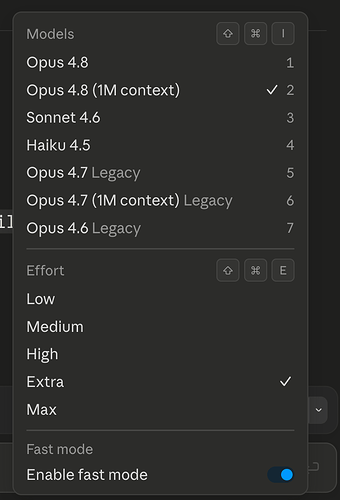
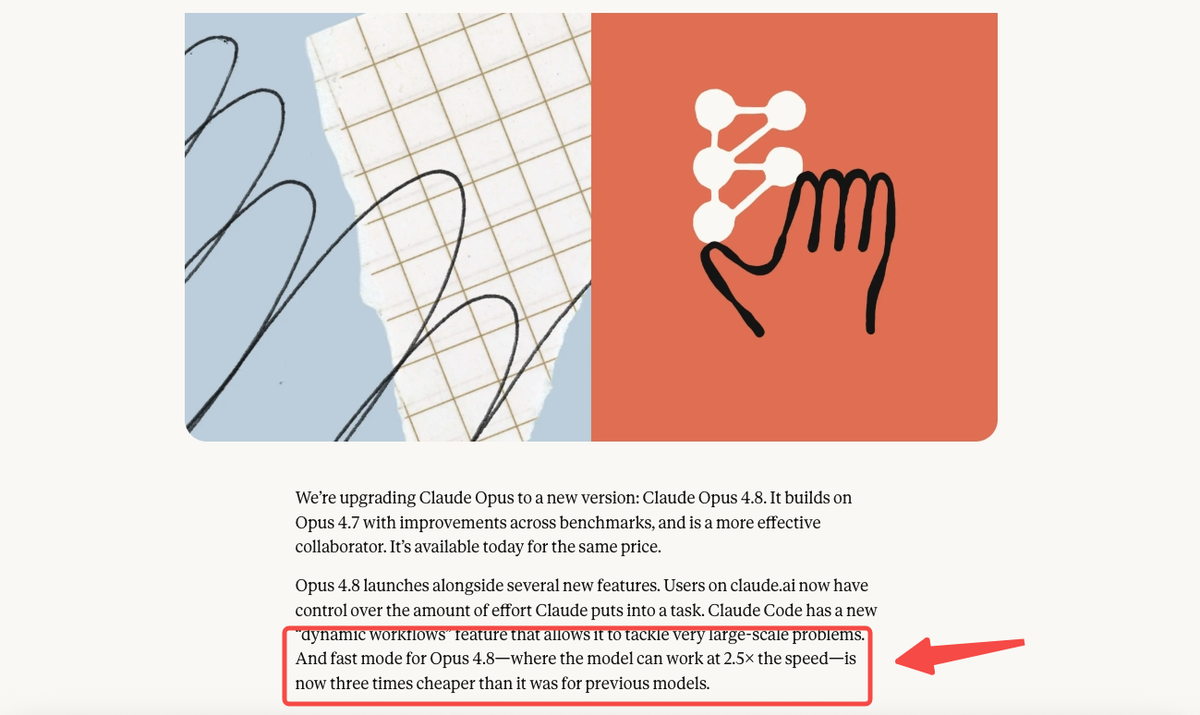
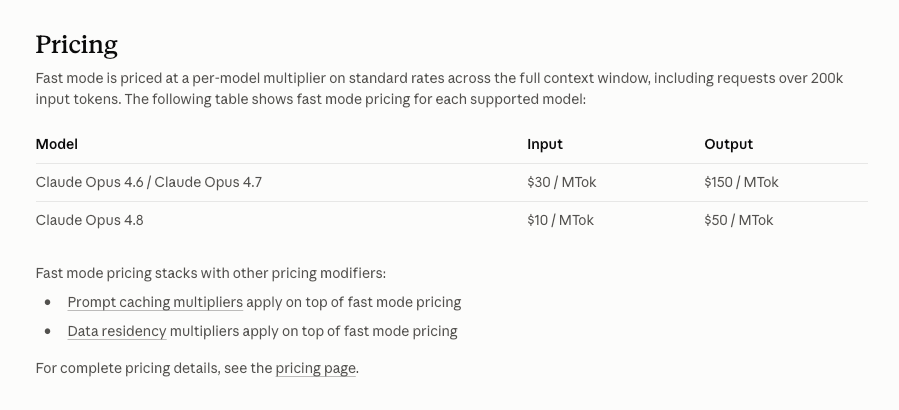
Fast Mode runs Opus 4.8 at 2.5× the speed of the standard tier. It's not a different or smaller model — it's the full Opus 4.8 served faster, for latency-sensitive work. The cost: Fast Mode is priced at $10 per million input tokens and $50 per million output, exactly 2× the standard $5/$25. (Anthropic notes Fast Mode for Opus 4.8 is about three times cheaper than Fast Mode was on previous Opus models, but it's still double the standard 4.8 rate — speed isn't free.)
/fast keeps full Opus
The key thing to understand: Fast Mode doesn't trade quality for speed. You're still running the complete Opus 4.8 model, just served at lower latency. This distinguishes it from the usual speed/cost lever (dropping to a smaller, weaker model) — with Fast Mode you keep frontier capability and pay for the latency reduction directly. That's why it makes sense for interactive work where you want both Opus-level quality and fast turnaround, and why it's wasteful for work where latency doesn't matter.
Default behavior in recent Claude Code
In recent Claude Code versions, Fast Mode has become the default for Opus 4.8 interactive sessions (reported from around v2.1.154 onward), reflecting that most interactive coding benefits from lower latency. If you don't want to pay the Fast Mode premium for a given session — for example, a long autonomous run where speed doesn't matter — check your Claude Code model/mode setting and switch to standard. Verify the current default and the toggle in your Claude Code version, since these details change between releases.
When Fast Mode Is Worth the Cost
Live debugging, multi-file edits, interactive loops
Fast Mode earns its premium in interactive work, where you're in a tight loop with the model and latency is the bottleneck on your productivity:
- Live debugging — you're iterating quickly (try this, read the error, try that), and each second of model latency is a second you're blocked
- Multi-file edits with review — you're proposing changes, reviewing diffs, and adjusting, where faster turnaround keeps you in flow
- Interactive exploration — asking questions about a codebase, refining a plan, where the conversation pace matters
In these scenarios, the 2.5× speed directly reduces your idle time, and the value of staying in flow can justify the 2× cost — because the bottleneck is latency, not token volume.
When standard mode is better for long autonomous runs
Fast Mode is the wrong choice for long autonomous runs where you're not waiting on each turn. If you kick off a task and walk away — a large refactor running unattended, an overnight migration, a long autonomous session — the latency reduction buys you nothing (you're not watching), while the 2× cost applies to every token. For that work, standard mode delivers the same Opus 4.8 quality at half the price. The rule of thumb: Fast Mode when you're actively waiting; standard mode when the model is working unattended.
Dynamic Workflows for Large Tasks
Plan, fan out to parallel subagents, merge in one session
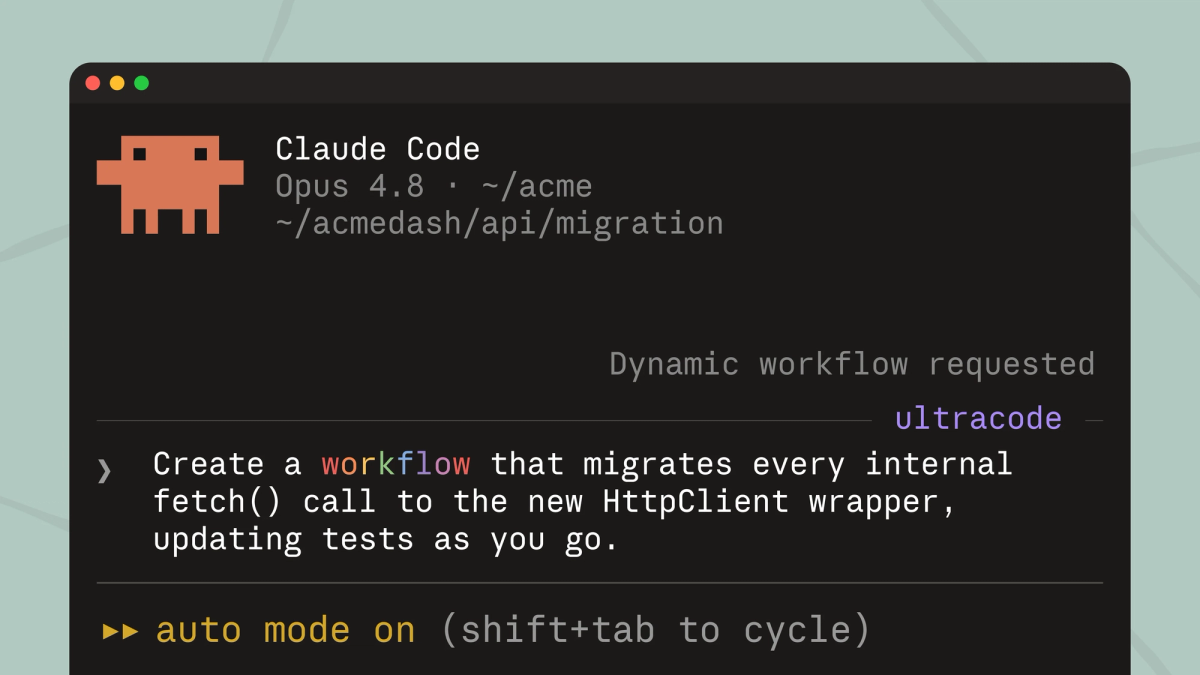
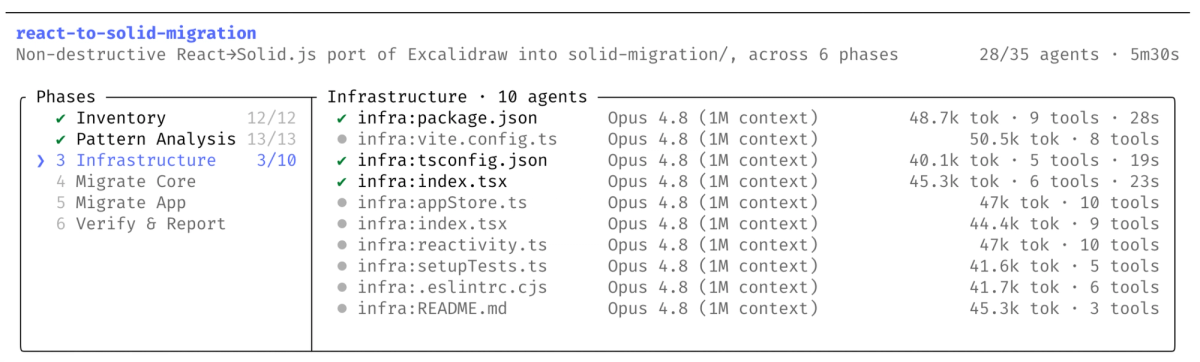
Dynamic Workflows is Claude Code's primitive for very large-scale problems — codebases with hundreds of thousands of lines, tasks too big for a single linear agent run. The pattern: one agent plans the work, fans out into parallel subagents that each handle a piece, verifies the outputs, and merges the result, all inside a single session. Under the hood, Claude writes a JavaScript orchestration script that coordinates the subagents at scale. A single run can spawn a large number of agents (Anthropic caps a workflow at up to 1,000 subagents), and runs are resumable — an interrupted workflow doesn't restart from scratch.
To use it, you describe a large task in Claude Code on an eligible plan, and Claude generates and runs the workflow. It's available as a research preview, so the exact interface and behavior may change — check the current Claude Code documentation for how to invoke it in your version.
Effort control: high and xhigh
Separate from Fast Mode, Opus 4.8 added user-selectable effort control — how much computation the model puts into a response, which directly affects token usage. On Opus 4.8, the effort parameter defaults to high across Claude Code and the Messages API. For tasks needing more computation, an xhigh setting is available, which spends more tokens for harder reasoning. (Anthropic notes that even at the high default, coding tasks use roughly the same tokens as Opus 4.7 while performing better; xhigh is for when you deliberately want to spend more compute on a hard problem.) Effort control on claude.ai and Cowork lets you dial this through the UI; in the API it's a parameter. The practical point: higher effort means more tokens and cost, so reserve xhigh for genuinely hard tasks rather than defaulting to it.
Cost and Token Usage Pitfalls
The first fast-mode turn bills full context
A pitfall that surprises people: Fast Mode bills from the first token at the higher rate, and the first turn of a session includes your full context. If you start a Fast Mode session with a large context loaded (many files, long history), that first turn is billed at the $10/$50 rate across all those input tokens — which can be a meaningful cost before you've done any real work. Be deliberate about what context you load into a Fast Mode session's opening turn, since you're paying the premium rate on all of it from the start.
Don't send 1M just because it exists
Opus 4.8 has a 1M-token context window by default, and Dynamic Workflows plus the large window make it tempting to load enormous context. Resist it. A large context window is a ceiling, not a target — filling it costs tokens (at 2× rate in Fast Mode) and can actually degrade focus on the relevant code. Load the context the task needs, not the maximum the window allows. The discipline of sending only relevant files matters more in Fast Mode, where every input token costs double, and in Dynamic Workflows, where context multiplies across subagents.
Common Mistakes
The recurring mistakes with these features come down to using them when they don't fit:
- Using Fast Mode for unattended runs — paying 2× for speed you're not there to benefit from. Use standard mode when the model works unattended.
- Defaulting to xhigh effort — spending extra tokens on tasks that don't need the extra computation. Reserve xhigh for genuinely hard reasoning; the high default handles most work.
- Reaching for Dynamic Workflows on tasks that aren't parallel — the feature shines on genuinely large, parallelizable work; using it on a task a single agent handles cleanly just adds orchestration overhead and token cost. Use it when the problem actually needs parallelism, not because the feature is new.
- Loading maximum context — sending huge context because the window allows it, paying for tokens that don't help. Send what the task needs.
- Skipping verification on workflow output — a workflow that spawns hundreds of subagents produces a lot of output, all of which still needs review before it lands. The scale doesn't reduce the verification burden; it increases it.
FAQ
What does Opus 4.8 Fast Mode actually do and how is it different from normal mode?
It runs the full Opus 4.8 model at 2.5× the speed of standard mode, for latency-sensitive interactive work — the same model and quality, not a smaller variant, served faster. The difference is cost: $10/$50 per million tokens versus standard's $5/$25, exactly 2×. The trade-off isn't quality for speed; it's paying double to reduce latency. Use it when you're actively waiting on each turn (debugging, interactive editing); use standard mode when the model works unattended.
Is Opus 4.8 Fast Mode worth the higher cost for coding work?
It depends on whether latency is your bottleneck. Fast Mode is worth the 2× cost when you're in a tight interactive loop — live debugging, multi-file edits with review, exploration — where faster turnaround keeps you in flow and reduces idle time. It's not worth it for long autonomous runs where you're not waiting on each turn, since you pay double for speed you don't benefit from. The right way to decide is cost-per-task in your workflow: if Fast Mode meaningfully shortens your active working time on interactive tasks, the premium can pay off; if the model is working unattended, standard mode delivers the same quality for half the price.
How do Dynamic Workflows with subagents actually work in practice?
You describe a large task in Claude Code (eligible plan), and Claude plans the work, writes a JavaScript orchestration script, fans out into parallel subagents, verifies outputs, and merges the result — all in one session. A run can spawn up to 1,000 subagents and is resumable, so an interruption doesn't restart everything. It's built for very large-scale problems (hundreds of thousands of lines), not everyday tasks, and ships as a research preview — verify current behavior in Claude Code's docs. The output still needs review: more subagents means more to verify, not less.
When should I use Fast Mode versus standard mode for long coding tasks?
The deciding factor is whether you're actively present. If you're interactively working through it — watching each turn, iterating — Fast Mode's speed reduces idle time and can justify the cost. If it's a long autonomous run you start and walk away from, use standard mode: you're not benefiting from the latency reduction, so the 2× cost is waste. A practical pattern for a mixed task: Fast Mode for interactive planning and review, standard mode for unattended execution.
What are the common mistakes people make when using Opus 4.8 Fast Mode?
The most common: using Fast Mode for unattended runs (paying 2× for speed you can't use), loading maximum context because the 1M window allows it (Fast Mode bills the full first-turn context at the higher rate), defaulting to xhigh effort when it isn't needed, and reaching for Dynamic Workflows on tasks that aren't genuinely parallel. The through-line: these features have specific fits — the mistakes come from using them by default rather than when the work calls for them.
Conclusion
Fast Mode and Dynamic Workflows are both about matching the tool to the work, not defaulting to the newest option. Fast Mode is worth its 2× cost when latency is your bottleneck — interactive debugging, editing, exploration — and wasteful when the model works unattended. Dynamic Workflows shine on genuinely large, parallelizable problems and add only overhead on tasks a single agent handles. Effort control's xhigh is for hard reasoning, not a default. The discipline across all three is the same: use them deliberately, watch the token cost (especially Fast Mode's full-rate first turn and the temptation to fill the 1M window), and remember that scale never reduces the need to verify the output. Match the feature to the task, and these tools earn their place; reach for them by reflex, and they just cost more.
Related Reading
