"Product pinged us at 9am — needed a cross-service feature by end of day. I was on the subway. By lunch it was on dev, screenshots in the thread, waiting for sign-off. I never opened my laptop."
— Jake Harrison, Staff Engineer, Brooklyn
Jake Harrison is a Staff Engineer at a B2B SaaS company in Brooklyn. His team owns the operations console — the admin tools customer success uses to help paying customers. The stack is a real production system: a Go backend split by router / handler / service / model, a React frontend under operations-tools/, and three separate backend services — internal-opreation for admin workflows, settlement for subscriptions and accounts, passport for identity and auth.
Which means almost no request Jake gets is ever "just add a button." A customer success workflow touches user state in Passport, subscription state in Settlement, and audit records in operations data. The old way of answering those requests was for three people to each open their repo, check their database, and come back the next day. By then context had drifted across chat, docs, and PR comments — and Jake, who was usually in a meeting or on the subway, was the bottleneck.
Now when product pings the channel with a cross-service feature request, Jake replies @Manager and Verdent takes it from there. It inspects routes, handlers, services, DB schema, and frontend pages in minutes. It proposes an implementation path that reuses existing code conventions — no inventing a demo architecture. It writes the code, deploys to dev, runs Jenkins, and posts screenshots into the thread. Jake reads it all on his phone, responds with feedback or "Ship it," and the feature goes live — in the same thread where the request started.
What used to be a next-day delivery coordinated across 3–4 people and 6–10 tabs is now a same-afternoon delivery, often within one commute. Jake hasn't opened his laptop for a cross-service feature in weeks.
Why this isn't a toy demo
Most "ship from phone" stories are about adding a button or changing a color — one file, one component, one repo. Jake's team's work doesn't look like that. The company's codebase is structured like a real internal product org:
- A Go backend split by
router/handler/service/model - A React operations frontend under
operations-tools/src/pagesandoperations-tools/src/components - Three backend services with distinct ownership:
internal-opreation— admin workflows and operator-facing APIssettlement— subscription, account, and credits statepassport— identity, auth, team, and user status - Production-style database models:
team_operation_log,tb_user_subscription, fields likeuser_id,create_time,marketing_plan_id,idempotency_key - Route conventions:
/inner/customer/list,/settlement/account/info,/passport/inner/user/info
So when a product request lands in Slack, "please code this" is the easy part. The hard part is answering:
- What already exists?
- Which service owns the truth?
- Can an existing handler / service / page be reused instead of creating a new path?
- Which tables and fields actually determine the business outcome?
- How do we prove the feature works before anyone says "ship it"?
In a production-style stack, those questions normally take a couple of engineers and most of a day. Jake's team runs them through Verdent Manager instead, directly in the Slack thread where the request arrived.
What's wired into the workspace
- Slack integration — the thread is the command surface, review surface, and release log
- Coding agent — reads and edits existing Go + React while following current project patterns
- Read-only DB access — verifies schemas, joins, and data shape before proposing implementation
- Browser + screenshot — opens the dev environment, captures UI states, posts evidence back to Slack
- Deploy pipeline hooks — trigger dev / staging / production rollout, report environment status
- Persistent memory — keeps naming, architectural choices, and previous decisions consistent across the entire thread
One Monday, 9:12am
Jake is on the Q train heading into the city. Sarah Chen, product manager for customer success, pings #ops-product:
@Manager We need an "at-risk VIP recovery" action in the operations console today. On the customer management page, add a prominent Slack outreach entry only for users who meet all of these conditions:
Constraints: reuse existing route and page conventions from the operations platform; don't hardcode Slack channel or workflow URLs (make them configurable); keep field names in snake_case; the customer list view still needs to paginate well; every outreach action must leave an auditable operation record; visual summary of recovery pipeline health, not just a row-level action; dev screenshots in thread before release.
A minute later, Verdent Manager picks it up:
"Investigating the existing implementation surface now."
Jake keeps reading Slack on his phone. By the time the train pulls into 14th St, the investigation is back.
What Manager found
Instead of a vague "we may need a new API," Manager comes back with grounded facts.
Admin frontend. There's already a customer entry page at operations-tools/src/pages/user/CustomerManagePage.tsx, which delegates to operations-tools/src/components/CustomerTable.tsx. The new feature can extend this existing table/actions flow — no new page needed.
Operations backend. Route style is grouped under /inner/*. Customer APIs already live under /inner/customer/list, /inner/customer/purchase-history, /inner/customer/disable. The handler pattern in internal-opreation is router -> handler -> service/dao -> model.
Cross-service data sources. Passport owns user identity/status. Settlement owns subscription/account truth. The existing customer aggregation in handler/customer.go already merges Passport users with Settlement account data — so this isn't a single-table feature. It should extend the existing aggregation path, not replace it.
Subscription evidence. Settlement's tb_user_subscription already carries the fields Sarah is asking about — cancel_at_period_end, ended_at, marketing_plan_id, status among them.
Auditability. Passport already writes team_operation_log style records with idempotency_key and create_time conventions. The new outreach actions should preserve the same audit style.
Then a recommended implementation:
A. extend the customer list DTO with a recovery eligibility summary B. add a dedicated Recovery column inCustomerTableC. add a VIP Recovery dashboard card on customer management D. create a Slack-trigger endpoint under/inner/customer/recovery/*that records each operator action for audit E. deploy to dev and post screenshots of the dashboard, customer rows in both eligible and ineligible states, and the operation log trace
Estimated scope: 12–15 files, 3 services, Recovery column + dashboard components + 1 action modal + chart library integration for real metrics visualization. Same-day delivery is realistic.
A small refinement
Before Manager starts coding, the operations lead chimes in:
"Good. Outreach status needs to show whether we already pinged them today."
Jake reads the thread, thinks about it, and adds his own nudge:
"Use the existing customer management flow, but make it demo-ready. Keep the row-level Recovery action and add a strong visual dashboard summary so viewers can understand pipeline health at a glance."
Manager absorbs both and replies with the fastest path: extend the current customer aggregation rather than adding a parallel endpoint, return a paginated recovery_summary per row plus a dashboard_summary, add a Recovery column and a VIP Recovery dashboard section above the table on the frontend, and open a modal with Slack destination and template preview on action. Validation plan: start local services, self-check page load and console/network errors, check whether the dashboard already has populated data; if empty, seed realistic test data across tb_user_subscription, tb_marketing_plan, and vip_recovery_record so the demo shows ~20 at-risk VIPs across tiers with a funnel and a 7-day trend; verify the API returns populated data, screenshot, verify audit records written, and post a final rollout summary.
Implementation
No sprint planning, no ticket assignment. Manager starts coding.
About half an hour later, it reports back from the branch feature/vip-recovery-v2 with 15 changed files across the three services — a new /inner/customer/vip-recovery/trigger route in the router, an extended handler/customer.go (customer list aggregation, dashboard payload, trigger endpoint), a new eligibility service and dashboard aggregation service, a cross-DB DAO, DTOs, and an audit table on the backend; on the frontend, a new Recovery column in CustomerTable.tsx, a VIP Recovery dashboard with its four chart components, and the composition update on CustomerManagePage.tsx.
All checks pass: go build, go test, npm run build.
The moment that matters
Before posting screenshots, Manager hits the new dashboard API to see what it actually returns. The endpoint responds successfully — but the metrics come back empty. In a demo environment with no prior VIP cancellations, the dashboard would render all zeros. Not a bug, but not shippable either: the product team asked for a demo-ready visual summary, and zeros tell no story.
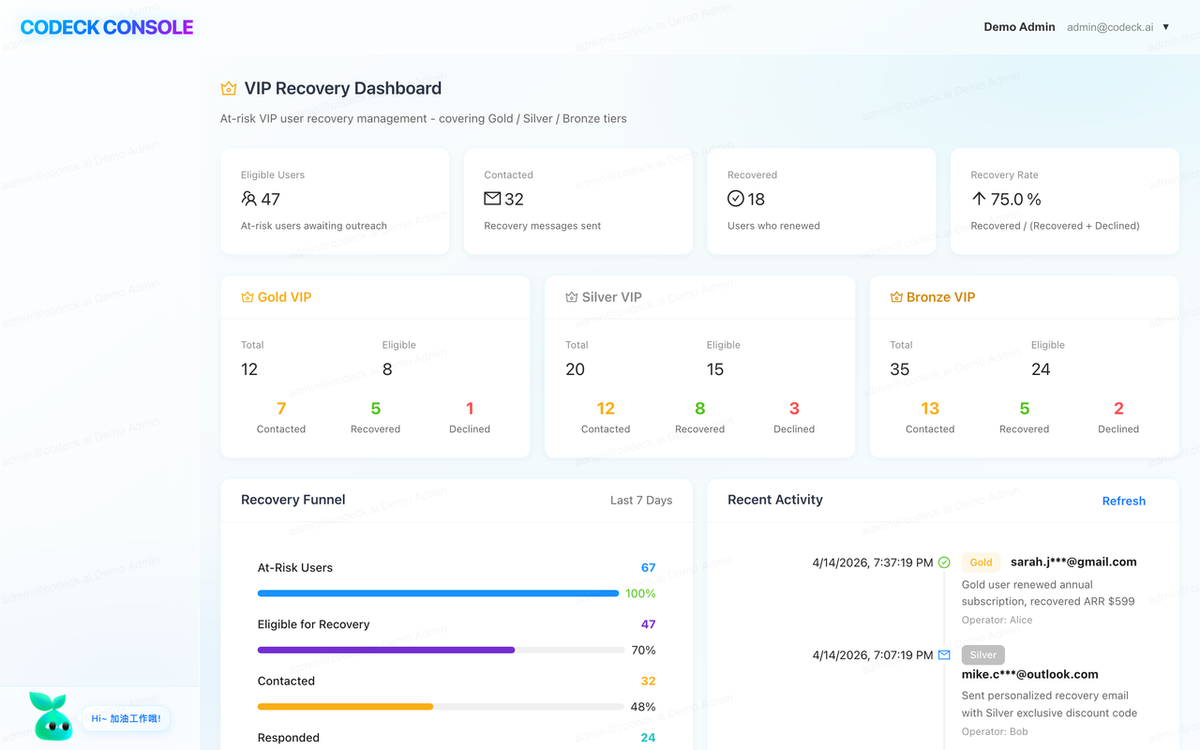
So Manager constructs realistic test data instead of screenshotting the empty state. It seeds settlement.tb_user_subscriptionwith paid current and recently-canceled VIP users, links settlement.tb_marketing_plan entries for recovery segmentation, and inserts vip_recovery_record activity for contacted / recovered / lost states. The target demo shape comes into view: ~20 at-risk VIPs across Gold / Silver / Bronze tiers, a recovery funnel with Eligible / Contacted / Recovered / Lost counts, a 7-day success-rate trend, top recovery opportunities with subscription values, and a recent outreach activity feed.
Then it re-checks the dashboard API, confirms a populated response, and only then moves to screenshots.
Screenshots in thread
Three images go up:
- The VIP Recovery dashboard at the top of the customer management page — KPI cards by tier, funnel, trend chart, opportunity ranking, and a recent outreach activity feed, all populated.
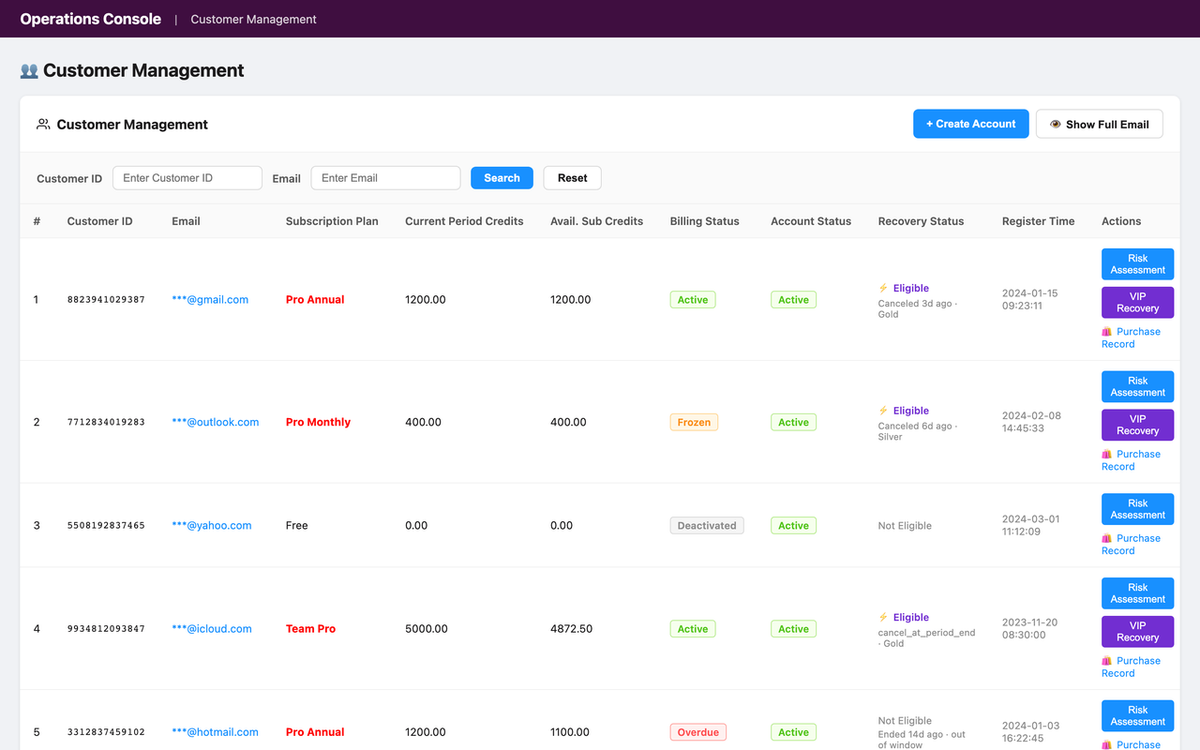
- The customer list showing the new Recovery column — green "Eligible" tags on recently-canceled VIP users, gray "Not Eligible" on the rest, with a single-line tooltip for the blocking reason. Pagination and existing columns are unchanged.
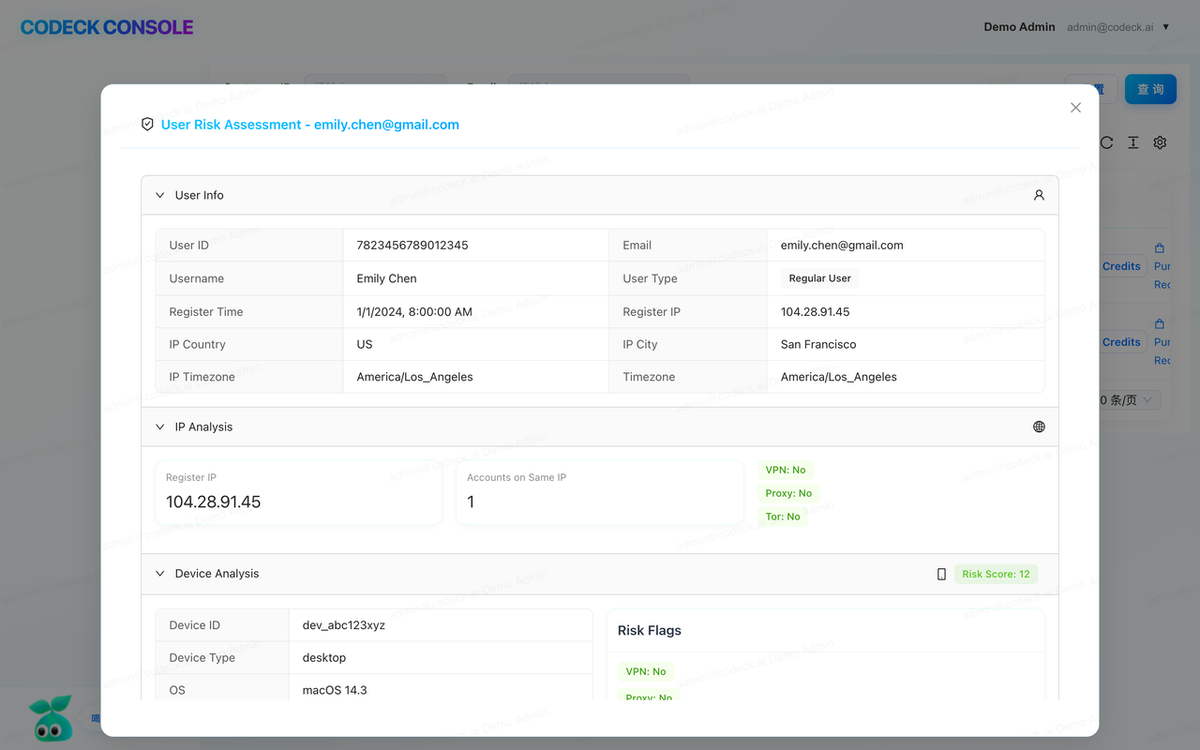
- The confirmation modal after clicking the row-level trigger — "Are you sure you want to initiate VIP recovery for this user?" with Cancel / Confirm buttons.
Manager's own commentary:
"I've inspected the customer management page myself first — no console errors, data loads correctly, VIP Recovery dashboard renders with live charts, Recovery column renders for all rows, eligibility badges match the expected logic. Everything looks clean."
Feedback, fix, ship
Sarah reviews the screenshots and asks for two things:
"The blocked reason tooltip is too verbose. Shorten it to a single-line summary. Also add a confirmation modal before triggering recovery — operators should not be able to misclick."
No meeting. No ticket. The feedback lands directly in the thread. Manager acknowledges, implements both, and reports back: the tooltip now shows a compact single-line format like Canceled 12d ago · Gold Plan · No active sub; the confirmation modal copy reads "Are you sure you want to initiate VIP recovery for this user?" with explicit Cancel / Confirm buttons; dashboard labels have been tightened so the funnel and trend chart read cleanly in screenshots; npm run buildpasses.
Jake replies:
"Looks good. Ship it."
Manager runs the deploy:
- ✅ PR #199 created and merged →
feature/vip-recovery-v2→ online - ✅ Tagged
v5.1.95 - ✅ Jenkins pipelines triggered:
internal-opreation #433— SUCCESS (3m 42s)opreations-tools-frontend #359— SUCCESS (2m 18s)
Then it opens the site — https://online-inner-operations.verdent.ai/customer-manage — and verifies: dashboard live with tier counts, funnel, trend, opportunities, and activity feed; Recovery column live with single-line summaries; confirmation modal working on trigger.
"VIP Recovery is live online. Feature now gives operators both a visual pipeline-health dashboard and row-level recovery actions for at-risk VIP users, with cancellation-based eligibility and operator-gated outreach."
Jake pockets his phone and gets off the train.
What's actually going on under the hood
Pulling back from the thread, five things make this feel less like a magic trick and more like actual engineering happening from a phone.
1. Manager investigates the real ownership graph first
The first response isn't a guess. It reads the current system and answers questions that normally require multiple engineers to coordinate manually — which repo owns the page, which route group serves it, which service is authoritative for user status and which for subscription status, which table actually carries the business signal, which existing handler can be extended without duplication.
In a production-style stack, the answer is rarely "just add a field." So the first Slack reply becomes a mini architecture review with evidence attached — grounded facts like "the existing customer aggregation already combines Passport and Settlement" instead of vague speculation like "we may need a new API."
2. Requirements are refined with production constraints, not demo assumptions
Manager doesn't flatten the request into "add a button." It translates it into engineering constraints that match the real codebase: keep route names consistent with /inner/customer/*, reuse the existing customer page, keep payloads paginated, return explicit blocking reasons for ineligible users, keep Slack destinations configurable rather than embedded in code.
The feature stops being a UI tweak. It becomes a cross-service business capability — list aggregation, eligibility evaluation, action execution, audit persistence, visual verification, deployment coordination. Normally the kind of work senior engineers reserve for desktop time. Here, the direction still happens from the phone; Manager carries the operational load.
3. It reuses existing code paths instead of inventing new architecture
The strongest signal this isn't a demo is what Manager avoids. It doesn't create a random /vip/recovery endpoint outside the route hierarchy. It doesn't duplicate a frontend page when CustomerManagePage and CustomerTable already exist. It doesn't use ad hoc naming that breaks the project's snake_case conventions. It doesn't bypass the existing router / handler / service / model layering.
Instead it follows the established pattern end-to-end — the new route registered under the current admin namespace, the handler composing upstream data, the service layer computing eligibility, DTOs with explicit fields, and the frontend extending the existing customer table flow rather than replacing it.
The result: the feature looks like it was built by the same codebase authors — not pasted in by an external prototype tool.
4. The Slack thread becomes a multi-system control room
By the middle of a thread, Verdent is coordinating five classes of work at once — code inspection across backend and frontend, schema verification, implementation, deployment, and visual review through screenshots posted back into Slack.
What makes this feel powerful isn't automation volume; it's decision compression. Instead of "let me check which repo owns this" / "I need to ask backend if that field exists" / "we should review screenshots tomorrow," the thread compresses all of it into one orchestrated loop:
implement → start local services → self-check → check data → seed test data if needed → verify API → screenshot → show user → feedback → fix → ship → verify online
Product and operations get something they rarely get from engineering discussions: confidence before release.
5. Acceptance is based on evidence, not trust
In smaller demos, "done" means "the code compiles." Here, "done" means the thread contains proof — the impacted page identified, the route shape matching existing conventions, the UI rendering the right state for eligible and ineligible users, the action writing an audit trail, dev screenshots looking correct, the smoke check reported back.
Before, product waited for someone to say "I think it's ready." After, product sees screenshots, rollout notes, and business impact numbers — same Slack window, same timestamp chain.
Results
By the time Jake's train reached his stop:
- 4,312 at-risk VIP users covered by the new workflow
- 1 existing page extended with both a dashboard and table actions
- 3 services coordinated without breaking ownership boundaries
- 12–15 files changed, all in a single controlled release
- 0 laptop lids opened
What Changed
| Before | After | |
|---|---|---|
| Research time | 45–90 min of manual repo-hopping | 3–8 min of coordinated inspection |
| People involved | 3–4, coordinating across chat, docs, PR | 1 Slack thread + Manager |
| Context switches | 6–10 tabs and tools | 1 conversational surface |
| Acceptance loop | Build now, review later | Build → screenshot → feedback → adjust, in the same thread |
| Delivery | Next day, maybe | Same afternoon, sometimes within one commute |
Who this pattern works for
Jake's team's setup isn't unique to them. The same workflow plays well for:
- Teams shipping internal operations features, revenue-impacting fixes, or admin workflow improvements that touch multiple systems
- Engineers who already have real backend / frontend / database services and want Manager to work inside existing conventions instead of inventing a demo architecture
- Product and operations teams that need answers with evidence — which service changes, which tables are involved, which page will surface the feature, what the rollout risk looks like
- Developers who want to turn fragmented time — commute, travel, between meetings — into meaningful delivery without sacrificing engineering rigor