

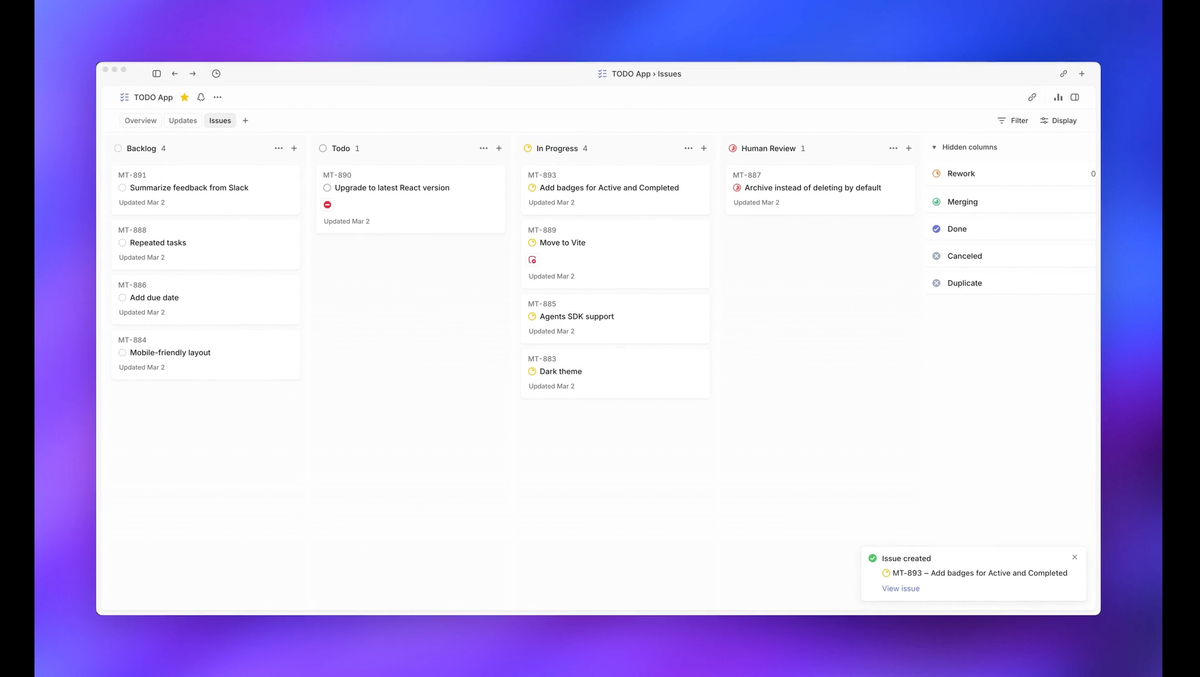
Before Symphony: five browser tabs, each with a Codex session, each needing you to approve the next step, redirect a wrong assumption, or notice a stall. After Symphony: an issue appears in Linear, an agent picks it up, and you review the PR. The distance between those two states is what this tutorial covers — and it's not a weekend afternoon. Plan for a focused day, especially if you're new to the Elixir toolchain.
This tutorial follows the official Elixir reference implementation. If you want to implement Symphony in another language, that's valid — point your coding agent at SPEC.md and generate an implementation. This guide does not cover that path.
What You'll Have Working by the End
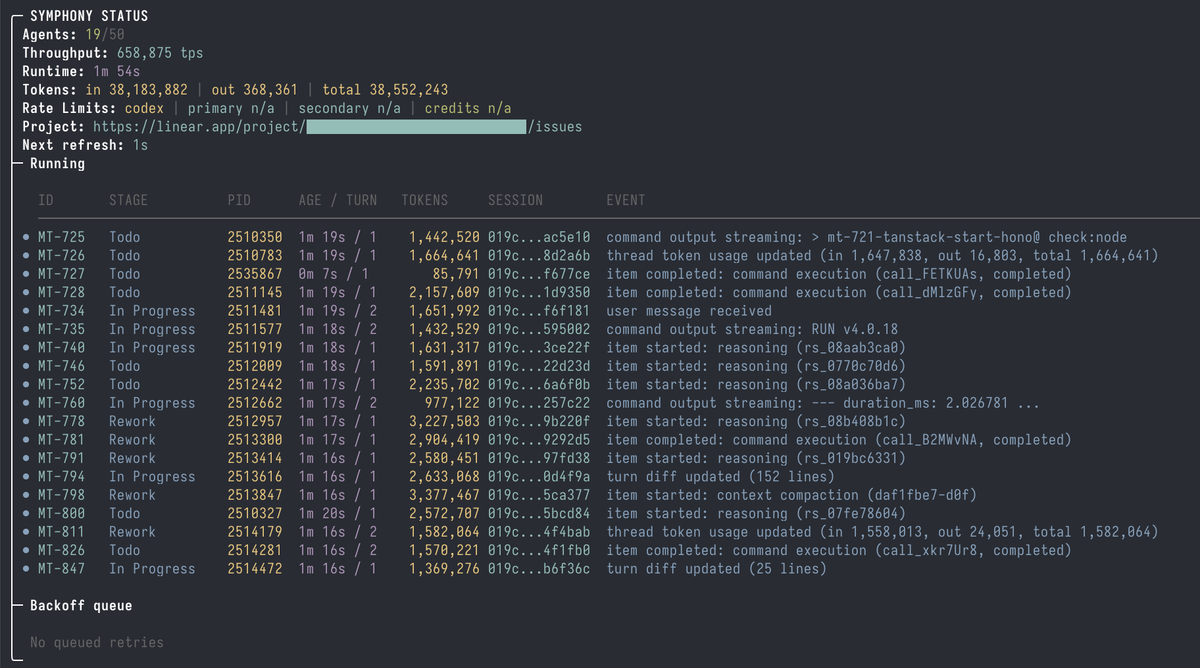
- The Symphony daemon running against your Linear project
- A WORKFLOW.md committed to your repo that an agent can execute
- A completed first run: one issue picked up, worked on, and transitioned to Human Review
- A clear picture of what Symphony requires from your codebase before it can produce useful output
Prerequisites
Elixir + Erlang/BEAM toolchain
The reference implementation requires Elixir and Erlang/OTP. For the full setup instructions from OpenAI, see the official Symphony announcement. The setup uses mise (formerly rtx) as the version manager — the mise.toml in the repo pins the required versions, so you don't need to manage them manually.
# Install mise if you don't have it (see https://mise.jdx.dev):
curl https://mise.run | sh
# or: brew install mise

# Verify:
mise --version
Database for state persistence
The Elixir reference implementation runs mix setup which typically initializes a database for persistent state. Check the elixir/README.md in the current repo for the specific database requirement before proceeding — this may be PostgreSQL or an embedded alternative depending on the current implementation version. For PostgreSQL:
# macOS:
brew install postgresql@16 && brew services start postgresql@16

# Ubuntu/Debian:
sudo apt install postgresql postgresql-contrib && sudo service postgresql start
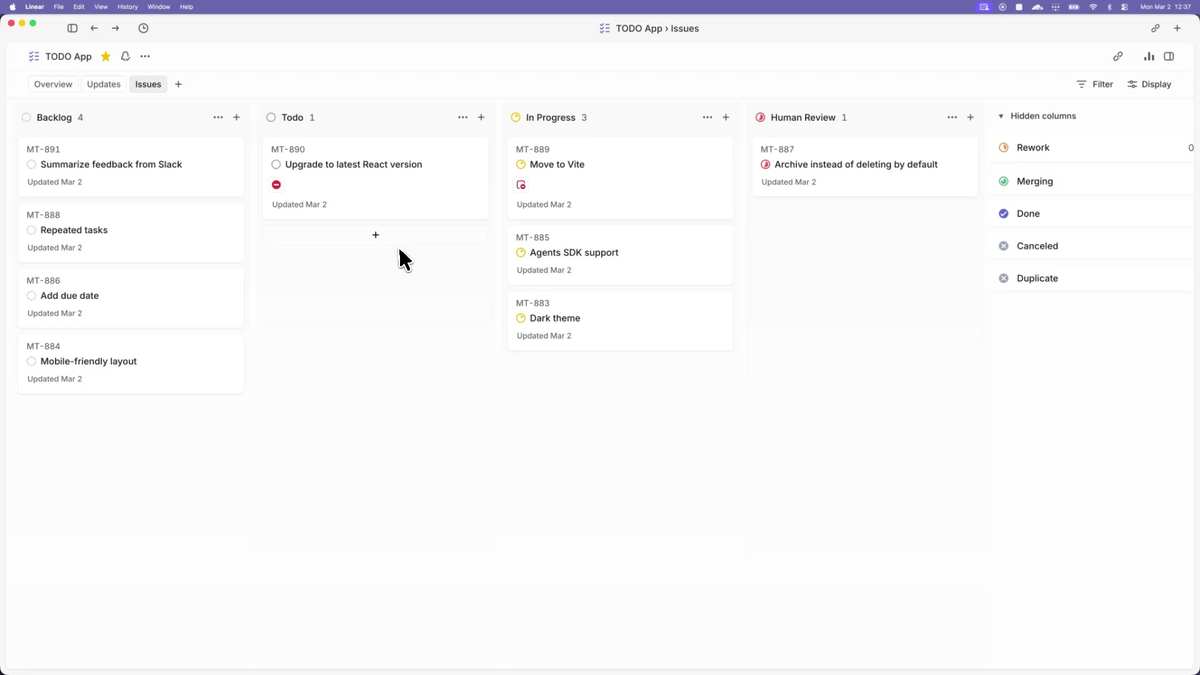
A Linear workspace with API access
You need a Linear account and an API token scoped to your workspace. Create one at Linear → Settings → API → Personal API keys (see Linear API documentation). The minimum required scope is read access to issues and the ability to post comments and transition issue states (the agent writes back to Linear directly). Store the token as an environment variable:
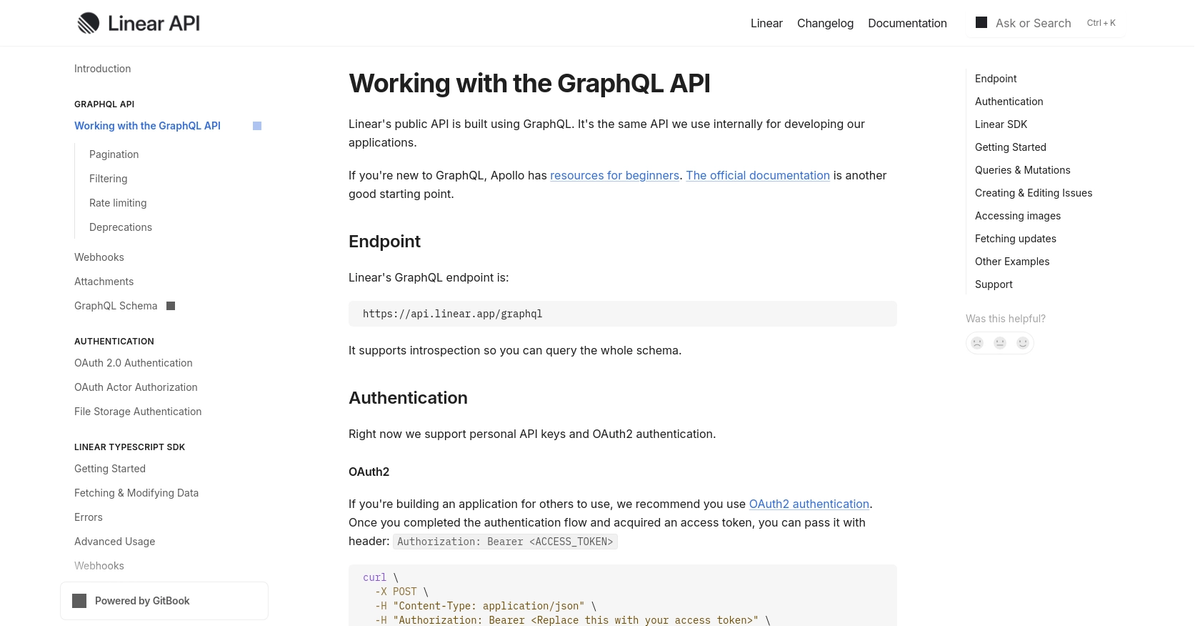
export LINEAR_API_KEY="lin_api_xxxxxxxxxxxxxxxx"Symphony reads this from the environment — tracker.api_key in WORKFLOW.md resolves to $LINEAR_API_KEY when the value is omitted or explicitly set to $LINEAR_API_KEY.
An OpenAI account with Codex access
Symphony's reference implementation invokes codex app-server — Codex's headless JSON-RPC 2.0 mode for programmatic control. You need:
- Codex CLI installed and authenticated
- An OpenAI account with Codex API access
# Install Codex CLI (see official repo: https://github.com/openai/codex):
npm install -g @openai/codex

# Authenticate:
codex   # follow the sign-in flow
Verify Codex is working in app-server mode before continuing. Symphony cannot gracefully handle a Codex authentication failure mid-run.
A repo with hermetic tests and CI
This is the prerequisite that most tutorials bury. Say it plainly: if your test suite doesn't reliably fail on regressions, Symphony will merge broken code. The agent is evaluated on whether it can get a PR merged — and if your CI green-lights bad changes, the agent's proof-of-work means nothing.
Before running Symphony on any repo:
make test(or equivalent) must exit non-zero on a deliberate regression- CI must run automatically on every PR and block merge on failure
- Issues must be written specifically enough that an agent can act without clarifying questions
If any of these aren't true, address them first. Symphony amplifies what your repo's engineering practices produce.
Clone and Inspect the Reference Implementation
git clone https://github.com/openai/symphony
cd symphony
Reading SPEC.md before touching code
Before running anything, read SPEC.md. It's the authoritative source for what the implementation is supposed to do. The Elixir code is one realization of the spec; if you hit surprising behavior, SPEC.md is the ground truth. Key sections:
- Section 4.1.1:
IssueRecordfields — these are the variables available in your WORKFLOW.md template ({{ issue.identifier }},{{ issue.title }},{{ issue.description }},{{ issue.priority }},{{ issue.branch }}) - Section on WorkflowDefinition: the typed fields behind your WORKFLOW.md front matter
- Trust and Safety: what the spec explicitly defers to implementations to decide
The elixir/ directory layout
symphony/
├── SPEC.md                  ← the specification
├── elixir/
│   ├── README.md            ← setup instructions for this implementation
│   ├── WORKFLOW.md          ← the reference WORKFLOW.md to adapt
│   ├── mix.exs              ← Elixir project config
│   ├── mise.toml            ← tool version pins (Elixir, Erlang)
│   └── lib/
│       └── symphony/        ← orchestration logic
Configure Your Linear Connection
API token scope
The token in LINEAR_API_KEY needs:
- Read access to issues and projects
- Write access to update issue states and post comments
- Access to create/read GitHub PR attachments (if your workflow includes linking PRs)
Verify the token works before wiring it to Symphony:
curl -s -H "Authorization: $LINEAR_API_KEY" \
  -H "Content-Type: application/json" \
  -d '{"query": "{ viewer { id name } }"}' \
  https://api.linear.app/graphql | jq .data.viewer
Filtering which projects / labels are eligible for dispatch
The tracker.project_slug field in WORKFLOW.md determines which Linear project Symphony polls. This is your primary trust boundary: only issues in that project are eligible for agent dispatch. Do not point Symphony at a catch-all project where unvetted issues from external contributors can appear.
A label-based filter (requiring a specific label before an issue becomes eligible) is an additional safety layer — configure it in your WORKFLOW.md's tracker section. The SPEC defines tracker.active_states as the states that trigger dispatch; restricting these to a label-gated state provides meaningful human sign-off before an agent starts work.
Write Your First WORKFLOW.md
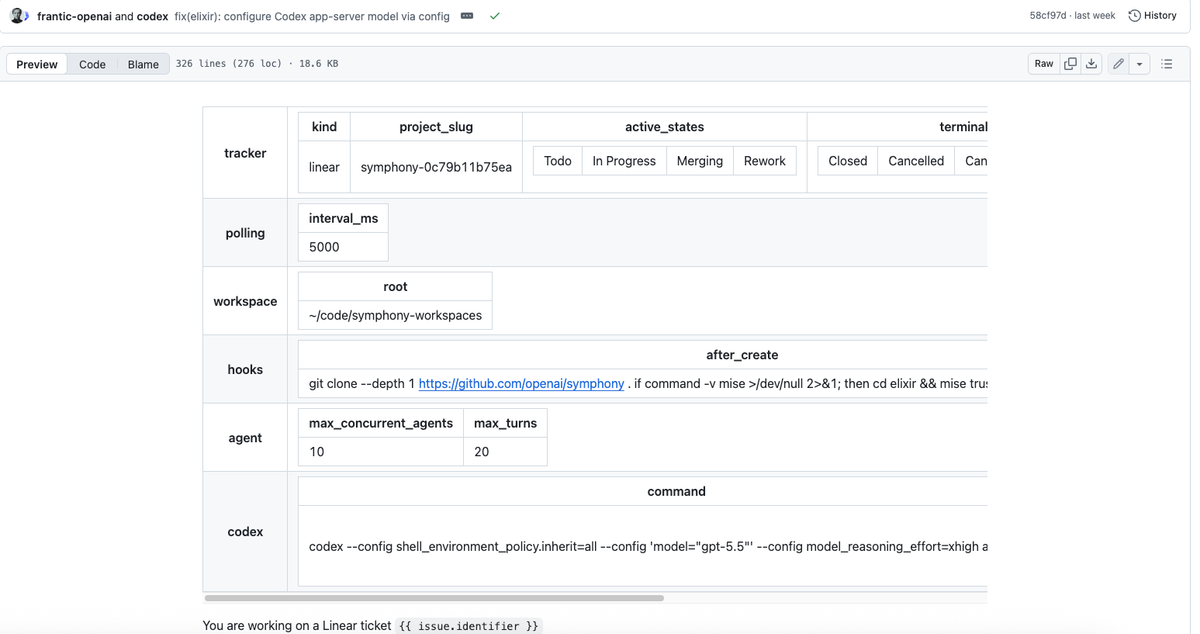
The WORKFLOW.md file lives in your repo root. It has two parts: YAML front matter for runtime configuration, and a Markdown body that becomes the Codex session prompt (rendered with Jinja2-style {{ variable }} substitution using the issue's fields).
Why agent prompts and runtime config live in-repo
The design is intentional: WORKFLOW.md is versioned with the branch the agent modifies. When the agent checks out a branch for an issue, it reads the WORKFLOW.md on that branch. This means you can evolve your agent instructions alongside your code, and rollbacks work correctly — a branch from two weeks ago runs the agent rules from two weeks ago.
Minimum viable WORKFLOW.md fields
This is the minimal configuration from the official elixir/README.md, with comments added for clarity:
---
tracker:
  kind: linear
  project_slug: "your-linear-project-slug"  # find this in Linear project settings

workspace:
  root: ~/code/symphony-workspaces           # where per-issue dirs are created
  hooks:
    after_create: |
      git clone git@github.com:your-org/your-repo.git .

agent:
  max_concurrent_agents: 2     # start low; increase once you trust it
  max_turns: 20                # max Codex turns per issue before Symphony stops

codex:
  command: codex app-server    # invokes Codex in headless JSON-RPC mode
---

You are working on a Linear issue {{ issue.identifier }}: {{ issue.title }}.

{{ issue.description }}

## Your workflow

1. Read the issue description carefully.
2. Understand the existing codebase before writing any code.
3. Implement the change in small, testable steps.
4. Run the test suite. Fix any failures before continuing.
5. Open a pull request with a clear description.
6. Move the issue to Human Review state when the PR is ready.

## Constraints

- Work only inside this repository directory. Do not touch any other path.
- Do not commit secrets, credentials, or API keys.
- All tests must pass before moving to Human Review.
Start with max_concurrent_agents: 1 or 2 for your first run. Running many agents in parallel before you've validated the workflow burns tokens on wrong-direction work.
How WORKFLOW.md is versioned with the branch the agent modifies
The agent checks out a branch for the issue it's working on. Symphony reads WORKFLOW.md from the workspace directory, which is the cloned repo at that branch. Practical implication: if you change WORKFLOW.md on main, agents working on existing branches won't see the change until they rebase. For small teams, this is rarely a problem — but it's the correct mental model for troubleshooting unexpected agent behavior.
Boot the Daemon and Watch the First Run
cd symphony/elixir

# Step 1: trust and install the toolchain
mise trust
mise install

# Step 2: set up dependencies and database
mise exec -- mix setup

# Step 3: build
mise exec -- mix build

# Step 4: launch with your WORKFLOW.md
mise exec -- ./bin/symphony /path/to/your-repo/WORKFLOW.md
If no path is passed, Symphony defaults to ./WORKFLOW.md in the current directory.
Polling cadence and concurrency caps
Symphony polls Linear on a configurable tick cadence (default: every few seconds). Each tick: fetch active candidate issues, check against concurrency cap, dispatch available slots. With max_concurrent_agents: 2, Symphony will run at most two agents simultaneously, queuing additional eligible issues.
Watch the terminal output on first launch. Before the first issue is dispatched, Symphony validates the WORKFLOW.md (a "scheduler preflight"). If validation fails — malformed front matter, missing required fields, path errors — it logs the error and does not dispatch. Validation errors do not crash the service; they block dispatch until the config is fixed.
Per-issue isolated workspace creation
When an issue is dispatched, Symphony:
- Creates a directory at
workspace.root/<issue-identifier>/ - Runs
hooks.after_create(yourgit clonecommand) - Renders the WORKFLOW.md body with the issue's variables
- Launches
codex app-serverin the workspace directory with the rendered prompt - Streams agent updates back to the orchestrator
Each issue has a completely independent filesystem. Two agents working in parallel cannot see each other's changes — they each cloned the repo separately.
What "Proof of Work" looks like in practice
The Proof of Work is the PR. When the agent completes its work, it opens a pull request and transitions the Linear issue to the Human Review state (as defined in your tracker.active_states configuration). In the reference WORKFLOW.md from the official repo, the agent also:
- Maintains a workpad comment on the Linear issue (a persistent progress log)
- Runs a PR feedback sweep before moving to Human Review
- Adds a
### Confusionssection to the workpad when any part of the task was unclear
You review the PR like any other. Merge if it's correct. Close and add a comment if it isn't — the agent's contribution ends at Human Review.
How to Build an AI Workflow with Symphony
Scope an issue Symphony can finish unattended
Symphony works best on issues where:
- The expected output is testable (the test suite can verify correctness)
- The implementation path is constrained (not "investigate and propose options")
- The issue body contains all context needed — no expected back-and-forth with product or design
A well-scoped issue example:
Add rate limiting to POST /api/sessions Return 429 withRetry-After: 60header when the same IP makes more than 10 requests per minute. Use Redis for the counter. Existing session tests are intests/api/test_sessions.py. The Redis client is already configured inapp/config.py.
A poorly-scoped issue example:
Look into the performance problem
The agent will attempt to execute whatever the issue says. Ambiguous issues produce expensive, wrong-direction agent runs.
Match WORKFLOW.md to your CI gates
Add explicit verification steps to the Markdown body:
## Required before Human Review
- [ ] `make test` exits 0
- [ ] `make lint` exits 0
- [ ] No new TODO or FIXME introduced
- [ ] PR description explains what changed and why
The agent reads these as instructions. Symphony doesn't automatically run CI — the PR triggers your existing CI pipeline. The agent's internal verification (running tests manually) is a first pass; CI is the authoritative gate.
When to keep humans in the loop
Keep humans in the loop for:
- Issues that require architectural decisions beyond what's specified
- Anything touching authentication, authorization, payment, or personally identifiable data
- Issues where "wrong" is expensive (data migrations, external API changes)
- Any task where the acceptance criteria can't be verified programmatically
Symphony's value is in the volume of well-scoped, verifiable tasks. It doesn't replace engineering judgment on tasks that require it.
Trust and Safety Posture You Must Decide Before Going Live
The SPEC is explicit: "Implementations are expected to document their trust and safety posture explicitly. This specification does not require a single approval, sandbox, or operator-confirmation policy." Translation: these decisions are yours, and they matter.
Codex approval level and sandboxing
The codex.approval_policy field controls what Codex can do without prompting. The default is safer: sandbox approvals, rule checks, and MCP elicitation are all rejected by default. If you remove these defaults, the agent can execute shell commands, write files, and make network requests without per-operation confirmation.
Start with the default approval policy. Loosen it only for specific operation types after you've observed what the agent actually needs to do for your workload.
Network restrictions and credential isolation
Each agent workspace is a cloned repo directory. The agent has access to whatever credentials are in its environment. Do not pass your production database credentials, cloud admin keys, or other high-privilege secrets into the environment where Symphony runs. Scope credentials to the minimum the agent needs: read-only git access, the ability to open PRs, and whatever APIs the WORKFLOW.md explicitly requires.
If your org has network egress controls, verify that the Codex API endpoint, Linear API, and GitHub API are reachable from the Symphony host — and that nothing else is.
Filtering untrusted Linear inputs
Linear issue titles, descriptions, and comments are rendered into agent prompts via {{ issue.description }}. If untrusted users (external contributors, customers, anyone outside your team) can create or edit issues in the tracked project, they can inject prompt content into your agent sessions. This is a prompt injection surface.
The mitigation: restrict the Symphony-tracked project to internal team members only. Do not use Symphony on public-facing issue trackers without additional input sanitization.
Common Pitfalls
Repo without hermetic tests
Symptom: the agent opens PRs that look correct but introduce subtle regressions that CI catches only intermittently or not at all.
Fix: before using Symphony, ensure make test is a reliable signal. If flaky tests cause CI to pass on broken code, fix the flakiness first. Symphony's throughput advantage disappears if human review has to catch what CI misses.
Workflow path resolution on different shells and OSes
Symptom: ./bin/symphony: cannot find WORKFLOW.md or unexpected workspace paths.
workspace.root expands ~ to the home directory. $VAR references in workspace.root are expanded before path handling. But codex.command stays a raw shell string — variable expansion there happens in the launched shell, not in Symphony. If you're passing a path with spaces or using a non-standard shell, quote accordingly and test the path manually before starting the daemon.
Loopback bind on the optional HTTP server
The reference Elixir implementation includes an optional HTTP server for operator monitoring (status dashboard, live logs). It binds to localhost by default. If you run Symphony in a Docker container or a VM and try to access the dashboard from the host, it won't be reachable without explicit port forwarding. Change the bind address or forward the port:
# Forward from container to host (Docker):
docker run -p 4000:4000 ...

# Or in WORKFLOW.md / config, set server bind to 0.0.0.0 if your security posture allows it
When to Stop and Reconsider
Multi-tenant or untrusted workloads
The GitHub README says "trusted environments" explicitly. If you're considering running Symphony on a shared codebase where issue authors include external parties, or in a multi-tenant environment where agent actions affect other customers, the trust model breaks. Stop and build explicit sandboxing before proceeding.
Production-critical paths
Symphony is labeled an engineering preview. It is not a production-supported product. Don't run it on the repo that manages your payment processing, your authentication infrastructure, or any system where an incorrect agent commit causes a P0 incident. Save Symphony for services with blast-radius-limited failures and strong rollback mechanisms.
FAQ
Can I run Symphony without Elixir?
Yes. The Elixir implementation is the reference, not the only option. The SPEC.md is the authoritative document; you can implement it in any language. OpenAI stress-tested the spec with TypeScript, Go, Rust, Java, and Python ports. If you don't want to use Elixir, pass SPEC.md to your coding agent and ask it to generate an implementation in your preferred language.
Do I have to use Linear?
The reference implementation uses Linear. The SPEC describes a tracker interface that other systems can satisfy. Community ports for GitHub Issues exist. Jira would require building the tracker adapter against the spec's interface — the effort depends on how closely Jira's API maps to the spec's IssueRecord model. If you're not on Linear, look for community implementations before building your own adapter.
Where does state live, and what about backups?
In the reference Elixir implementation, the orchestrator holds "single authoritative in-memory state." Restart Symphony and it reconciles state from Linear on startup — active issues become active agents again. Workspace directories persist at workspace.root between restarts. For disaster recovery, Linear is the source of truth; the workspaces are reconstruction artifacts. If you lose the Symphony host, you lose in-progress agent workspaces but not the issue state.
Can multiple agents touch the same repo concurrently?
Each agent operates in its own cloned workspace — they don't share a working tree. Two agents can be working on different branches of the same repo simultaneously without conflict. The risk is at merge time: if both agents modify the same file on different branches, standard git merge conflict resolution applies. Symphony doesn't resolve merge conflicts automatically; the agent's PR merge either succeeds or the author (agent or human) resolves the conflict.
What happens if an agent crashes mid-run?
Symphony detects stalls via agent.stall_timeout_ms (configurable). If a Codex subprocess exits unexpectedly or stops producing output for longer than the stall timeout, Symphony terminates the worker and queues a retry with exponential backoff:
delay = min(10000 × 2^(attempt - 1), max_retry_backoff_ms)Default maximum backoff is 300 seconds (5 minutes). The agent restarts in the same workspace directory, so partially-written code and prior commits are preserved. The continuation turn prompt (rather than the original issue prompt) is used for restarts, signaling to the agent that it's resuming rather than starting fresh.
Related Reading
