Claude Skills vs MCP: When CLI+Skills Beats MCP
Why we keep this comparison short
I've written six Claude Skills this season, and I almost never use MCP.
The few MCP servers I keep installed, such as Figma, Notion, and Chrome DevTools, stay switched off most of the time. The first time I compared GitHub MCP against the gh CLI, gh won so cleanly that I never opened the MCP again.
So this is not another layer-cake explainer for claude skills vs mcp. The SERP already has those. This is written by someone who picked between the two every working day for half a year, on Claude Code, Verdent, and Codex.
The short version: if you're building a coding agent, build everything you can as CLI + Skill first. Reach for MCP only when the useful state genuinely lives inside someone else's running system.
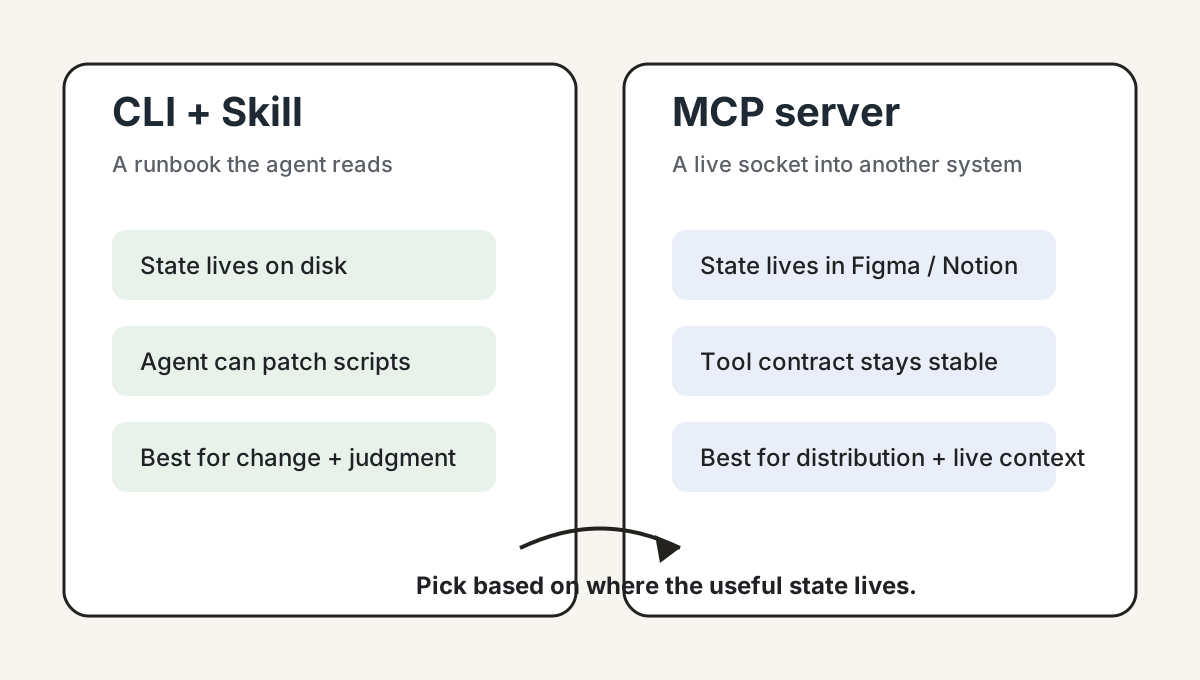
The honest one-liner: a Skill is a runbook, an MCP server is a live socket
Most posts settle on a layer model: Skills sit at the prompt or knowledge layer, while MCP sits at the integration layer. That is not wrong. It is just bloodless.
Here is the split that predicts which one you should reach for:
- A Skill is a runbook the agent reads. It encodes how you do something: which scripts to run, what order to use, what to check when it fails, and which local quirks matter.
- An MCP server is a live socket into another system. It exposes the current state of an external product, such as a selected Figma node, a browser page, or a Notion database row.
Both are legitimate. They answer different questions. A Skill tells the agent, "how do we do X here?" An MCP server tells the agent, "what is true right now over there?"
Case 1: why I built transcribe-skill as a Skill, not an MCP server
One of the six Skills is transcribe-skill. Its job is to turn a YouTube link, podcast feed, direct audio URL, or local media file into clean text and SRT, optionally cleaned up using the show's metadata page.
I never seriously considered making it an MCP server. Four reasons hit in order.
Iteration speed. Transcription tools live next to moving targets. Small platforms change their player, YouTube tightens cookies, Bilibili rotates anti-scrape, podcast RSS grows a new edge case, and subtitle formats drift. With CLI scripts, the agent opens sources.py or audio.py, edits the parser, and reruns. With MCP, the same fix has to flow through tool contracts, resource URIs, error envelopes, and client compatibility.
Workflow knowledge fits prose plus files. The valuable parts are not only API calls. They are judgments: which platforms need cookies, when to fall back, how to clean an interview transcript, and when speaker diarization is worth trusting.
Self-healing stays natural. A coding agent can run a script, read stderr, locate the parser, edit the file, retry, and write the lesson back into notes. That loop is native to a CLI plus repo setup. With an MCP server, letting the server modify its own implementation introduces hot reload, permission, and debugging problems I do not want to own.
Local dependencies stay legible. Transcription leans on ffmpeg, yt-dlp, Whisper, cookie jars, temp audio caches, and API keys. With CLI calls, the agent sees stdout, stderr, file paths, and partial artifacts. MCP wraps that into tool results, and the debugging surface narrows just when you need it widest.
What transcribe-skill actually looks like in the repo is a SKILL.md runbook in the middle, with Python primitives hanging off it. Around that runbook sit per-platform notes and output-style notes. None of those pieces wants to live behind a tool schema.
Case 2: why I do reach for Figma MCP
The counter-case is concrete. A designer selected a Pricing Card frame in Figma and asked me to ship it as a Svelte or React component on our marketing site. The brief was visually faithful code, existing design tokens, reused Button, Card, and Input primitives, exported icon assets, and respected auto-layout spacing.
Figma MCP earned its keep because it handed the agent structured design context off the current selection: frame hierarchy, component nodes, text, color, spacing, auto-layout, variables, and asset references. With Code Connect wired up, it also told the agent which Figma component maps to which file in our repo.
If I had tried to fake that with a Skill, the pain would have stacked up in three layers.
- The state lives inside Figma. Which node the designer selected, which page is open, which variant a component instance inherits, and which token is bound to which variable all live in the running Figma file.
- The semantics need an official channel. Screenshots give pixels. The REST API gives partial JSON. Stitching Dev Mode, variables, component mappings, Code Connect, asset exports, and current selection into something stable means rebuilding a Figma connector.
- The loop closes only if both sides talk. With a Skill, the agent generates code while the design stays in Figma. Review collapses to screenshot-vs-build squinting. With MCP, the agent can read tokens, export assets, and sometimes write back to the canvas.
The honest part: MCP made the agent operate on the selected design object rather than a URL or screenshot. The annoying part is the operational tail. Figma MCP still depends on the right seat, server, and client beta support. When it breaks, debugging it is harder than reading Python stderr.
The decision matrix I actually use
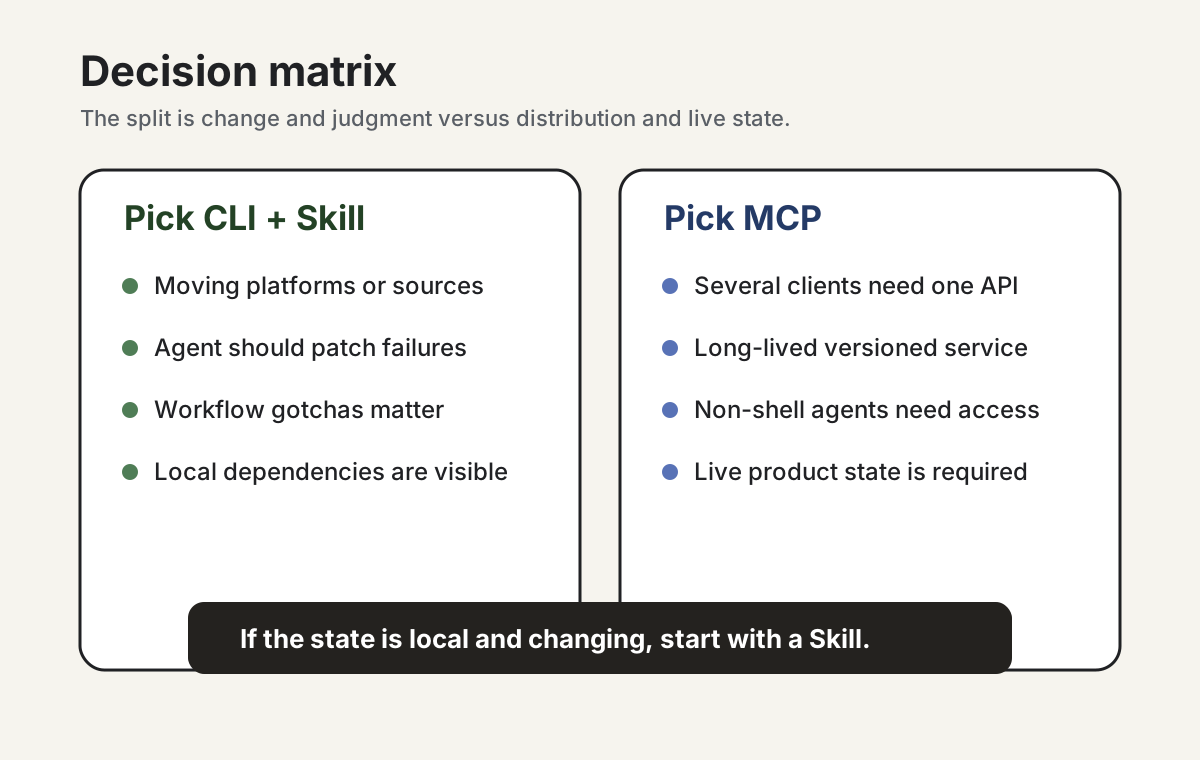
Two cases are not a framework. But the same seven splits keep showing up. This is the table I would give a teammate who has half an hour to decide.
| Goal | Pick |
|---|---|
| Quickly support a moving set of platforms or sources | CLI + Skill |
| Let the coding agent diagnose and patch its own failures | CLI + Skill |
| Sediment platform-specific gotchas and cleaning rules | Skill |
| Expose the same capability to several clients | MCP |
| Ship something as a long-lived, versioned service | MCP |
| Stand up a standardized tool API across a team | MCP |
| Reach non-coding agents or no-shell environments | MCP |
The Skill column is heavy on change and judgment. The MCP column is heavy on distribution and contract. If the row you care about is not here, that itself is a signal. The real problem may be a missing CLI, an unclear owner, or a host limitation.
A Skill gotcha that's nowhere in the docs: description is a classifier prompt
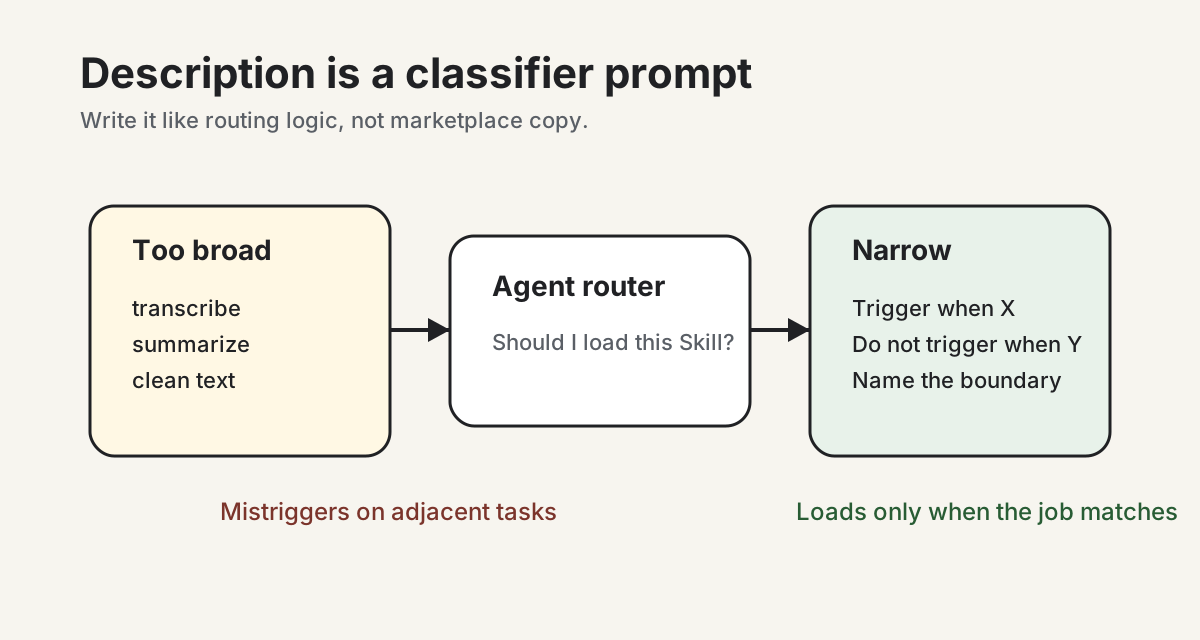
One thing the SKILL.md reference pages do not spell out: the description field is not marketplace copy. It is a lightweight classifier prompt. The agent reads it to decide whether to load this Skill at all.
The first time I wrote a description, I made the mistake almost everyone makes. I described the Skill like a product feature: transcribe, summarize, clean, content rewrite, video download. The model started reaching for it on adjacent tasks where it had no business.
The fix was not writing more. It was writing narrower, in a different shape: trigger when X / do not trigger when Y. The mistriggers stopped almost immediately, and the relevant triggers got more reliable.
If a Skill feels flaky or fires when it should not, check the description before you touch the runbook. Treat it as the conditional you hand to the agent, not as a README header.
My rule of thumb, and where it stops working
Here is the sentence I actually use:
If you're building a coding agent, build everything you can as CLI + Skill first. Reach for MCP only for the things that genuinely live inside someone else's running system.
That comes out of six Skills, three hosts, and a handful of MCP servers I have used in anger. It does not generalize everywhere, and the honest version has to say where.
- If you are publishing an MCP server for a multi-client audience, this rule is not yours. I have not shipped one to a registry. Transport choices, client compatibility, versioning, and distribution are the problems MCP was designed for.
- If your agent runs on Claude Desktop or only through the bare Agent SDK, my Skill experience may not transfer cleanly. I run Skills on Claude Code, Verdent, and Codex. The host changes what a Skill feels like.
- If this is part of an enterprise distribution story, MCP starts winning rows that do not appear in my matrix. Standardized contracts, audit, and central control are real advantages.
If you're shipping a coding agent, write the Skills first.