

Windsurf just flipped its pricing model — and the developer community is not happy about it. I've been using Windsurf as part of my daily coding workflow for a while now, and when the March 2026 announcement dropped, my first instinct was to pull up the numbers and figure out what actually changed versus what's just a rebrand.
Here's the honest breakdown.
⚠️ Documentation lag notice: As of March 23, 2026, Windsurf's official docs (docs.windsurf.com) still show the old pricing (Pro $15/mo, Teams $30/mo). The new quota-based pricing ($20/$40/$200) is confirmed via Windsurf's official blog announcement and their X post. All numbers in this article reflect the new system. Verify against windsurf.com/pricing before subscribing.What Just Changed (March 2026 Pricing Update)
This isn't just a rename. The structural change has real practical implications.
Old system (pre-March 2026):
- Pro: $15/mo → 500 prompt credits, spent freely anytime during the billing cycle
- Teams: $30/user/mo → 500 credits/user
- No Max plan
- Credits were a fungible balance — use 400 in day one, fine
New system (effective March 2026, per official announcement):
- Pro: $20/mo → usage quota that refreshes on a daily and weekly basis
- Teams: $40/user/mo
- Max: $200/mo — new, targeting power users
- Quota replaces credits as the unit — no more "500 credits to spend whenever"
The core shift: credits were a monthly pool. Quotas are rate limits. You can't sprint through your entire monthly allocation on one big project anymore. The daily/weekly refresh caps how much you can use in any given window, regardless of how much quota you have "left" for the month.
What doesn't change for existing subscribers: If you're a paying subscriber, your price isn't changing, and Windsurf is including a free extra week to try the new system before you commit. That transition window applies to users who were on the old credit-based plans.
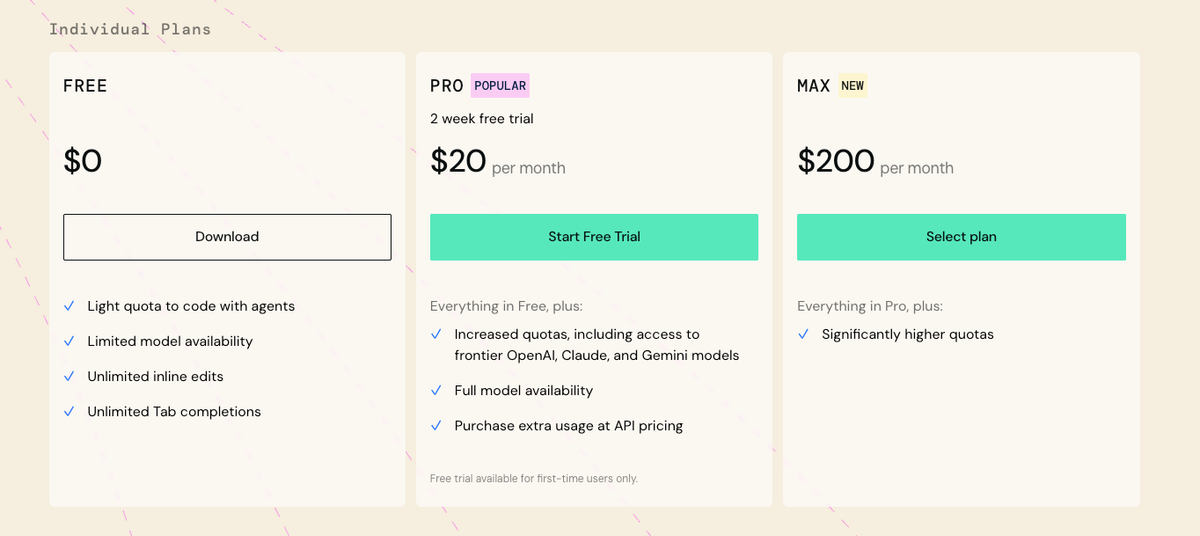
All Windsurf Plans at a Glance
| Plan | Price | Usage type | Tab completion | Extra usage | Best for |
|---|---|---|---|---|---|
| Free | $0 | Light quota | Unlimited | N/A | Evaluating the tool |
| Pro | $20/mo | Standard quota (daily + weekly refresh) | Unlimited | At API price | Individual devs, daily use |
| Max | $200/mo | Heavy quota (daily + weekly refresh) | Unlimited | At API price | Power users, heavy Cascade |
| Teams | $40/user/mo | Standard quota per seat | Unlimited | At API price | Teams up to 200 seats |
| Enterprise | Custom | Custom | Unlimited | Custom | 200+ seats, compliance needs |
Source: windsurf.com/pricing, March 2026
Free — What You Actually Get
The Free plan gives you a light usage quota and unlimited Tab completions. Tab is Windsurf's inline autocomplete — it never counts against any quota on any plan. That part hasn't changed.
What has changed is that once you hit your free quota, you're locked out of premium models. A handful of zero-cost models remain available, so you're not completely blocked — but Cascade on a free model is a meaningfully degraded experience compared to SWE-1 or Claude Sonnet 4.6.
Honest take: The free tier exists to let you form an opinion, not run a workflow. Budget 3–5 meaningful Cascade sessions before you hit the wall.
Pro ($20/month)
Pro gets you the standard quota with daily and weekly refreshes, access to all premium models including SWE-1, SWE-1.5, Claude Sonnet 4.6, GPT-5, and Gemini 3.1 Pro, plus unlimited Tab and unlimited Command (inline edits).
When you exceed included quota, additional usage is charged at API pricing — you're billed for actual token consumption rather than buying a credit block.
The $5 price increase matters because Windsurf's previous $15 price point was its clearest competitive advantage over Cursor's $20 Pro. That gap is now gone.
Max ($200/month) — Who It's For
The Max tier is Windsurf's new $200/month option, positioned for heavy users who need more than the standard quota allows.
The Max plan carries a significantly larger daily and weekly quota allowance — effectively putting it in the same tier as Cursor Ultra ($200/mo) or Claude Code Max 20× ($200/mo) in terms of positioning. It's designed for developers who were repeatedly buying add-on credits under the old system and want a predictable ceiling instead.
Who this is actually for: If you're running Cascade on large codebases for multiple hours daily, regularly hitting rate limits on Pro, or managing a solo-dev product where Windsurf is your primary build tool, Max makes sense. For occasional-to-moderate use, Pro covers it.
Teams ($40/user/month)
Teams includes everything in Pro plus centralized billing, admin analytics, and priority support. Seats are capped at 200 users; above that you're in Enterprise territory.
One important mechanic: base prompt credits are not pooled — each user has their own credit limit. However, purchased add-on prompt credits are pooled across the organization. This means your per-seat quota is individual, but if you buy extra usage blocks, those are shared across the team. Useful to know when planning team budgets.
Access Control features are listed as "coming soon" for Teams, available as an add-on at +$10/user/month.
Enterprise ($60/user/month)
Enterprise doubles the per-seat quota vs Teams, adds RBAC, SSO + SCIM (included, not add-on), longer model context windows, and the highest priority support tier. Seat cap is still 200 users. Above 200, pricing is custom.
Per Windsurf's official documentation, Enterprise also notes hybrid deployment options as coming soon — relevant for regulated industries.
How Quota and Credits Work
Tab completions vs Cascade usage
Tab completions are free on every plan, always. They don't touch your quota. This covers inline code suggestions as you type — the autocomplete layer.
Cascade (Windsurf's AI agent for multi-file edits, codebase reasoning, refactoring) is what burns quota. Every message you send to Cascade with a premium model consumes from your daily/weekly allowance. If Cascade takes 20 internal actions to complete a task — file reads, code writes, test runs — you're still charged for one prompt. The granularity is per-message, not per-action.
There's a meaningful carve-out: failed operations don't consume quota. If a user message is unsuccessful — for example, if Cascade attempts to write to a file but that file has unsaved changes — the operation will fail and it will not consume a credit.
SWE-1 vs third-party models — cost difference
This is where real costs vary significantly, and it's the part most articles skip.
| Model | Cost per message | Notes |
|---|---|---|
| SWE-1 (Windsurf native) | Fixed rate | Windsurf's own agent model |
| SWE-1.5 (Fast Agent) | Fixed rate | New, faster iteration model |
| SWE-1-mini | Fixed rate, lower | Lighter tasks, less capable |
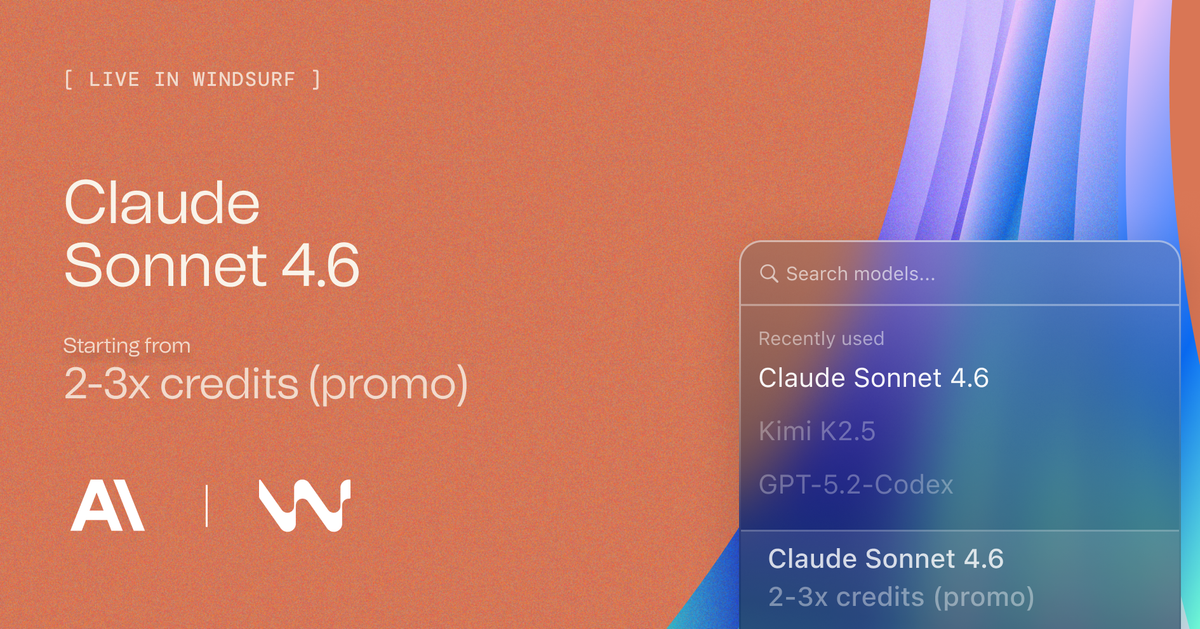
| Claude Sonnet 4.6 | Token-based | Input + output tokens counted |
| GPT-5 | Token-based | Input + output tokens counted |
| Gemini 3.1 Pro | Token-based | Input + output tokens counted |
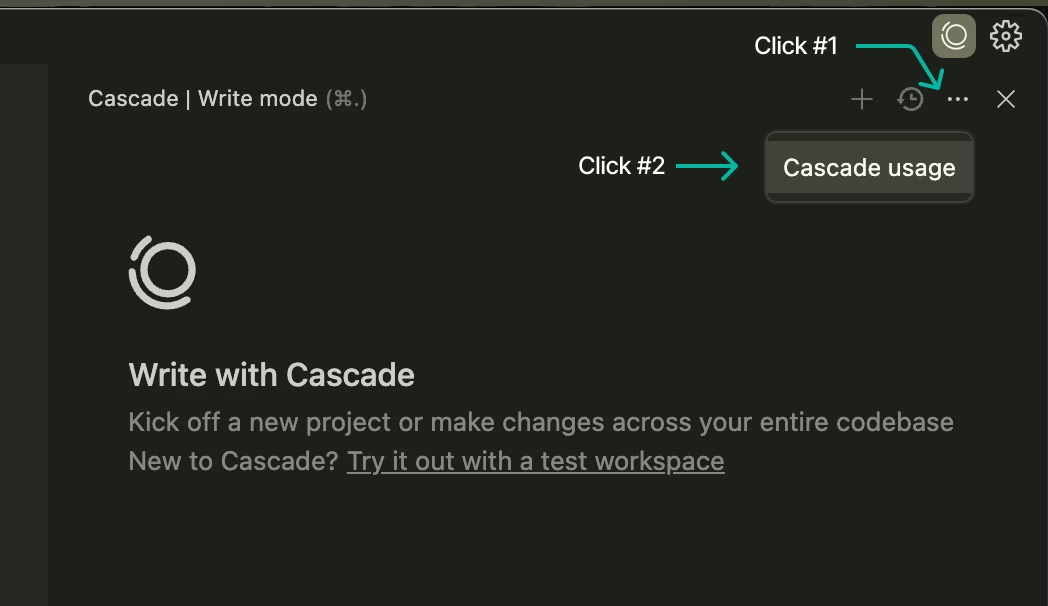
Practical implication: A long conversation with Claude Sonnet 4.6 on a large codebase drains quota much faster than the same session with SWE-1-mini, because token-based models count actual context length. One developer reported on dev.to that a single Opus 4.6 code review consumed approximately 8% of their weekly quota under the new system — compared to roughly 8/500 credits (1.6%) under the old model. That's a ~4–5× effective cost increase for frontier model usage.
If you're on Pro and primarily using Cascade for lightweight tasks with SWE-1-mini or free models, you'll likely never hit the quota limit. If you're running Claude Sonnet 4.6 on a 50K-line codebase daily, Pro quota will not cover a full month of heavy use.
Auto-refill and add-on mechanics
When you hit your included quota, two options:
- Purchase add-on credits: $10 for 250 units (Pro), $40 for 1,000 pooled units (Teams/Enterprise). These don't expire and roll over month-to-month — unlike the monthly quota which resets at billing cycle.
- Automatic Credit Refills: Set a minimum threshold (triggers at ~15 credits remaining) and a max monthly spend cap ($50 default for Pro, $160 for Teams). The system tops you up automatically without interrupting a Cascade session.
Add-on credits require an active subscription. If you cancel, they're frozen until you resubscribe — they don't disappear, but you can't use them without a paid plan.
Who Should Be on Which Plan
Stay on Free if: You're evaluating the tool before committing, or Tab completion is your primary use case. Don't expect it to support a real workflow.
Use Pro ($20/mo) if: You're an individual dev using Cascade regularly but not all-day-every-day. If you're primarily on SWE-1 or SWE-1-mini (the cheaper models), the standard quota will hold up. Watch your quota in the first week to calibrate.
Use Max ($200/mo) if: You were consistently buying add-on credits under the old system, you run multi-hour Cascade sessions daily, or you're regularly using frontier third-party models (Claude Sonnet 4.6, GPT-5) on large context workloads.
Use Teams ($40/user/mo) if: You need centralized billing and per-user analytics, and you have at least 3–5 developers. Below that headcount, individual Pro subscriptions are cheaper and simpler.
Use Enterprise ($60/user/mo) if: You need SSO, RBAC, compliance documentation, or longer model context — and your procurement process requires it.
How Windsurf Pricing Compares to Cursor and Copilot
| Windsurf Pro | Cursor Pro | GitHub Copilot Pro | |
|---|---|---|---|
| Price | $20/mo | $20/mo | $10/mo |
| Agent sessions | Quota (daily/weekly) | 500 premium requests/mo | Limited (Copilot agent) |
| Tab completion | Unlimited | Unlimited | Unlimited |
| Frontier models | Claude, GPT-5, Gemini | Claude, GPT-4.1, Gemini | GPT-4.1, Claude |
| IDE | VS Code, JetBrains | VS Code (fork) | VS Code, JetBrains, others |
| Teams pricing | $40/user | $40/user | $19/user (Business) |
| Power user tier | Max $200/mo | Ultra $200/mo | — |
The key context: Windsurf was differentiated at $15 Pro. At $20, it's now priced identically to Cursor Pro — which invites direct comparison on capability, and Cursor has a more mature ecosystem and stronger community perception for complex projects. Windsurf's edge is now primarily SWE-1's native codebase understanding and the Cascade agent architecture.
Copilot at $10 remains the budget option, but it's not a direct competitor in agentic coding capability.
FAQ
Does the March 2026 change affect existing subscribers?
No — existing paid subscribers keep their current pricing. Windsurf is not changing prices for paying subscribers, and is including a free extra week to try the new system before you commit. Pre-purchased credits are converted into extra usage under the new system. New subscribers from March 2026 onward are on the new quota pricing.
Is Tab completion unlimited on all plans?
Yes. Tab (Windsurf's inline autocomplete) is unlimited on every plan including Free. It never touches your quota. Only Cascade (the AI agent) and Chat with premium models consume from your daily/weekly allowance.
What's the difference between SWE-1, SWE-1.5, and SWE-1-mini?
All three are Windsurf's native models, as opposed to third-party models like Claude or GPT-5. SWE-1 is the flagship agent model. SWE-1.5 is the newer "Fast Agent" model — announced on the pricing page as of March 2026, optimized for faster iteration. SWE-1-mini is the lightweight version, suited for smaller tasks and quota-conscious use. All three cost a fixed rate per message (not token-based), making them more predictable for quota management than third-party frontier models.
How many Cascade sessions does Pro ($20/month) realistically cover?
This depends heavily on which model you use. On SWE-1 or SWE-1-mini, Pro's standard quota covers most normal daily development workflows — Windsurf says the quota is designed to cover "the majority of users" without hitting limits. On Claude Sonnet 4.6 or GPT-5 with long context, a single heavy session can consume 8%+ of weekly quota. If your work involves large codebase analysis with frontier models regularly, Pro may require add-on credit purchases. Monitor your quota in the first week to establish your actual burn rate.
Is there a student discount?
Yes. Windsurf offers 50%+ off Pro for verified students with a .edu email address — bringing the cost to approximately $7–8/month for what was formerly the $15 Pro plan. Given the new $20 price point, the student tier is proportionally even more valuable. Check windsurf.com/editor/students for eligibility.

Bottom line: The quota shift is a structural downgrade in flexibility for power users, full stop. The daily and weekly reset caps mean you can't front-load usage on sprint days the way the old credit system allowed. Whether $20 Pro is still worth it depends entirely on which models you use and how your workday flows — check your quota in week one before deciding whether to stick with Pro or jump to Max.
