
"Você atingiu seu limite de uso." Você está no meio de uma sessão, o agente está no meio de um refactor, e o Cursor para. A mensagem de erro te dá três opções: trocar de modelo, fazer upgrade do plano ou pagar por uso extra. Nenhuma delas explica o que aconteceu ou por quê.
O modelo de uso do Cursor mudou fundamentalmente em junho de 2025 e continuou evoluindo desde então. A estrutura atual não bate com o modelo de "contagem de requisições" que a maior parte da documentação ainda usa. Aqui está o que realmente acontece quando você bate no teto — e o que fazer a respeito.
O Que os Limites de Uso do Cursor Significam
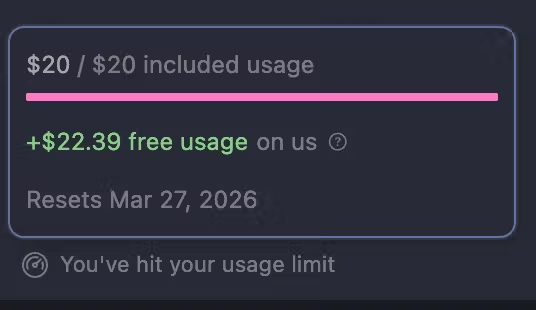
O plano Pro do Cursor inclui $20 de uso de modelo por mês, cobrados em créditos equivalentes a dólar atrelados ao custo real de token da API. Isso substituiu o antigo modelo de 500 requisições rápidas / requisições lentas ilimitadas em junho de 2025.
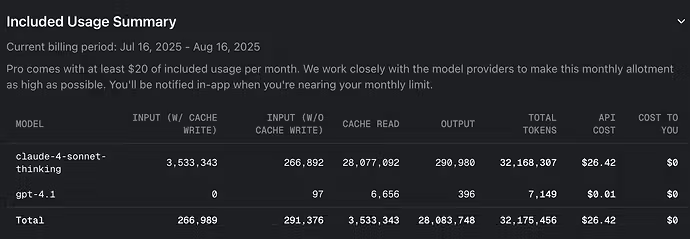
Os créditos não são um número fixo de requisições — são um orçamento. Até onde os $20 rendem depende inteiramente de qual modelo você está usando e de quanto contexto você está enviando:
Requisições Gemini: aproximadamente 550 por $20 incluídos Requisições GPT 4.1: aproximadamente 650 por $20 incluídos Requisições Claude Sonnet 4: aproximadamente 225 por $20 incluídos Modo MAX (qualquer modelo): bem menos, já que expande a janela de contexto e cobra proporcionalmente Quando os $20 acabam, o Cursor pode parar ou continuar sob demanda às suas custas, dependendo de você ter configurado ou não um limite de gasto em Settings → Billing. Sem um limite de gasto configurado em Settings → Billing, o uso excedente é cobrado automaticamente no final do período.
A implicação prática: "atingir seu limite de uso" não significa que você fez requisições demais. Significa que você consumiu o valor em dólar de computação incluído no seu plano.
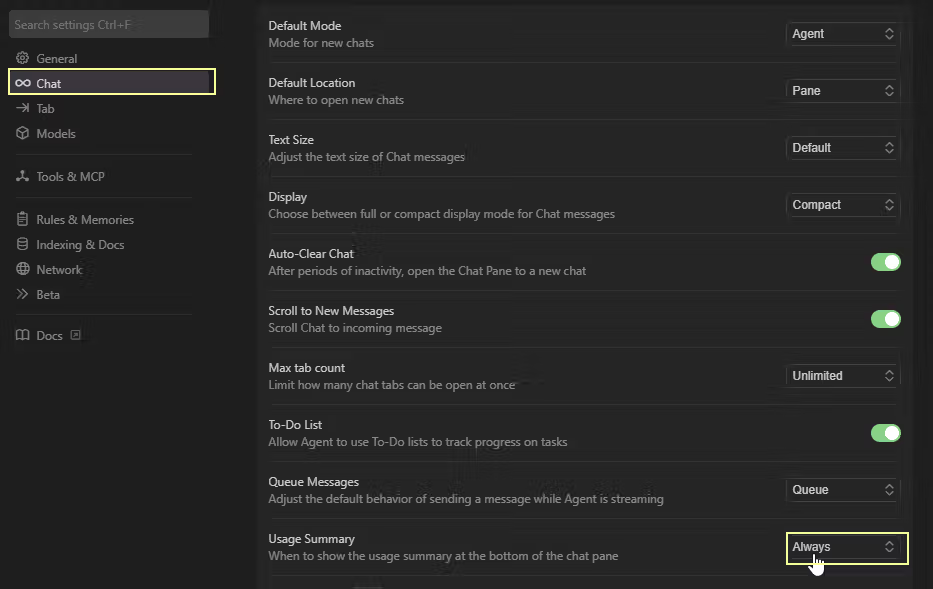
Pro Limits, Rate Limits e Token Limits
Esses três termos descrevem coisas diferentes, e o Cursor usou eles de forma inconsistente — o que é a raiz da maior parte da confusão dos usuários.
Tetos de requisição
O modelo antigo limitava requisições. O modelo atual não limita o número de requisições — ele limita o valor em dólar de computação consumido. Uma única sessão de Agent com múltiplas etapas, que toca em 20 arquivos e roda várias tool calls, pode consumir o que antes eram 5 a 10 "requisições" separadas em créditos. É por isso que usuários pesados batem no limite mais rápido do que a documentação antiga sugeria.
Plano Pro em 2026: $20 de uso incluído por mês. Reseta na sua data de cobrança, não no mês calendário. O uso sob demanda entra automaticamente quando o pool acaba — a menos que você tenha configurado um limite de gasto pra evitar isso.
Limites de token
Tokens são a unidade base. Todo modelo cobra tokens de entrada (o que você envia — seu prompt, contexto, conteúdo do codebase) e tokens de saída (o que o modelo gera) separadamente. O tamanho do contexto é o principal fator do custo de token de entrada.
Quando você adiciona arquivos grandes ao contexto, abre várias abas que o Cursor está indexando, ou usa o Composer num codebase grande, você está aumentando o consumo de tokens de entrada por requisição. Uma única requisição com 100K tokens de contexto custa aproximadamente 4× o que uma requisição com 25K tokens custa — mesmo modelo, mesma tarefa, custo diferente.
A documentação de limites de uso do Cursor descreve isso assim: quanto maior o prompt ou a janela de contexto enviada a um modelo, mais tokens ele consumiu do seu valor incluído.
Termo "Ilimitado" e os Limites Reais
O marketing do Cursor usa "ilimitado" em dois lugares que significam coisas diferentes:
O Auto mode é genuinamente ilimitado no Pro e acima. Quando você usa o Auto — o roteador de modelos do Cursor, que escolhe com base em confiabilidade e custo — o uso é cobrado em taxas fixas ($1,25/M de entrada, $6/M de saída), mas não consome do seu pool de créditos mensal de $20. Esse é o "uso ilimitado" que foi mal comunicado no lançamento: ele se aplica só ao Auto, não à seleção manual de modelos.
Tab completions no Pro são "ilimitadas" no sentido de que não contam contra o seu pool de créditos de $20. Elas são movidas por um modelo mais rápido e mais barato que o Cursor absorve dentro da assinatura. Você não vai bater num limite de tab completion no Pro.
Requisições de modelos premium não são ilimitadas. Selecionar manualmente Claude Sonnet, Claude Opus, GPT-5 ou Gemini Pro consome do seu pool de $20. Quando o pool acaba, essas requisições param, a menos que você pague pelo uso sob demanda.
A confusão é compreensível: o Cursor descreveu a mudança de plano de junho de 2025 como uma migração pra uso "ilimitado", mas o ilimitado só se aplicava ao Auto mode. O próprio esclarecimento de preços de junho de 2025 do Cursor reconheceu que "não deixaram claro que 'uso ilimitado' era só pro Auto e não pros outros modelos."
O Que Acontece Quando Você Atinge o Limite
Mensagens de erro
A mensagem padrão quando seu uso incluído se esgota:
"Você atingiu seu limite de uso."
O prompt geralmente vem seguido de opções:
Trocar pra um modelo diferente (geralmente Auto ou um modelo mais leve que consome de forma diferente)
Fazer upgrade do plano (Pro → Pro+ → Ultra)
Pagar por uso extra sob demanda
Se você não configurou um limite de gasto, o Cursor também pode oferecer continuar sob demanda e cobrar o excedente no fim do ciclo de cobrança. A taxa sob demanda espelha o preço da API do modelo subjacente — você paga a margem do Cursor em cima do custo bruto do modelo.
Filas mais lentas ou requisições bloqueadas
Rate limits são separados dos limites de crédito. Mesmo no Pro e acima, o Cursor aplica limites de concorrência e throughput pra evitar que um único usuário monopolize a capacidade do modelo. Em horários de pico, requisições podem entrar em fila em vez de falhar. Os sintomas são diferentes de bater no teto de crédito: as requisições funcionam, mas devagar, em vez de falhar com um erro.
Se você está vendo respostas lentas sem um erro explícito de limite de uso, é mais provável que seja rate limiting (não esgotamento de crédito). Checar Settings → Usage mostra se o seu valor incluído já foi consumido.
O Que Você Pode Fazer Agora
Reduzir contexto
A ação de maior impacto antes de bater no teto de novo é reduzir o contexto por requisição.
Passos concretos:
Feche abas irrelevantes: o Cursor indexa arquivos abertos. Mais arquivos abertos = mais tokens por carregamento de contexto. Mantenha abertos só os arquivos relevantes pra tarefa atual.
Use @-references em vez de contexto do codebase inteiro: @file e @function miram em código específico em vez de carregar tudo. Isso é significativamente mais barato do que queries com contexto grande.
Resuma a conversa anterior: históricos de chat longos aumentam o custo de token de entrada a cada nova mensagem. Começar uma nova thread de conversa reseta o contexto acumulado.
Evite o modo MAX a menos que seja necessário: o modo MAX expande a janela de contexto, o que é poderoso pra raciocínio complexo em arquivos grandes — e proporcionalmente mais caro. Use só quando o contexto padrão for genuinamente insuficiente.
Dividir tarefas
Sessões de Agent com múltiplas etapas que abrangem muitos arquivos numa única conversa consomem crédito mais rápido do que requisições segmentadas e direcionadas. Em vez de "refatorar o módulo de autenticação inteiro", divida em "refatorar o handler de login" e "refatorar o gerenciador de sessão" como sessões separadas. Cada sessão individual é mais barata; o trabalho total é o mesmo.
Isso é especialmente relevante pra solo founders e times pequenos que têm pools de crédito mensais limitados. Decompor tarefas não é só boa prática de engenharia — estica diretamente até onde o seu uso incluído vai.
Fazer upgrade ou mudar de workflow
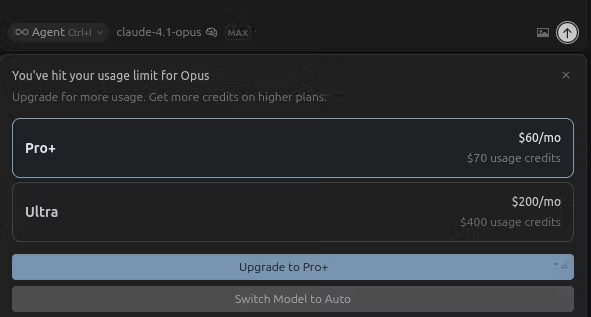
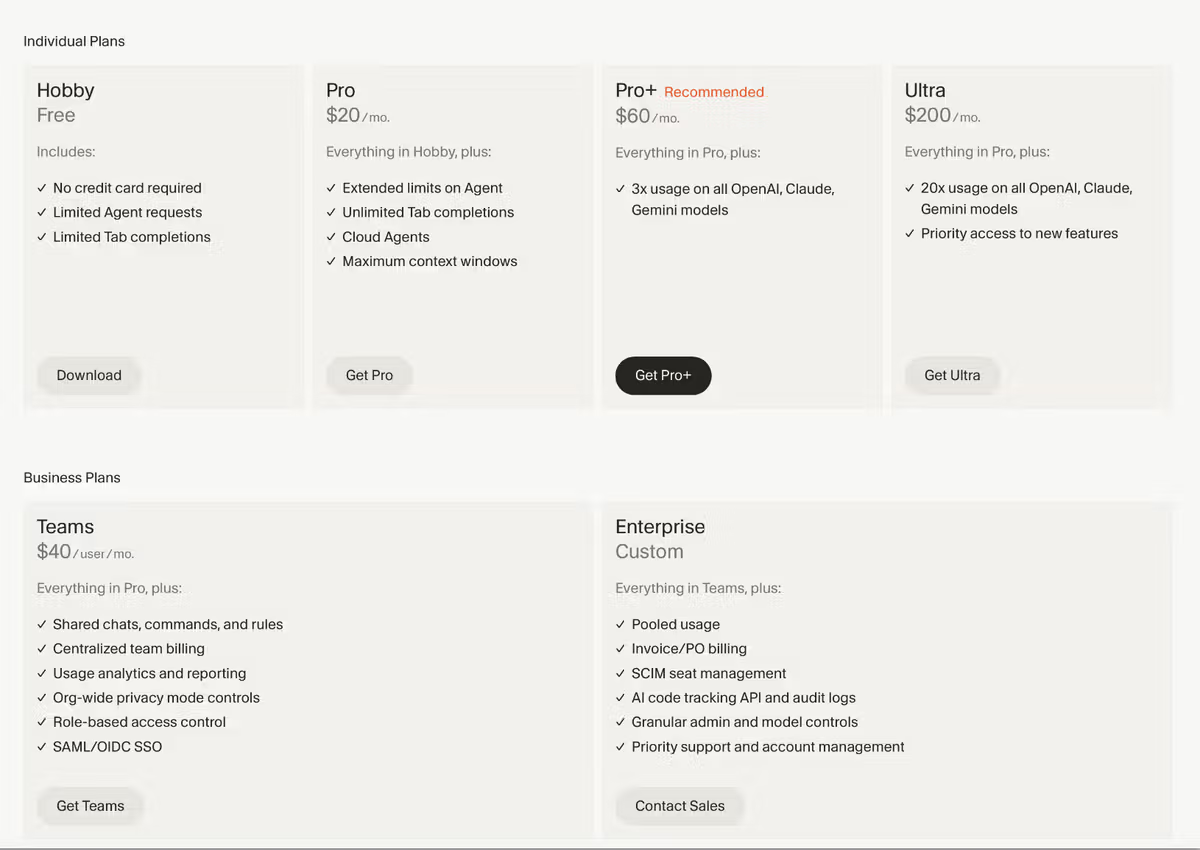
O Pro+ ($60/mês) oferece 3× o pool de crédito incluído — aproximadamente $60 de uso de modelo — pra devs que costumam esgotar o Pro nas duas primeiras semanas do mês.
O Ultra ($200/mês) oferece 20× o valor incluído. Usuários pesados que rodam o modo MAX com frequência, trabalham com codebases grandes ou rodam muitas sessões de Agent por dia podem descobrir que até o Ultra é esgotável. A documentação do Cursor observa que "uso pesado do MAX pode consumir seu valor incluído em dias, mesmo no Ultra."
Auto mode primeiro: pra trabalho de rotina — code completions, edições simples, perguntas rápidas — use o Auto. Ele está incluído sem tocar no seu pool de crédito. Reserve modelos premium selecionados manualmente pras tarefas em que as características específicas do modelo importam.
Traga sua própria chave: o Cursor suporta conectar sua própria chave de API da OpenAI ou da Anthropic. Você paga o provedor diretamente pelas taxas da API deles, o que remove a margem por token do Cursor. Isso pode ser mais barato do que o preço de excedente sob demanda pra usuários pesados, embora exija gerenciar a cobrança da API separadamente.
Pra workflows que esgotam repetidamente os limites de crédito por causa da natureza das tarefas — não da quantidade de trabalho — a pergunta é se o fator limitante é o pool de crédito ou o próprio modelo de agente único, IDE único. Execução multi-agente que roda tarefas em paralelo em branches isoladas pode ser mais eficiente do que ficar pedindo repetidamente a um único agente pra passar por etapas sequenciais. Ferramentas como a Verdent resolvem isso no nível de orquestração em vez do nível de cada requisição — mas isso é uma mudança de arquitetura de workflow, não uma correção de limite de uso.
FAQ
Por que o Cursor diz que atingi meu limite de uso?
Os $20 de uso de modelo incluídos (plano Pro) se esgotaram pro período de cobrança. Isso acontece mais rápido com modelos premium selecionados manualmente (Claude Sonnet, Opus, GPT-5), janelas de contexto maiores, modo MAX e sessões de Agent com múltiplas etapas. O uso do Auto mode não consome desse pool — se você estava usando Auto e bateu no limite, verifique se trocou pra um modelo específico durante a sessão.
O Cursor Pro é realmente ilimitado?
O Auto mode é ilimitado no Pro. As tab completions são efetivamente ilimitadas no Pro. Requisições de modelos premium selecionados manualmente não são ilimitadas — elas consomem do pool de uso incluído de $20/mês. O esclarecimento de preços de junho de 2025 do Cursor reconheceu que a definição de "ilimitado" não estava clara: o ilimitado se aplicava só ao Auto mode, não à seleção direta de modelo. A página oficial de preços é a referência autoritativa pros limites atuais.
Como eu reduzo o uso de token no Cursor?
Feche arquivos abertos irrelevantes (menos arquivos indexados = menos contexto carregado por requisição). Use referências @file e @function em vez de contexto amplo do codebase. Comece novas threads de conversa quando o histórico anterior for longo. Evite o modo MAX pra tarefas que não precisam de contexto estendido. Use o Auto mode pra trabalho de rotina e reserve a seleção manual de modelo pra tarefas complexas em que o modelo específico importa.
Devo trocar de ferramenta se continuar batendo nos limites do Cursor?
Bater nos limites com frequência no Pro significa uma de três coisas: seu volume de trabalho justifica o Pro+ ou o Ultra; seus padrões de uso são ineficientes (contexto grande demais, modelos premium usados pra tarefas de rotina); ou as tarefas que você roda são estruturalmente mais adequadas a uma ferramenta diferente. Se você está esgotando limites por causa de sessões de Agent com múltiplas etapas e múltiplos arquivos num codebase grande, vale considerar se o modelo sequencial de agente único é a arquitetura certa — ou se a execução paralela de agentes com decomposição explícita de tarefas se encaixa melhor no trabalho.