
"Mobile coding" has meant autocomplete in a text editor, or maybe a lightweight terminal app when you're desperate. The Codex mobile remote control launched May 14, 2026 is neither of those things. It's not a development environment. Your phone doesn't compile anything. What changed is how a developer stays in the loop while a coding agent runs — and that's a meaningfully different shift in the collaboration model than the name implies.
Based on OpenAI's May 14, 2026 announcement. Preview feature; behavior may change. Treat the in-app experience as the source of truth.
Why Mobile Control Matters for Coding Agents
Long-running tasks need checkpoints
A coding agent working on a complex refactor doesn't finish in five minutes. It reads files, runs tests, interprets failures, adjusts its approach, and comes back to you — repeatedly — with decision points. "Should I rewrite the abstraction layer or preserve the existing interface?" "This test is failing in a way that suggests the problem is upstream — do you want me to investigate?" "I've reached the point where I'd need to modify the payments module. Do you want to proceed?"
These checkpoints aren't obstacles. They're where human judgment is actually required. An agent that doesn't surface decision points is an agent that makes those decisions unilaterally — and those are exactly the decisions you want to make yourself on anything that matters.
Before mobile remote control, every checkpoint meant returning to the desk. A session running for two hours while you're in a meeting, on a commute, or at lunch was either abandoned mid-task or ran on without oversight past the decisions that should have paused it. Neither is a good outcome.
The developer shifts from executor to reviewer
The mental model shift is worth naming clearly: mobile remote control accelerates the transition from developer-as-executor (writing code) to developer-as-reviewer (judging what the agent produced and steering what it does next). This isn't a new idea — it's been the promise of agentic coding tools since they appeared. What's new is that the review and steering loop no longer requires physical presence at a workstation.
"As agents take on longer-running work, a new rhythm for collaboration is emerging," OpenAI said in the launch announcement covered by TechCrunch. "To keep work moving, you need to be able to easily answer a question, review what Codex found, change direction, approve what comes next, or add a new idea." That's a description of a supervisor, not an implementer. Mobile access makes that supervision possible without desk-tethering.
What the Mobile Loop Looks Like
Start work on desktop or remote host
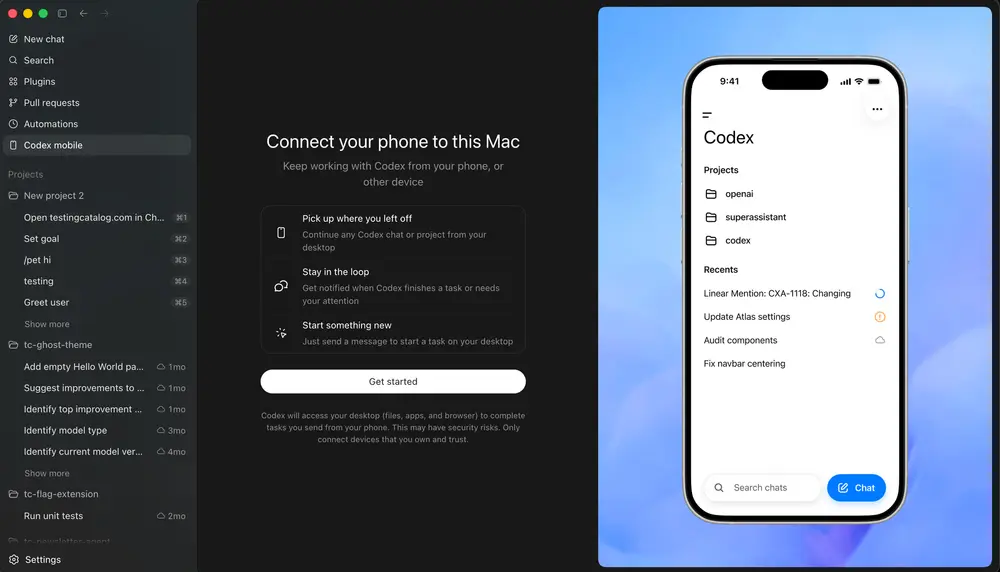
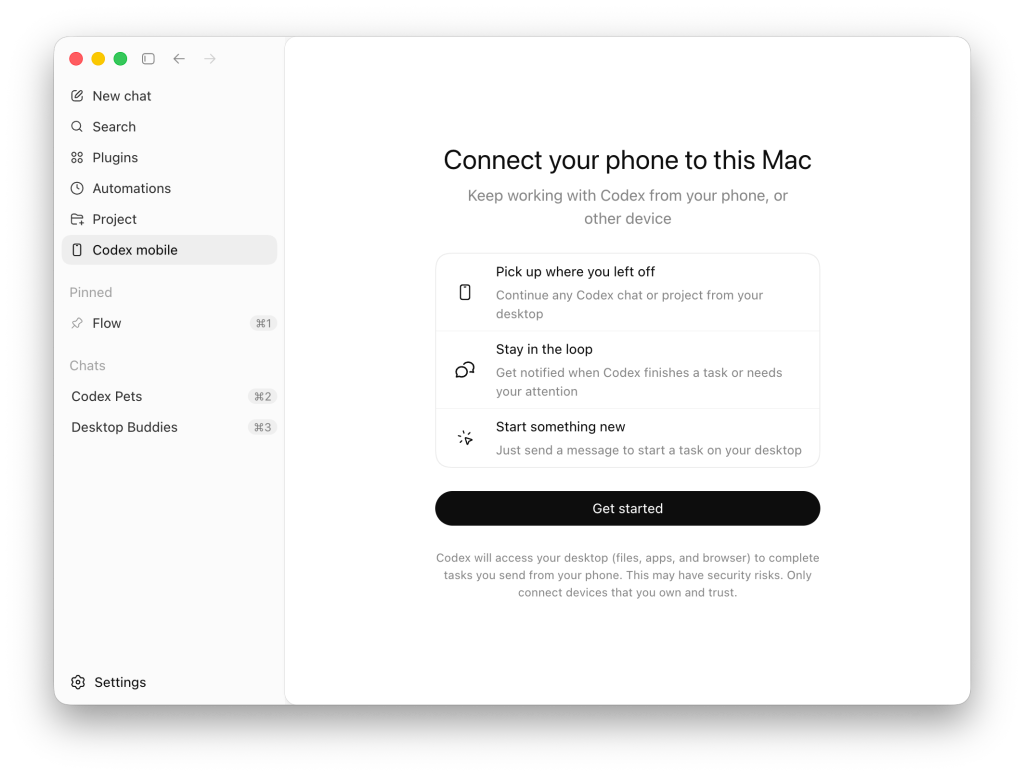
A task begins on the machine where Codex is running: your laptop, a Mac mini, a company devbox, a remote environment over SSH. You define the task, set the context, maybe write a AGENTS.md with the relevant constraints, and start the agent. This part hasn't changed — the host is still the execution environment.
Agent hits a decision point
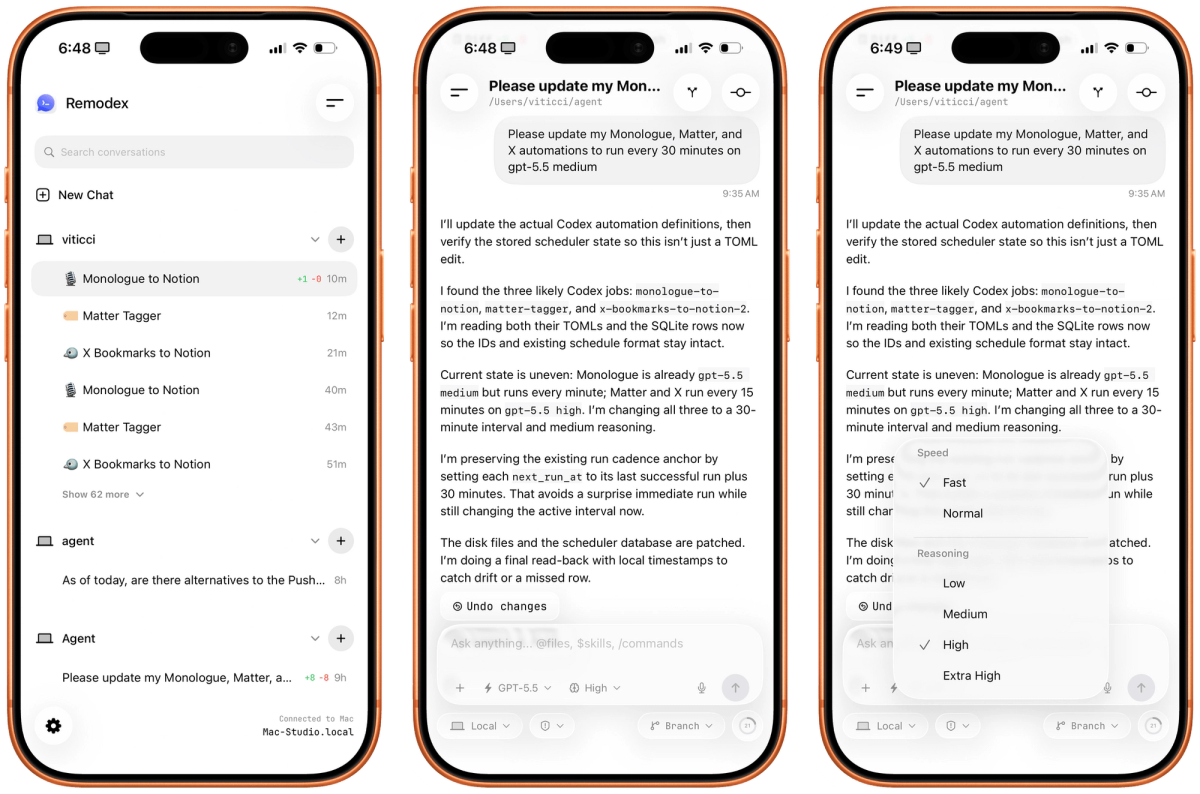
Codex surfaces approval requests when it encounters an action that requires your judgment: a command that mutates state, a file change that touches sensitive code, a next step that requires your direction. With the mobile integration, these surfaced requests arrive on your phone rather than requiring you to be watching the terminal.
You see the relevant context: what Codex has done so far, what it's asking to do next, and whatever output supports the decision — terminal output, a diff, a screenshot, a test result. You have the same information you'd have at the desk, compressed for a mobile screen.
Developer approves, redirects, or adds context on mobile
Three things you can do from the phone that matter:
Approve: If the proposed action looks right and the context supports it, you approve. Codex continues on the host.
Redirect: If Codex is heading in the wrong direction — a correct interpretation of your original prompt, but not what you actually wanted — you can add context or reframe the task from your phone. This is qualitatively different from a simple notification. You're actively shaping what the agent does next, not just acknowledging that it's still running.
Add new work: A bug you notice in the review output, a follow-up task that occurs to you while reviewing the diff — you can queue it from the phone. The task starts on the host immediately.
Final diff waits for proper review
This is the constraint that responsible mobile workflow requires: the final diff, the merge decision, the production deploy — those wait for a proper review at your desk. Mobile control is for the in-session supervision. Terminal output on a 6-inch screen has limits. Code review does not compress well to that format.
The mobile approval loop is for keeping long sessions moving. The final gate is still at the desk, where you can read the full diff, run your own verification, and make a considered merge decision.
Real Engineering Scenarios
Bug investigation during commute
A service starts showing elevated error rates before you leave for the day. You kick off a Codex session to investigate — start with log analysis, then trace into the relevant code path. You're on the train when Codex flags: "I've identified what looks like a race condition in the request handler. Do you want me to propose a fix, or should I first gather more evidence?" You review the analysis on your phone, see that the evidence is solid, and approve the next step. By the time you're home, Codex has drafted a fix and a test. You review both properly when you arrive.
The agent did the investigative work. The human provided direction at the key decision point. Neither required you to stay at a desk.
Refactor choice while away from desk
You started a refactoring session that involves restructuring an abstraction layer. Mid-task, Codex surfaces a decision: preserving backward compatibility requires either a compatibility shim (more code, more complexity) or a breaking change with a migration path (cleaner, but requires coordinating with the team). This is a judgment call that requires context you have and Codex doesn't.
From your phone, you add context — the team has a scheduled migration window next sprint, so the breaking change with migration path is acceptable. Codex continues with that direction. A decision that would have sat unresolved for hours gets made immediately.
Production incident triage on the go
You're paged during an incident. On your phone, you connect to the Codex session running against the production debugging environment. Codex has been analyzing logs and has surfaced a hypothesis: the issue traces to a configuration change deployed two hours ago. It's asking for permission to run a specific diagnostic command that will confirm or disprove the hypothesis.
You review the command, confirm it's read-only and appropriate, and approve. Codex runs it and returns the output. You now have the confirmation you need to direct the on-call engineer to the right rollback. This isn't Codex doing the incident response independently — it's Codex doing the analytical legwork while you retain decision authority.
Capturing an idea before it fades
Less dramatic: you're away from the desk and have a clear mental image of how a feature should work. You open the ChatGPT app, describe the task in specific terms, and start a Codex session. The agent begins working. When you get back to your desk, there's meaningful progress rather than a blank cursor.
The idea-to-implementation gap has been shortened not because you coded on your phone, but because you used the time when you couldn't be at your desk to get work started on a machine that can do the work.
Why This Is Not "Coding on Your Phone"
This distinction is worth a dedicated section because the name "mobile coding agent" invites exactly the wrong mental model.
The host does the work
Every line of code Codex writes, every command it runs, every file it reads or modifies — all of that happens on the host machine. Your phone is a display and input device for that work. It doesn't compile. It doesn't run tests. It doesn't have access to your files, your credentials, or your local environment.
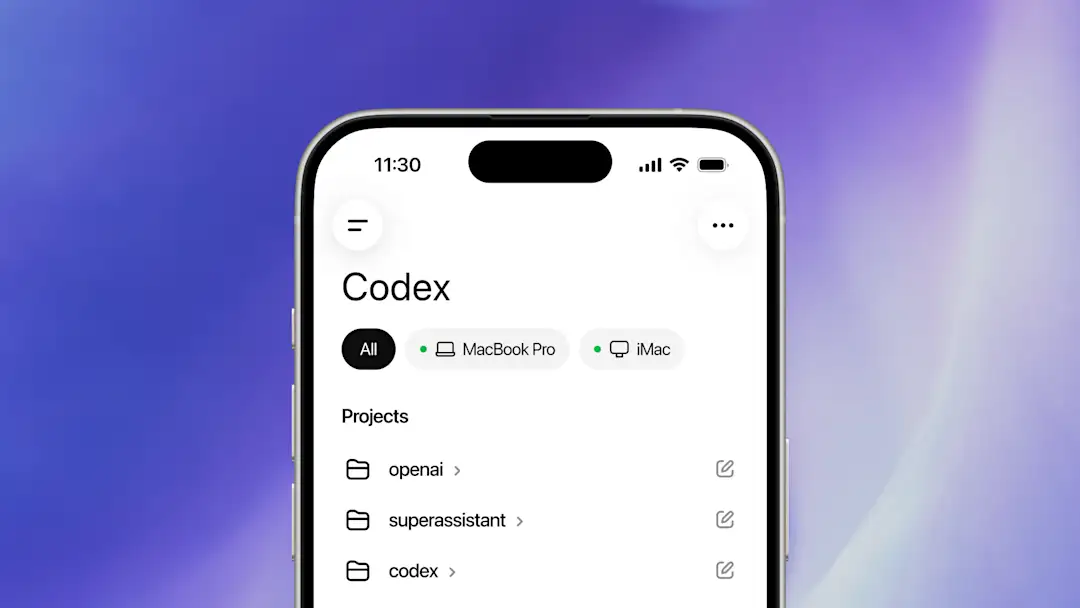
Your files, credentials, permissions, and local setup stay on the machine where Codex is operating, while updates flow back to your phone in real time, including screenshots, terminal output, diffs, test results, and approvals.
If your phone dies mid-session, Codex on the host continues working. The phone is not in the critical path for execution — it's in the critical path for supervision and direction.
Mobile handles attention, approval, and direction
What your phone does in this loop:
- Delivers updates from the running agent in real time
- Surfaces decisions that require your judgment
- Accepts your input (approvals, context, redirects, new tasks)
- Shows you the output artifacts that justify or inform decisions
What your phone does not do:
- Execute code
- Access the filesystem
- Hold credentials
- Make autonomous decisions on your behalf
The workflow isn't "coding on your phone." It's "supervising a coding agent without being physically present at the workstation where the agent runs."
Risks and Failure Modes
Approving too quickly on small screens
The approval prompt on a mobile screen shows a compressed view of what Codex wants to do. For simple, clearly-scoped actions, that's fine. For actions with broader implications — a command that modifies multiple files, a decision about an architectural approach, anything touching sensitive code — the compressed view loses context.
The risk is approving because the summary looks reasonable, without the context that a full-screen diff or terminal output would provide. This isn't a theoretical risk: approval fatigue is a known phenomenon in security contexts, and the smaller the screen the more it applies. The approval that feels like a quick "yes" on mobile may be the one that should have waited for a desk review.
Missing context in diffs or screenshots
A diff showing 47 files changed is not reviewable on a phone. A screenshot of a UI that looks approximately right might be hiding a rendering issue that's visible at full resolution. Terminal output that spans multiple screens compresses to a truncated view that may omit the relevant error.
For tasks where the output artifact is simple — a confirmation that tests passed, a diagnostic result with a clear yes/no answer — mobile review is appropriate. For tasks where proper review requires seeing the full output, defer to the desk.
Over-delegating ambiguous tasks
The temptation when you have mobile control is to start tasks that aren't fully specified yet — "figure out what's causing the slowdown and fix it" — with the intention of steering them from your phone as needed. This works only if the steering checkpoints are predictable and the agent's interpretation of an ambiguous task happens to align with what you'd want.
In practice, ambiguous tasks produce ambiguous progress, and ambiguous progress is harder to evaluate on a small screen. A plan-first approach — requiring Codex to produce an explicit plan for approval before taking any action — mitigates this by forcing specificity upfront, when you can review it properly, rather than discovering the ambiguity mid-execution when you're in a less-than-ideal review environment.
How Teams Should Add Guardrails
The mobile approval loop changes the conditions under which agents receive approval. Teams should adjust their configurations to account for the fact that approvals may come from a developer who has less context than they would at a desk.
Plan-first checkpoints
Requiring a plan before execution is the most reliable guardrail for the mobile context. If Codex must produce a structured plan and receive approval before touching any files, the plan review happens at a moment when you can give it proper attention — potentially at a desk before the session begins — and execution only proceeds after that review.
A plan-first gate can be enforced through AGENTS.md:
## Pre-execution requirement
Before modifying any file, output a structured plan:
- Files to be modified
- Specific changes per file
- Acceptance criteria (what "done" means)
Wait for explicit [APPROVED] before proceeding.
This isn't specific to mobile — it's a good practice generally. In the mobile context, it's a critical guardrail because it ensures the consequential review happens at the right moment.
Review gates before merge
The mobile approval loop should not be the last gate before a merge. Configure your workflow so that a PR opened by a Codex session requires human review at the desk before it's eligible to merge — regardless of what approvals were given during the session.
This is a policy decision, not a Codex configuration: your team's branch protection rules, required reviewers, and CI requirements determine whether any PR — agent-generated or human-generated — gets to merge. Agent-generated PRs should not be exempt from those requirements simply because a developer approved steps from their phone during the session.
Safe command policies
Codex's execpolicy system lets you define command-level allow/deny/prompt rules in Starlark .rules files. Commands that should never auto-approve — regardless of whether the developer is at a desk or on mobile — can be blocked or forced to prompt:
# Test your rules before deploying them:
codex execpolicy check --pretty \
  --rules ~/.codex/rules/team.rules \
  -- git push origin main
Separately, Hooks (the Codex PermissionRequest hook) can intercept approval requests before they reach the user, automatically denying categories of commands at the hook level — kubectl, aws, production deploy commands — so they never surface as mobile approval prompts at all.
# config.toml — force approval for destructive operations regardless of mode
[approval_policy]
# granular lets you control specific categories without turning off all approvals
sandbox_approvals = true
execpolicy_rule_prompts = true  # execpolicy-flagged commands always prompt
For teams with strict requirements around destructive commands, the combination of execpolicy rules (define what's blocked), auto-review (approvals_reviewer = "auto_review" for an intermediate agent check), and sandbox modes (sandbox_mode = "workspace-write" keeps network access off by default) provides layered protection that holds whether the developer is reviewing from a desk or a phone.
FAQ
Is mobile approval safe for production code?
Not by itself, and not without preparation. Mobile approval during an in-session checkpoint is appropriate for keeping work moving on investigative or implementation tasks where the checkpoint is low-stakes and the context is clear. Approving a production deploy, a schema migration, a credential change, or any action with serious consequences from a phone screen — without full context — is a risk that the compressed mobile view makes worse, not better. The right answer for high-stakes actions is either a desk review before the action happens, or execpolicy rules that prevent those actions from reaching the mobile approval prompt at all.
What tasks should I approve from my phone?
Low-stakes, context-clear actions: running a diagnostic command with known-safe output, approving a next step in an investigation where you can read the reasoning on screen, confirming that tests passed, adding context or direction to redirect a session that's heading the right way but needs more specificity. Actions where the summary is the complete picture.
Defer to the desk: anything that modifies many files, anything that touches production systems, any architectural decision where you need to see the full diff to evaluate the trade-offs, any deployment or database operation, any action involving credentials or API keys.
Should teams allow mobile approvals for destructive commands?
No — and this should be a deliberate configuration decision, not a default. Use execpolicy rules and Hooks to prevent destructive commands (git push to protected branches, database migrations, deploy scripts, rm -rf patterns) from surfacing as mobile approval prompts. Teams can use Codex's execpolicy check to validate their rules before deploying them. The sandbox mode workspace-write (default) limits network access and helps scope what Codex can do without additional approval. For commands that should require dual-approval or senior engineer sign-off, the right mechanism is PR-level branch protection and required reviewers — not the in-session approval prompt.
How is this different from just using Slack notifications?
Significantly different. A Slack notification tells you something happened. Codex mobile remote control lets you act on what's happening. From the phone, you can review the full output artifact that triggered the decision point — the diff, the terminal output, the screenshot, the test results — not just a summary. You can add context that changes what Codex does next. You can redirect the entire approach if the output shows it's going wrong. You can start new tasks. The feedback loop is interactive and bidirectional: you're a participant in the agent's execution, not an observer getting pinged when something completes or fails.
Related Reading
