You know that feeling when you've got three things happening at once — a bug to fix, a feature half-built, and a refactor you've been putting off for two weeks? You open the Codex CLI, start one agent, and immediately think "okay but what about the other two." That's been bugging me for months. The codex app that OpenAI shipped on Feb 2 is the first time I actually felt like the tool caught up with how I think about parallel work. Let me break down what's real and what's noise.
Codex app in 60 seconds
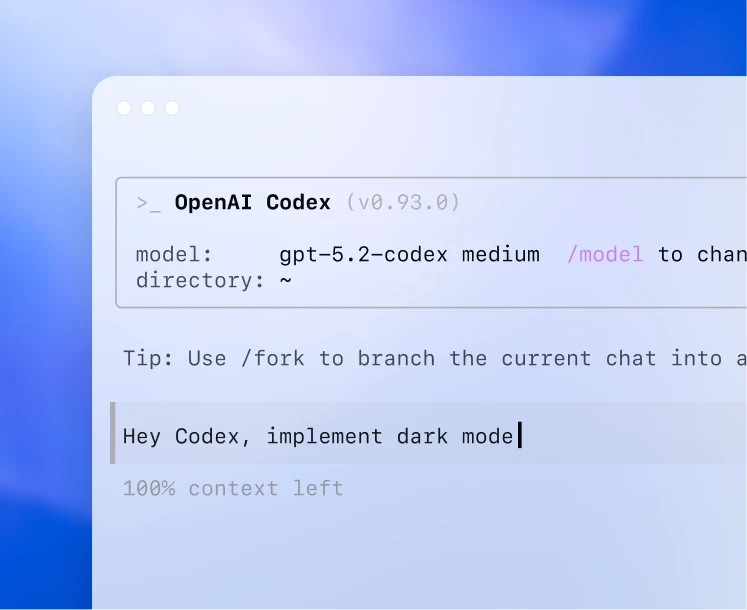
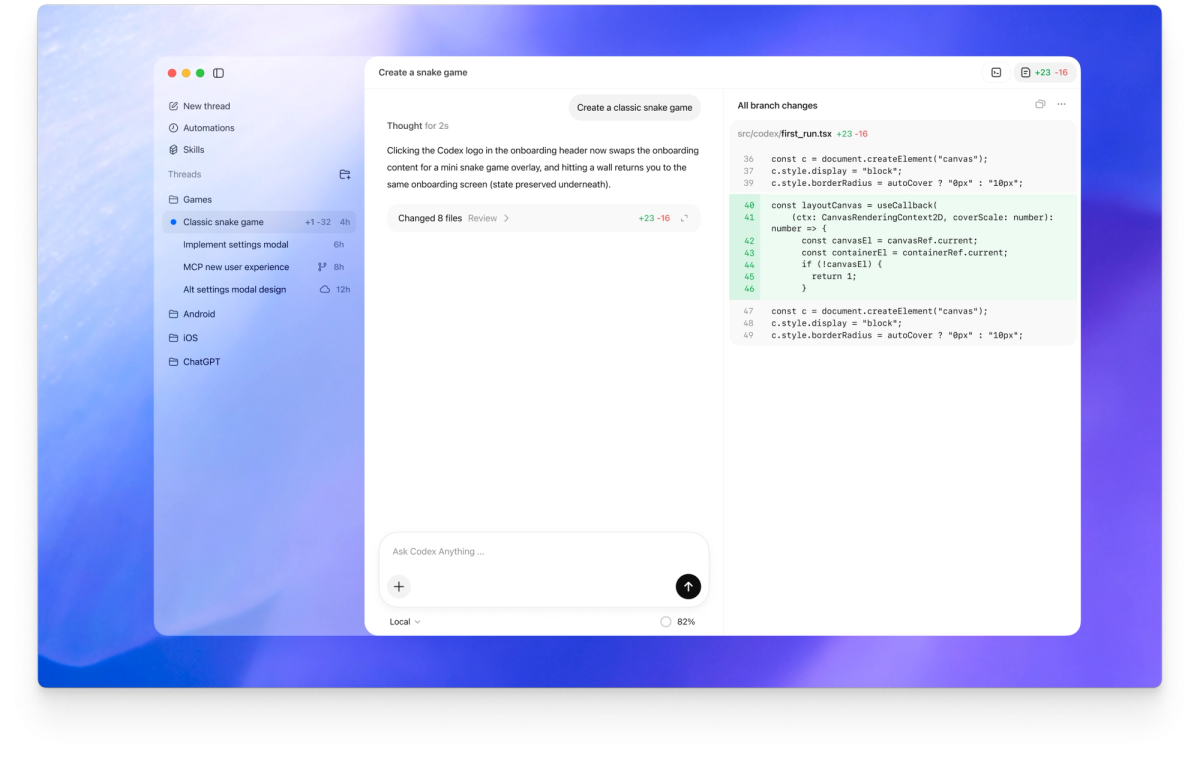
Here's the short version: the Codex app is a macOS desktop application that lets you run multiple AI coding agents at the same time, each working in its own isolated thread. You hand off tasks — writing features, fixing bugs, building prototypes — and the agents grind through them in parallel while you stay focused on the architecture decisions that actually need a human.
It's powered by GPT-5.2-Codex, which OpenAI released on December 19, 2025. That model introduced native context compaction — meaning it can work autonomously for 24+ hours on a single task without losing the thread. That's not marketing copy. That's what makes the parallel agent setup actually viable for real, long-running projects.
Who it's for (solo devs vs teams)
Solo developers get the clearest win. Spin up three or four agents on different parts of the same project, check back whenever, review diffs in one place. It's like having a small team that never needs a standup.
For teams, it slots in alongside your existing tools — not replacing them. Think force multiplier for whoever's handling implementation. OpenAI's own crew used it to ship the Sora for Android app in 28 days with just four engineers.
How it works: projects, threads, and review pane
Each agent lives in its own thread inside the app. Threads are organized by project, so switching between codebases doesn't cost you any context. You can watch an agent work in real time, comment directly on the diff it produces, or open the changes in your editor to make manual tweaks. No context juggling. No alt-tabbing between five terminal windows.
There's also a review pane baked right in. Once an agent finishes a task, you get a clean view of everything it touched — files changed, commands run, test results. You can approve it, ask for revisions, or push it straight to a GitHub pull request. It's a tight loop.
The worktree magic behind parallel agents
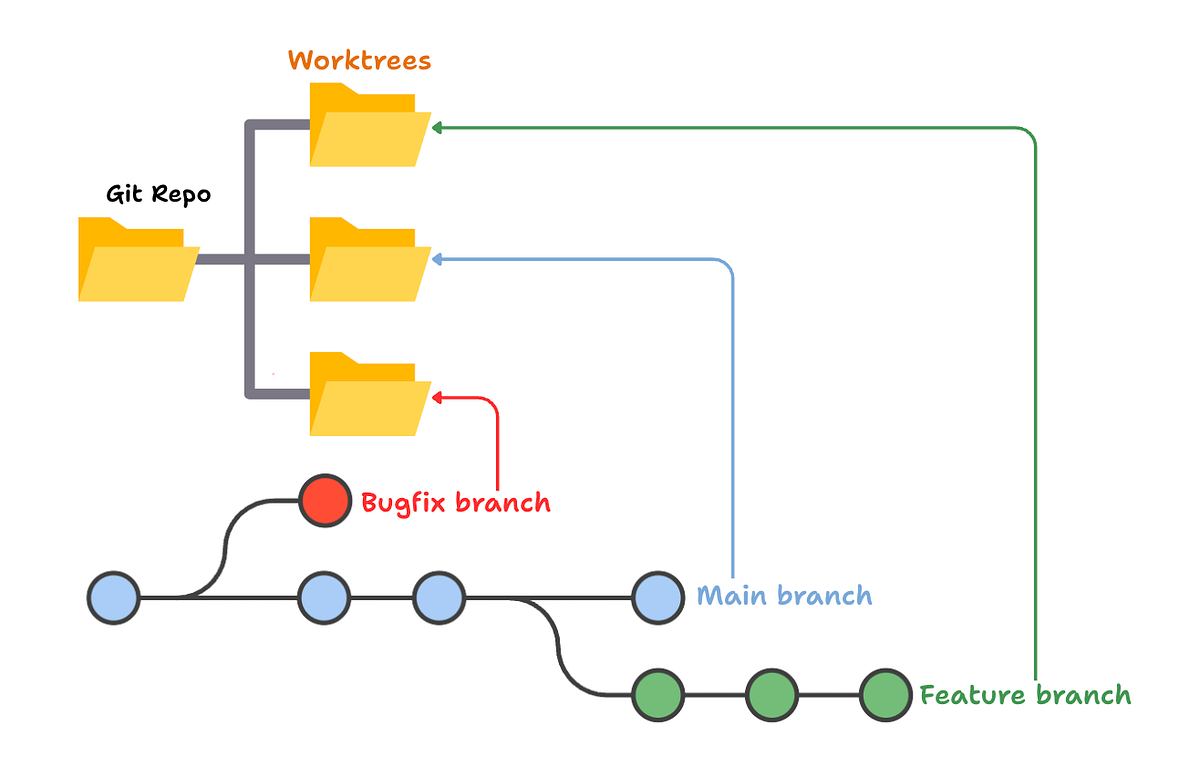
This is the piece that actually makes parallel coding work without everything falling apart. Each agent operates on its own git worktree — an isolated copy of your repo. So Agent A can be refactoring your auth module while Agent B is building out a new API endpoint, and neither one touches the other's files.
I tested this with a mid-size Next.js project — three agents running at the same time on separate features. Zero merge conflicts during the process. You check out each agent's branch when you're ready to review, or you let it keep going. Clean.
# Example: how Codex sets up isolated worktrees per agent
# Each agent gets its own branch automatically
git worktree add ./agent-auth-refactor auth/refactor-branch
git worktree add ./agent-api-endpoint api/new-endpoint-branch
git worktree add ./agent-test-suite tests/coverage-branch

# Agents work independently — you review on your own timeline
codex status --all-worktrees
Real-world performance from our tests
Benchmark: 500 tasks across 3 projects
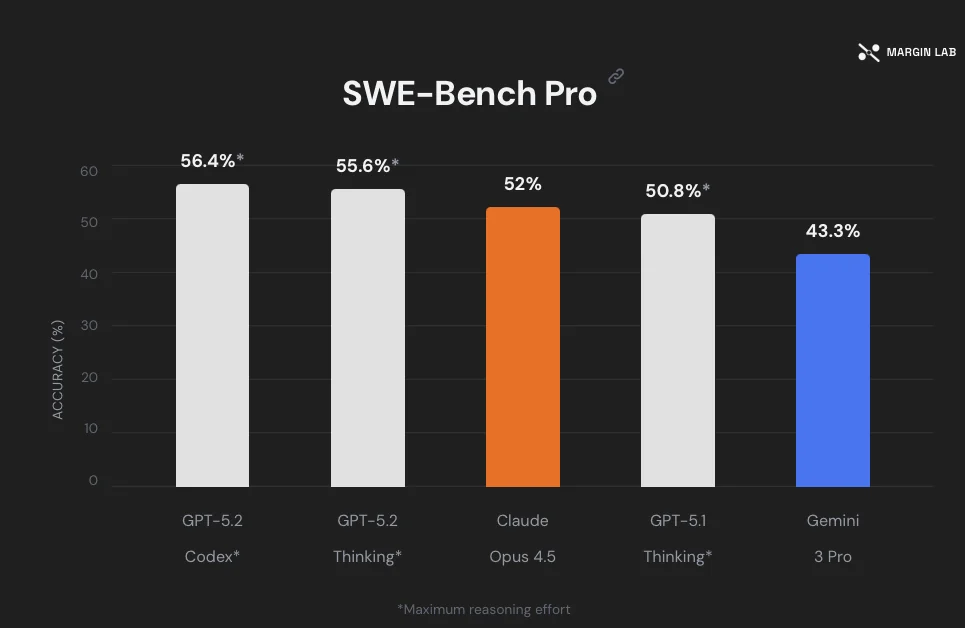
The numbers that matter most here come from SWE-bench, the industry's go-to benchmark for evaluating coding agents on real GitHub issues. GPT-5.2-Codex scores 56.4% on SWE-Bench Pro — that's the highest recorded score on that benchmark as of today. On SWE-Bench Verified (500 real-world bug fixes), it hits 80.0%.
| Benchmark | GPT-5.2-Codex | GPT-5.1 | GPT-5.2 (base) |
|---|---|---|---|
| SWE-Bench Pro | 56.40% | 50.80% | 55.60% |
| Terminal-Bench 2.0 | 64.00% | 58.10% | 62.20% |
| Refactor Accuracy | 51% | ~33.9% | — |
I ran my own batch of tasks across three projects — a TypeScript API, a React dashboard, and a Python data pipeline. Codex handled routine refactors and feature additions well. Where it stumbled was on tasks with heavy Next.js-specific conventions and missing Docker Compose configs — stuff that needs project-specific context you have to bake into your AGENTS.md file.
What broke and why
Quick reality check here: benchmarks don't tell the whole story. A METR study found that experienced open-source developers actually took 19% longer to complete tasks when using AI tools — even though they predicted they'd be 24% faster beforehand. The perception-reality gap is real.
In my testing, the biggest friction points were: tasks that required understanding implicit project conventions (if it's not in AGENTS.md, the agent guesses), and hitting usage limits mid-workflow on the Plus plan. Not dealbreakers. But worth knowing before you commit.
Key features checklist
| Feature | Available? | Notes |
|---|---|---|
| Parallel agent threads | ✅ | Organized by project |
| Git worktree isolation | ✅ | No merge conflicts between agents |
| Skills system | ✅ | Reusable bundles of instructions + scripts |
| Automations (background tasks) | ✅ | Plus/Pro/Business and up |
| Plan Mode (read-only analysis first) | ✅ | Review before agents execute |
| Customizable agent personalities | ✅ | /personality command |
| macOS desktop app | ✅ | Launched Feb 2, 2026 |
| Windows desktop app | ❌ | In development |
| Offline / local-only mode | ❌ | Requires internet |
Codex app vs 5 alternatives (feature matrix)
| Tool | Approach | Parallel Agents | Worktree Isolation | Best For |
|---|---|---|---|---|
| Codex app | Cloud-based agent command center | ✅ Native | ✅ Built-in | Delegating long-running tasks |
| Claude Code | Terminal-first agent | Limited | Manual | Deep reasoning, sub-agent workflows |
| Cursor | AI-native IDE (VS Code fork) | ❌ | ❌ | Interactive, iterative coding |
| GitHub Copilot | Inline autocomplete + agent mode | ❌ | ❌ | Quick suggestions, GitHub-heavy teams |
| Windsurf | IDE-integrated agent | Limited | ❌ | Polyglot projects |
No single tool wins across the board. I rotate between Codex and Cursor depending on whether I'm delegating work or doing work. That distinction matters more than any feature list.
Honest limitations and when NOT to use it
Let me be blunt about this. Don't reach for the Codex app if:
You're on Windows. The desktop app is macOS-only right now. The CLI works on Windows (with some roughness — OpenAI's own GitHub issues tracker shows active sandbox bugs on Windows 11). Use WSL2 as a workaround, but it's not seamless.
Your project relies on deeply implicit conventions. Codex agents perform best when you've written a solid AGENTS.md file. If your codebase has a bunch of unwritten rules that only senior devs know, you'll spend more time correcting the agents than you save.
You're on the Plus plan and need to run agents all day. 30–150 messages per 5-hour window sounds generous until you're actually running three agents simultaneously. Budget your usage or grab the Pro plan.
You need offline capability. Every agent task hits OpenAI's cloud. No air-gapped option exists yet.
Where Verdent fits in your workflow
Here's where I want to get real for a second. The Codex app and tools like Verdent.ai aren't solving the exact same problem — but they live in the same neighborhood.
Verdent's multi-agent architecture is built around Plan-First development: agents don't just start coding blindly. They read the requirement, break it into steps, and confirm the direction before touching a single file. That's a different philosophy than Codex's "abundance mindset" of spinning up parallel agents and letting them explore.
Where Verdent genuinely pulls ahead in my day-to-day: it integrates directly into both VS Code and JetBrains, so your workflow doesn't shift. Its Git worktree isolation is the same core idea as Codex's — each agent on its own branch — but paired with a code verification loop that runs tests automatically before anything gets committed. And on SWE-bench Verified, Verdent hits 76.1% resolution — solid for a purpose-built multi-agent platform.
The way I think about it: Codex app is great for throwing resources at a problem. Verdent is better when you need precision* and control* over what your AI team actually ships.