
Last October, a teammate pinged me mid-sprint: "Have you tried that new Skills thing Anthropic dropped?" I'd seen the announcement, skimmed it, filed it under probably just a fancier system prompt — and moved on. Three weeks later I had six skills running and my Claude setup time was basically zero. Turns out Claude Skills aren't a minor UX tweak. They're a rethink of how you hand context to an AI agent. If that sounds interesting, stick around — this whole guide is for you.
What Are Claude Skills? A Plain-English Definition
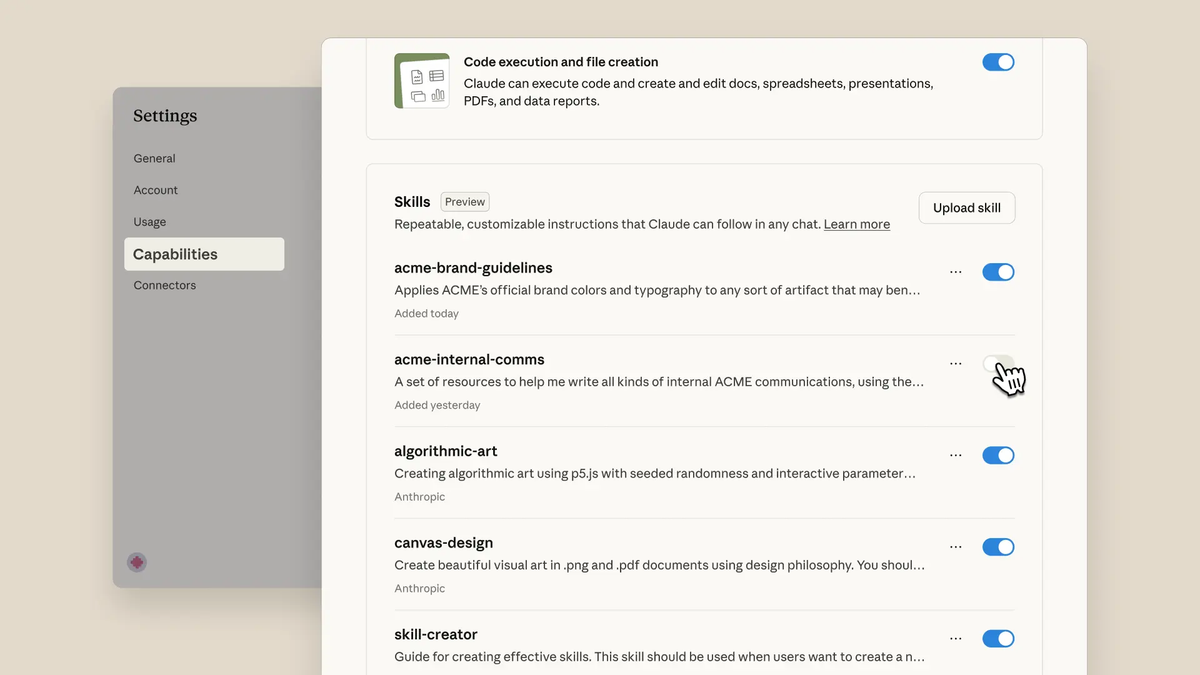
Claude Skills are modular, reusable capability packages that you install into Claude so it can perform specialized tasks without you re-prompting it every single time.
Think of it this way: instead of writing a 400-token system prompt explaining your company's PDF handling process on every run, you package that knowledge into a skill — a folder with a SKILL.md file, some instructions, and optional scripts. Claude loads it when relevant, ignores it when not. That's it.
The one-line definition: a skill is a directory containing a SKILL.md** file with organized instructions, scripts, and resources that give agents additional capabilities.** Anthropic describes them as a way to transform general-purpose agents into specialized ones that fit your needs. In practice it's closer to writing an onboarding guide for a new hire — except the hire never forgets it.
Key characteristics at a glance:
| Property | What it means |
|---|---|
| Composable | Skills stack together; Claude auto-selects relevant ones |
| Portable | Build once, use acrossClaude.ai, Claude Code, and API |
| Efficient | Only loads what's needed, when it's needed |
| Executable | Can include code scripts for deterministic reliability |
When Were Claude Skills Released? (Timeline)
October 2025 Announcement
Claude Skills trace back to October 16, 2025, when Anthropic published their engineering deep-dive on Agent Skills — the clearest public explanation of how the system works under the hood. The same week, Skills launched as a feature preview for Pro, Max, Team, and Enterprise users, with Code Execution required as a dependency.
Worth noting: Anthropic's document creation abilities (Excel, Word, PowerPoint, PDF generation) that shipped in September 2025 were already powered by Skills under the hood — most users just didn't know it yet. Enterprise clients including Box, Canva, and Rakuten were already in early testing by launch week.
December 2025 Agent Skills Open Standard
On December 18, 2025, Anthropic made the feature significantly more interesting. They published Agent Skills as an open standard at agentskills.io — meaning a skill you build for Claude can, in principle, run in ChatGPT or Cursor if those platforms adopt the spec. At the same time, Team and Enterprise plans got organization-wide skill management, a partner skills directory, and out-of-the-box integrations with Notion, Canva, Figma, and Atlassian.
That's a deliberate bet on interoperability over lock-in, and it changes the ROI calculation for teams investing time in skill-building.
How Claude Skills Work: The SKILL.md Structure
Required Files and Folder Layout
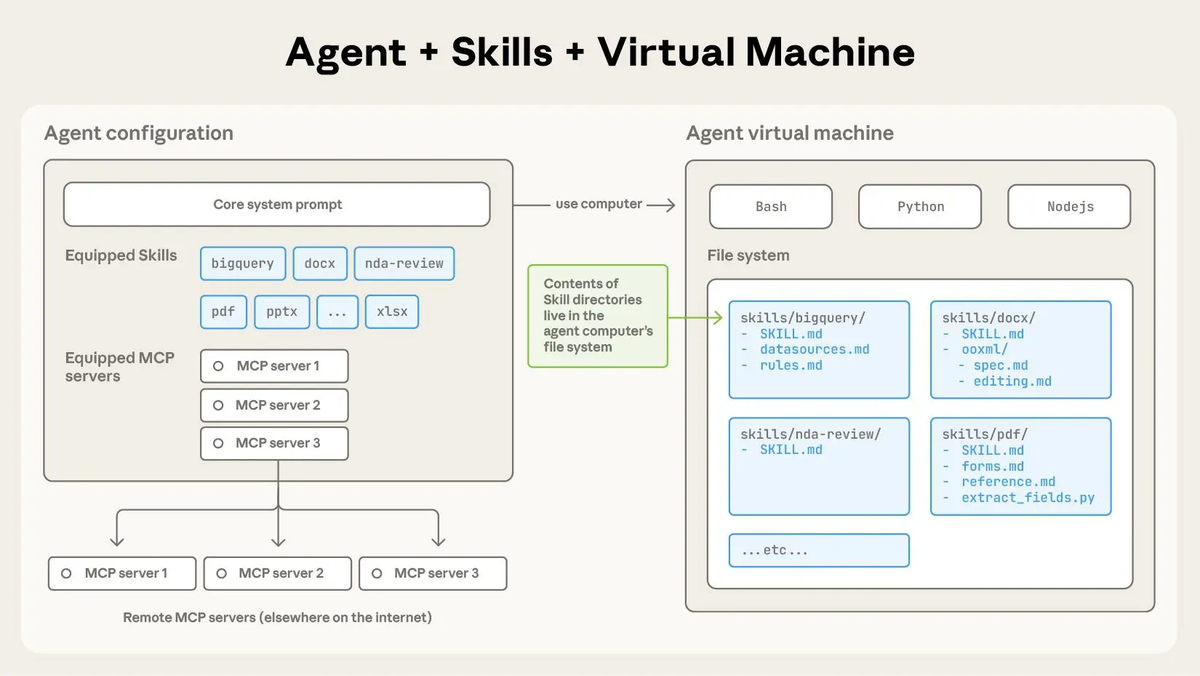
A skill lives in a directory. The minimum viable skill looks like this:
my-skill/
└── SKILL.md
The SKILL.md must start with YAML frontmatter containing two required fields:
---
name: pdf-form-filler
description: Fills out PDF forms using pre-extracted field data
---

## Instructions
When the user asks to fill out a PDF form, use the provided script to extract
all form fields first, then populate them based on user input.
As skills grow in complexity, you can bundle additional files alongside SKILL.md:
pdf-skill/
├── SKILL.md          ← Core instructions + metadata
├── reference.md      ← General PDF handling reference
├── forms.md          ← Loaded only when filling forms
└── extract_fields.py ← Python script Claude can execute
Anthropic's official skills repository on GitHub has production-ready examples for PDF, Word, Excel, and PowerPoint — worth cloning before you build anything from scratch.
Progressive Disclosure Explained
This is the design principle that makes Skills actually scalable.
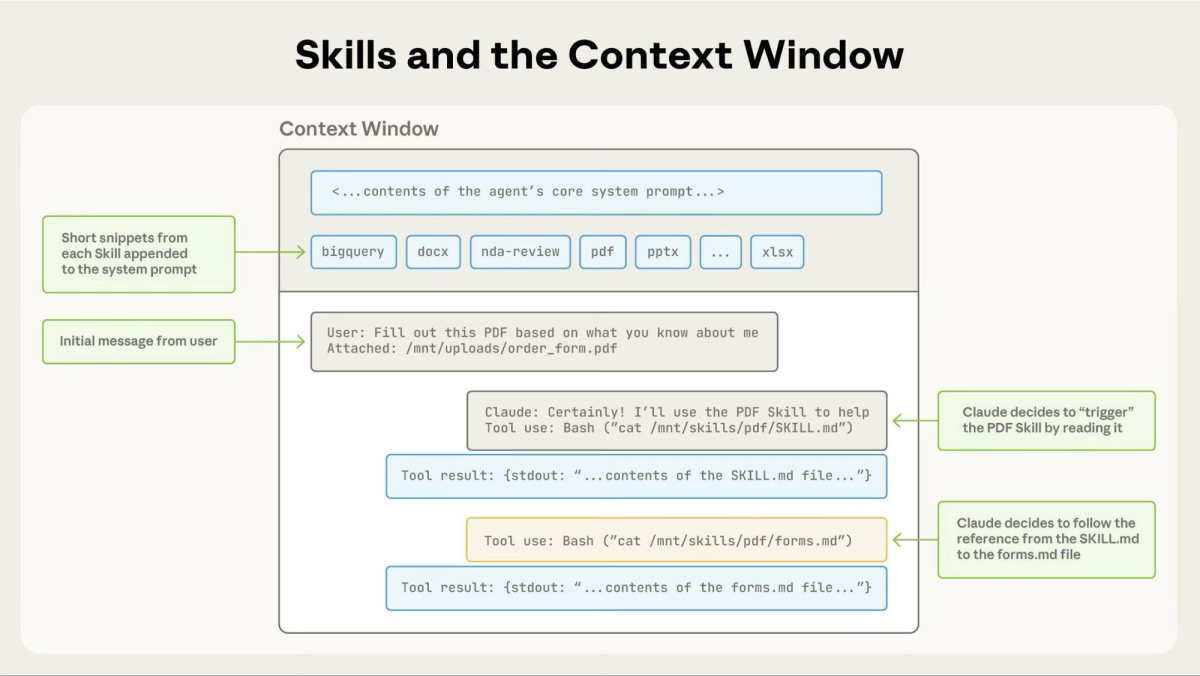
At agent startup, Claude pre-loads only the name and description from every installed skill into its system prompt. That's Level 1: enough context to know when a skill is relevant, without bloating the context window.
When Claude determines a skill matches the current task, it reads the full SKILL.md body. That's Level 2.
If the task requires sub-specialization (like form-filling vs. general PDF reading), Claude reads the linked files referenced in SKILL.md. That's Level 3+.
Because additional context is fetched via file reads rather than pre-loaded, the amount of knowledge you can bundle into a skill is effectively unbounded. A skill can reference a 50-page technical spec — Claude only reads the sections it needs.
Key Benefits of Using Claude Skills
I've been running Skills on real projects since November 2025. Here's what actually changes in practice:
- Zero re-prompting overhead. Your brand guidelines, coding conventions, API patterns — install them as skills and stop copy-pasting context into every session. For teams managing a large codebase, this alone saves 10–15 minutes per dev per day.
- Deterministic code execution. Skills can bundle pre-written scripts. When Claude needs to extract PDF form fields or sort a dataset, it runs your script rather than generating token-by-token — faster and more reliable for production-grade workflows.
- Composable specialization. You can install multiple skills and Claude coordinates them automatically. A workflow that reads a spreadsheet, applies your data normalization rules, and outputs a formatted report can chain three separate skills without you orchestrating anything.
- Cross-platform portability. With the open standard published in December 2025, skills you build today won't be trapped in one platform. If your team uses Cursor for some workflows and Claude Code for others, the same skill folder works in both.
- Enterprise-grade governance. For Team and Enterprise plans, admins control which skills are available org-wide — versioned, managed, and auditable. No more individual developers running experimental prompts in production contexts.
Claude Skills vs Other Claude Features
This question comes up constantly, so here's a direct comparison:
| Feature | What it does | Best for |
|---|---|---|
| Claude Skills | Packages reusable expertise + code into installable folders | Recurring specialized workflows, team standardization |
| System Prompt | One-time instructions per session | Simple behavioral customization, single-turn tasks |
| Projects | Persistent context + document storage withinClaude.ai | Knowledge bases, long-running research |
| MCP Servers | Connects Claude to external tools and APIs | Live data access, third-party service integration |
| Custom Instructions | Personal preferences saved to your account | Tone, format, response style defaults |
The key distinction: MCP gives Claude access to external tools. Skills give Claude domain knowledge and procedures. The most powerful setups combine both — MCP for connectivity, Skills to encode how to use it correctly.
How to Get Started with Claude Skills
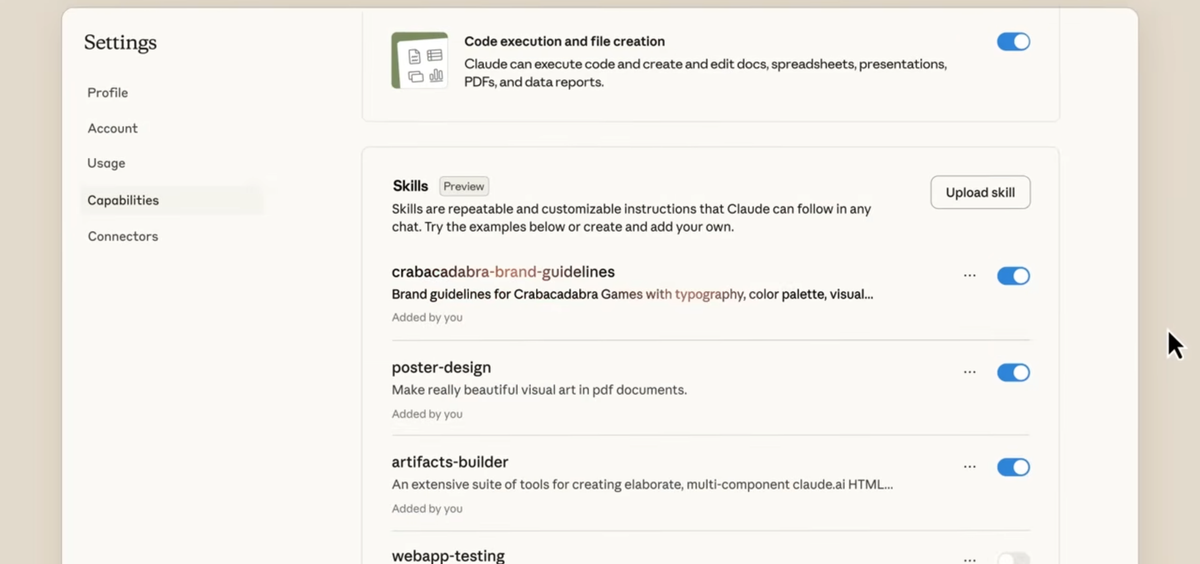
Skills are available on Pro, Max, Team, and Enterprise plans and require Code Execution to be enabled. Here's the practical path:
Step 1 — Enable Code Execution and Skills. Both live under Settings → Feature Previews. Enable Code Execution first — Skills won't function without it. Team and Enterprise admins need to enable Skills org-wide before individual members can use them. Anthropic's support page for Claude Skills walks through the exact steps for each plan type.
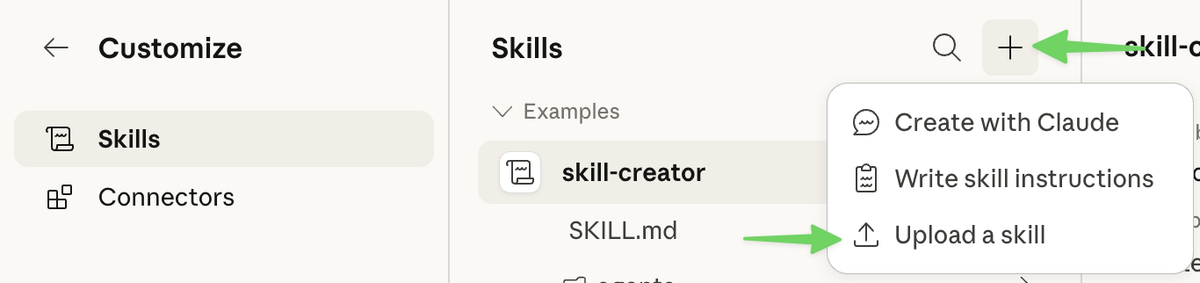
Step 2 — Use the Skill Creator Skill. Anthropic ships a meta-skill called skill-creator that builds your first custom skill interactively. Describe your workflow, and Claude generates the folder structure and SKILL.md for you. Good starting point.
Step 3 — Or fork a pre-built skill. The official skills repository has production-ready skills for .pdf, .docx, .xlsx, and .pptx — the same ones powering Claude's document creation features. Faster to learn from a working example than to start blank.
Step 4 — Add skills via the API (for developers). The Agent Skills API reference covers the /v1/skills endpoint for programmatic skill versioning and management. In Claude Code, drop the skill folder into your project directory — Claude discovers it automatically at startup.
One honest note: keep individual skill descriptions concise (under 50 words). With 10+ skills installed, bloated descriptions add up fast in your system prompt. And since skills can execute code, treat unknown skill sources the same way you'd treat an unreviewed npm package.
FAQ
Q: What are Claude Skills in simple terms? Reusable instruction packages — folders with a SKILL.md file — that teach Claude how to handle specific tasks. Install once, runs automatically whenever relevant. No re-prompting.
Q: When was the Claude Skills announcement date? October 16, 2025, via Anthropic's engineering blog. Launched the same week for Pro, Max, Team, and Enterprise users. The Agent Skills open standard followed on December 18, 2025.
Q: Do Claude Skills work with Claude Code? Yes. Drop a skill folder into your project directory and Claude Code picks it up at startup. Skills work across Claude.ai, Claude Code, the Claude Agent SDK, and the API.
Q: Are Claude Skills the same as MCP servers? No. MCP connects Claude to external tools and live data. Skills package domain knowledge and procedures — including executable scripts. They complement each other well.
Q: Can I use Claude Skills across different AI platforms? As of December 2025, yes — for platforms that adopt the open standard at agentskills.io. The spec is designed for portability across Claude, ChatGPT, Cursor, and others.
Q: Is there a free tier for Claude Skills? Skills require a paid plan (Pro, Max, Team, or Enterprise) and Code Execution enabled in beta.
Ready to Build Your First Skill?
The difference between developers who are manually re-prompting Claude on every session and those running skills-equipped workflows is already visible in output quality and turnaround time. I've seen it on real projects — it's not subtle.
If you're managing a complex codebase, running repeatable data workflows, or trying to standardize AI usage across a team, Claude Skills are the most direct path to consistent, production-grade output.
Start here: How to Use Claude Skills →
Related resources:
