
A few weeks ago I watched a senior developer on my team spend twenty minutes configuring a Codex session to work with an internal staging dashboard — switching between terminal prompts, browser tabs, and clipboard-paste workflows to give Codex the context it needed. The tool was capable. The problem was routing: the developer was manually doing a job the agent architecture should have handled automatically. That's the problem the three-tier model is OpenAI's answer to. Whether it's a complete answer is a different question.
Why OpenAI Built Three Browser Tools, Not One
The gap each tier fills
The naive solution to "AI needs browser access" is one universal browser integration. Give the agent a browser, let it do everything there. The problem is that "browser" means three functionally distinct things in a developer's workflow:
- Structured API access — interactions with tools that have well-defined data models: creating a GitHub issue, updating a Linear ticket, reading a Figma component spec. These are predictable, schema-bound operations.
- Authenticated session navigation — browsing internal dashboards, staging environments, and tools that require sign-in. The session state is the access mechanism; there's no API.
- Local development preview — localhost servers, file-backed HTML, dev builds that don't exist on any external network.
These three contexts require different trust models, different sandboxing decisions, and different failure modes. A single browser tool would have to make worst-case assumptions across all three — either too permissive for local dev work or too restrictive for external authenticated access. The three-tier design resolves this by giving each context its own purpose-built surface.
What "computer use" alone couldn't cover
When Codex launched background computer use in April 2026 — documented in the Codex changelog — it gave the agent the ability to drive any desktop application visually. But computer use operates on screen pixels — it's general-purpose but blunt. For interactions that have structured APIs, screen automation is worse: slower, less reliable, fragile to UI changes, and harder to audit. The plugin tier exists because API-grade reliability is substantially better than computer-use automation for services that expose one.
The three-tier model is therefore a hierarchy of precision: use the most precise tool available, fall back to less precise tools when necessary.
Tier 1 — Dedicated Plugins
Where structured integrations win
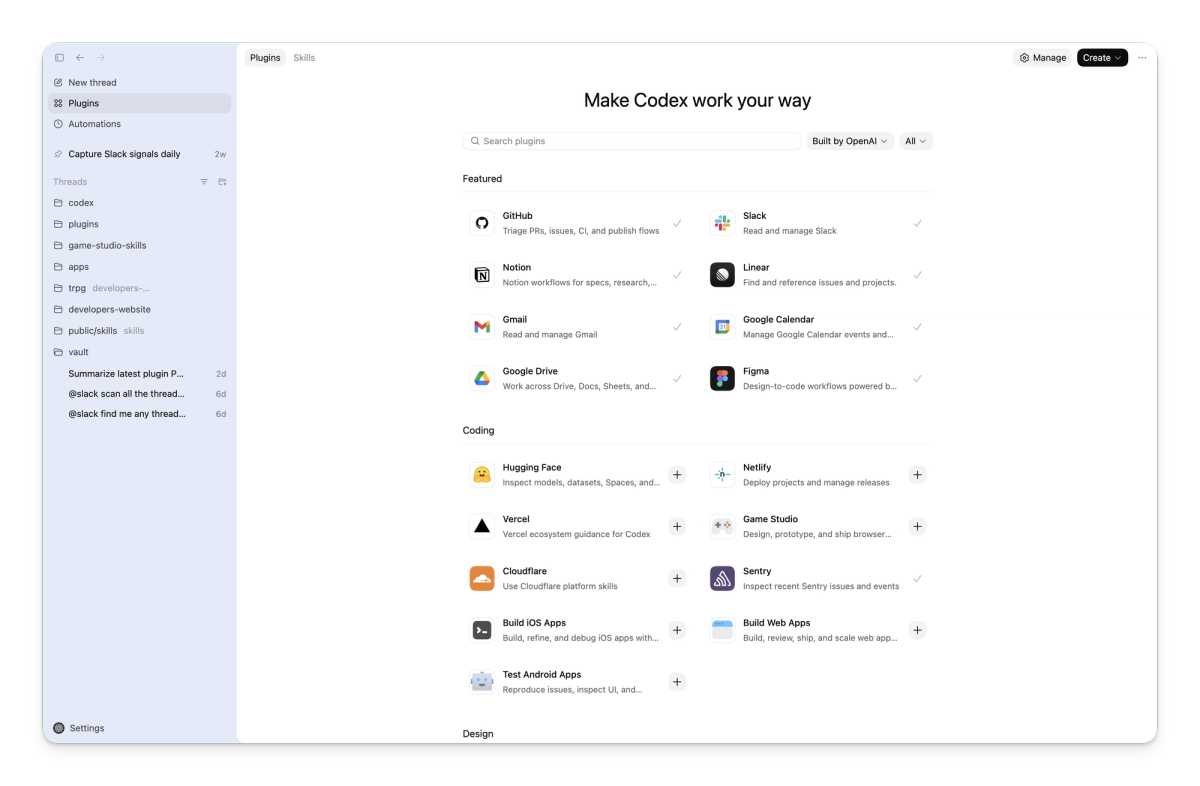
OpenAI and Figma's official integration uses MCP to connect Codex directly to Figma's design platform, supporting a faster workflow from implementation to design canvas. The official curated plugin directory includes GitHub, Slack, Figma, Gmail, Google Drive, Notion, Linear, Sentry, Vercel, Box, Cloudflare, and Hugging Face. Each plugin bundles three components: authentication credentials, predefined prompt workflows ("skills"), and MCP server configurations — packaged as a single installable unit.
For these services, the plugin tier is the right choice because the operation is structured. Creating a GitHub issue has a defined schema. Searching a Slack channel has a defined API. The agent can form precise requests and receive predictable structured responses. Compared to navigating these services through a browser — parsing HTML, finding the right form fields, handling session state — the plugin path is faster, more reliable, and produces auditable API-level logs.
API-grade reliability and predictable schemas
The reliability difference isn't marginal. Browser automation against a logged-in session will break whenever the UI changes — a new onboarding flow, a redesigned navigation, a modal that appears for certain account states. Plugin integrations fail on breaking API changes, which happen on documented schedules with advance notice. For long-running agentic workflows where reliability matters more than raw capability, the plugin tier is the right starting point.
Plugins also produce cleaner audit trails. An API call to Linear's GraphQL endpoint leaves a structured record with timestamps, the requesting agent's identity, and the specific mutation performed. A browser automation session that clicks through Linear's UI produces a session log that's harder to parse after the fact.
The limit: services without good plugins
The plugin tier covers well-known developer tools with stable APIs. It doesn't cover the long tail: internal dashboards built on proprietary frameworks, legacy enterprise tools with no public API, services where the plugin doesn't exist yet or where the installed plugin doesn't cover your specific workflow. OpenAI's plugin documentation notes that "more plugin capabilities are coming soon" — which is an acknowledgment that the current coverage is incomplete. When the plugin tier has nothing, the fallback is Chrome.
Tier 2 — The Chrome Extension
Why signed-in browser state matters
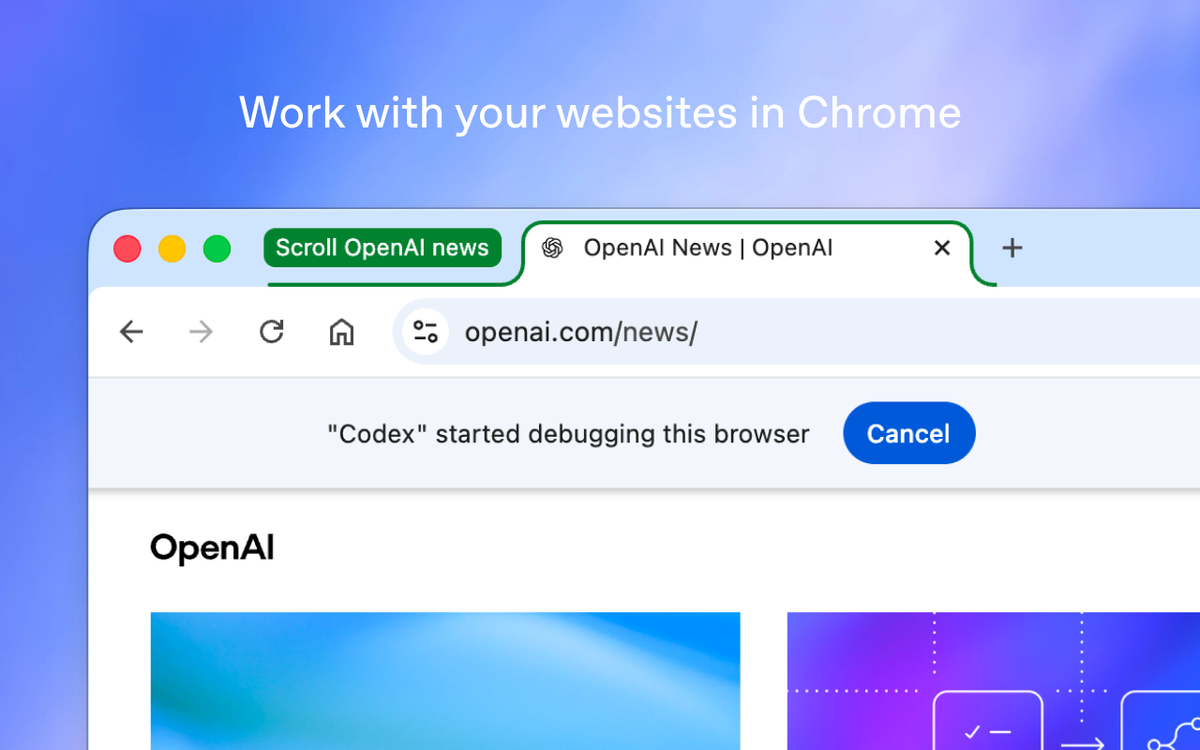
The Chrome extension (v1.1.4, May 7, 2026) solves the session state problem: it operates inside your actual Chrome profile, with your existing cookies and authentication tokens. This is what makes the staging dashboard example from the introduction tractable — instead of the developer manually copying context out of an authenticated session, Codex can navigate there directly.
The signed-in browser tier is the bridge between the plugin tier (structured, API-based) and the in-app browser (sandboxed, session-isolated). It's the most powerful tier in the model because it has access to the broadest surface — any page you can reach with your credentials — and the most dangerous for the same reason.
When Chrome wins over plugins
The Chrome tier is appropriate when:
- The target service has no plugin, or the available plugin doesn't cover the specific workflow
- The interaction requires visual navigation rather than API calls (workflows that span multiple pages, involve modals, or respond to UI state that isn't exposed via API)
- The task involves scraping or reading information that's only presented in the browser UI
The explicit syntax for invoking Chrome directly is @Chrome open [tool] and do [thing]. Without the explicit invocation, Codex selects Chrome automatically when it determines the task requires authenticated browser state.
The trade-off: real browser context comes with real risk
The Chrome tier's power is its liability. OpenAI's documentation on computer use and browser tools explicitly instructs users to treat page content as untrusted context. The signed-in session means Codex has access to anything your browser session can reach — which, in practice, includes email, internal systems, cloud consoles, and anything else you're logged into in Chrome.
Prompt injection is the primary risk vector: malicious content on a web page can attempt to redirect Codex's behavior by embedding instructions in the page content the agent reads. The blast radius of a successful prompt injection is larger when the agent has signed-in browser access than when it's working in a sandboxed environment. OpenAI has not published specific attack success rates for Codex Chrome; the user-facing guidance is to review before granting site access and to maintain a domain blocklist for sensitive services.
Tier 3 — The In-App Browser
Sandboxed by design, no Chrome profile contact
The in-app browser is built on OpenAI's Atlas technology and runs as a completely sandboxed environment. It never reads from or writes to your Chrome profile. Cookies, session tokens, saved passwords, and browsing history are all out of scope. What the in-app browser sees is only what it navigates to itself, in its own isolated context.
This isolation is the design point. For local development work — where the concern is verifying that your own code renders correctly, not accessing external services — the sandboxed model is strictly better. You don't want your dev server preview bleeding into your real browser session. You don't want your Chrome history being accessible to a preview task. The in-app browser's sandboxing is a feature, not a limitation.
The right tier for localhost and dev servers
Localhost, local dev servers (localhost:3000, 127.0.0.1:8080), file-backed HTML previews — these are the in-app browser's domain. The Chrome extension cannot and should not be used for this work: it's designed for external authenticated sites, and pointing it at localhost provides no benefit while unnecessarily expanding the Chrome extension's scope.
The official documentation is explicit: use the in-app browser for local development servers and file-backed previews. This is not a configuration choice — it's the intended architecture.
Frontend preview and verification work
Beyond localhost, the in-app browser handles public pages that don't require authentication. Reading a documentation page to verify API behavior, checking a public web app's rendering — these are appropriate in-app browser tasks. The key criterion: if you don't need to be signed in to access the page, use the in-app browser.
How Codex Selects a Tier (and How to Override It)
Default routing: plugins → Chrome → in-app
Codex's default tool selection follows the priority stack. If an installed plugin covers the task, Codex uses it. If the task requires authenticated browser access and no plugin exists, Codex reaches for Chrome. If the task is local or doesn't require authentication, the in-app browser is selected.
This routing is automatic. Codex analyzes the task description and determines which tier is appropriate. The agent is not perfect at this — ambiguous task descriptions may produce suboptimal routing choices — but for clearly specified tasks, automatic selection generally produces the right outcome.
Forcing a tool with @Chrome
The @Chrome prefix explicitly routes a task through the Chrome extension regardless of what Codex would select automatically:
@Chrome open our internal status dashboard and check whether the staging deploy is greenThe explicit invocation is most useful when:
- You know the task requires Chrome but the description is ambiguous enough that Codex might choose the in-app browser
- You want to verify that Codex is using Chrome for a specific workflow, not making an assumption about automatic routing
What happens when more than one tier could work
Some tasks are genuinely ambiguous. Reading a public GitHub repository doesn't require authentication (in-app browser could work) but also has a plugin with a richer integration surface. Codex resolves these cases with plugin priority: if a relevant plugin is installed and active, it takes precedence over browser navigation. This is the right default — plugins are more reliable than browser automation for services that have them — but it means you should verify your plugin configuration before assuming Codex will use browser navigation for a service with an available plugin.
What This Means for Multi-Agent Coding Workflows
Tool selection as a first-class problem in agentic systems
The three-tier model makes an implicit point about agentic system design: tool selection is a first-class problem, not an afterthought. The conventional approach to giving agents tools is additive — list all available tools, let the LLM pick. This approach breaks at scale because with many available tools, the agent's tool selection decisions become a significant source of unreliability. Choosing the wrong tool for a task produces failures that are hard to debug: the agent completed a task, just not the right one in the right way.
The three-tier model is a hard-coded priority scheme rather than a free-choice selection. The agent doesn't reason about whether to use plugins or Chrome — the architecture makes that decision structurally. This trades flexibility for predictability. The architecture knows more about tool appropriateness than any individual task description can convey.
Why "one big agent with all tools" struggles at scale
The monolithic tool approach — one agent, all tools, let the model figure it out — runs into two problems at scale. First, tool selection noise: with many tools available, the model's attention is partially consumed by choosing between them, and tool selection errors compound with task length. Second, blast radius asymmetry: tools with large blast radius (browser access to authenticated sessions) and tools with small blast radius (sandboxed local preview) require different safeguards, but a single agent with all tools provides no structural guarantee about which tool is used for which task.
The three-tier approach addresses both. Tool selection is deterministic by default. The trust boundary of each tier is defined by the tier's design, not by the agent's real-time judgment.
Implications for IDE-anchored multi-agent platforms
The three-tier model is a product-layer solution to tool routing within a single agent's execution context. There's a different layer of tool selection that the three-tier model doesn't address: routing between agents in a multi-agent system, and routing within the codebase context rather than the browser context.
IDE-anchored multi-agent platforms like verdent.ai operate at that different layer — the problem they're solving is which agent handles which part of a coding task, which model handles which complexity tier, and how parallel agents coordinate on a shared codebase through Git worktree isolation. This is not a browser routing problem. It's a codebase coordination problem. The two layers are not in competition; a team could use Codex's three-tier browser architecture for browser-side tasks while using a multi-agent platform for the IDE-level coordination of parallel coding work.
Trade-offs and Open Questions
Auditability across three execution surfaces
Three execution surfaces mean three different audit mechanisms. Plugin calls produce API-level structured logs. Chrome extension activity produces session-level logs with per-site permissions. In-app browser activity is sandboxed and doesn't write to Chrome history. For organizations that need to audit what the agent did and when, correlating across three surfaces is more complex than a single unified execution log would be.
This is not a criticism of the design — the three surfaces have different sandboxing requirements that prevent a unified log — but it's a practical consequence that teams with compliance requirements should account for. OpenAI has not published a unified audit framework for multi-tier Codex activity as of this writing.
Failure modes that cross tier boundaries
Some task failures will cross tier boundaries in unintuitive ways. If a plugin call fails — because the plugin's authentication token has expired, or because the service API returns an unexpected error — does Codex fall back to the Chrome tier automatically? The official documentation doesn't specify tier fallback behavior explicitly. Silence on this point means teams should verify empirically for their specific workflows, rather than assuming graceful tier-to-tier fallback.
Similarly, if Chrome extension access is blocked by a new per-site permission prompt mid-task, Codex's behavior is not fully specified. The three-tier model's robustness under tier-level failures is an open question.
What to watch as the architecture matures
The current model is explicitly described as a work in progress. The plugin directory is expanding. Computer use region availability is extending. The Atlas in-app browser's capabilities are being refined. Several questions that matter for production adoption remain open: whether automatic tier selection will become more configurable, how audit logging will evolve across tiers, and whether the Chrome extension's permission model will develop more granular controls.
The three-tier model is OpenAI's current iteration on browser tool architecture, not a stable final design. Teams adopting it should plan for change in each tier's scope and capabilities.
FAQ
Is the three-tier model (plugins → Chrome → in-app browser) unique to Codex?
The explicit product-level labeling of a three-tier hierarchy is distinctive to Codex — OpenAI named and documented the routing priority stack as a design feature. Other coding agents make similar distinctions in practice: Claude Code has plugin/extension integrations, Computer Use, and its own sandboxed execution environment. Aider has different modes for API-connected workflows versus local-only tasks. What Codex did is make the tier selection explicit as a product concept rather than an implementation detail. Whether that distinction produces meaningfully better routing is an empirical question that depends on task types and configured integrations.
Does Codex always pick the safest tier according to OpenAI's documentation?
OpenAI has not publicly stated a guarantee that Codex always selects the most restrictive tier. The documented routing priority (plugins → Chrome → in-app) is a default behavior, not a security guarantee. The official documentation defines when each tier is used but does not assert that the agent will never select a more permissive tier when a more restrictive one would suffice. Teams with security requirements that depend on tier selection behavior should validate empirically against their specific task types rather than relying on the documented default as a guarantee.
Can I disable the Chrome tier entirely?
The domain blocklist under Computer Use settings can restrict which sites the Chrome extension can access, effectively disabling Chrome for specific sites. A complete disable of the Chrome tier — preventing Codex from using the Chrome extension even for non-blocklisted sites — is not documented as a supported configuration in the current release. OpenAI has not publicly stated whether this capability is planned.
How does this three-tier routing compare to MCP-based tool selection?
MCP (Model Context Protocol) is a protocol-layer solution: it standardizes how agents discover and invoke external tools, leaving selection logic to the agent and the host. Codex's three-tier model is a product-layer solution: it hard-codes a priority scheme for a specific class of tools (browser surfaces) rather than letting the agent reason freely about which tool to use.
Both are answers to tool selection problems at different abstraction levels. MCP solves "how do agents discover and invoke tools?" — the protocol problem. The three-tier model solves "when should browser automation be used, and which browser surface?" — the browser tool problem. IDE-anchored multi-agent platforms like verdent.ai address a third level: how do multiple agents coordinate tool use and codebase access within a parallel coding workflow? These three levels are complementary, not competing.
Will the in-app browser and Chrome extension eventually merge?
OpenAI has mentioned plans for a "super app" combining ChatGPT, Codex, and the Atlas browser — suggesting some integration is planned at the product level. However, the in-app browser and the Chrome extension serve fundamentally different sandboxing purposes. The in-app browser's value comes from its isolation — it never touches your Chrome profile. The Chrome extension's value comes from its access to signed-in session state. Merging these would require giving up one of the two properties. OpenAI has not stated plans to merge the two surfaces, and the sandbox architecture difference means a straightforward merge is not technically feasible while preserving both surfaces' intended behavior.
Related Reading
- Codex Chrome Extension: What It Does and When to Use It
- Codex Chrome vs Claude for Chrome: Which to Use in 2026
- Agentic Engineering Patterns: Real Workflows for Dev Teams in 2026
- Harness Engineering in Practice: Build AI Coding Workflows That Scale
- What Is oh-my-codex (OMX)? Orchestration Layer for Codex CLI
