
Running “autonomous” AI agents without a dashboard isn’t engineering; it’s gambling. We’ve become far too comfortable with fire-and-forget scripts that turn our terminals into expensive black boxes.
Just yesterday, I stared at a static cursor for twenty minutes, wondering whether the agent was doing deep reasoning—or quietly burning through my API credits in an infinite loop. No logs. No feedback. No way to intervene.
That’s why Ralph TUI immediately caught my attention. It forces a hard truth most agent frameworks ignore: if you can’t see what your AI is doing in real time, you shouldn’t be letting it touch your codebase. Ralph TUI isn’t just another wrapper—it’s a Mission Control dashboard designed to bring visibility, control, and recovery back into autonomous agent workflows.
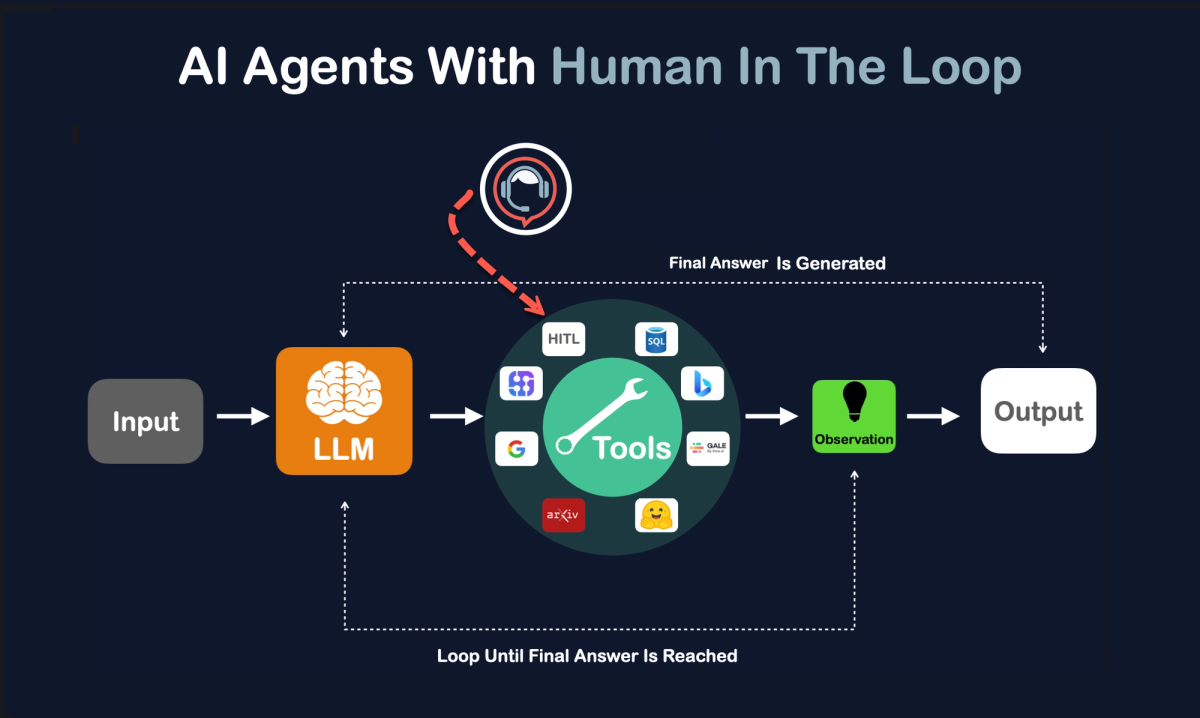
The Reality Check: Why "Fire and Forget" is Dangerous
Let’s be honest for a second. Script-based loops are great for quick demos, but for long-running engineering tasks? They are a nightmare.
The "Black Box" Problem
When you run a standard agent loop script, you are trusting the process. But in my experience, "trusting the process" usually leads to:
- The Infinite Fix Loop: The agent tries to fix a bug, breaks a test, fixes the test, breaks the code, and repeats this until your token limit hits zero.
- The Silent Death: The process hangs, but the logs don’t tell you until you kill the terminal.
- The "Ghost" Completion: It finished 10 minutes ago, but didn't exit properly.
This confused the hell out of me at first. Why were we building autonomous agents without building a dashboard to watch them?
The Opportunity: Moving from Scripts to Orchestration
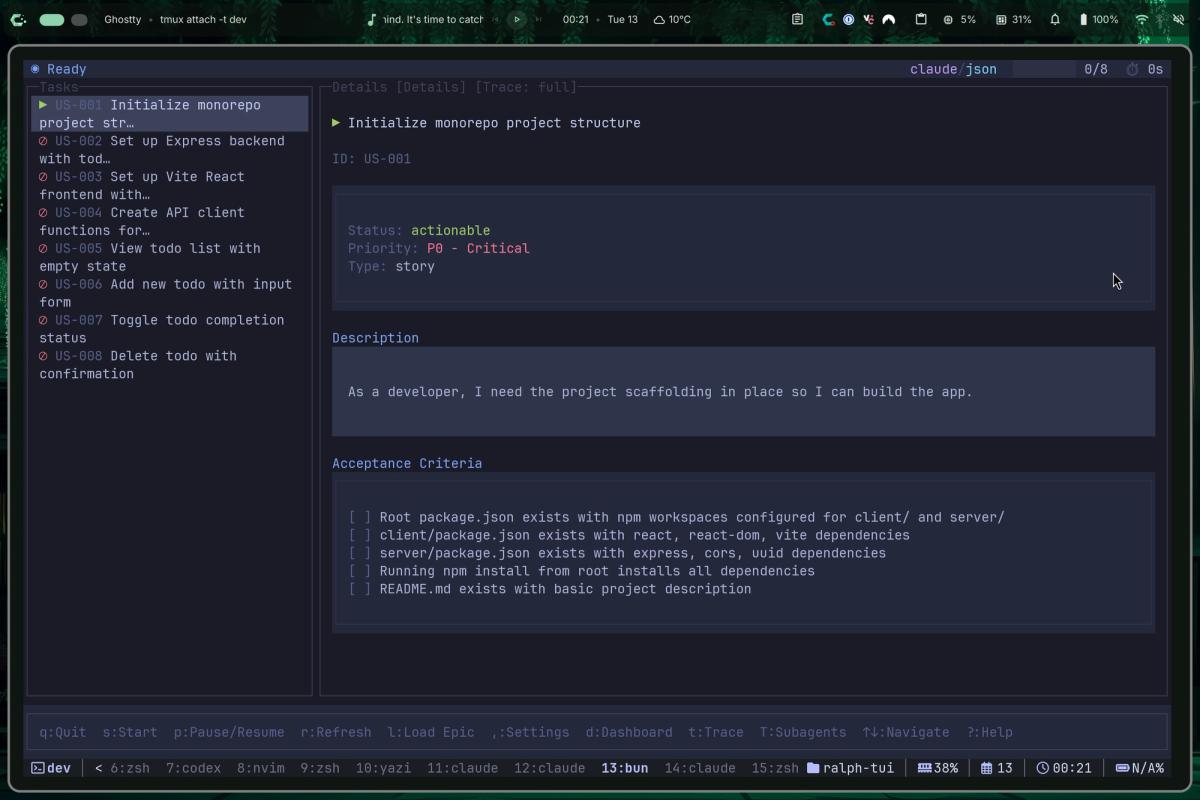
Here’s where things get interesting. Ralph TUI isn't just a UI; it’s an Agent Loop Orchestrator.
Think of it like moving from a manual transmission to an automatic with cruise control—and a heads-up display.
Why this matters right now:
- Visibility: It visualizes the task execution. You see exactly which step the agent is on.
- Control: You can pause, resume, or kill a specific task without nuking the whole session.
- Recovery: It writes state to disk (
.ralph-tui/session.json). If your computer crashes, the agent remembers where it left off. - Flexibility: It’s not hard-coded to Claude. You can plug in cheaper models for cheaper tasks.
Market Gap Analysis
| Feature | Standard Scripts | Ralph TUI |
|---|---|---|
| Visibility | Logs only (hard to read) | Visual Dashboard (TUI) |
| State Management | Memory only (lost on crash) | Persisted to Disk (Recoverable) |
| Model Locking | Usually fixed (e.g., Claude) | Agnostic (Swap models easily) |
| Execution Mode | Local Only | TUI / Headless / Remote |
The Solution: 3-Step Implementation Framework
Stop reading about it and let’s actually get this running. I’ve broken this down into the workflow I use personally.
Step 1: Installation (The Bun Way)
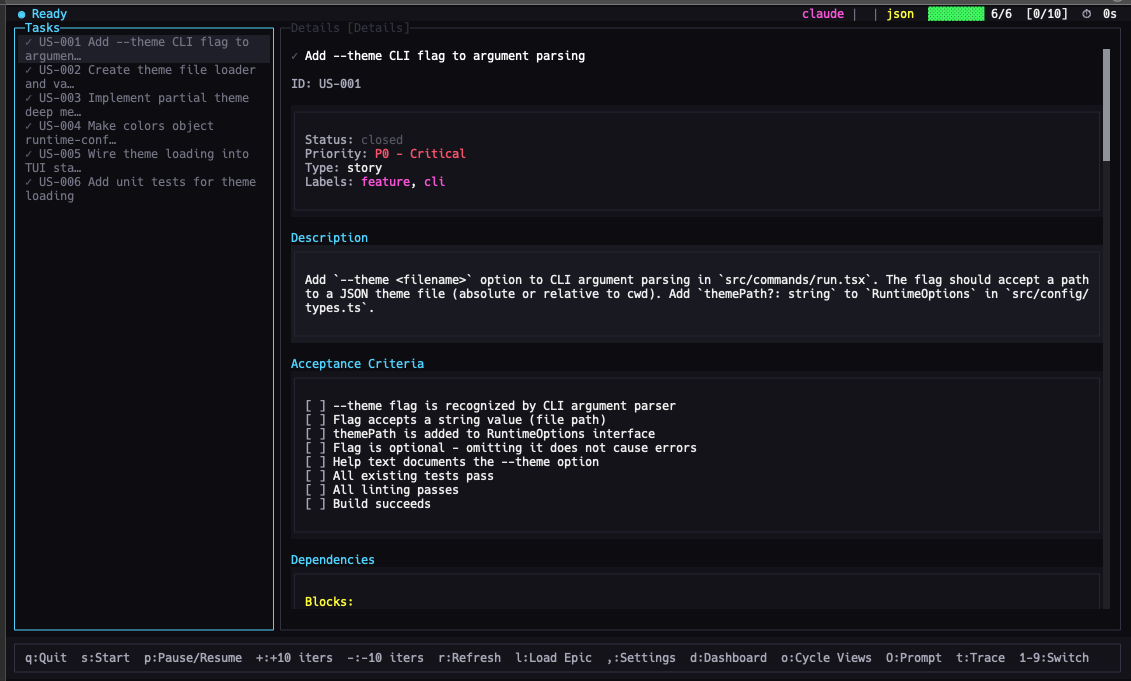
Ralph TUI is built on the Bun/TypeScript ecosystem. It’s snappy. If you don’t have Bun, get it. If you’re strictly Node.js, that works too, but Bun feels faster here.
The "Game Changer" Install:
# Check if you have Bun (if not, get it, seriously)
bun --version

# The standard install
bun add -g ralph-tui

# Verify it’s actually there
ralph-tui --help
Quick note: If you refuse to use Bun, npm i -g ralph-tui works, but don't blame me if it feels slightly slower.
Step 2: The "PRD" Workflow
This is the part that blew my mind. Most people skip this and just try to chat with the agent. Don't do that. Use the Setup and PRD (Product Requirement Document) flow.
Initialize your repo:
mkdir ralph-tui-demo && cd ralph-tui-demo
ralph-tui setup- Why this is important: This command scans your installed agents (Claude Code, OpenCode, etc.) and generates a
.ralph-tui/config.toml. It sets the ground rules. - Generate the Requirements:
ralph-tui create-prd --chat- Instead of you writing a boring text file, the CLI acts like a Product Manager. It interviews you. It asks about edge cases.
- The Output: It generates a
prd.jsonfile. This is the "fuel" for the agent.
Step 3: The First Controlled Run
Here is the kicker—and where most people screw up. Do not let the agent run indefinitely on the first try.
Use the iteration limit. Put the beast in a cage before you let it roam free.
# The safe way to start
ralph-tui run --prd ./prd.json --iterations 5
What to look for:
- Does the TUI load?
- Is it picking up the task from the JSON?
- After 5 steps, did it actually change code or just hallucinate?
Once you verify the loop is actually working, then you can remove the limit or switch to headless mode for CI/CD pipelines.
Success Metrics: How to Measure Agent Efficiency
How do you know if this is actually saving you time? I track these simple KPIs.
| Metric | Benchmark | Excellent | Measurement Tool |
|---|---|---|---|
| Task Completion Rate | 60% | 90%+ | TUI Dashboard |
| "Stuck" Detection | > 20 mins | < 5 mins | Visual Logs |
| Cost per Feature | $5.00+ | < $1.50 | API Dashboard |
The Reality: If you see the agent editing the same file 4 times in a row without passing the test, kill the process. That is the beauty of TUI—you can actually see that happening instantly.
Real Talk: The Cost-Saving Strategy (Opus vs. Haiku)
I get asked this constantly: "Can I use this without going bankrupt on Claude Opus credits?"
The answer is yes, but you need a strategy.
Ralph TUI allows you to specify agents and models.
ralph-tui run --prd ./prd.json --agent claude --model opusMy Personal "Tiered" Strategy:
- The Grunt Work (Cheap Models):
Tasks: Adding comments, fixing linting errors, writing unit tests for existing code.
Model: Claude Haiku or cheaper open-source models.
Why: You don't need a PhD-level AI to fix indentation. - The Architect (Expensive Models):
Tasks: Core logic refactoring, solving complex bugs, setting up the initial architecture.
Model: Claude Opus or Sonnet 3.5.
Why: This is where "cheap" becomes expensive because the cheap model will fail 10 times.
Pro Tip: Use the "Skills" feature. You can install plugins like /ralph-tui-prd inside your agent to automate the boring stuff.
bunx add-skill subsy/ralph-tui --allComparison: Ralph Loop vs. Ralph TUI
I’ll keep this simple because time is money.
Ralph-Claude-Code (The Loop):
- Vibe: Autopilot.
- Best for: Speed. You trust the agent 100% and just want it done.
- Risk: High. If it hallucinates, it keeps going.
Ralph TUI:
- Vibe: Mission Control.
- Best for: Engineering tasks, long-running jobs, and cost management.
- Risk: Low. You can see the crash coming and steer away.
Bottom Line: If you are a casual user, the Loop is fine. If you are trying to actually ship production code with agents, you need TUI.
Actionable Next Steps
If you’re ready to stop guessing what your agents are doing, here is your homework for today:
- Pick a non-critical branch. Do not run this on
main. Seriously. - Install Ralph TUI (
bun add -g ralph-tui). - Run a "Lint Fix" task. It’s the perfect "Hello World" because it’s verifiable.
- Watch the screen. Get comfortable with stopping the agent when it starts looping.
One final warning: The goal isn't to let the AI do everything. The goal is to let the AI do the boring things while you watch.
