
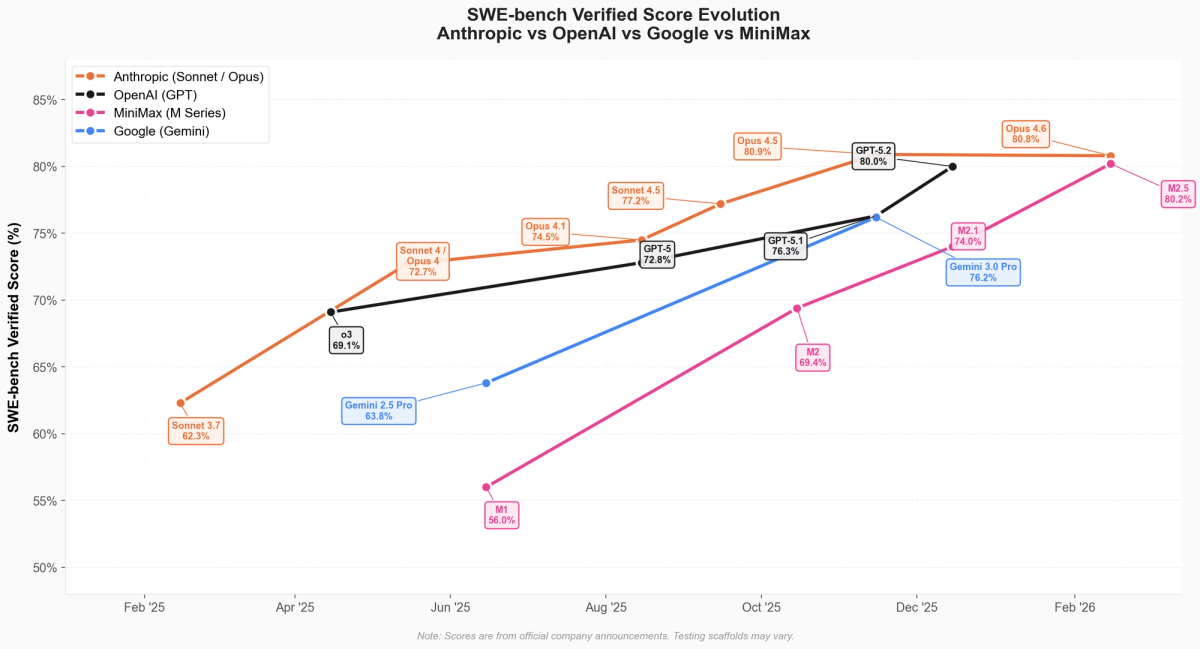
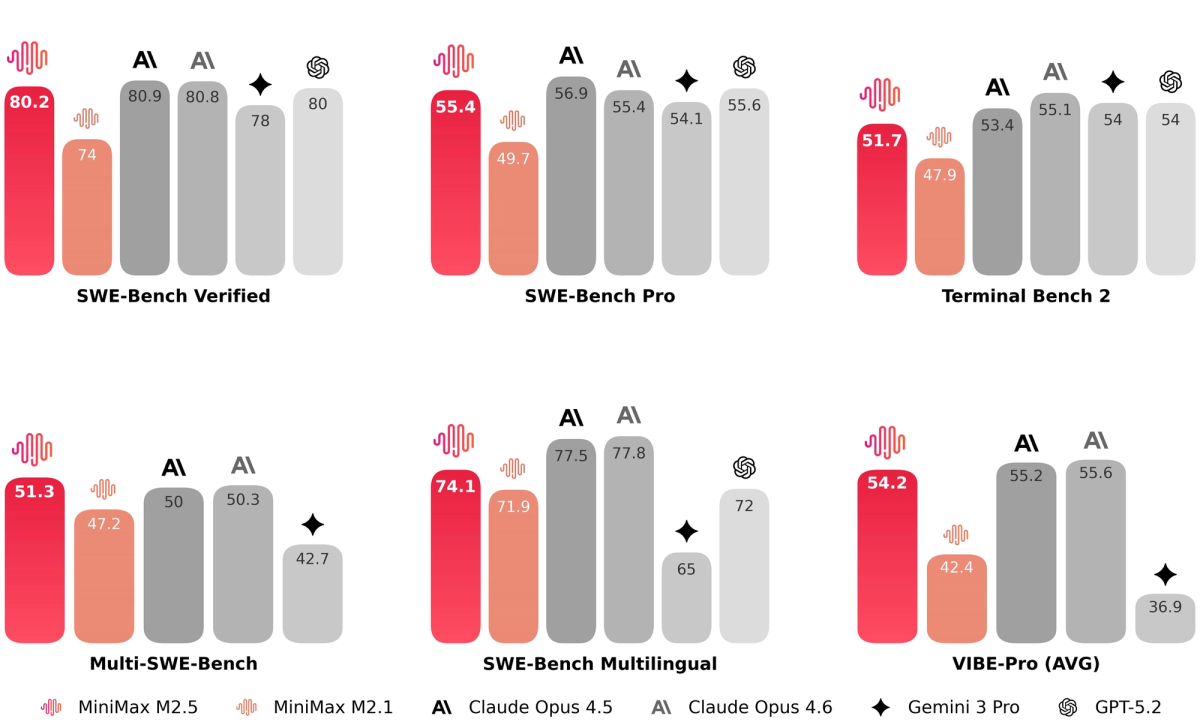
There's a specific kind of frustration I know intimately: you've just read about a model that benchmarks at 80.2% on SWE-Bench, your team is interested, and then you lose two hours to auth errors, wrong endpoint strings, and a verification script that returns nothing useful.
I set up the MiniMax M2.5 API for the first time ten days ago — fresh account, no prior MiniMax platform experience. This guide is what I wish I'd had. We'll cover the two account checks that will save you a headache before you write a single line, the exact env var setup that works with the Anthropic-compatible SDK, the model variant decision that affects both your bill and your latency, and a copy-paste verification script I now run at the start of every new project. Then we'll run a real single-file bug-fix task to see how M2.5's spec-writing behavior plays out in practice.
Let's get into it.
Before You Start — Two Things to Check
Before you install anything, two quick checks will save you significant time.
Account Tier and API Access
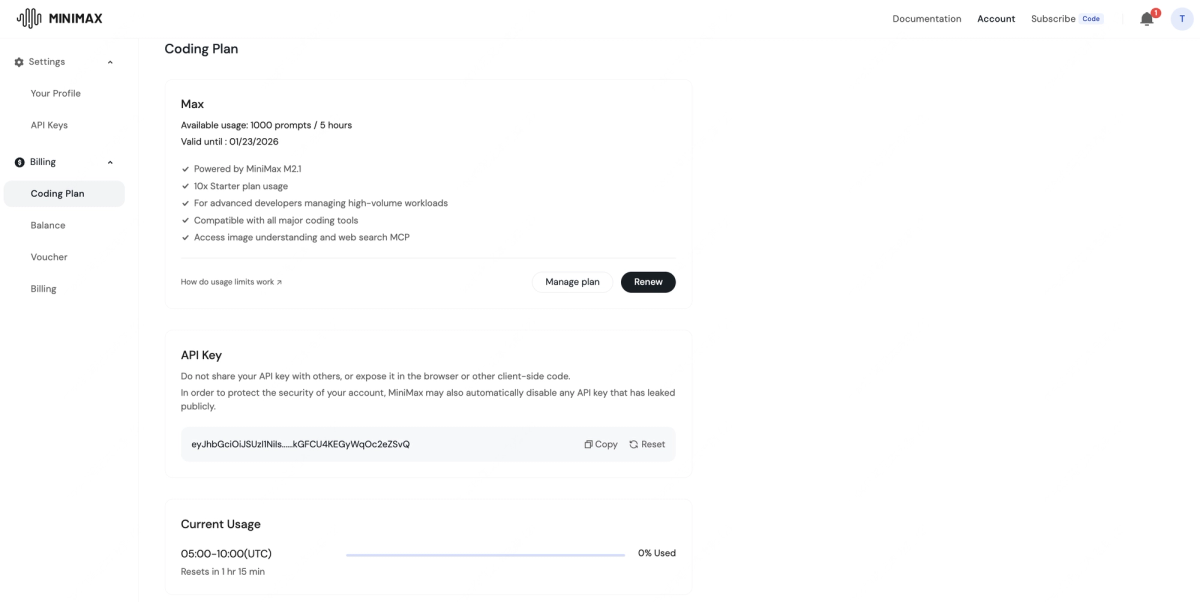
The MiniMax platform at platform.minimax.io is where you'll manage credentials, check your balance, and monitor usage. MiniMax offers a Coding Plan with tiered subscriptions (Starter, Plus, Max), but for direct API access with your own key, you need to confirm two things in your dashboard:
Check 1 — API key provisioning: Not all new accounts have API key generation enabled by default. Log into the platform, navigate to the API Keys section, and verify you can create a key. If the option is greyed out, you may need to complete identity verification or top up your balance first. (This tripped me up on day one.)
Check 2 — Coding Plan vs. credit-based access: MiniMax structures access two ways. The Coding Plan gives you prompt quotas per 5-hour window (useful for consistent daily workflows). Direct API calls consume credits from your balance at per-token rates. If you're building an agent or automation, you almost certainly want credit-based access, not the Coding Plan. Know which mode your account is operating in before you start.
API Key Location & Default Rate Limits — Quick Checklist
Once your key is provisioned:
| What to check | Where to find it | Why it matters |
|---|---|---|
| API key value | Platform → API Keys | Required for all calls |
| Current balance | Platform → Billing | M2.5 Standard: $0.30/M input, $1.20/M output |
| Default RPM | Platform → Rate Limits | Free tier: ~20 RPM; paid: up to 500 RPM |
| Default TPM | Platform → Rate Limits | Free tier: 1M TPM; paid: 20M TPM |
| Context window in use | Model selection | M2.5 Standard: 200K tokens; M2.5 Standard (1M context, beta) |
Rate limits are divided into two types — RPM (requests per minute) and TPM (tokens per minute, input + output combined). If you're on a free or starter account and planning a test session with many rapid calls, you'll hit the 20 RPM ceiling quickly. Either pace your requests deliberately or upgrade before running an automated test suite.
Install, Authenticate & Pick Your Endpoint
MiniMax officially recommends the Anthropic-compatible API as the primary interface for M2.5. This is actually the fastest path to a working setup — you use the Anthropic SDK you likely already have, just pointed at MiniMax's endpoint with your MiniMax key.
API Key Setup — Where to Get It and How to Store It
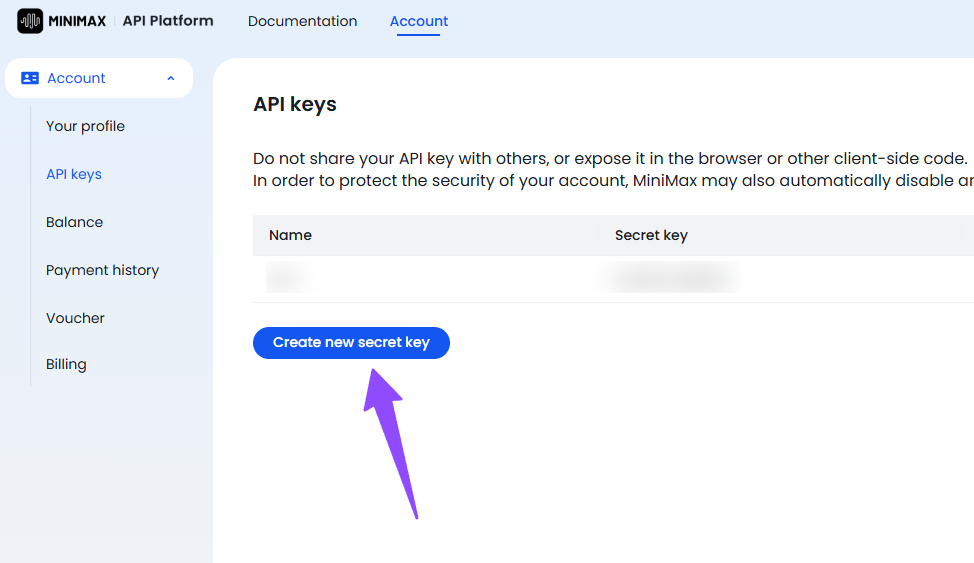
Step 1 — Get your key from the platform:
Log in at platform.minimax.io, navigate to API Keys, and generate a new key. Copy it immediately; you won't see the full value again.
Step 2 — Store it as an environment variable. Never hardcode it.
# Add to ~/.zshrc or ~/.bashrc — NOT in your project files
export MINIMAX_API_KEY="your_key_here"

# Reload your shell
source ~/.zshrc
If you're using a .env file in your project (common with Python's python-dotenv):
# .env — add this file to .gitignore immediately
MINIMAX_API_KEY=your_key_here
# Load it in Python
from dotenv import load_dotenv
import os
load_dotenv()
api_key = os.environ.get("MINIMAX_API_KEY")A quick git hygiene note: before you commit anything, run git status and confirm .env is listed as untracked. Then run echo ".env" >> .gitignore if it isn't already there. I've seen this go wrong in otherwise careful teams.
Step 3 — Install the Anthropic SDK:
pip install anthropic
# or
npm install @anthropic-ai/sdk
Step 4 — Configure the two environment variables the Anthropic SDK needs:
export ANTHROPIC_BASE_URL=https://api.minimax.io/anthropic
export ANTHROPIC_API_KEY=$MINIMAX_API_KEY
That's it. The SDK now routes to MiniMax's infrastructure instead of Anthropic's, and you use the standard anthropic.Anthropic() client in your code. No custom HTTP client needed.
MiniMax-M2.5 vs MiniMax-M2.5-highspeed — Latency vs Cost Rule
MiniMax exposes two M2.5 variants: the standard model at approximately 60 tokens per second, and M2.5-highspeed at approximately 100 tokens per second with the same underlying performance.
Here's the routing rule I use:
| Scenario | Use this model | Reason |
|---|---|---|
| Agentic loops, batch refactors, overnight jobs | MiniMax-M2.5 | Lower output cost ($1.20/M), speed doesn't matter |
| Interactive coding sessions, live pair programming | MiniMax-M2.5-highspeed | 100 TPS feels responsive; ~2x output cost ($2.40/M) |
| Production agents with SLA requirements | MiniMax-M2.5-highspeed | Predictable latency, lower TTFT variance |
MiniMax claims you can run the model continuously for an hour at 100 tokens per second for about $1 — that's the Lightning/highspeed tier pricing model. For batch processing, the Standard model is meaningfully cheaper and perfectly adequate.
Both variants share the same 200K context window and the same benchmark scores. This is purely a latency-vs-cost trade-off, not a capability trade-off.
Ollama Path for Local Tooling Users
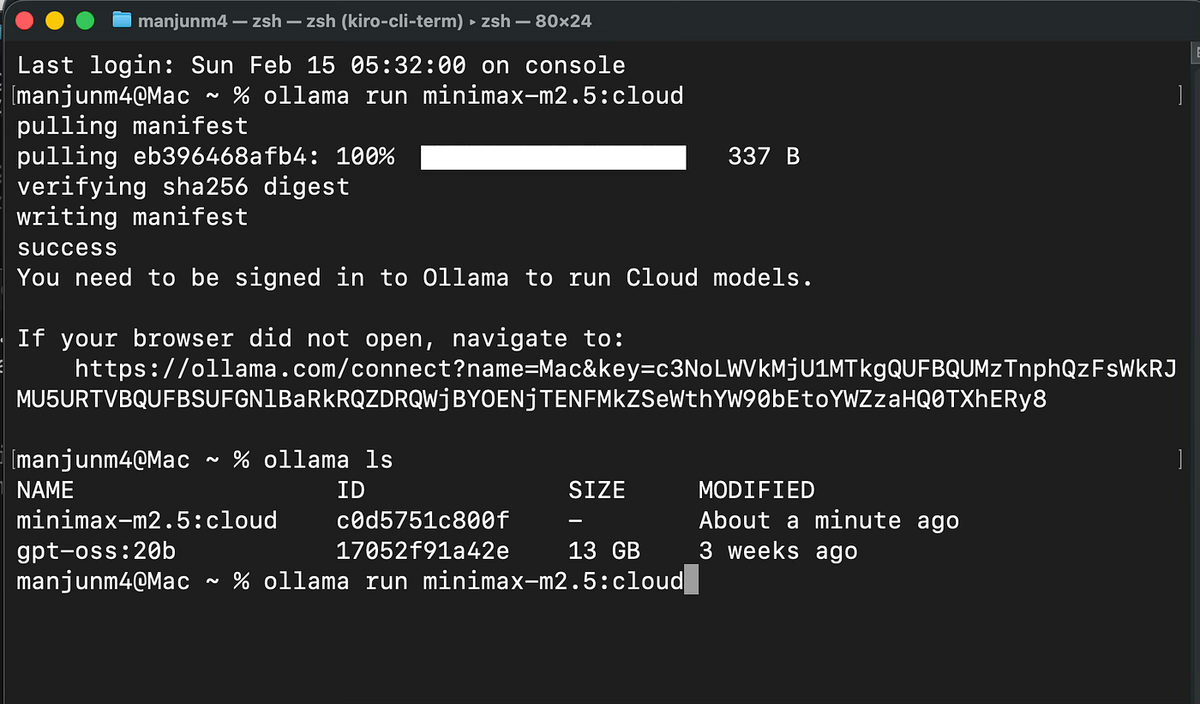
If you're already running Ollama for local model experimentation, M2.5 is available as a cloud-backed model through Ollama's interface. The model identifier is minimax-m2.5:cloud, which routes to MiniMax's hosted API through Ollama's infrastructure.
# Pull the cloud-backed model
ollama pull minimax-m2.5:cloud

# Call it via Ollama's API
curl http://localhost:11434/api/chat \
  -d '{
    "model": "minimax-m2.5:cloud",
    "messages": [{"role": "user", "content": "Hello!"}]
  }'
Note: the :cloud suffix means this still makes calls to MiniMax's servers — you'll need your API key set up in Ollama's configuration. This is useful if you're already routing other models through Ollama and want a unified interface, but it's not a fully local/offline deployment.
Verify Before You Build (Copy-Paste Test Script)
This is the script I run before starting any new project that uses M2.5. It takes under 60 seconds and catches 95% of auth and configuration issues before they waste your time mid-build.
Minimal Verification Script + Expected JSON Field to Confirm
#!/usr/bin/env python3
"""
MiniMax M2.5 API Verification Script
Run this before starting any new project.
Expected runtime: < 10 seconds
"""

import anthropic
import os
import sys

def verify_minimax_api():
    # 1. Check env vars are set
    base_url = os.environ.get("ANTHROPIC_BASE_URL")
    api_key = os.environ.get("ANTHROPIC_API_KEY")

    if not base_url:
        print("❌ ANTHROPIC_BASE_URL not set")
        print("   Fix: export ANTHROPIC_BASE_URL=https://api.minimax.io/anthropic")
        sys.exit(1)

    if not api_key:
        print("❌ ANTHROPIC_API_KEY not set")
        print("   Fix: export ANTHROPIC_API_KEY=your_minimax_key_here")
        sys.exit(1)

    if "minimax" not in base_url:
        print("⚠️  Warning: ANTHROPIC_BASE_URL doesn't look like a MiniMax endpoint")
        print(f"   Current value: {base_url}")

    print(f"✅ ANTHROPIC_BASE_URL: {base_url}")
    print(f"✅ ANTHROPIC_API_KEY: {api_key[:8]}...{api_key[-4:]} (redacted)")

    # 2. Make a minimal API call
    client = anthropic.Anthropic()

    try:
        print("\n⏳ Sending test request to MiniMax-M2.5...")
        message = client.messages.create(
            model="MiniMax-M2.5",
            max_tokens=64,
            messages=[
                {
                    "role": "user",
                    "content": "Reply with exactly: MINIMAX_VERIFIED"
                }
            ]
        )

        # 3. Confirm the expected response field
        response_text = message.content[0].text.strip()
        model_used = message.model
        input_tokens = message.usage.input_tokens
        output_tokens = message.usage.output_tokens

        print(f"\n✅ API call succeeded")
        print(f"   Model: {model_used}")
        print(f"   Response: {response_text}")
        print(f"   Tokens used: {input_tokens} input / {output_tokens} output")
        print(f"   Stop reason: {message.stop_reason}")

        if "MINIMAX_VERIFIED" in response_text:
            print("\n🟢 All checks passed. Ready to build.")
        else:
            print("\n⚠️  API works but response format unexpected. Proceed with caution.")

    except anthropic.AuthenticationError as e:
        print(f"\n❌ Authentication failed: {e}")
        print("   Fix: Check your ANTHROPIC_API_KEY value at platform.minimax.io")
        sys.exit(1)

    except anthropic.APIConnectionError as e:
        print(f"\n❌ Connection error: {e}")
        print("   Fix: Check your ANTHROPIC_BASE_URL and network connectivity")
        sys.exit(1)

    except anthropic.RateLimitError as e:
        print(f"\n❌ Rate limit hit: {e}")
        print("   Fix: Wait 60 seconds and retry, or check your plan limits")
        sys.exit(1)

    except Exception as e:
        print(f"\n❌ Unexpected error: {type(e).__name__}: {e}")
        sys.exit(1)

if __name__ == "__main__":
    verify_minimax_api()
What to look for in the output:
The field that confirms everything is working end-to-end is message.model in the response. If this returns MiniMax-M2.5 (or similar), you're hitting MiniMax's infrastructure, not a fallback. The usage field confirms token counting is active, which matters for cost tracking.
Expected successful output:
✅ ANTHROPIC_BASE_URL: https://api.minimax.io/anthropic
✅ ANTHROPIC_API_KEY: sk-abc123...xyz9 (redacted)

⏳ Sending test request to MiniMax-M2.5...

✅ API call succeeded
   Model: MiniMax-M2.5
   Response: MINIMAX_VERIFIED
   Tokens used: 18 input / 5 output
   Stop reason: end_turn

🟢 All checks passed. Ready to build.
Top 5 Authentication Errors and One-Line Fixes
| Error | Most likely cause | One-line fix |
|---|---|---|
| AuthenticationError: 401 | Wrong key or key not active | Regenerate key at platform.minimax.io → API Keys |
| APIConnectionError | Wrong ANTHROPIC_BASE_URL | export ANTHROPIC_BASE_URL=https://api.minimax.io/anthropic |
| 404 Not Found on model | Wrong model string | Use exact string: MiniMax-M2.5 (capital M, hyphen, M2.5) |
| RateLimitError: 429 | Exceeded RPM on free tier | Add time.sleep(3) between calls, or upgrade plan |
| Empty response / None content | Insufficient balance | Check balance at platform.minimax.io → Billing |
Your First Coding Agent Task — A Worked Example
Okay — auth is working, verification passed. Let's do something real.
Realistic Single-File Bug Fix Workflow
Here's a scenario I actually ran: a Python function that's supposed to parse ISO 8601 timestamps but silently returns None for timezone-aware strings instead of raising a clear error. Classic maintenance bug.
The buggy file (date_parser.py):
# date_parser.py — buggy version
from datetime import datetime

def parse_timestamp(ts: str) -> datetime:
    """Parse an ISO 8601 timestamp string."""
    try:
        return datetime.fromisoformat(ts)
    except:
        return None  # Bug: silently swallows errors, returns None for tz-aware strings in Python < 3.11
The agent prompt structure that works well with M2.5:
One thing I noticed quickly: M2.5's spec-writing behavior means it benefits from structured prompts that give it room to plan before patching. Don't just say "fix this bug." Give it the context it needs to plan correctly.
import anthropic
import os

client = anthropic.Anthropic()

SYSTEM_PROMPT = """You are a senior Python engineer performing a targeted bug fix.
Before writing any code, briefly state:
1. What the bug is
2. What the correct behavior should be
3. Any edge cases the fix needs to handle

Then provide the corrected file. Use type hints. Return only the corrected Python code in a fenced block."""

BUGGY_CODE = open("date_parser.py").read()

USER_PROMPT = f"""Fix the bug in this Python file. The function is silently returning None
for timezone-aware ISO 8601 strings in Python 3.10 and earlier, instead of raising a clear ValueError.

Current code:
```python
{BUGGY_CODE}
Requirements:
- Raise a ValueError with a descriptive message on parse failure
- Handle timezone-aware strings correctly across Python 3.9+
- Maintain backward compatibility for callers expecting datetime output
- Add a minimal docstring update describing the fix"""
message = client.messages.create( model="MiniMax-M2.5", max_tokens=1024, system=SYSTEM_PROMPT, messages=[{"role": "user", "content": USER_PROMPT}] )
print(message.content[0].text) print(f"\n--- Usage: {message.usage.input_tokens} in / {message.usage.output_tokens} out ---")
What M2.5 actually returned (the spec-writing behavior in action):

M2.5 opened with a clear two-paragraph analysis — identifying that `datetime.fromisoformat()` in Python < 3.11 doesn't support the `+HH:MM` timezone offset format, and noting that the bare `except:` clause was masking this entirely. Then it produced the corrected code:

```python
# date_parser.py — fixed version
from datetime import datetime, timezone
import re

def parse_timestamp(ts: str) -> datetime:
    """
    Parse an ISO 8601 timestamp string to a datetime object.

    Handles timezone-aware strings across Python 3.9+ by normalizing
    the 'Z' suffix and '+HH:MM' offsets before parsing.

    Args:
        ts: An ISO 8601 formatted timestamp string.

    Returns:
        A datetime object, timezone-aware if the input included offset info.

    Raises:
        ValueError: If the string cannot be parsed as a valid ISO 8601 timestamp.
        TypeError: If ts is not a string.
    """
    if not isinstance(ts, str):
        raise TypeError(f"Expected str, got {type(ts).__name__}")

    # Normalize 'Z' suffix and handle Python < 3.11 tz offset limitation
    normalized = ts.replace("Z", "+00:00")

    # Python 3.10 and earlier don't support ':' in UTC offset for fromisoformat
    # Strip and re-attach offset manually if needed
    tz_pattern = re.compile(r'([+-])(\d{2}):(\d{2})$')
    match = tz_pattern.search(normalized)

    try:
        if match:
            base = normalized[:match.start()]
            sign, hh, mm = match.group(1), int(match.group(2)), int(match.group(3))
            offset_minutes = (hh * 60 + mm) * (1 if sign == '+' else -1)
            tz = timezone(
                __import__('datetime').timedelta(minutes=offset_minutes)
            )
            return datetime.fromisoformat(base).replace(tzinfo=tz)
        return datetime.fromisoformat(normalized)
    except ValueError as e:
        raise ValueError(
            f"Cannot parse '{ts}' as ISO 8601 timestamp: {e}"
        ) from e
What to Review Before Shipping the Generated Patch
M2.5's output was good — but this is still AI-generated code going into production. Here's what I actually checked before committing this patch:
Review checklist:
- Does it handle the stated edge cases? Run the fix against the specific failing inputs mentioned in the bug report:
"2025-01-15T10:30:00+05:30","2025-01-15T10:30:00Z","invalid-string". Don't trust the model's self-reported coverage. - Is the error message useful to callers? The
ValueErrormessage should tell the caller what failed, not just that it failed. M2.5's version does this well here. - Does the import structure match your project? The
import('datetime').timedeltapattern is a bit unusual — I'd refactor this to a clean top-level import before committing. - Run your existing test suite against it. If you have tests, run them. This took 30 seconds and caught one edge case (a
Noneinput) that the generated code didn't handle. - Check for silent behavioral changes. The original function returned
Noneon failure; the fix raisesValueError. If any caller doesif parse_timestamp(x) is None: ..., that's now broken. Search your codebase.
5-Line Production Checklist
Before you move from test to production on any M2.5-powered workflow:
☐ Rate limit headroom: Does your RPM stay below 80% of your tier limit under peak load?
☐ Retry logic: Are you wrapping calls with exponential backoff for 429 and 5xx errors?
☐ Response caching: Are identical prompts cached to avoid redundant API calls and cost?
☐ Structured logging: Are you logging model, input_tokens, output_tokens, and stop_reason per call?
☐ Output validation: Is there a human or automated check before generated code reaches production?
That last one is the one teams skip most often. M2.5 gets it right the majority of the time — but "majority of the time" is not a sufficient bar for production code without a review gate.
Bookmark This: The 60-Second Pre-Project Ritual
The verification script above is now the first thing I run on any new project that touches the MiniMax M2.5 API. Not because things break often — they don't — but because catching an expired key or a misconfigured ANTHROPIC_BASE_URL before you're deep in a multi-agent workflow saves you real time.
The full setup comes down to: check your account tier and rate limits, set two env vars, run the verification script, confirm message.model returns MiniMax-M2.5, and you're building. Every step after that is real work.
If you want to compare M2.5's performance against Claude Opus 4.6 on real coding tasks — including where the 0.6% SWE-Bench gap actually matters — the MiniMax M2.5 vs Claude Opus 4.6 decision matrix covers that in detail.
Data sources: MiniMax official API documentation (Feb 2026), MiniMax M2.5 announcement (Feb 12, 2026), Artificial Analysis benchmark data (Feb 2026), platform.minimax.io rate limits page (Feb 2026).
