
Last week, I found myself staring at three different terminal windows, two VS Code tabs, and a ChatGPT conversation, all trying to coordinate what should've been a simple refactor. Sound familiar?
That messy context-switching nightmare is exactly what OpenAI's new Codex app promises to solve. On February 2, 2026, OpenAI launched the Codex desktop app for macOS—a dedicated "command center" for managing multiple AI coding agents in parallel. As someone who's been neck-deep in AI coding tools since the Claude Code preview, I had to test whether this actually lives up to the "orchestrate your AI development team" pitch.
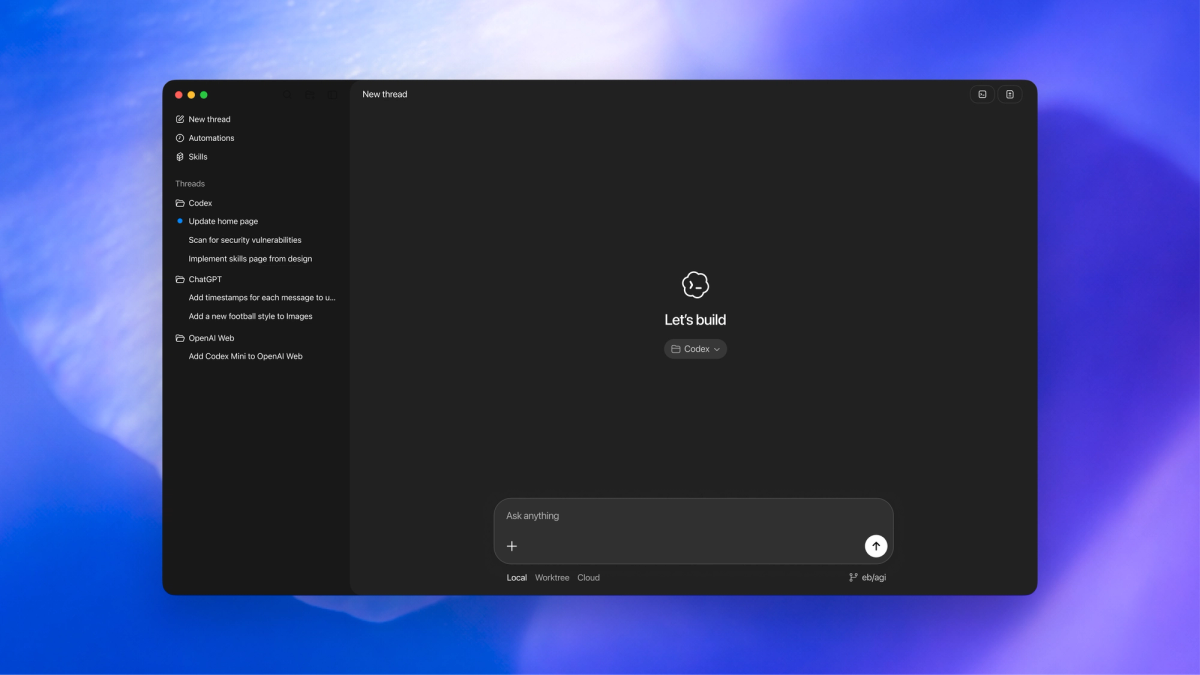
Here's what I learned in my first real session: the parallel agent setup genuinely feels polished, skills and automations are production-ready (not beta experiments), and the cloud+local hybrid flow reduces setup friction. But there are three immediate adoption blockers that teams need to know about before committing: it's macOS-only right now, there's no built-in editor loop, and you're locked into OpenAI's model stack.
This isn't a "10 reasons why Codex is amazing" post. It's the honest friction points and pleasant surprises from actually using it on a real codebase, so your team can decide if this fits your workflow.
What we tested (so you can reproduce the experience)
Setup scope: one real repo + one real task + cloud/local connection
I tested Codex on a mid-sized Next.js project (roughly 12,000 lines across 40+ components) with a specific task: refactor our authentication flow to use React Server Components while maintaining backward compatibility with client-side auth checks.
My setup:
- Machine: M3 MacBook Pro (because that's the only option right now)
- Project: Private GitHub repo, already cloned locally
- Task complexity: Medium—required understanding existing patterns, modifying multiple files, and running tests
- Connection: Started local, then switched to cloud execution to test the remote agent feature
- Subscription: ChatGPT Plus ($20/month), which includes Codex access across CLI, web, IDE extension, and the new app
The goal wasn't just to see if it could complete the task, but to identify where the process felt smooth versus where I hit walls.
The baseline expectation we had (parallel agents + workflow continuity)
Based on the marketing, I expected:
- True parallel execution: Multiple agents working on different parts of the codebase simultaneously without conflicts
- Workflow continuity: Seamless handoff between the Codex app, my IDE, and terminal
- Smart task decomposition: Agent breaking down complex requests into logical subtasks
- Git worktree isolation: Each agent working in its own branch without touching my main codebase
The promise is basically: "What if you could delegate to a team of AI developers instead of just one autocomplete assistant?" Let's see if it actually delivers.
The "wow" parts in the first hour (it feels polished)
Skills + Automations feel "complete", not experimental
This caught me off guard. Most AI coding tools introduce new features in perpetual beta. Codex's Skills and Automations feel like they've already been battle-tested internally.
Skills are packaged instructions that extend what the agent can do beyond code generation. OpenAI's skills library includes ready-to-use integrations for Figma, Linear, cloud deployment platforms (Cloudflare, Netlify, Render, Vercel), and document creation.
Here's a concrete example from my session:
# I asked Codex to: "Create a migration guide document
# showing the old vs new auth patterns"

# It used the create-docs skill to generate a professional PDF
# with code examples, comparison tables, and migration steps
# WITHOUT me having to explain the document structure
Automations pair skills with schedules to handle recurring work. During setup, I configured a daily automation:
| Automation | Schedule | Output |
|---|---|---|
| Daily Issue Triage | 9 AM Mon-Fri | Inbox notification with prioritized issues |
| CI Failure Summary | On push to main | Slack notification with error analysis |
| Dependency Updates | Weekly | PR with updated packages + changelog |
The key difference: these aren't "coming soon" features. They work now, with clear documentation and error handling.
Cloud + local integration: where it reduces setup friction
The cloud execution option genuinely surprised me. When I switched from local to cloud mid-task:
What stayed the same:
- My local git state (untouched)
- Project configuration and environment variables
- MCP server connections and custom skills
- Thread history and context
What changed:
- Execution speed (cloud was noticeably faster for test runs)
- No impact on my local machine resources
- Results appeared in a review queue when ready
This is huge for long-running tasks. I could close my laptop, grab lunch, and come back to completed work without keeping my machine awake.
The friction point? You have to explicitly switch between local and cloud execution. There's no automatic "this task is too heavy, should I use cloud?" intelligence yet.
The déjà vu: parallel agents / worktree is the same battleground
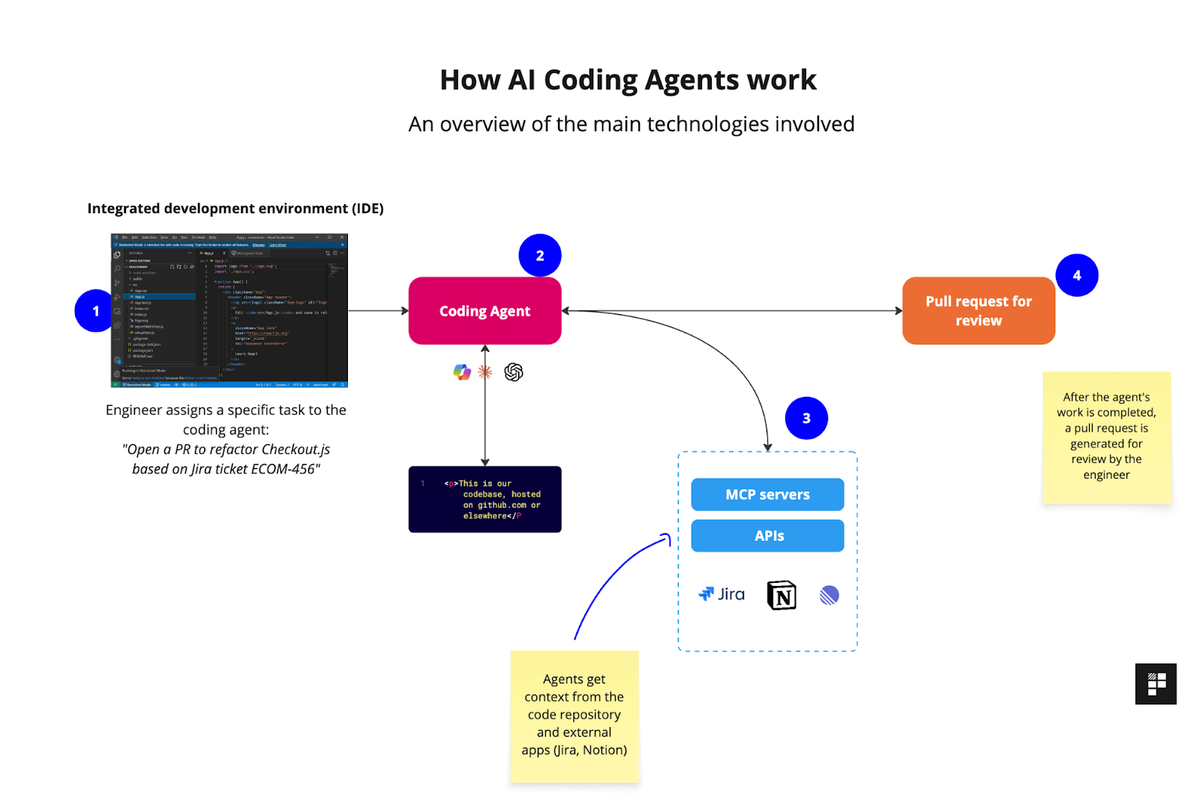
Why "parallel" matters (context switching is the real tax)
Let me show you the actual productivity drain that parallel agents address:
Traditional single-agent flow:
- Fix bug in authentication → wait for completion → context lost
- Switch to documentation task → wait → forgot where I was
- Go back to auth → re-read code → waste 10 minutes rebuilding context
- Total time: 2.5 hours for work that should take 45 minutes
Parallel agent flow with Codex:
- Agent 1: Fix auth bug (runs in background)
- Agent 2: Update docs (runs simultaneously)
- Agent 3: Refactor related components (also parallel)
- Review all three when ready, context intact
The context-switching tax isn't just time—it's mental energy. Every time you interrupt one task to start another, you lose 15-20 minutes rebuilding your mental model.
Codex's worktree-based parallel execution genuinely solves this. Each agent gets its own isolated git branch, so three agents can modify overlapping files without merge conflicts during execution.
Threads/projects vs worktrees/branches: similar promise, different mechanics
Here's where it gets interesting. Codex uses threads (logical grouping) and worktrees (git isolation) together:
| Concept | What it is | Why it matters |
|---|---|---|
| Thread | A conversation + task scope with one agent | Preserves context across messages |
| Project | Container for multiple threads | Organizes related work |
| Worktree | Isolated git working directory | Prevents file conflicts during parallel execution |
In practice:
- I created one Project called "Auth Refactor"
- Started three Threads: "Migration Script", "Component Updates", "Test Coverage"
- Each thread automatically got its own Worktree
The mechanics felt similar to Claude's parallel thinking mode, but with tighter git integration. The big difference: Codex forces you to review and merge worktrees back to your main branch manually, while some tools try to auto-merge (which often breaks).
3 differences that immediately change adoption
Only one model stack (today) vs multi-provider orchestration
This is the biggest constraint. Codex currently uses:
- GPT-5.2-Codex (standard model)
- GPT-5.3-Codex (newest, announced February 5, 2026)
What you can't do:
- Route tasks to Claude Opus 4.6 for complex planning
- Use Gemini for code search across large codebases
- Switch to specialized models for different task types
For comparison, platforms like Cursor let you choose between multiple providers. Codex commits you to OpenAI's ecosystem.
When this matters:
# Complex refactor requiring deep reasoning
# Ideal: Use Claude Opus 4.6's 1M token context window
# Reality: Limited to GPT-5.3-Codex's capabilities

# Simple CRUD operations
# Ideal: Use faster, cheaper model
# Reality: Same GPT-5.x consumption
Bottom line: If your team already has strong opinions about which AI model handles specific tasks best, Codex's single-provider approach might feel limiting.
No built-in editor loop (today): why jumping out matters during debugging/refactor
Codex shows you diffs and lets you review changes. What it doesn't have: an integrated code editor for quick tweaks during the review process.
The workflow reality:
- Agent completes task → presents diff in Codex app
- You spot a small issue (e.g., incorrect variable name)
- Options:
Ask agent to fix it (new round trip, 30-60 seconds)
Open in VS Code, fix manually, come back (context switch)
Stage the good parts, fix later (lose momentum)
Compare this to tools like Cursor or the upcoming Xcode 26.3 agentic coding integration, which let you edit code inline during agent review.
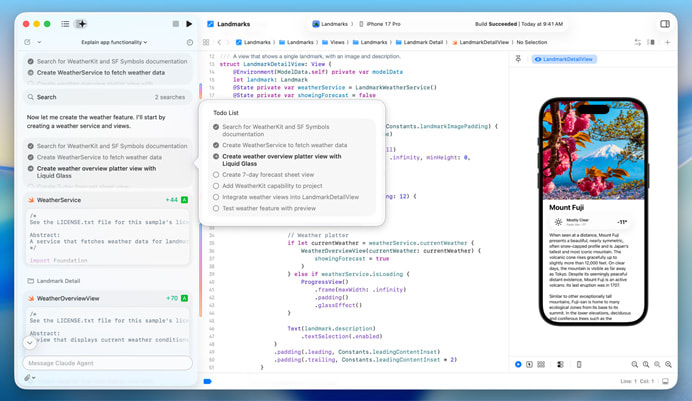
The workaround:
# In the Codex app, right-click on a diff
# Select "Open in VS Code" → makes changes → save
# Return to Codex to commit or continue

# This works, but breaks the "command center" flow
For quick prototypes, this is fine. For serious refactoring where you're constantly tweaking details? The jump-out-and-back friction adds up.
macOS-only (today): what breaks when your team is mixed OS
OpenAI announced Windows support is coming, but there's no release date. The delay is due to sandboxing primitives—Windows lacks the OS-level isolation tools that macOS provides for safely running AI-generated code.
What this means for mixed teams:
| Team Member | Platform | Codex Access | Workaround |
|---|---|---|---|
| Sarah (Mac) | macOS | Full app access | Native experience |
| Mike (Windows) | Windows 11 | CLI + IDE extension only | Uses WSL2 for agent mode |
| Chen (Linux) | Ubuntu 24.04 | CLI + IDE extension | Command line workflow |
The CLI and IDE extensions work across platforms, but they lack:
- Visual project/thread organization
- Native diff review interface
- Automations management UI
- Worktree visualization
For teams standardized on Mac (many mobile dev shops), this isn't a blocker. For cross-platform teams, it creates a two-tier experience where Mac users get the premium interface.
"Go beyond code generation with skills" — what Codex is aiming for
Skills as packaged actions for knowledge work (research/docs/ops)
Here's where Codex differentiates from pure coding assistants. Skills extend the agent into adjacent work that developers actually do:
Research skills:
# web-search skill: Agent can search the web for API docs,
# Stack Overflow solutions, or recent package updates
# Before: You manually search → copy-paste into chat → ask for help
# With skill: Agent searches autonomously and applies findings
Documentation skills:
# create-pdf skill: Generates professional migration guides
# create-spreadsheet skill: Builds comparison matrices
# create-docx skill: Writes RFC-style proposals

# I used this to auto-generate a "Before vs After" auth flow doc
# with code examples and architecture diagrams
Operations skills:
# deploy-to-vercel skill: Builds, tests, deploys to preview environment
# linear-integration skill: Creates tasks from failed tests
# figma-to-code skill: Pulls design specs and generates components
The promise: your AI agent becomes a junior dev who can also handle the grunt work around code—not just the code itself.
Where we align vs diverge: general agent OS vs coding-first depth
This reveals a strategic fork in the AI coding tools market:
Codex's direction (General Agent OS):
- Skills for research, documentation, project management, deployment
- Automations that run unattended on schedules
- Vision: AI handles the full software delivery lifecycle
Alternative approach (Coding-First Depth):
- Deep IDE integration with inline editing
- Multi-model routing for task-specific optimization
- Vision: AI as a pair programmer, not a team manager
Neither is "right"—it depends on your team's pain points:
| Your Priority | Better Fit |
|---|---|
| Eliminate context switching across tools | Codex (command center model) |
| Real-time pair programming with AI | Cursor/Windsurf (IDE-first) |
| Automate recurring project maintenance | Codex (automations) |
| Fine-grained control over AI model selection | Multi-provider tools |
My take: Codex is aiming to be the operating system for AI-assisted software work, not just a coding assistant. That's ambitious, but it means they're solving a different problem than traditional autocomplete tools.
If you're evaluating Codex app this week (practical tips)
Start with 2–3 tasks that reveal reality fast
Don't waste your trial on toy examples. Use these three task types to stress-test what matters:
Task 1: Bug fix across multiple files
# Example: "Fix the authentication timeout issue affecting
# users on Safari browsers"

# What this reveals:
- Can the agent understand interconnected code?
- Does it propose a coherent fix or surface-level patches?
- How well does it handle debugging when first attempt fails?
Task 2: Feature with backward compatibility
# Example: "Add two-factor authentication support while
# maintaining existing password-only login flow"

# What this reveals:
- Planning capability (does it map dependencies first?)
- Refactoring quality (clean vs messy code)
- Test coverage (does it update existing tests?)
Task 3: Documentation + code sync
# Example: "Update API documentation to reflect the new
# authentication endpoints and generate migration examples"

# What this reveals:
- Cross-domain capability (docs + code)
- Practical skill usage (create-docs skill)
- Attention to developer experience details
These three tasks will surface: reasoning depth, refactoring quality, and whether the "beyond code generation" promise actually helps.
Add one governance check early (permissions, secrets, audit trail expectations)
Before your team goes all-in, verify the controls:
Security governance checklist:
| Check | What to verify | Why it matters |
|---|---|---|
| Sandbox boundaries | Which directories can agents access? | Prevent accidental sensitive file exposure |
| Network permissions | Does agent request approval for external API calls? | Control outbound connections |
| Secrets handling | How are environment variables managed? | Avoid hardcoding credentials in agent-generated code |
| Audit trail | Can you see all agent actions and file modifications? | Compliance and debugging |
How to test:
# 1. Create a test project with a .env file containing dummy secrets
# 2. Ask agent to "deploy to production"
# 3. Verify it asks for permission before accessing .env
# 4. Check if it proposes reading secrets from environment vs hardcoding

# Expected behavior: Agent should request explicit approval
# for sensitive operations
OpenAI's Codex security documentation covers sandboxing, but test your specific workflow to confirm the guardrails align with your policies.
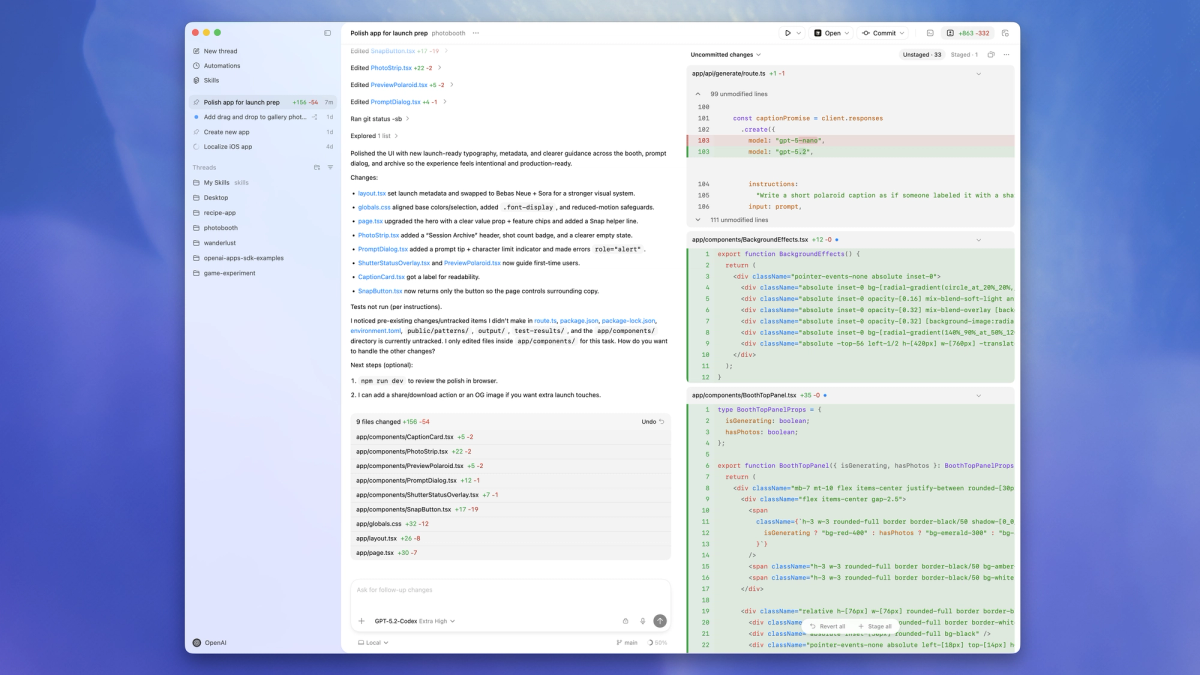
When we'd still recommend pairing it with a parallel engineering IDE
Codex works best when integrated into a larger toolchain, not as a replacement for everything:
Recommended hybrid workflow:
Codex App (Command Center)
├── Delegate: Large refactors, parallel feature work
├── Automate: Daily issue triage, CI monitoring
└── Generate: Documentation, migration scripts

↓ Hand off to ↓

VS Code / JetBrains (Deep Editing)
├── Quick fixes during agent review
├── Complex debugging with breakpoints
└── Fine-tuning generated code

↓ Integrate with ↓

GitHub / Linear (Project Tracking)
├── Pull requests from agent worktrees
├── Automated task creation from Codex findings
└── Team collaboration on agent outputs
Why this matters:
- Speed: Switching to IDE for small tweaks is faster than asking agent to re-generate
- Control: You maintain hands-on familiarity with critical code paths
- Flexibility: Use Codex for heavy lifting, IDE for precision work
Think of Codex as the project manager and your IDE as the specialist tool. Trying to force Codex to be your only interface creates friction the app isn't designed to solve yet.
FAQ
Does Codex app support Windows? (as of Feb 2026)
No. The Codex app launched February 2, 2026 for macOS only. Windows support is planned but delayed due to sandboxing complexity.
Current Windows workaround:
- Use Codex CLI via WSL2 (Windows Subsystem for Linux)
- Install IDE extension in VS Code (experimental sandbox mode)
- Access Codex via web interface at chatgpt.com/codex
Timeline: OpenAI hasn't announced a Windows app release date. Developer feedback suggests they're prioritizing sandbox security over fast Windows deployment.
Does Codex app include an editor? What's the workaround?
No built-in editor. The Codex app is a command center for agents, not a code editor.
The workflow:
- Review agent changes in Codex app diff viewer
- Right-click → "Open in VS Code" (or your default editor)
- Make manual edits if needed
- Return to Codex to commit or continue
Why this design: OpenAI positions Codex as orchestration layer, not editor replacement. Their documentation emphasizes integration with existing IDEs rather than building another editor.
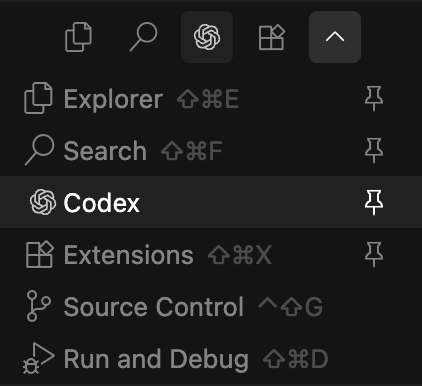
Alternative: Install the Codex IDE extension for VS Code to bring agent capabilities directly into your editor.
Can skills be shared across a team? What should be reviewed?
Yes. Skills can be shared via git repositories and loaded across CLI, IDE extension, and app.
How to share skills:
# 1. Create custom skill in .agents/skills directory
# 2. Check into team repo
# 3. Team members pull repo → skills auto-load

# Skills persist across Codex interfaces
# (same skill works in app, CLI, and IDE)
What to review before sharing:
- API keys/secrets: Skills should never hardcode credentials
- Destructive operations: Flag skills that delete files, modify production systems
- External dependencies: Document required tools, npm packages, system libraries
- Permission requirements: Note if skill needs network access, file system writes
Governance tip: Create a skills/README.md explaining each custom skill's purpose, permissions, and review status. This prevents surprises when agents autonomously use team skills.
Final Take: Where Codex Fits (and Where It Doesn't)
After a week with the Codex app, here's the honest assessment:
Codex excels at:
- Parallel task execution that genuinely reduces context switching tax
- Production-ready skills and automations (not experimental features)
- Cloud/local hybrid flow for long-running work without blocking your machine
Codex feels limiting when:
- You need multi-model flexibility (locked into OpenAI's stack)
- Your team runs Windows or Linux (Mac-only app for now)
- You want inline editing during agent review (requires IDE jump)
Who should adopt now:
- Mac-based teams comfortable with OpenAI ecosystem
- Projects where parallel feature work outweighs model selection needs
- Teams that value automation of non-code work (docs, triage, deploys)
Who should wait:
- Cross-platform teams needing consistent experiences
- Teams requiring specific models for specific tasks (Claude for planning, Gemini for search, etc.)
- Workflows dependent on tight editor integration
The Codex app isn't trying to be the best pair programming tool—it's aiming to be the command center for AI-assisted software delivery. If that aligns with how your team wants to work, the current limitations are mostly temporary (Windows support, editor integration). If you need deep IDE coupling and model flexibility now, alternatives like Cursor or Claude Code might fit better.
For me? I'm keeping it in the rotation alongside VS Code + Claude, using Codex for the big parallel lifts and my IDE for precision work. That hybrid approach captures the best of both worlds. lf you're deciding between Verdent and Codex app, our comparison guide is here.
