---
title: Overview
description: Verdent is **an AI-native desktop app for building software**. It helps you turn ideas into executable plans, run work reliably, and stay in flow while it handles the busywork and parallel tasks.
---
- **Verdent's Mission:** "Bring the joy back to coding. Focus on creation."
- **Focus on creation:** Verdent gives you a clean, immersive experience so you can stay focused on the joy of creation and leave the complexity behind.
- **Trust the results:** Verdent helps you think things through, executes with precision, and delivers high-quality results you can trust.
- **Stay in flow:** Verdent takes on multiple tasks at once, so you stay in flow while it handles the chaos of parallel work.
---
## What you can do with Verdent
- **Build from scratch:** describe your idea and iterate to a working result.
- **Work on real codebases:** ship features, refactor, and optimize inside existing repos.
- **Debug & fix bugs:** reproduce issues, pinpoint root causes, and fix until tests pass.
- **Go beyond coding:** research, documentation, data analysis, and chart generation.
Verdent is your work partner. Start with the tasks above, then keep exploring. If you can describe the goal, Verdent can help you move it forward.
---
## Getting Started
1. Download Verdent from the [website](https://www.verdent.ai/) and install it.
2. Open Verdent and create or open a project folder.
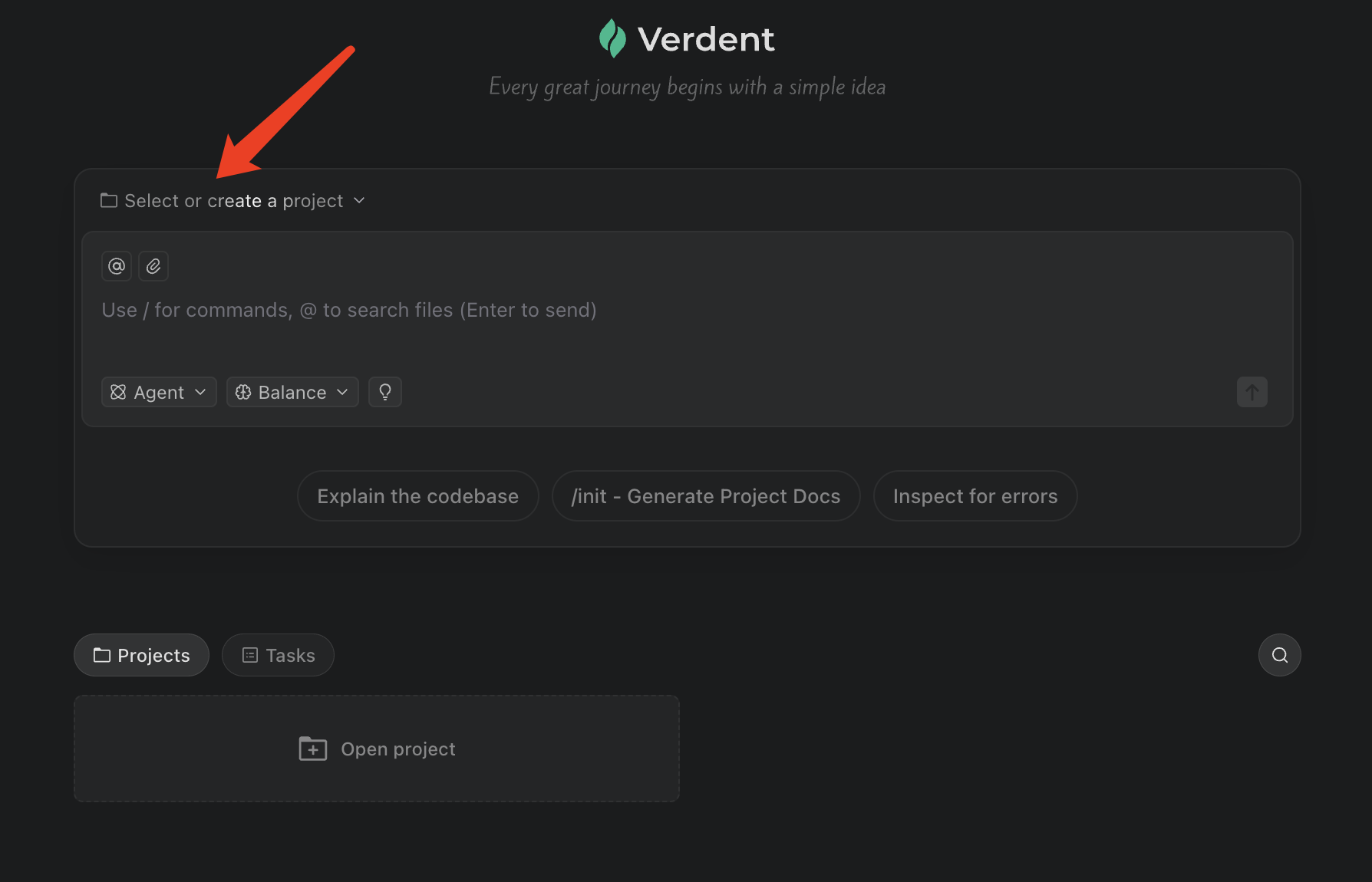 3. Describe what you want (you can attach context via files/logs when needed).
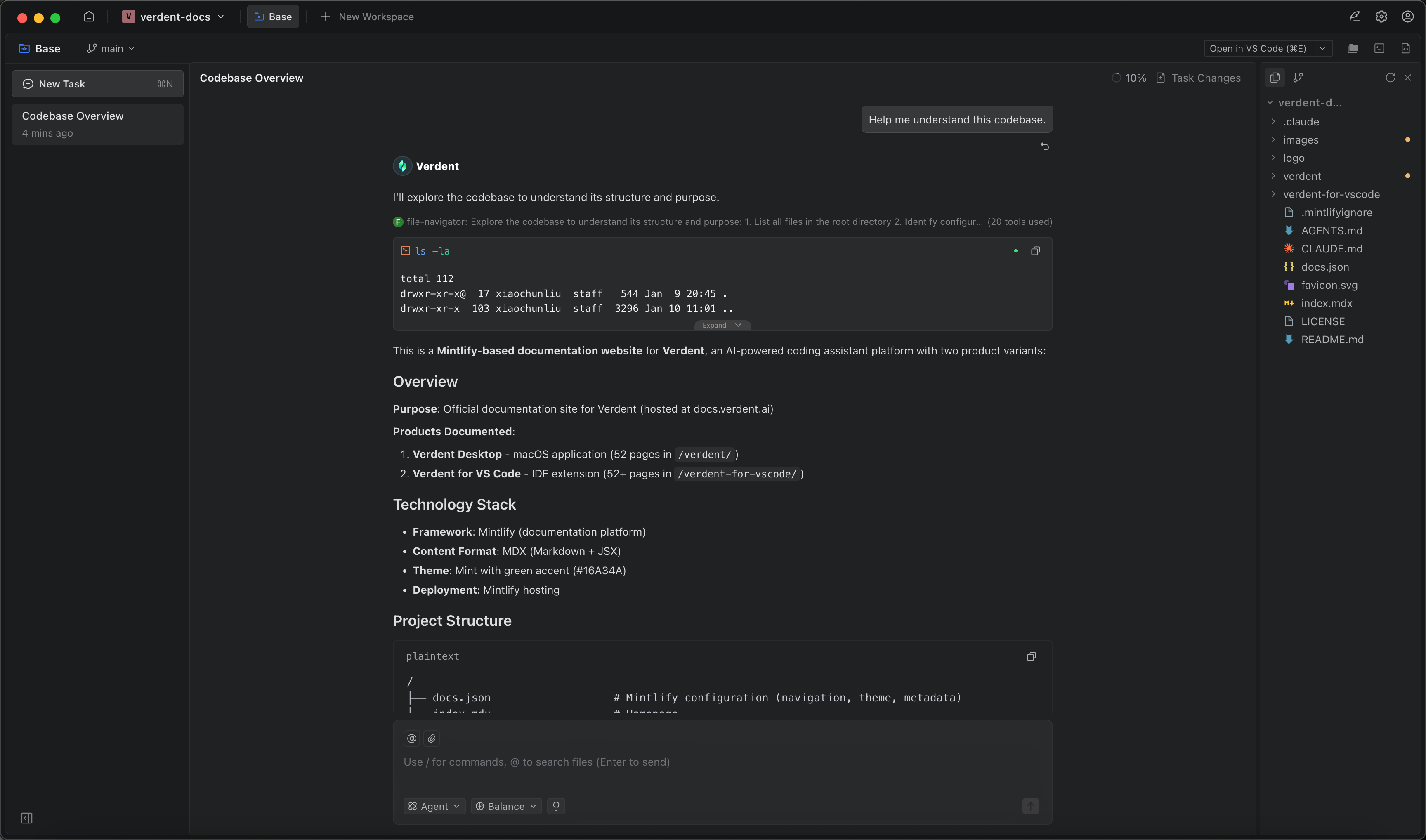
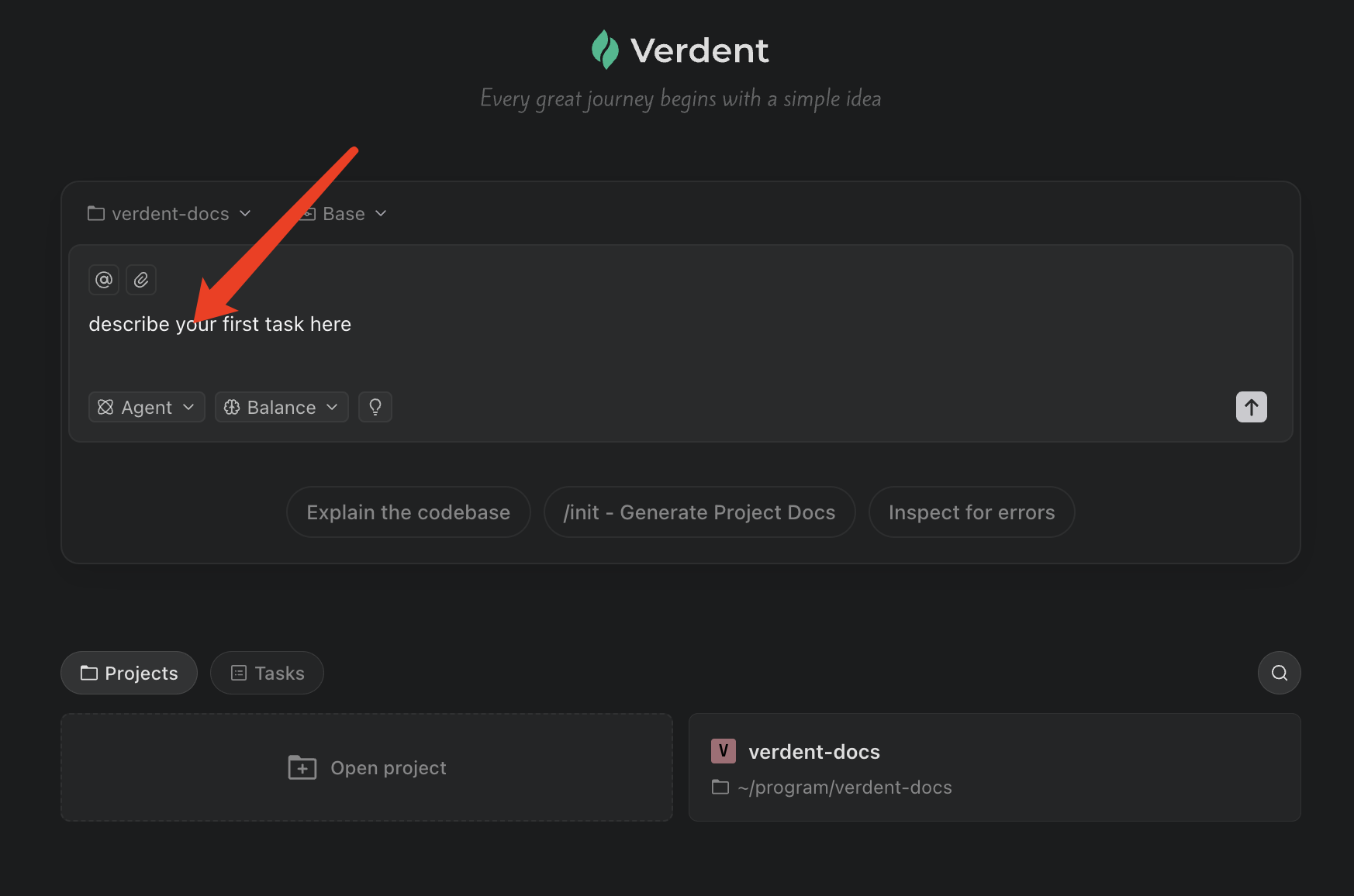 4. Send it, and Verdent will execute your task and ultimately provide the result.
 ---
## Core Concepts
- **Agent Mode — "Just do it."**
Give a goal, and Verdent breaks it into steps, executes, and delivers clear outputs.
- **Plan Mode — "Think together, then execute."**
Start with a vague idea; Verdent helps clarify requirements, identify risks, and produce an executable plan.
- **Tasks — Parallelize non-coding work.**
Run multiple threads of thinking/research/analysis without waiting or losing context.
- **Workspaces — Parallelize code changes safely.**
Each workspace is an isolated code environment with its own change history, so multiple implementations can run in parallel without interfering.
---
## Why Developers Choose Verdent
- **Stronger results you can trust by default**
- Verdent pairs a **world-class coding agent** with **multiple frontier models**, then makes every run transparent with structured steps and clear code-change summaries.
- **Fast delivery without losing quality**
- Minimal, distraction-free UI built for high-efficiency AI collaboration.
- "Send a task, it runs." Clear progress, clear outputs, and built-in review/quality checks.
- **Turns vague ideas into executable plans**
- **Plan Mode** helps users clarify goals, surface gaps/risks, and turn incomplete thoughts into structured, step-by-step plans.
- Users stay in control: accept/modify/skip suggestions, then execute with full visibility.
- **Built for parallel work. Stay in flow under interruptions.**
- Use **Tasks** to parallelize "thinking work" (research, clarification, comparisons, code reading) with instant switching. No idle time.
- Use **Workspaces** to parallelize “code-changing work” safely in isolated environments (separate change state, commits, branches).
- When urgent work interrupts, spin up a new Workspace, keep the original intact, then merge or discard confidently.
- **More than coding: a single tool for end-to-end work**
- Beyond code: documentation/PRDs, data analysis + charts, and industry/competitor research.
- Helps one person cross boundaries (frontend/backend/deploy/testing) and deliver end-to-end outcomes.
---
## More Than Just Coding
Verdent isn't just about writing code. It can also write documentation, PRDs, run data analysis, generate charts, and more. You're not limited by roles or technical barriers.
**Scenario:** Product managers need to write PRDs, MRDs, or other documentation. Ideas are scattered and requirements are unclear.
**With Verdent:** Turn scattered thoughts into a review-ready PRD, and generate a demo directly when needed.
Verdent understands existing functionality and constraints
Focus on problem discussion and document creation
Gradually organize scattered ideas into a clear structure
Automatically fills in background, goals, scope, boundaries, and risks
Walk the team through the solution with a working prototype
**Scenario:** Anyone who needs data to make decisions faces barriers. SQL and Python have high learning curves, and custom analysis means waiting on data analysts.
**With Verdent:** State the business question. Verdent turns it directly into clear conclusions, charts, and usable analysis reports.
Bring in data in any format: Excel, CSV, database tables, API data, logs, or system exports
Use natural language, just like talking to a data analyst
Data processing, chart generation, and result interpretation in one go
Clear, accurate analysis reports ready to present
**Scenario:** You need to understand where the industry is heading, what competitors are doing, what to learn and avoid. But information is scattered and manual collection is slow.
**With Verdent:** Verdent reads through scattered information, thinks it through, and organizes it into logical, structured research reports with clear conclusions.
Specify the topic and objectives, provide relevant links, or let Verdent search
Reads through relevant information, filters what matters, and analyzes
Outputs a clear framework and concrete takeaways
Ask follow-up questions and continue the analysis
**Scenario:** Engineers are often blocked by technical boundaries. Frontend, backend, deployment, testing: there's always an unfamiliar part.
**With Verdent:** Verdent fills in unfamiliar parts of the tech stack, so one person can independently complete end-to-end delivery.
Explain functional goals and use cases
Unfamiliar technologies are handled; you focus on decisions and trade-offs
Writes code, adds tests, runs everything, and fixes issues
Features work, results are clear, ship directly or keep iterating
---
## Pricing Plans
Verdent uses a credit-based pricing model with four tiers:
| Plan | Price | Monthly Credits* | Best For |
|------|-------|------------------|----------|
| **Free Trial** | $0 | 100 (7 days) | One-time offer per new user |
| **Starter** | $19/month | 320 | Light users & first-time explorers |
| **Pro** | $59/month | 1,000 | Regular users & mid-sized projects |
| **Max** | $179/month | 3,000 | Heavy users & demanding tasks |
*Limited-time 2x bonus active: All plans currently include double credits (320 becomes 640, 1,000 becomes 2,000, 3,000 becomes 6,000). Verdent will provide 15+ days advance notice before this bonus ends. Current plan and model details live in [Credits & Plans](/docs/account-billing/credits-and-plans) and [Model Pricing](/docs/account-billing/model-pricing).
Credits are shared across both Verdent for Visual Studio Code and the Verdent desktop app, enabling seamless workflow integration between platforms.
---
## Use Cases at a Glance
Describe what you want and Verdent thinks it through, turns your idea into a clear plan, and drives it forward step by step. Great when you have an idea but haven't figured out the path yet.
Autonomous planning and implementation of new features, components, and functions across multiple files with intelligent task breakdown.
Deep codebase analysis, explaining complex functions, identifying patterns, and performing safe refactoring while preserving functionality.
Comprehensive test generation, bug diagnosis from error messages, and multipass repair cycles until code passes verification.
Coordinated changes across multiple files with understanding of project structure, dependencies, and architectural improvements.
Run multiple agents simultaneously with Workspaces. Build features in parallel and merge completed work without conflicts.
Switch between projects instantly while maintaining session context. Perfect for developers managing multiple codebases.
Turn vague ideas into an executable plan with Plan Mode. Verdent proactively clarifies requirements, surfaces risks, and structures next steps before execution.
Explore multiple approaches, compare trade-offs (complexity, scope, risk), and converge on a clear direction, then execute with full transparency.
Draft PRDs, specs, and technical docs from scattered notes. Iterate with clarification, organize scope, and produce review-ready documents.
Import CSV/Excel/logs and ask questions in natural language. Verdent runs the analysis and outputs clear charts and actionable conclusions.
Gather information across sources, synthesize insights into structured conclusions, and keep digging with follow-up questions.
Turn an idea into a working prototype quickly: generate key flows, wire up core logic, and produce a demo you can share.
Write documentation, PRDs, run data analysis, generate charts, and conduct research. No technical barriers, just describe what you need.
---
## FAQs
Plan Mode is a read-only execution mode where Verdent analyzes code, conducts research, and creates detailed implementation plans without modifying files or executing commands. After generating a plan, Verdent presents two options: **Edit** (to request modifications and refine the plan) or **Start Building** (to switch to Agent Mode and begin execution). The agent can ask clarifying questions to remove uncertainty before execution. This mode is ideal for complex tasks where you want to review the approach before committing to changes, ensuring alignment between your expectations and Verdent's proposed solution.
A git worktree is an isolated working directory linked to the same repository. Verdent uses worktrees to enable parallel development without file conflicts. Each worktree has its own working files but shares git history with the main repository.
Verdent is a standalone application with features designed for parallel development:
- **Parallel agents** - Run multiple agents in isolated Workspaces simultaneously
- **Project management** - Switch between projects while maintaining session state
- **Native performance** - Not constrained by extension or browser limitations
Both share the same credit pool.
---
## Next Steps
Complete your first task with Verdent
Understand projects, workspaces, and parallel execution
---
## Core Concepts
- **Agent Mode — "Just do it."**
Give a goal, and Verdent breaks it into steps, executes, and delivers clear outputs.
- **Plan Mode — "Think together, then execute."**
Start with a vague idea; Verdent helps clarify requirements, identify risks, and produce an executable plan.
- **Tasks — Parallelize non-coding work.**
Run multiple threads of thinking/research/analysis without waiting or losing context.
- **Workspaces — Parallelize code changes safely.**
Each workspace is an isolated code environment with its own change history, so multiple implementations can run in parallel without interfering.
---
## Why Developers Choose Verdent
- **Stronger results you can trust by default**
- Verdent pairs a **world-class coding agent** with **multiple frontier models**, then makes every run transparent with structured steps and clear code-change summaries.
- **Fast delivery without losing quality**
- Minimal, distraction-free UI built for high-efficiency AI collaboration.
- "Send a task, it runs." Clear progress, clear outputs, and built-in review/quality checks.
- **Turns vague ideas into executable plans**
- **Plan Mode** helps users clarify goals, surface gaps/risks, and turn incomplete thoughts into structured, step-by-step plans.
- Users stay in control: accept/modify/skip suggestions, then execute with full visibility.
- **Built for parallel work. Stay in flow under interruptions.**
- Use **Tasks** to parallelize "thinking work" (research, clarification, comparisons, code reading) with instant switching. No idle time.
- Use **Workspaces** to parallelize “code-changing work” safely in isolated environments (separate change state, commits, branches).
- When urgent work interrupts, spin up a new Workspace, keep the original intact, then merge or discard confidently.
- **More than coding: a single tool for end-to-end work**
- Beyond code: documentation/PRDs, data analysis + charts, and industry/competitor research.
- Helps one person cross boundaries (frontend/backend/deploy/testing) and deliver end-to-end outcomes.
---
## More Than Just Coding
Verdent isn't just about writing code. It can also write documentation, PRDs, run data analysis, generate charts, and more. You're not limited by roles or technical barriers.
**Scenario:** Product managers need to write PRDs, MRDs, or other documentation. Ideas are scattered and requirements are unclear.
**With Verdent:** Turn scattered thoughts into a review-ready PRD, and generate a demo directly when needed.
Verdent understands existing functionality and constraints
Focus on problem discussion and document creation
Gradually organize scattered ideas into a clear structure
Automatically fills in background, goals, scope, boundaries, and risks
Walk the team through the solution with a working prototype
**Scenario:** Anyone who needs data to make decisions faces barriers. SQL and Python have high learning curves, and custom analysis means waiting on data analysts.
**With Verdent:** State the business question. Verdent turns it directly into clear conclusions, charts, and usable analysis reports.
Bring in data in any format: Excel, CSV, database tables, API data, logs, or system exports
Use natural language, just like talking to a data analyst
Data processing, chart generation, and result interpretation in one go
Clear, accurate analysis reports ready to present
**Scenario:** You need to understand where the industry is heading, what competitors are doing, what to learn and avoid. But information is scattered and manual collection is slow.
**With Verdent:** Verdent reads through scattered information, thinks it through, and organizes it into logical, structured research reports with clear conclusions.
Specify the topic and objectives, provide relevant links, or let Verdent search
Reads through relevant information, filters what matters, and analyzes
Outputs a clear framework and concrete takeaways
Ask follow-up questions and continue the analysis
**Scenario:** Engineers are often blocked by technical boundaries. Frontend, backend, deployment, testing: there's always an unfamiliar part.
**With Verdent:** Verdent fills in unfamiliar parts of the tech stack, so one person can independently complete end-to-end delivery.
Explain functional goals and use cases
Unfamiliar technologies are handled; you focus on decisions and trade-offs
Writes code, adds tests, runs everything, and fixes issues
Features work, results are clear, ship directly or keep iterating
---
## Pricing Plans
Verdent uses a credit-based pricing model with four tiers:
| Plan | Price | Monthly Credits* | Best For |
|------|-------|------------------|----------|
| **Free Trial** | $0 | 100 (7 days) | One-time offer per new user |
| **Starter** | $19/month | 320 | Light users & first-time explorers |
| **Pro** | $59/month | 1,000 | Regular users & mid-sized projects |
| **Max** | $179/month | 3,000 | Heavy users & demanding tasks |
*Limited-time 2x bonus active: All plans currently include double credits (320 becomes 640, 1,000 becomes 2,000, 3,000 becomes 6,000). Verdent will provide 15+ days advance notice before this bonus ends. Current plan and model details live in [Credits & Plans](/docs/account-billing/credits-and-plans) and [Model Pricing](/docs/account-billing/model-pricing).
Credits are shared across both Verdent for Visual Studio Code and the Verdent desktop app, enabling seamless workflow integration between platforms.
---
## Use Cases at a Glance
Describe what you want and Verdent thinks it through, turns your idea into a clear plan, and drives it forward step by step. Great when you have an idea but haven't figured out the path yet.
Autonomous planning and implementation of new features, components, and functions across multiple files with intelligent task breakdown.
Deep codebase analysis, explaining complex functions, identifying patterns, and performing safe refactoring while preserving functionality.
Comprehensive test generation, bug diagnosis from error messages, and multipass repair cycles until code passes verification.
Coordinated changes across multiple files with understanding of project structure, dependencies, and architectural improvements.
Run multiple agents simultaneously with Workspaces. Build features in parallel and merge completed work without conflicts.
Switch between projects instantly while maintaining session context. Perfect for developers managing multiple codebases.
Turn vague ideas into an executable plan with Plan Mode. Verdent proactively clarifies requirements, surfaces risks, and structures next steps before execution.
Explore multiple approaches, compare trade-offs (complexity, scope, risk), and converge on a clear direction, then execute with full transparency.
Draft PRDs, specs, and technical docs from scattered notes. Iterate with clarification, organize scope, and produce review-ready documents.
Import CSV/Excel/logs and ask questions in natural language. Verdent runs the analysis and outputs clear charts and actionable conclusions.
Gather information across sources, synthesize insights into structured conclusions, and keep digging with follow-up questions.
Turn an idea into a working prototype quickly: generate key flows, wire up core logic, and produce a demo you can share.
Write documentation, PRDs, run data analysis, generate charts, and conduct research. No technical barriers, just describe what you need.
---
## FAQs
Plan Mode is a read-only execution mode where Verdent analyzes code, conducts research, and creates detailed implementation plans without modifying files or executing commands. After generating a plan, Verdent presents two options: **Edit** (to request modifications and refine the plan) or **Start Building** (to switch to Agent Mode and begin execution). The agent can ask clarifying questions to remove uncertainty before execution. This mode is ideal for complex tasks where you want to review the approach before committing to changes, ensuring alignment between your expectations and Verdent's proposed solution.
A git worktree is an isolated working directory linked to the same repository. Verdent uses worktrees to enable parallel development without file conflicts. Each worktree has its own working files but shares git history with the main repository.
Verdent is a standalone application with features designed for parallel development:
- **Parallel agents** - Run multiple agents in isolated Workspaces simultaneously
- **Project management** - Switch between projects while maintaining session state
- **Native performance** - Not constrained by extension or browser limitations
Both share the same credit pool.
---
## Next Steps
Complete your first task with Verdent
Understand projects, workspaces, and parallel execution